

Naver Products Scraper | Shopping Prices, Sellers and Ratings
Pricing
from $2.98 / 1,000 products
Naver Products Scraper | Shopping Prices, Sellers and Ratings
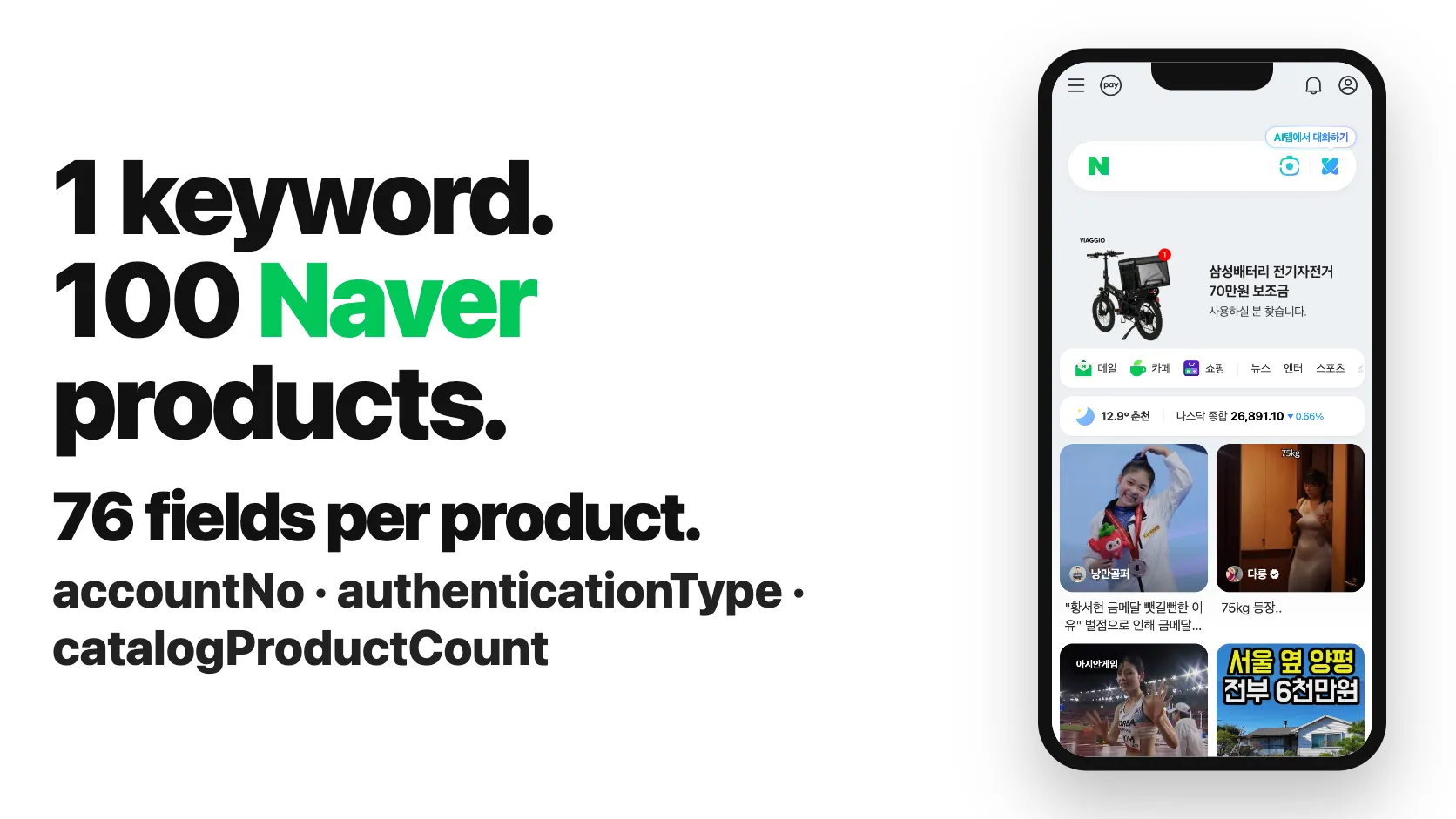
Naver Shopping scraper (네이버 쇼핑 크롤러): 100 products in 9 seconds, 76 fields per product. Search by keyword, search link, product link or Brand Store id and get price, discount, stock, seller, rating, reviews, shipping, category and price comparison, plus brand and model for Brand Stores. No login.
Pricing
from $2.98 / 1,000 products
Rating
0.0
(0)
Developer

SilentFlow
Maintained by CommunityActor stats
0
Bookmarked
14
Total users
9
Monthly active users
7 days ago
Last modified
Categories
Share
Naver Products Scraper (네이버 쇼핑) | Shopping Prices, Brand Stores and Sellers (2026)
From SilentFlow. Creators of Pinterest Scraper and Leboncoin Scraper, with 420,000+ combined lifetime runs.
Turn Naver Shopping into a spreadsheet: every product of a keyword, a search link or a whole Brand Store, with price, discount, stock, store, rating, reviews, shipping and price comparison on one flat row, and for Brand Store products their brand, model, full category path, discounts, points and delivery promises. 100 products in 11 seconds on the prefilled input, a Brand Store's catalog from its id in under a minute, and 30,000 distinct products for a single keyword in under a minute and a half. No Naver account needed.
Why choose this actor?
Stuck at the 10,000 products Naver Shopping shows for a keyword? Copying a brand's catalog from its Naver store by hand? Getting rows without stock, without brand and model, without the price comparison behind them?
- A whole Brand Store from its id. Type
helinoxand get the store's catalog, one row per product: on 28 Sep 2026 it gave 429 distinct products in 49 seconds, sold-out ones included and flaggedsaleStatus: "OUTOFSTOCK", each with brand, model, full category path, seller tags, stock, courier and the store's own menu.brickmansion, a store listing 1,982 products, gave 1,133 distinct products in 84 seconds. Paste a product link and you get that one product with the same details. The most used Naver Shopping scraper takes keywords and product or category links, not a store. - Well over 10,000 products for one keyword, in one run. Naver lists at most 10,000 products per order of a search. When you ask for more, the run goes on with the other orders (best selling, most reviewed, highest and lowest price, newest) and saves only the products it has not saved yet. On 28 Sep 2026,
노트북(laptop) gave 30,000 distinct products in 81 seconds with Brand Store details off: 9,983 in relevance order, then 9,399 new ones from best selling, 5,403 from most reviewed and 5,215 from highest price, sold by 5,208 different stores. The most used Naver Shopping scraper caps a keyword at 10,000 products per run. - 137 fields per product, up to 116 filled on Brand Store products. On the prefilled run (a keyword, a search link and the
helinoxstore, 100 products) 76 fields carried a value on at least half of the rows, among them the stock the seller declares (stockQuantity, on 100 of 100 rows), the address the seller ships from, the store grade and the four levels of Naver category ids. Products sold by a Brand Store get 35 more: in the first 100 products of캠핑의자(camping chair), the 22 Brand Store products carried 116 filled fields on at least half of them, with brand, manufacturer, model, full category path, seller discount, mobile price, purchase and review points, courier, delivery promises and the store's company name, grade, sales count and Instagram. - 10,000 products in under half a minute. The first 10,000 products of
노트북were saved in 25 seconds with Brand Store details off, and in 39 seconds with them on (45 of those laptops came from Brand Stores); 100 products take a few seconds. Keywords, Naver search links, Brand Stores and product links run together, a link keeps its own order and filters, and one cap,maxItems, is shared across all of them with every product saved once.

Try your first Naver Shopping product table
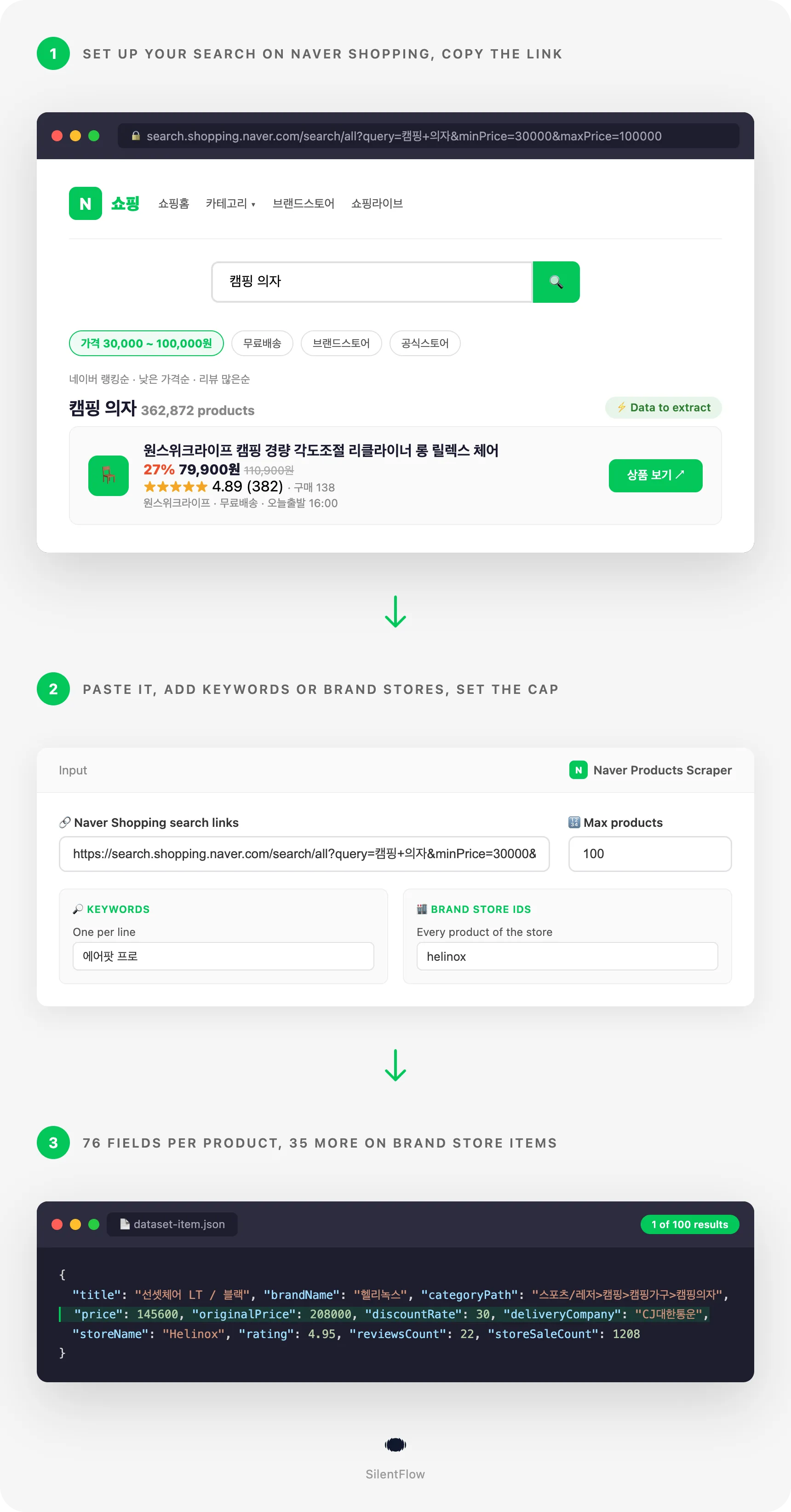
Paste this input into the Input tab (JSON view) and press Start. It is the prefilled input of the form: the first products Naver Shopping shows for 에어팟 프로 (AirPods Pro), the first of a 캠핑 의자 (camping chair) search limited to 30,000 to 100,000 KRW, and products of the Helinox Brand Store, 100 in all.
On 28 Sep 2026 this input returned 100 products in 11 seconds from 36 stores: 34 AirPods listings, 33 camping chairs priced between 35,000 and 99,000 KRW, and 33 Helinox products. 38 rows carry Brand Store details (hasBrandDetails: true): the Helinox products and 5 of the camping chairs. 35 rows belong to a Naver price comparison, 25 are second-hand AirPods (isUsed: true) and 36 ship the same day. Naver counted 33,900 products for 에어팟 프로 and 405,337 for the camping chair search, so raise maxItems to go further.
Runs of this size fit easily in the Apify Free plan, so you can try the actor on your own keywords and stores before scheduling anything. Each product is one row of the dataset; export it as JSON, CSV, Excel or HTML from the Storage tab, or read it from the API. The Products view shows title, price, stock, store, rating, reviews, search and link at a glance; the Prices view shows the price before discount, the discount rate, the shipping fee and the free shipping flag; the Brand Store details view shows brand, model, category path, seller discount, stock and the store's grade.
| SilentFlow · Naver suite | ||
 Naver Scraper Naver ScraperShopping Products, Prices |  Naver Reviews Scraper Naver Reviews ScraperShopping Product Reviews |  Naver Products Scraper Naver Products ScraperYou are here |
Copy to your AI assistant
Paste this block into Claude, ChatGPT or Cursor to give it full context about this actor:
How to scrape Naver Shopping products
Three inputs, from the simplest to the most filtered. Each one runs as it is.
Get the first 100 products Naver shows for a keyword
One keyword, the default cap. The rows come in the order Naver Shopping ranks them, and rank is each product's position on Naver.
Collect 300 tumblers between 10,000 and 50,000 KRW with free shipping
Price range and free shipping apply to every keyword. On 28 Sep 2026 this input returned 300 products in 32 seconds, every one priced inside the range and shipped for free, from 65 stores; 236 of them sold by Brand Stores, 81 of which came with their Brand Store details.
Read a whole Brand Store by its id
Type the id in the store's address, helinox for brand.naver.com/helinox. The run reads the store's categories in its three orders and saves each product once, with the Brand Store details. This input returned 429 products in 49 seconds on 28 Sep 2026, 195 of them sold out (saleStatus: "OUTOFSTOCK"), filed under 14 top categories of the store's own menu (storeCategories).
Input parameters
| Field | Type | Default | What it does |
|---|---|---|---|
keywords | array of strings | prefilled 에어팟 프로 | Searches as typed in Naver's search bar, one per line. |
startUrls | array of links | prefilled one search link | Naver Shopping or Naver search pages, read with their own order and filters; product pages (one row each) and Brand Store pages (the whole store). |
storeIds | array of strings | prefilled helinox | Naver Brand Stores to read whole, by the id in their address or a link to the store. |
maxItems | integer | 100 | Products saved for the whole run, shared evenly across keywords, links and stores. Past 10,000 for one search, the other orders are read too. |
sort | string | REL | The order read first: REL relevance, PURCHASE best selling, REVIEW most reviewed, LOW_PRICE, HIGH_PRICE, RECENT newest. |
minPrice | integer (KRW) | none | Lowest price for keywords and stores, and for links that set none. |
maxPrice | integer (KRW) | none | Highest price for keywords and stores, and for links that set none. |
freeShippingOnly | boolean | false | Products shipped for free only. |
includeBrandDetails | boolean | true | Adds the 35 Brand Store details to search products sold by a Brand Store. Store and product link rows always have them. |
debugMode | boolean | false | Adds detailed lines to the run log. |
No field is required. Leave keywords, startUrls and storeIds all empty and the run stops at once, telling you to add one.
Accepted formats
- Keywords: any text Naver's search bar takes. Korean keywords (
유기농 사과,캠핑 의자) match the most products; brand and model names work in English (nike 운동화,iphone 16 case). - Naver Shopping search links: the Plus Store search
https://search.shopping.naver.com/ns/search?query=..., the classichttps://search.shopping.naver.com/search/all?query=...and its mobilehttps://msearch.shopping.naver.com/search/all?query=.... The query, the order (sort=price_asc,price_dsc,date,review),minPrice,maxPrice,price=lo~hi,catId,freeDelivery=true,fastDelivery=true,score=true(4.8 stars and up),productSet=brandstoreandproductSet=officialmallare kept. - Naver search links:
https://search.naver.com/search.naver?query=...andhttps://m.search.naver.com/search.naver?query=..., read as their query. - Product links:
https://smartstore.naver.com/{store}/products/{id},https://brand.naver.com/{store}/products/{id}and theirm.versions, one row each with the Brand Store details, when the store is a Brand Store. - Brand Store ids and links: in
storeIds, the id of the store's address (helinox,brickmansion) or any link to the store, on brand.naver.com or smartstore.naver.com. A store link pasted instartUrlsreads the store too. - Skipped with a log line: catalog pages (
/catalog/...), product links that do not name their store (smartstore.naver.com/main/products/...), links to other sites, and the stores and product pages of Smart Stores that are not Brand Stores. For those, use Naver Scraper, which reads stores and products by their address.
What data can you extract from Naver Shopping?
Every row is one product, of a search, a store or a product link, with 137 fields in twelve groups. A field Naver does not give for a product is null, never an empty string, a list without entries is [], and numbers are numbers.
| Group | Fields |
|---|---|
| Identity (9) | id, url, mobileUrl, title, channelProductId, originalMallProductId, standardProductName, standardGroupEpId, standardGroupId |
| Category (5) | categoryId, lCatId, mCatId, sCatId, ssCatId |
| Product (32) | productType, isUsed, goodsType, saleType, windowType, authenticationType, isNewProduct, isGroupProduct, isFreshProduct, isLoungeProduct, isBranchProduct, isKurlyProduct, isHighEndProduct, isKnockitProduct, isPS, isSuperPointProduct, hasGift, isCustomProduct, isCustomProductAfterOrder, preOrderDeadlineDays, standardPurchaseOptionCount, standardPurchaseOptionValues, standardPurchaseOptionContents, minPurchaseQuantity, totalCapacity, unitCapacity, capacityUnit, colors, requiresInstallation, hasInstallationFee, membershipLifeCycleType, verticalCd |
| Store (13) | storeName, storeId, storeUrl, mallId, mallSeq, mallGradeType, officialCertifiedMallType, isSmartStore, isBrandStore, isIndividualSeller, channelNo, naverPaySellerNo, accountNo |
| Price (5) | price, originalPrice, discountRate, currency, salePricePer1 |
| Reviews and stock (5) | rating, reviewsCount, averageReviewScore6Month, totalReviewCount6Month, stockQuantity |
| Delivery (12) | deliveryFee, isFreeShipping, fastDeliveryType, deliveryFilters, deliveryMethodTypes, shipFromAddress, orderCutoffTime, notDeliveryDayOfWeek, isOverseaProduct, isMembershipFreeDelivery, isCustomsDutySeparate, isCustomsServiceFeeSeparate |
| Promotions (3) | promotionTypes, promotionIds, exceptBenefitTypes |
| Price comparison (10) | matchType, catalogId, catalogUrl, catalogName, catalogProductCount, catalogParentId, catalogChildId, catalogMatchType, catalogPurchaseOptions, catalogNPlusPickCandidates |
| Media (2) | imageUrl, images |
| Brand Store details (36) | hasBrandDetails, categoryPath, categoryIdPath, categoryName, storeCategories, brandName, manufacturerName, modelName, productNo, saleStatus, sellerTags, sellerDiscount, naverDiscount, mobileDiscountedPrice, mobileDiscountRate, purchasePoints, textReviewPoints, photoReviewPoints, deliveryCompany, deliveryFeeType, deliveryType, isTodayDelivery, hasArrivalGuarantee, hasFreeReturnInsurance, hasOptions, hasAddOnProducts, hasSubscription, storeCompanyName, storeRepresentativeName, storeBusinessType, storeRepresentType, storeActionGrade, storeSaleCount, storeDescription, storeImageUrl, storeSocialLinks |
| Source (5) | keyword, sort, rank, searchUrl, scrapedAt |
Each entry of catalogPurchaseOptions has 8 fields of its own: nvMid, channelProductId, optionName, salePrice, deliveryFee, rentalTotalFee, imageUrl and url, one per variant Naver groups under the same catalog.
How many rows carry each block depends on the market. On the 30,000-product 노트북 run, stockQuantity was set on every row, shipFromAddress on 29,356, a rating on 17,375, a same-day delivery promise on 17,509 and a price comparison (catalogId) on 7,182. On the prefilled run, 76 of the 137 fields carried a value on at least half of the rows.
hasBrandDetails says whether a row carries the Brand Store details. Every row of a store id or a product link has them. For a search it depends on who sells the product: 22 of the first 100 캠핑의자 products and 152 of the first 1,000, where outdoor brands run their own stores, but 45 of the first 10,000 노트북 products, since laptops sell mostly outside Brand Stores. The other rows keep these fields null and every search field.
Output example
One row of a 캠핑의자 search, a camping chair sold by the KZM Brand Store, with its Brand Store details (images cut to three links here):
A few facts that help when you use the data:
idis Naver's product id and stays the same from one run to the next: use it to join weekly runs and follow a price or a stock level. A product found both by a search and in a store carries the sameidand is saved once.priceis what a buyer pays before shipping, after the seller's discount, in Korean won;originalPriceis the price before that discount. On Brand Store rows,sellerDiscountandnaverDiscountsplit that discount in won, andmobileDiscountedPriceis the price in the Naver app.stockQuantityis the stock the seller declares on Naver. Most sellers keep it accurate; some enter a placeholder such as 99,999,999 for goods they never run out of, so treat very large values as "in stock".saleStatus: "OUTOFSTOCK"marks a sold-out Brand Store product.matchType: "WINNER"marks the listing Naver shows first in its price comparison;catalogProductCountis how many sellers the comparison holds.sortandranksay where the row came from: for a search, the order and the product's position on Naver, from 1; for a store, the store's order (POPULAR,RECENT,REVIEW) and the position on that page of the store's category, whose address issearchUrl. Rows of a product link have themnull.searchUrlopens the page the row was read on: the link you pasted, the Plus Store search of your keyword, or the store's category page.purchasePointsis the Naver Pay points a buyer earns on the purchase;textReviewPointsandphotoReviewPointsthe points for a written or a photo review.storeCompanyNameandstoreRepresentativeNameare the legal name and representative every Korean online store must display. Contacts Naver hides from visitors (phone, e-mail, business address) are never in a row.urlandstoreUrlare permanent store pages. Image links are served by Naver's image servers.scrapedAtis the time of the run in RFC 3339 UTC. Prices, stock, counts and ratings are read live at that moment.
Advanced usage
Go past 10,000 products for one keyword
Naver lists at most 10,000 products per order. Set maxItems above that and the run reads the other orders after the one you chose, saving only new products. With Brand Store details off, this input returned 30,000 distinct laptops in 81 seconds on 28 Sep 2026; sort on each row tells you which order it came from.
Compare two Brand Stores side by side
Several store ids share maxItems evenly, 100 each here. Group the rows by storeId and compare price bands (price, sellerDiscount), stock, sold-out share (saleStatus) and how each store files its catalog (storeCategories). This input returned 200 products in 6 seconds.
Get the full record of products you already know
Paste product links from your browser, Smart Store or Brand Store: each gives one row with the Brand Store details, sort and rank left null. Two links returned their two rows in 2 seconds. A link of a store that is not a Brand Store is reported in the log and skipped.
Mix keywords with searches you set up on Naver
Paste the address of a Naver Shopping or Naver search page: its order and filters are kept. Here a Brand Store search for humidifiers, a Naver search page for organic apples and one keyword. This input returned 150 products in 15 seconds, 50 per search, every humidifier from a Brand Store, 27 of them with their Brand Store details.
Size a whole category across several keywords
Eight keywords of one category share maxItems evenly, 625 each here, and a product listed under two keywords is saved once. Group the dataset by storeName or mallGradeType to see which stores hold the category.
Track prices and stock of a keyword list every week
Schedule this input weekly in Apify and compare price, originalPrice, discountRate and stockQuantity by id from one run to the next. The prices view of the dataset shows the price columns side by side.
List the best sellers and the newest listings of a niche
PURCHASE starts with the products Naver ranks as best selling, RECENT returns only recently listed products, often a few hundred per keyword. Run one then the other to see what sells and what just arrived.
Re-run a filtered search you set up on Naver
Set the order and filters on Naver Shopping in your browser, copy the address and paste it. Here official stores only, fast delivery, 4.8 stars and up, cheapest first. Filters of the form fill only what the link leaves unset, so this run also caps the price at 80,000 KRW, and stops as soon as the cheapest-first list passes it.
Rank the sellers of a market in Python
Pull the run into pandas and count products, reviews and stock per store, with the city each store ships from.
The dataset also downloads as JSON, CSV, Excel or XML from the run page, or at https://api.apify.com/v2/datasets/{DATASET_ID}/items?format=csv&token=YOUR_TOKEN.
FAQ
What is Naver Shopping? Naver is South Korea's largest search engine, and Naver Shopping (네이버 쇼핑) is its product search. It lists the products of millions of Smart Store and Brand Store sellers and groups identical models into price comparison catalogs. For a Korean shopper it plays the part Google Shopping and Amazon search play elsewhere.
Do I need a Naver account or an API key? No. The actor reads what any visitor of Naver Shopping sees. There is no login, no developer key and nothing to install.
How many products can I get per keyword?
As many as maxItems asks for, up to what Naver holds. Naver lists at most 10,000 products per order of a search; past them the run reads the other orders and saves only products it has not saved yet. 노트북 gave 30,000 distinct products in one run on 28 Sep 2026. The ceiling is the union of Naver's six orders, so a very large keyword can give tens of thousands of products, never all of the millions Naver counts.
In which order do the rows come?
In the order you choose with sort, the one you see on Naver Shopping, relevance by default. rank is each product's position in that order on Naver. When the run moves on to another order, sort changes on the rows that come from it.
Can I search with English keywords?
Yes for brands and models (nike 운동화, iphone 16 case). Korean keywords match more products, because Naver indexes Korean titles. A translation tool gives you the Korean keyword in seconds.
Can I scrape several keywords, links and stores in one run?
Yes. Product links come first, then keywords, search links and stores run one after the other and share maxItems evenly: 100 products for two searches gives 50 each. A search or a store that has fewer products leaves its share to the next ones. A product found by a first search is not saved again by a later one or by a store.
What is a Brand Store, and why do only some rows have Brand Store details?
Brand Stores (브랜드스토어) are the official Naver stores of brands, on brand.naver.com. Naver shows their full product record to any visitor, and the actor adds it to the row: brand, manufacturer, model, category path, discounts, points, courier, delivery promises and the store's details. A search row gets it when its seller is a Brand Store that Naver serves this way; in the first 1,000 캠핑의자 products, 152 of the 288 flagged isBrandStore did. The other rows keep every search field and have the details null. Nothing is dropped.
Can I get every product of a store?
Of a Brand Store, as far as its pages go: the run reads the store's categories and sub-categories in three orders, 40 products each, and saves each product once, sold-out ones included. A store of a few hundred products comes almost whole (helinox: 429 distinct products); a store of thousands gives more than half (brickmansion: 1,133 of the 1,982 it lists). The log says whether every category was read. Smart Stores that are not Brand Stores cannot be read by id: search their products by keyword instead.
How reliable is the stock?
stockQuantity is the number the seller declares on Naver, on every row. It moves as orders come in, which makes it a useful sales signal between two runs. Some sellers enter a placeholder such as 99,999,999 for goods they never run out of: read those as "in stock", not as a count.
What is the price comparison part of a row?
Naver groups listings of the same model into a catalog. A row that belongs to one carries catalogId, catalogUrl, catalogName, the number of sellers in the comparison (catalogProductCount) and the variants Naver lists under it with their price (catalogPurchaseOptions). matchType: "WINNER" marks the listing Naver shows first. A product sold by one store only has these fields null.
Why is there no review text or specification table? Review text, star breakdowns and specification tables are not in the rows. Brand Store products come with brand, manufacturer, model, category path and the store's details; for review text, Naver Scraper reads it for the products you choose.
Do the filters combine?
Yes. minPrice, maxPrice and freeShippingOnly apply together, to keywords and to stores, and a link adds its own. productSet=officialmall plus fastDelivery=true plus score=true in a link, with maxPrice: 80000 in the form, returns products of official stores that ship fast, rated 4.8 and up, at 80,000 KRW or less. A filtered search reads more of Naver's list to fill maxItems, since it keeps only the matching products.
How fresh is the data, and are the links permanent?
Everything is read live when the run starts; nothing is cached. Smart Store, Brand Store and catalog links are permanent pages on Naver, and id never changes for a product. Images are served by Naver's image servers.
What happens when a keyword has no product, or a store is not a Brand Store? The run finishes and its status says why: no product matched, or the stores given are not Brand Stores, so you can tell an empty search from a problem reaching Naver. No empty or error row is ever added to your dataset.
Is a large run slower with Brand Store details?
A little, depending on the market: each detailed product is one more page to read. The first 10,000 노트북 products took 39 seconds with details and 25 without, the first 1,000 캠핑의자 products 53 seconds with 152 detailed. Set includeBrandDetails to false for the fastest large keyword runs; store ids and product links keep their details.
More SilentFlow scrapers
🛒 E-commerce
 Pinterest - Pinterest Scraper | Pins, Boards and Profiles
 Leboncoin - Leboncoin Scraper | Classified Ads, Prices and Sellers
 Leboncoin - Leboncoin Ad Details Scraper
 Back Market - Back Market Scraper | Refurbished Prices
 ImportYeti - US Customs Records, Suppliers & Trade Data - ImportYeti Scraper - US Customs Records, Suppliers & Trade Data
 TikTok Shop - TikTok Shop Scraper | Products, Sellers and Creator Videos
 1688 Wholesale - 1688 Wholesale Scraper
 Udemy Course - Udemy Course Scraper
 JD - JD Products Scraper | Prices, Brands and Barcodes
 Store Leads Ecommerce - Store Leads Ecommerce Scraper
 Amazon Seller - Amazon Seller Scraper | Emails, Phones and Ratings
 Bring a Trailer - Bring a Trailer Scraper
 Lowes - Lowes Products Scraper | Prices, Stock and Specs
 Store Leads - Store Leads Scraper | Shopify Data
 Avito - Avito Scraper | Listings, Prices and Sellers
 Leboncoin - Leboncoin Scraper
 Mobile.de - Mobile.de Scraper
 Taobao - Taobao Scraper | Products, Prices and Sellers
 Udemy - Udemy Scraper
 Agoda - Agoda Scraper | Hotel Prices and Guest Ratings
 Alibaba - Alibaba Products Scraper | Wholesale Prices and MOQ
 AliExpress - AliExpress Reviews Scraper | Feedback, Ratings and Photos
 AliExpress - AliExpress Scraper | Products, Prices and Sales
 Allegro - Allegro Scraper | Products, Prices and Sellers
 Avito - Avito Profiles Scraper | Sellers, Ratings and Reviews
 Back Market - Back Market Scraper | Refurbished Electronics Prices
 BAUHAUS - BAUHAUS Scraper | Product Prices, EAN and Specs
 CARFAX - CARFAX Scraper | Used Cars, Prices and History
 Coupang - Coupang Detail Scraper | Product Prices and Options
 Ctrip - Ctrip Scraper | Attractions, Tickets and Reviews
 eBay Marketplace - eBay Marketplace Scraper
 Europages - Europages Scraper | Suppliers and B2B Companies
 Eventim - Eventim Scraper | Events, Ticket Prices and Venues
 GasBuddy - GasBuddy Scraper | Gas Prices by Station
 Google Hotels - Google Hotels Scraper | Prices, Offers and Ratings
 Homedepot - Homedepot Reviews Scraper | Customer Reviews and Ratings
 Leboncoin - Leboncoin Details Scraper | Full Ad Data and Sellers
 Mercari - Mercari Scraper | Listings, Sold Prices and Sellers
 Vinted Marketplace - Vinted Marketplace Scraper
 Walmart - Walmart Product Scraper
 Alibaba - Alibaba Scraper | Products, Prices and Suppliers
 Amazon - Amazon Product Scraper
 Amazon Marketplace - Amazon Marketplace Scraper
 AutoScout24 - AutoScout24 Scraper
 eBay Listings - eBay Listings Scraper
 Europages Deep Dive Extractor - Europages Deep Dive Extractor | VAT, Decision Makers, ISO Certs
 Pinterest - Pinterest Scraper
 Trip - Trip Scraper | Hotels, Prices and Reviews
 Vinted - Vinted Scraper
 Walmart - Walmart Scraper | Prices, Reviews, Sellers, Availability
💼 Jobs
 ZipRecruiter - ZipRecruiter Jobs Scraper | Salary, Company & Location Filters
 Indeed - Indeed Company Reviews Scraper
 Multi Board - Multi Board Job Scraper
 Glassdoor Job Listings - Glassdoor Job Listings Scraper
 🔥 Glassdoor - 🔥 Glassdoor Scraper
 LinkedIn Job Search - LinkedIn Job Search Scraper | Salaries & Seniority
 ATS - ATS Jobs Scraper | Greenhouse, Lever and Ashby
 Dice Tech - Dice Tech Jobs Scraper
 iimjobs - iimjobs Scraper | Jobs, Companies and Recruiters
 Jora - Jora Jobs Scraper
 Malt Freelancer - Malt Freelancer Scraper
 Malt - Malt Scraper | Freelance Profiles
 Welcome to the Jungle - Welcome to the Jungle Job Scraper
 All - All Jobs Scraper
 Arbeitsagentur - Arbeitsagentur Jobs Scraper
 Cutshort - Cutshort Jobs Scraper | Salaries, Skills and Companies
 Dice - Dice Jobs Scraper | US Tech Jobs, Salaries, Skills
 Glassdoor - Glassdoor Jobs Scraper
 Indeed - Indeed Jobs Scraper | Job Listings in 73 Countries
 Jora - Jora Scraper | Jobs in Australia, New Zealand, Singapore
 StepStone - StepStone Scraper
 YCombinator - YCombinator Jobs Scraper | Startup Jobs, Salaries and Founders
 Arbeitsagentur - Arbeitsagentur Scraper | German and Austrian Job Board
 Indeed - Indeed Companies Scraper | Reviews, Salaries, Interviews
 Indeed - Indeed Jobs Scraper | NLP Skills
 LinkedIn - LinkedIn Jobs Scraper
 Naukri & NaukriGulf - Naukri & NaukriGulf Jobs Scraper
 Seek - Seek Job Scraper
 Welcome to the Jungle - Welcome to the Jungle Scraper | Jobs and Company Data
 Ziprecruiter - Ziprecruiter Scraper
🏠 Real estate
 SeLoger - SeLoger Scraper | Real Estate Listings
 Anjuke - Anjuke Scraper | Rental Listings, Prices and Agents
 Realtor Rental Listings - Realtor Rental Listings Scraper
 Airbnb Pro Host Contact & - Airbnb Pro Host Contact & Email Scraper
 Bien'ici - Bien'ici Scraper | Property Listings
 Rightmove - Rightmove Scraper
 Trulia Rental Listings - Trulia Rental Listings Scraper
 Airbnb Professional Host - Airbnb Professional Host Scraper | Emails, Phones, SIRET
 Airbnb Search - Airbnb Search Scraper
 Bienici - Bienici Scraper
 Idealista - Idealista Scraper
 Realestate.com.au - Realestate.com.au Scraper
 SeLoger - SeLoger Scraper | French Property Listings and Agencies
 Zillow - Zillow Scraper
 Airbnb Search - Airbnb Search Scraper | Prices, Fees, Amenities, Hosts
 Idealista - Idealista Scraper
 Realtor Rental - Realtor Rental Scraper
 Trulia Rental - Trulia Rental Scraper | US Rentals, Prices, Pet Policy
📣 Social media
 LinkedIn Post Search - LinkedIn Post Search Scraper | Keywords, Hashtags & Profiles
 Facebook Search - Facebook Search Scraper
 Instagram - Instagram Story Scraper | Stories & Highlights
 LinkedIn Leads - LinkedIn Leads Scraper | Sales Navigator Export
 TikTok - TikTok Scraper
 YouTube - YouTube Channel Scraper | Videos, Shorts and Views
 Facebook Search - Facebook Search Profiles Scraper | People by Name or Keyword
 Instagram Engagement - Instagram Engagement Scraper
 Meta Ad Library - Meta Ad Library Scraper
 OnlyFans - OnlyFans Profile Scraper
 TikTok Trend - TikTok Trend Scraper | Trending Hashtags and Videos
 OnlyFans - OnlyFans Creator Scraper
 Skool Community - Skool Community Scraper
 Bilibili - Bilibili Scraper
 Facebook Thread - Facebook Thread Profiles Scraper | Followers, Bios & Engagement
 Kuaishou - Kuaishou Scraper | Videos, Comments and Creator Stats
 LinkedIn Event - LinkedIn Event Scraper
 Reddit - Reddit Scraper | Posts, Comments and Subreddits
 Reddit - Reddit Scraper | Comments, Posts and Users
 Snapchat - Snapchat Contacts Scraper | Phones, Emails and Websites
 Weibo - Weibo Scraper | Posts, Profiles and Engagement
 Xigua - Xigua Scraper | Videos, Creators and Downloads
 Discord - Discord Scraper | Servers, Member Counts and Invites
 Facebook - Facebook Company Scraper | Emails, Phones, Ratings
 Facebook Business Page - Facebook Business Page Scraper
 Kwai - Kwai Scraper | Videos, Creators and Hashtags
 LinkedIn Ads Library - No Cookies - LinkedIn Ads Library Scraper - No Cookies
 LinkedIn Hashtag & - LinkedIn Hashtag & Post Scraper | No Cookies
 Skool Group - Skool Group Scraper
 Snapchat - Snapchat Ads Scraper | Ad Library, Impressions & Targeting
 YouTube - YouTube Transcript Scraper
🏢 Business data
 Tencent - Tencent Scraper | Maps Places, Phones and Ratings
 LinkedIn People Search - LinkedIn People Search Scraper | Profiles & Companies
 LinkedIn Company Search - LinkedIn Company Search Scraper | Profiles & Firmographics
 Company Data - Company Data Scraper | Emails, Phones and Tech Stack
 FanDuel - FanDuel Scraper | Odds, Spreads and Player Props
 ForexFactory - ForexFactory Scraper | Economic Calendar and Forecasts
 Justdial - Justdial Companies Scraper | Business Leads, Phones and Emails
 Kakao - Kakao Scraper | Map Places, Reviews and Phones
 OpenTable - OpenTable Reviews Scraper | Restaurant Reviews and Ratings
 SoftwareAdvice - SoftwareAdvice Scraper | Reviews, Ratings and Pros & Cons
 Teachable Course - Teachable Course Scraper
 Zomato - Zomato Reviews Scraper | Restaurant Ratings and Replies
 2GIS - 2GIS Reviews Scraper | Ratings, Photos and Owner Replies
 LinkedIn Sales Navigator - LinkedIn Sales Navigator Scraper
 Teachable - Courses, Prices & Instructors - Teachable Scraper - Courses, Prices & Instructors
 Trustpilot - Trustpilot Scraper | Reviews, Ratings and Company Contacts
 Website Tech Stack - Website Tech Stack Scraper
✈️ Travel
 Google Maps - Google Maps Scraper
 Booking.com Hotel - Booking.com Hotel Scraper
 Flight Price - Flight Price Scraper
 Trip - Trip Reviews Scraper | Hotel Reviews and Ratings
 Booking - Booking Scraper | Hotel Prices, Photos, Availability
🎯 Lead generation
 Northdata - Northdata Company Scraper
 ZocDoc - ZocDoc Scraper | Doctors, Reviews and Availability
 UK Companies House - UK Companies House Enricher
 Dealroom - Dealroom Scraper | Companies and Investors
 CNPJ Brazilian - CNPJ Brazilian Company Enricher
 Google Ads Transparency - Google Ads Transparency Scraper
 SIRET - SIRET Company Enricher
 BuiltWith - BuiltWith Scraper | Tech Stacks and Top Sites
 Domain - Domain Enricher
 French Company Prospector - French Company Prospector
 SEC - SEC Scraper | EDGAR Filings and Company Data
 USPTO - USPTO Scraper | Trademark Search and Status
 ZocDoc - ZocDoc Scraper
 Clutch - Clutch Scraper | Agencies, Reviews, Ratings, Services
 Clutch Agency - Clutch Agency Scraper
 Dealroom Startup Data - Dealroom Startup Data Scraper
 G2 - G2 Reviews Scraper
 PagesJaunes - PagesJaunes Scraper | French Business Emails and SIRET
 PagesJaunes - PagesJaunes Business Scraper
 SIRET French - SIRET French Company Enricher
 ThomasNet Suppliers - ThomasNet Suppliers Scraper
🔎 SEO
 Similarweb - Similarweb Scraper | Website Traffic, Rankings and Competitors
 Google News - Google News Scraper
 Apple - Apple Scraper | App Store Apps, Ratings and Charts
📈 Marketing
 Pexels -
 🧰 More tools
 PrizePicks - [PrizePicks Scraper | Player Props, Lines and Projection


