

Mobile.de Scraper
Pricing
from $0.50 / 1,000 results
Mobile.de Scraper
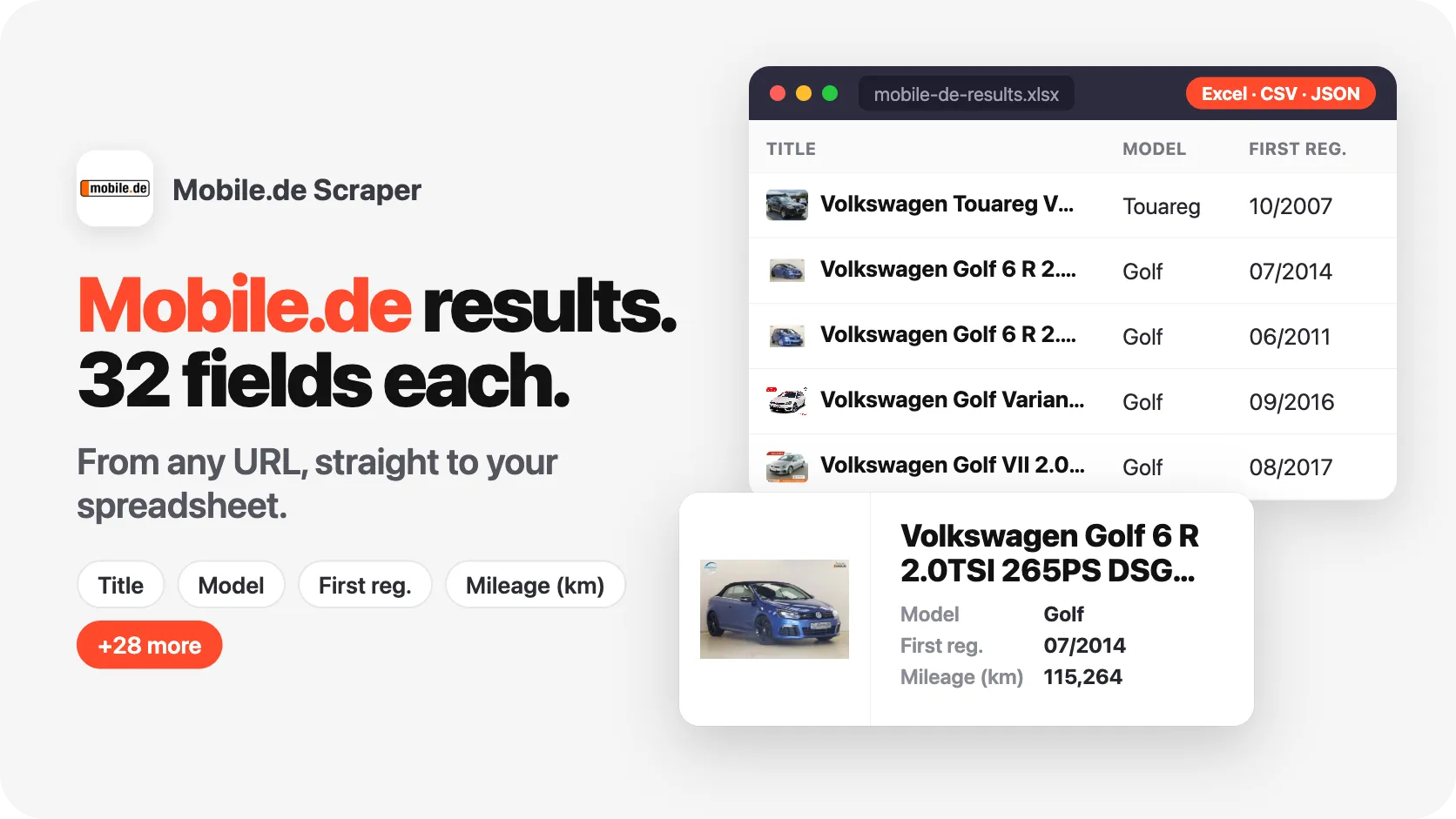
Scrape vehicle listings from Mobile.de, Germany's largest car marketplace. Get make, model, price, mileage, registration, power, fuel, transmission, equipment and photos, plus the dealer name, phone, address and exact GPS on every listing. Search by URL or filters and export to JSON, CSV or Excel.
Pricing
from $0.50 / 1,000 results
Rating
5.0
(1)
Developer

SilentFlow
Maintained by CommunityActor stats
1
Bookmarked
13
Total users
3
Monthly active users
11 days ago
Last modified
Categories
Share
From SilentFlow. Creators of Pinterest Scraper and Leboncoin Scraper, with 420,000+ combined lifetime runs.
Turn every listing on Germany's largest vehicle marketplace into clean, structured data. 500 fully detailed vehicles in under 90 seconds, with dealer phone, address and GPS on every record.
Mobile.de lists more than 1.5 million cars, motorbikes, vans, trucks and motorhomes across Germany and Europe. This scraper pulls that inventory into ready-to-use JSON, CSV or Excel: make, model, price, mileage, full technical specs, the complete equipment list, every photo, and the selling dealer with contact details and map coordinates. Paste a search URL, type a few keywords, list listing ids or set a few filters, press start, and get structured results you can drop straight into a spreadsheet, a database, or a model.
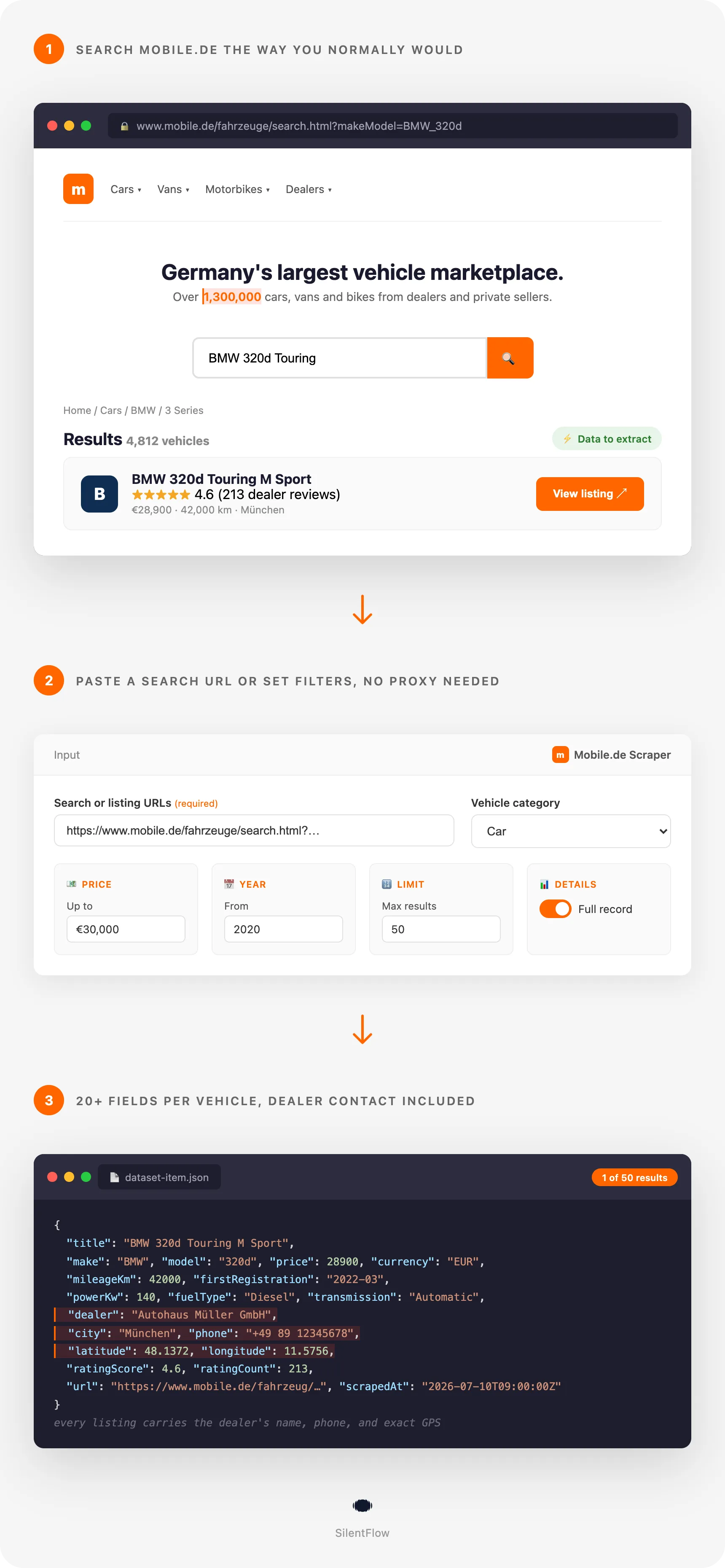
How it works
✨ Why teams choose this over other Mobile.de scrapers
Shopping around for used-car data and getting half-empty rows back? Running a scraper that breaks every time mobile.de ships a redesign? Paying for results that skip the one field you actually needed?
- 🏷️ Every record carries the dealer, not just the car. Name, street address, phone number, and exact GPS latitude and longitude come on every single listing, plus the dealer's star rating and review count. Most scrapers give you the car and make you guess who is selling it.
- 🧾 The full equipment list, not a summary. Each vehicle ships with its complete feature list (often 40 to 60 items: driver assistance, comfort, safety, infotainment) exactly as the seller entered it, so you can filter on the exact options buyers ask for.
- 💶 The mobile.de price rating is included. When the marketplace rates a price against the market, you get that rating and its label, so you can spot the good deals without building your own valuation model.
- 🔎 Search by URL, keyword, listing id or filters. Configure a precise search on mobile.de and paste the link, type keywords like
tesla model 3, list the listing ids you track, or skip the site entirely and set category, make, model, price, mileage, year and fuel right here. Every path hits the same rich data. - 🌍 Every category, not just cars. Cars, motorbikes, vans, trucks, semi-trailer trucks, motorhomes, construction machines and trailers all work with the same input.
- 📐 Clean, typed JSON. Mileage is a number, power comes as both kW and HP, coordinates are floats, dates are ISO timestamps. No scraping HTML out of a text blob on your side.
- 🔁 Structured for automation. No login, no API key, no browser extension. Feed the output straight into Google Sheets, a warehouse, or a pricing pipeline.

🎯 What you can do with Mobile.de data
| Team | What they build |
|---|---|
| Used-car dealers | Track competitor pricing on the exact make, model and year you stock, and reprice daily |
| Car-buying services | Surface underpriced listings by comparing each car's price rating against the market |
| Lead generation | Build dealer call lists with name, phone, address and GPS, filtered by region and inventory size |
| Market analysts | Measure depreciation curves and regional price gaps across hundreds of thousands of listings |
| Fleet and leasing | Source vehicles by mileage, registration year and equipment, then rank by total value |
| Insurers and valuation | Feed real listing prices, KBA type codes and specs into pricing and risk models |
| Parts and salvage | Find damage cases and non-runners by category and location for parts sourcing |
| Data and ML teams | Assemble labelled vehicle datasets (specs, photos, prices) for training and analysis |
📥 Input parameters
Search by URL, keyword or listing id
| Field | Type | Description |
|---|---|---|
searchUrls | array | Mobile.de search result URLs or individual listing URLs. Paste as many as you like. |
searchTerms | array | Keywords, one per line, like tesla model 3, golf gti or sportback. Each term is its own search, matched the way the mobile.de search box does, and combined with the filters below. |
listingIds | array | Mobile.de listing ids, one per line, like 453303025 (the number at the end of a listing URL). Each id returns the full record of that listing. A listing URL works here too. |
The three fields can be used together in one run. When all three are empty, the filters below make the search on their own.
Filters (combined with search terms, or used on their own)
| Field | Type | Description |
|---|---|---|
searchCategory | select | Cars, Motorbikes, Vans, Trucks, Semi-trailer trucks, Motorhomes, Construction machines, Trailers |
models | array | Make and model by mobile.de id, e.g. 3500 (BMW) or 3500|20 (make and model) |
priceMin / priceMax | integer | Price range in euros |
mileageKmMin / mileageKmMax | integer | Mileage range in kilometres |
registrationYearMin / registrationYearMax | integer | First-registration year range |
fuelType | array | Petrol, Diesel, Electric, Hybrid, LPG, CNG, Hydrogen, Ethanol |
sort | select | Relevance, Price, Mileage, Newest, Registration |
Limits and options
| Field | Type | Description |
|---|---|---|
maxItems | integer | Maximum number of listings to collect |
includeDetails | boolean | Fetch each listing's full record (description, equipment, all photos, technical attributes). On by default |
proxyConfiguration | object | Optional proxy. Off by default |
debugMode | boolean | Show detailed logs |
📊 Output data
Each listing is one JSON object. A search result enriched with its full detail record looks like this:
When includeDetails is off, you still get every search-level field, including the dealer name, phone and rating. The detail step adds description, the complete features list, attributes, condition, makeId and modelId, the dealer's street address and GPS coordinates, and the full photo set.
🗂️ Data fields
| Category | Fields |
|---|---|
| Identity | id, url, title, shortTitle, subTitle |
| Vehicle | make, model, makeId, modelId, category, vehicleClass |
| Price | price.amount, price.currency, price.localized, price.type, priceRating.rating, priceRating.label |
| Specs | firstRegistration, mileageKm, powerKw, powerHp, fuelType, transmission, displacementCc, exteriorColor, doors, seats |
| Condition | condition, isNew |
| Content | description, features[], attributes[], images[] |
| Location | location.country, location.zip, location.city |
| Dealer | dealer.name, dealer.type, dealer.address, dealer.phone, dealer.latitude, dealer.longitude, dealer.ratingScore, dealer.ratingCount, dealer.ratingLink |
| Registration codes | kba.hsn, kba.tsn |
| Timestamps | scrapedAt |
🚀 Examples
Scrape all BMWs under 20,000 euros registered from 2016
Set searchCategory to Cars, models to 3500, priceMax to 20000, registrationYearMin to 2016.
Pull a saved mobile.de search
Configure the search on mobile.de, copy the address bar URL, paste it into searchUrls.
Build a dealer lead list in one region
Set a search URL scoped to a postcode area, keep includeDetails on, then filter the output by dealer to get name, phone, address and coordinates.
Find damage cases and non-runners for parts
Set searchCategory to Cars and sort by price ascending, then filter output on condition.
Search by keyword
Type tesla model 3 into searchTerms and run. Add filters such as priceMax or fuelType to narrow the keyword results.
Track a few listings over time
Put their ids, such as 453303025, into listingIds (or paste the listing URLs into searchUrls) and run on a schedule to watch price and status changes.
🤖 Copy to your AI assistant
💻 Integrations
Python
JavaScript
Google Sheets and BI tools Export the dataset as CSV or connect the Apify dataset API to Google Sheets, Looker Studio or Power BI to build live dashboards of pricing and inventory.
📈 Performance
| Metric | Value |
|---|---|
| Listing-only speed | 500 results in under 10 seconds |
| With full details | 500 results in under 90 seconds |
| Categories supported | cars, motorbikes, vans, trucks, semi-trailer trucks, motorhomes, machines, trailers |
| Coverage | Germany plus other European listings on mobile.de |
Runtime scales with maxItems and whether includeDetails is on. For a quick scan, turn details off and keep the rich search fields, including the dealer's name, phone and rating.
💾 Data export
Results are available as JSON, JSONL, CSV, Excel, HTML table, RSS and XML through the Apify Console or the API. Every run stores its dataset so you can re-download or stream it into your own tools at any time.
💡 Tips for best results
- Start from a mobile.de search URL when you need precise filters. Everything you can pick on the site (region, equipment, seller type) carries over.
- Turn off
includeDetailsfor a fast first pass, then re-run with details on for the listings you care about. The search results already include price, specs and the dealer's name, phone and rating. - Use
modelsids for exact matching. A bare make id like3500returns the whole brand; add a model id (3500|20) to narrow it down. - Raise
maxItemsgradually to keep runs quick while you tune your filters. It caps the whole run: with several search terms, give it room for all of them. - Combine filters (year plus mileage plus fuel) to cut a 1.5 million listing marketplace down to the few hundred vehicles that matter.
❓ FAQ
What vehicle types can I scrape? Cars, motorbikes, vans, trucks, semi-trailer trucks, motorhomes, construction machines and trailers.
Do I need a mobile.de account or API key? No. Provide a search URL, keywords, listing ids or filters and run the actor.
Can I scrape a specific search I already set up?
Yes. Copy the URL from your browser after running the search on mobile.de and paste it into searchUrls.
Can I search by keyword or by listing id instead of a URL?
Yes. Type keywords into searchTerms, one per line, like tesla model 3 or golf gti: each one is searched the way the mobile.de search box does it, and the filters (category, makes, price, mileage, year, fuel, sort) narrow the results. Put listing ids into listingIds, like 453303025, to get the full record of each of those listings. You can fill searchUrls, searchTerms and listingIds in the same run; saved runs that only use searchUrls or the filters behave exactly as before.
Does it return the dealer's contact details? Yes. Every listing includes the dealer name, address, phone number, GPS coordinates, and rating where the seller is a dealer. Private sellers return the fields the marketplace exposes.
Does it include individual dealer reviews? The output includes the dealer's aggregate rating (score and review count) and a link to their reviews page. Individual review texts are not part of a listing record.
Can I get all photos of a car?
Yes. With includeDetails on, the full photo set is returned as direct image URLs.
What is the price rating? When mobile.de has enough comparable data, it rates a listing's price against the market. That rating and its label are included. Some listings have no rating, which is reported honestly rather than guessed.
Are prices numbers or text?
Both. price.amount is a number and price.localized is the formatted string shown on the site.
What are the KBA codes?
hsn and tsn are the German vehicle registration type codes, useful for exact model identification and parts matching.
Can I run this on a schedule? Yes. Use Apify Schedules to run daily or hourly and track price and inventory changes over time.
⚖️ Legal
This scraper collects data that mobile.de publishes openly, without logging in. Use it responsibly and in line with applicable law. When your results include personal data (for example a private seller's name or phone number), you are the data controller and are responsible for a lawful basis and for honouring data-subject rights under the GDPR, the CCPA, and similar regulations. Do not use scraped contact details for unsolicited outreach where that is prohibited. Review mobile.de's terms and your own legal obligations before large-scale collection.
🔗 Related scrapers
Looking for other vehicle marketplaces? Explore our other automotive and classifieds scrapers on Apify to cover more inventory across Europe.
More SilentFlow scrapers
🛒 E-commerce
 Pinterest - Pinterest Scraper | Pins, Boards and Profiles
 Leboncoin - Leboncoin Scraper | Classified Ads, Prices and Sellers
 Leboncoin - Leboncoin Ad Details Scraper
 Back Market - Back Market Scraper | Refurbished Prices
 ImportYeti - US Customs Records, Suppliers & Trade Data - ImportYeti Scraper - US Customs Records, Suppliers & Trade Data
 TikTok Shop - TikTok Shop Scraper | Products, Sellers and Creator Videos
 1688 Wholesale - 1688 Wholesale Scraper
 Naver - Naver Scraper | Shopping Products, Prices and Reviews
 Udemy Course - Udemy Course Scraper
 JD - JD Products Scraper | Prices, Brands and Barcodes
 Store Leads Ecommerce - Store Leads Ecommerce Scraper
 Amazon Seller - Amazon Seller Scraper | Emails, Phones and Ratings
 Naver - Naver Reviews Scraper | Shopping Product Reviews
 Bring a Trailer - Bring a Trailer Scraper
 Lowes - Lowes Products Scraper | Prices, Stock and Specs
 Store Leads - Store Leads Scraper | Shopify Data
 Avito - Avito Scraper | Listings, Prices and Sellers
 Leboncoin - Leboncoin Scraper
 Naver - Naver Products Scraper | Shopping Prices, Sellers and Ratings
 Taobao - Taobao Scraper | Products, Prices and Sellers
 Udemy - Udemy Scraper
 Agoda - Agoda Scraper | Hotel Prices and Guest Ratings
 Alibaba - Alibaba Products Scraper | Wholesale Prices and MOQ
 AliExpress - AliExpress Reviews Scraper | Feedback, Ratings and Photos
 AliExpress - AliExpress Scraper | Products, Prices and Sales
 Allegro - Allegro Scraper | Products, Prices and Sellers
 Avito - Avito Profiles Scraper | Sellers, Ratings and Reviews
 Back Market - Back Market Scraper | Refurbished Electronics Prices
 BAUHAUS - BAUHAUS Scraper | Product Prices, EAN and Specs
 CARFAX - CARFAX Scraper | Used Cars, Prices and History
 Coupang - Coupang Detail Scraper | Product Prices and Options
 Ctrip - Ctrip Scraper | Attractions, Tickets and Reviews
 eBay Marketplace - eBay Marketplace Scraper
 Europages - Europages Scraper | Suppliers and B2B Companies
 Eventim - Eventim Scraper | Events, Ticket Prices and Venues
 GasBuddy - GasBuddy Scraper | Gas Prices by Station
 Google Hotels - Google Hotels Scraper | Prices, Offers and Ratings
 Homedepot - Homedepot Reviews Scraper | Customer Reviews and Ratings
 Leboncoin - Leboncoin Details Scraper | Full Ad Data and Sellers
 Mercari - Mercari Scraper | Listings, Sold Prices and Sellers
 Vinted Marketplace - Vinted Marketplace Scraper
 Walmart - Walmart Product Scraper
 Alibaba - Alibaba Scraper | Products, Prices and Suppliers
 Amazon - Amazon Product Scraper
 Amazon Marketplace - Amazon Marketplace Scraper
 AutoScout24 - AutoScout24 Scraper
 eBay Listings - eBay Listings Scraper
 Europages Deep Dive Extractor - Europages Deep Dive Extractor | VAT, Decision Makers, ISO Certs
 Pinterest - Pinterest Scraper
 Trip - Trip Scraper | Hotels, Prices and Reviews
 Vinted - Vinted Scraper
 Walmart - Walmart Scraper | Prices, Reviews, Sellers, Availability
💼 Jobs
 ZipRecruiter - ZipRecruiter Jobs Scraper | Salary, Company & Location Filters
 Indeed - Indeed Company Reviews Scraper
 Multi Board - Multi Board Job Scraper
 Glassdoor Job Listings - Glassdoor Job Listings Scraper
 🔥 Glassdoor - 🔥 Glassdoor Scraper
 LinkedIn Job Search - LinkedIn Job Search Scraper | Salaries & Seniority
 ATS - ATS Jobs Scraper | Greenhouse, Lever and Ashby
 Dice Tech - Dice Tech Jobs Scraper
 iimjobs - iimjobs Scraper | Jobs, Companies and Recruiters
 Jora - Jora Jobs Scraper
 Malt Freelancer - Malt Freelancer Scraper
 Malt - Malt Scraper | Freelance Profiles
 Welcome to the Jungle - Welcome to the Jungle Job Scraper
 All - All Jobs Scraper
 Arbeitsagentur - Arbeitsagentur Jobs Scraper
 Cutshort - Cutshort Jobs Scraper | Salaries, Skills and Companies
 Dice - Dice Jobs Scraper | US Tech Jobs, Salaries, Skills
 Glassdoor - Glassdoor Jobs Scraper
 Indeed - Indeed Jobs Scraper | Job Listings in 73 Countries
 Jora - Jora Scraper | Jobs in Australia, New Zealand, Singapore
 StepStone - StepStone Scraper
 YCombinator - YCombinator Jobs Scraper | Startup Jobs, Salaries and Founders
 Arbeitsagentur - Arbeitsagentur Scraper | German and Austrian Job Board
 Indeed - Indeed Companies Scraper | Reviews, Salaries, Interviews
 Indeed - Indeed Jobs Scraper | NLP Skills
 LinkedIn - LinkedIn Jobs Scraper
 Naukri & NaukriGulf - Naukri & NaukriGulf Jobs Scraper
 Seek - Seek Job Scraper
 Welcome to the Jungle - Welcome to the Jungle Scraper | Jobs and Company Data
 Ziprecruiter - Ziprecruiter Scraper
🏠 Real estate
 SeLoger - SeLoger Scraper | Real Estate Listings
 Anjuke - Anjuke Scraper | Rental Listings, Prices and Agents
 Realtor Rental Listings - Realtor Rental Listings Scraper
 Airbnb Pro Host Contact & - Airbnb Pro Host Contact & Email Scraper
 Bien'ici - Bien'ici Scraper | Property Listings
 Rightmove - Rightmove Scraper
 Trulia Rental Listings - Trulia Rental Listings Scraper
 Airbnb Professional Host - Airbnb Professional Host Scraper | Emails, Phones, SIRET
 Airbnb Search - Airbnb Search Scraper
 Bienici - Bienici Scraper
 Idealista - Idealista Scraper
 Realestate.com.au - Realestate.com.au Scraper
 SeLoger - SeLoger Scraper | French Property Listings and Agencies
 Zillow - Zillow Scraper
 Airbnb Search - Airbnb Search Scraper | Prices, Fees, Amenities, Hosts
 Idealista - Idealista Scraper
 Realtor Rental - Realtor Rental Scraper
 Trulia Rental - Trulia Rental Scraper | US Rentals, Prices, Pet Policy
📣 Social media
 LinkedIn Post Search - LinkedIn Post Search Scraper | Keywords, Hashtags & Profiles
 Facebook Search - Facebook Search Scraper
 Instagram - Instagram Story Scraper | Stories & Highlights
 LinkedIn Leads - LinkedIn Leads Scraper | Sales Navigator Export
 TikTok - TikTok Scraper
 YouTube - YouTube Channel Scraper | Videos, Shorts and Views
 Facebook Search - Facebook Search Profiles Scraper | People by Name or Keyword
 Instagram Engagement - Instagram Engagement Scraper
 Meta Ad Library - Meta Ad Library Scraper
 OnlyFans - OnlyFans Profile Scraper
 TikTok Trend - TikTok Trend Scraper | Trending Hashtags and Videos
 OnlyFans - OnlyFans Creator Scraper
 Skool Community - Skool Community Scraper
 Bilibili - Bilibili Scraper
 Facebook Thread - Facebook Thread Profiles Scraper | Followers, Bios & Engagement
 Kuaishou - Kuaishou Scraper | Videos, Comments and Creator Stats
 LinkedIn Event - LinkedIn Event Scraper
 Reddit - Reddit Scraper | Posts, Comments and Subreddits
 Reddit - Reddit Scraper | Comments, Posts and Users
 Snapchat - Snapchat Contacts Scraper | Phones, Emails and Websites
 Weibo - Weibo Scraper | Posts, Profiles and Engagement
 Xigua - Xigua Scraper | Videos, Creators and Downloads
 Discord - Discord Scraper | Servers, Member Counts and Invites
 Facebook - Facebook Company Scraper | Emails, Phones, Ratings
 Facebook Business Page - Facebook Business Page Scraper
 Kwai - Kwai Scraper | Videos, Creators and Hashtags
 LinkedIn Ads Library - No Cookies - LinkedIn Ads Library Scraper - No Cookies
 LinkedIn Hashtag & - LinkedIn Hashtag & Post Scraper | No Cookies
 Skool Group - Skool Group Scraper
 Snapchat - Snapchat Ads Scraper | Ad Library, Impressions & Targeting
 YouTube - YouTube Transcript Scraper
🏢 Business data
 Tencent - Tencent Scraper | Maps Places, Phones and Ratings
 LinkedIn People Search - LinkedIn People Search Scraper | Profiles & Companies
 LinkedIn Company Search - LinkedIn Company Search Scraper | Profiles & Firmographics
 Company Data - Company Data Scraper | Emails, Phones and Tech Stack
 FanDuel - FanDuel Scraper | Odds, Spreads and Player Props
 ForexFactory - ForexFactory Scraper | Economic Calendar and Forecasts
 Justdial - Justdial Companies Scraper | Business Leads, Phones and Emails
 Kakao - Kakao Scraper | Map Places, Reviews and Phones
 OpenTable - OpenTable Reviews Scraper | Restaurant Reviews and Ratings
 SoftwareAdvice - SoftwareAdvice Scraper | Reviews, Ratings and Pros & Cons
 Teachable Course - Teachable Course Scraper
 Zomato - Zomato Reviews Scraper | Restaurant Ratings and Replies
 2GIS - 2GIS Reviews Scraper | Ratings, Photos and Owner Replies
 LinkedIn Sales Navigator - LinkedIn Sales Navigator Scraper
 Teachable - Courses, Prices & Instructors - Teachable Scraper - Courses, Prices & Instructors
 Trustpilot - Trustpilot Scraper | Reviews, Ratings and Company Contacts
 Website Tech Stack - Website Tech Stack Scraper
✈️ Travel
 Google Maps - Google Maps Scraper
 Booking.com Hotel - Booking.com Hotel Scraper
 Flight Price - Flight Price Scraper
 Trip - Trip Reviews Scraper | Hotel Reviews and Ratings
 Booking - Booking Scraper | Hotel Prices, Photos, Availability
🎯 Lead generation
 Northdata - Northdata Company Scraper
 ZocDoc - ZocDoc Scraper | Doctors, Reviews and Availability
 UK Companies House - UK Companies House Enricher
 Dealroom - Dealroom Scraper | Companies and Investors
 CNPJ Brazilian - CNPJ Brazilian Company Enricher
 Google Ads Transparency - Google Ads Transparency Scraper
 SIRET - SIRET Company Enricher
 BuiltWith - BuiltWith Scraper | Tech Stacks and Top Sites
 Domain - Domain Enricher
 French Company Prospector - French Company Prospector
 SEC - SEC Scraper | EDGAR Filings and Company Data
 USPTO - USPTO Scraper | Trademark Search and Status
 ZocDoc - ZocDoc Scraper
 Clutch - Clutch Scraper | Agencies, Reviews, Ratings, Services
 Clutch Agency - Clutch Agency Scraper
 Dealroom Startup Data - Dealroom Startup Data Scraper
 G2 - G2 Reviews Scraper
 PagesJaunes - PagesJaunes Scraper | French Business Emails and SIRET
 PagesJaunes - PagesJaunes Business Scraper
 SIRET French - SIRET French Company Enricher
 ThomasNet Suppliers - ThomasNet Suppliers Scraper
🔎 SEO
 Similarweb - Similarweb Scraper | Website Traffic, Rankings and Competitors
 Google News - Google News Scraper
 Apple - Apple Scraper | App Store Apps, Ratings and Charts
📈 Marketing
 Pexels -
 🧰 More tools
 PrizePicks - PrizePicks Scraper | Player Props, Lines and Projections
 Apple - Apple Reviews Scraper | App Store Reviews and Ratings
📬 Support
Have a use case that needs a field we do not return yet, or a search that behaves unexpectedly? Reach out through the actor's Apify page and we will help you get the data you need.


![Mobile.de [$0.8💰] Unlimited Search & Detail [Richest Output] avatar](https://images.apifyusercontent.com/45_qonAW8nei1lrox9bVYiI0EEkVcit6aif80yOz4zw/rs:fill:76:76/cb:1/aHR0cHM6Ly9hcGlmeS1pbWFnZS11cGxvYWRzLXByb2QuczMudXMtZWFzdC0xLmFtYXpvbmF3cy5jb20vbmduOHZSRVNUa3NleVdFNnAtYWN0b3ItdXk0ZzRRcUtrMm1pUWUybGItN040N3hOMEZ0Wi1tb2JpbGUucG5n.webp)

![LeBonCoin Car Scraper [Just 💰$0.69] — Vehicle Listings avatar](https://images.apifyusercontent.com/ycUCZy884cOl6wOZEB0s49721B5vR_5--Ztc2lJ3vkU/rs:fill:76:76/cb:1/aHR0cHM6Ly9hcGlmeS1pbWFnZS11cGxvYWRzLXByb2QuczMudXMtZWFzdC0xLmFtYXpvbmF3cy5jb20vclB1SjNjc1NCUjVsaTVmd1QtYWN0b3ItOXNRN1RoZFpNSWh3cnVmRTQtV0QxR1FOYTZpbS1MZWJvbmNvaW5fbG9nby5wbmc.webp)


![🚗 mobile.de [$0.59/1K💰] Fast Scraper · Finance · Dealer GPS avatar](https://images.apifyusercontent.com/CCGG37ztaNAW2oKg0fgvPAGDkxzESBzTHCX-ptCDQ9I/rs:fill:76:76/cb:1/aHR0cHM6Ly9hcGlmeS1pbWFnZS11cGxvYWRzLXByb2QuczMudXMtZWFzdC0xLmFtYXpvbmF3cy5jb20vclB1SjNjc1NCUjVsaTVmd1QtYWN0b3ItREtRNHJySGpvbWxHS3NZSVQtUm8wQlowbW8wWC1tb2JpbGUtZGUucG5n.webp)