

Zillow Scraper
Pricing
from $0.60 / 1,000 results
Zillow Scraper
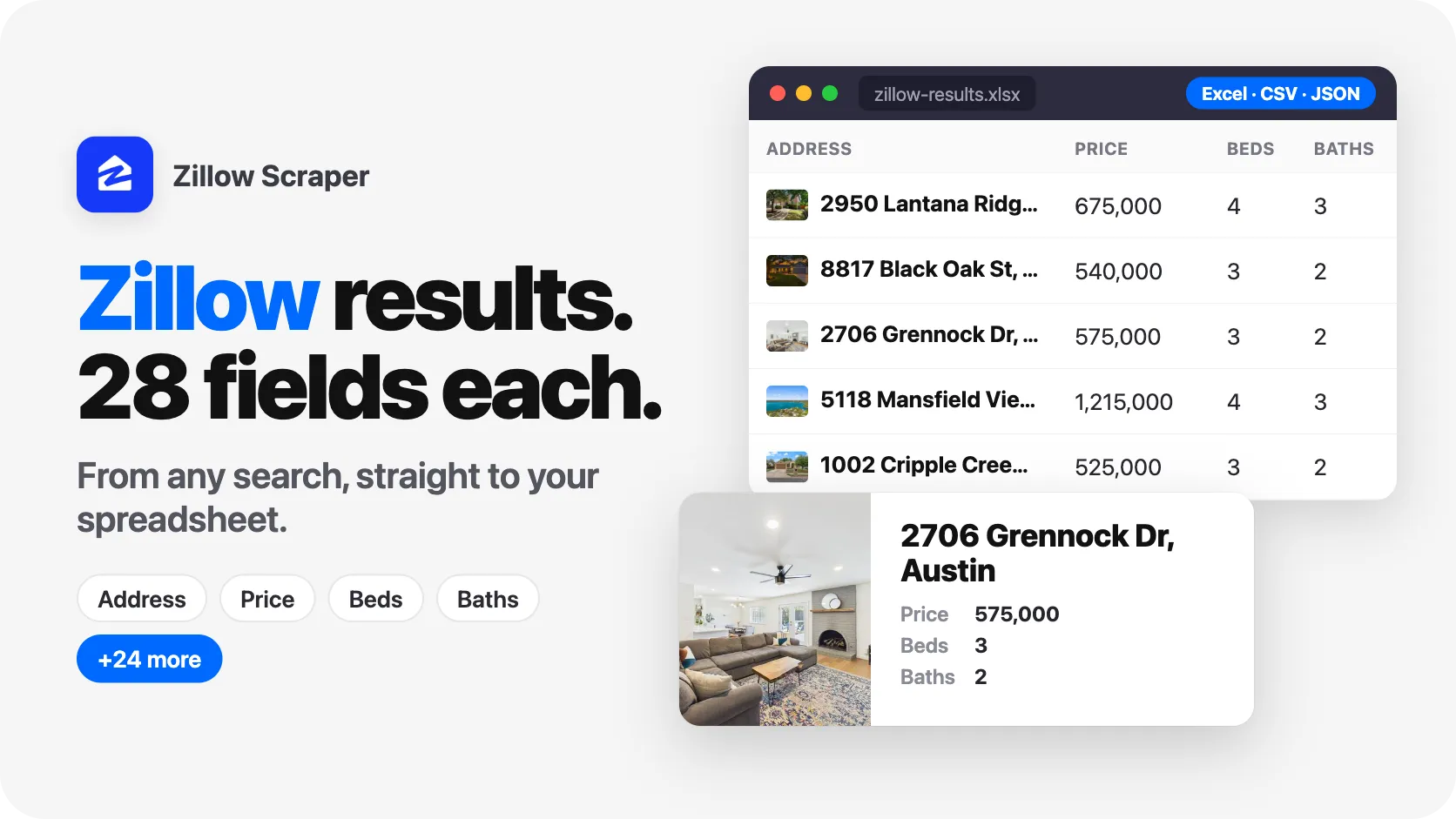
Scrape Zillow listings by city, ZIP, or neighborhood. Pull homes for sale, for rent, and recently sold with prices, beds, baths, photos, and Zestimates, plus full detail: price and tax history, schools, lot facts, and agent contacts. No 1,000-result cap. Export to CSV, JSON, or Excel for comps.
Pricing
from $0.60 / 1,000 results
Rating
0.0
(0)
Developer

SilentFlow
Maintained by CommunityActor stats
1
Bookmarked
8
Total users
1
Monthly active users
16 days ago
Last modified
Categories
Share
From SilentFlow. Creators of Pinterest Scraper and Leboncoin Scraper, with 420,000+ combined lifetime runs.
Turn any U.S. city, ZIP, or neighborhood into a clean feed of Zillow listings. For sale, for rent, or recently sold, with prices, beds, baths, photos, valuations, and full property detail in one structured record per home.
Type a location. Get back every listing that matches, with the fields you actually use for comps, lead lists, and market analysis. No copy-pasting from Zillow tabs, no building search URLs by hand, no hitting the 1,000-result wall.
How it works
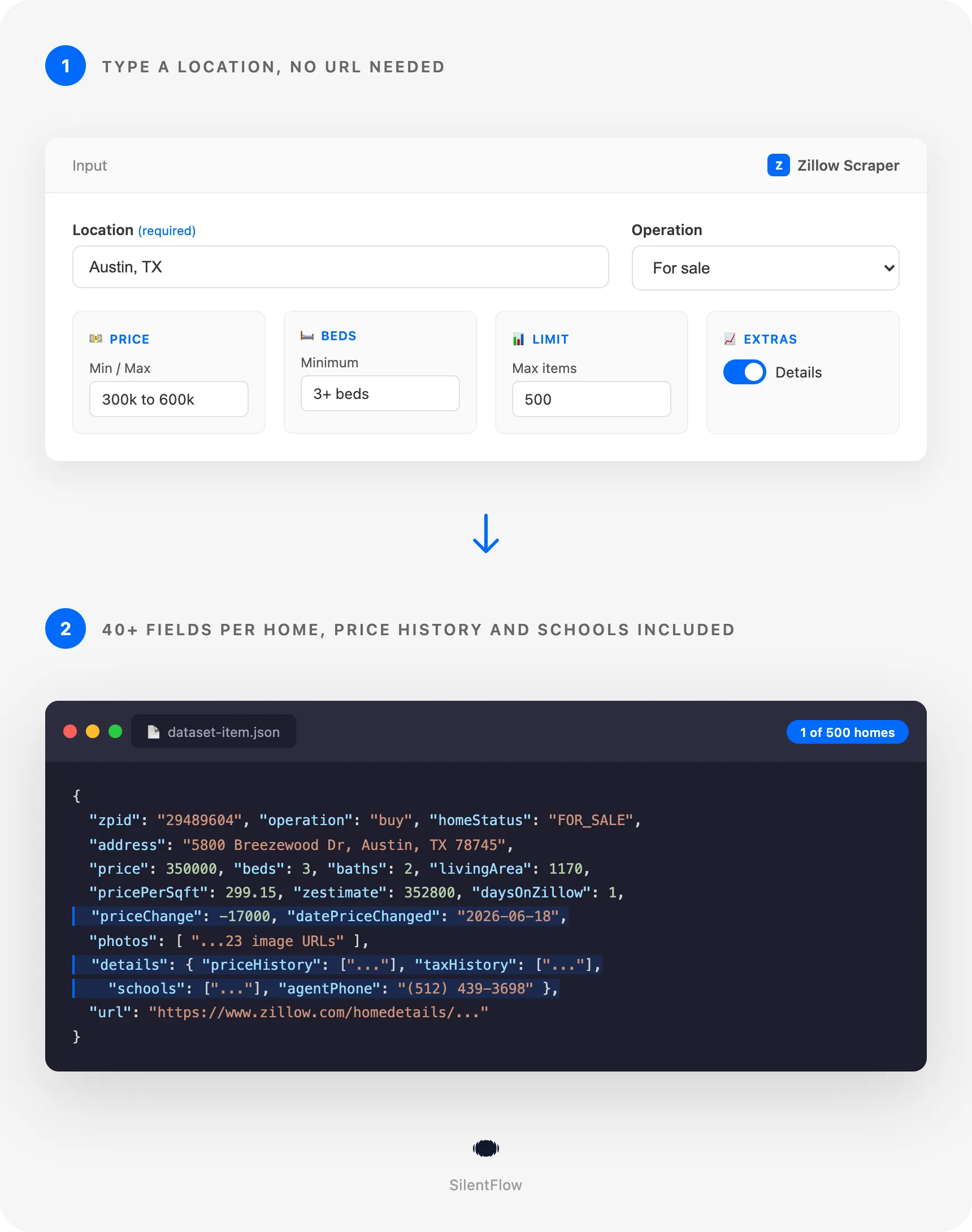
- You enter a location. A city like
Austin, TX, a ZIP like90210, a neighborhood, county, or state. Add price, bed, bath, or home-type filters if you want. Already have the search open on Zillow? Paste its link instead. - The scraper pulls every matching listing. Buy, rent, or sold, across the whole area, not just the first page Zillow shows you.
- You get one structured record per home, ready to export to CSV or Excel, drop into a sheet, or feed into a model or dashboard.
Turn on Fetch Details and each home is enriched with its full property profile: price history, tax history, assigned schools, lot and construction facts, HOA, agent name and phone, and more.
✨ Why teams choose this over other Zillow scrapers
Building search URLs by hand just to scrape a city? Hitting the 1,000-result cap on a big metro? Stuck with raw listing dumps that are missing the fields you actually need?
- 🏙️ Just type a location. A city, ZIP, neighborhood, or address. No building a Zillow URL, no copying map coordinates, no learning a query format. Most scrapers make you do that work yourself.
- ♾️ No 1,000-result limit. Pull every for-sale, rental, or sold home in an entire metro, not the capped page Zillow shows in the browser. Big markets come back complete.
- 🏠 Buy, rent, and sold in one place. One Actor handles all three. Switch with a single setting instead of wiring up three different tools.
- 📜 The full property story, not just the card. Turn on detail enrichment and get price history, tax history, assigned schools, lot and construction facts, HOA, and Zestimate. The data behind the listing, not just the headline.
- 📇 Agent contact details. Pull the listing agent's name, phone, and brokerage for outreach and lead lists, captured straight from the listing.
- 📸 Whole photo galleries, ready to use. Full-resolution image URLs for every photo, not a single thumbnail and not raw keys you have to assemble.
- 📉 Spot price drops and deals. Every listing carries its price change and the date it changed, so you can surface reductions the moment they happen.
- 💰 Pay per result, not per minute. Proxies included, no compute fees. You pay for homes delivered, and nothing else.
- 🧹 One clean record per home. Normalized JSON with a flat, predictable shape. It drops straight into a spreadsheet, a CRM, or an AI workflow.

🎯 What you can do with Zillow data
| Team | What they build |
|---|---|
| Real estate investors | Pull every sold home in a ZIP with price and tax history to run comps and spot undervalued deals |
| Agents and brokerages | Build for-sale and for-rent lead lists by city with the listing agent's name and phone attached |
| Proptech and data products | Power a property search app or AVM with normalized buy, rent, and sold listings at scale |
| Market analysts | Track price drops, days on market, and inventory across neighborhoods over time |
| Mortgage and lending | Enrich applications with tax history, valuations, and assigned-school data for a property |
| Rental operators | Aggregate every rental in a metro with rent, beds, baths, and per-unit pricing for buildings |
| Researchers | Compare home values, year built, and lot size across cities and ZIP codes |
📥 Input parameters
You only need a location (or a Zillow link) and how many homes you want. Everything else is optional.
Core
| Field | Type | Required | Description |
|---|---|---|---|
location | string | Yes* | A city, ZIP, neighborhood, county, state, or address. Example: Austin, TX. |
locations | array of strings | No | Search several locations in one run. Overrides location when set. |
startUrls | array of links | No | Zillow links to scrape: search pages (https://www.zillow.com/austin-tx/rentals/) and property pages (https://www.zillow.com/homedetails/..._zpid/). When set, location and locations are ignored. |
operation | string | No | buy, rent, or sold. Default buy. A Start URL that names its own market (for rent, sold) uses that market. |
maxItems | integer | Yes | Maximum number of listings to return. Default 100. |
fetchDetails | boolean | No | Enrich each listing with full detail-page data (price/tax history, schools, lot facts, agent). Default false. |
* Provide location, locations, or startUrls.
Start URLs keep what you were looking at: the exact area on the map, the price, bed and bath filters in the link, and the market it names. A property page link returns that home as one listing with the same fields as a search result; turn on fetchDetails to add its description, price and tax history, schools and agent. You can mix search pages and property pages in the same run.
Filters
| Field | Type | Description |
|---|---|---|
minPrice / maxPrice | integer | Price range. Per month for rentals. 0 for any. |
minBeds / maxBeds | integer | Bedroom range. 0 for any. |
minBaths | number | Minimum bathrooms. |
homeTypes | array | Restrict to houses, townhomes, multifamily, condos, land, apartments, manufactured. Empty for all. |
sortBy | string | newest, relevance, lowPrice, highPrice, bedrooms, bathrooms, sqft, lotSize, yearBuilt. |
locationType | string | Force a match type (city, zipcode, neighborhood, county, state) when a name is ambiguous. Auto-detects by default. |
📊 Output data
One record per home. The base record covers everything on the listing card and more.
With fetchDetails: true, each record gains a details object with the full property profile:
🗂️ Data fields
Listing
| Category | Fields |
|---|---|
| Identity | zpid, url, operation, statusType, statusText, homeStatus |
| Price | price, priceText, currency, pricePerSqft, priceChange, datePriceChanged |
| Size | beds, baths, livingArea, lotAreaValue, lotAreaUnit, homeType |
| Location | address (street, city, state, ZIP), latitude, longitude |
| Market | daysOnZillow, zestimate, rentZestimate, taxAssessedValue, dateSold |
| Flags | listingTypes, isFeatured, isZillowOwned, isNonOwnerOccupied, isPremierBuilder, hasVideo, has3DModel |
| Media | imgSrc, photos |
| Broker | brokerName |
| Rentals | unit, isBuilding, buildingName, minBaseRent, maxBaseRent, unitCount, units |
Details (with fetchDetails: true)
| Category | Fields |
|---|---|
| Description | description, yearBuilt, lotSize, stories, parcelNumber |
| Facts | heating, cooling, appliances, flooring, hasGarage, parkingCapacity, pricePerSqft |
| Money | zestimate, rentZestimate, monthlyHoaFee, propertyTaxRate, taxAnnualAmount, lastSoldPrice |
| History | priceHistory, taxHistory |
| Schools | schools (name, rating, grades, distance, link) |
| Agent | agentName, agentPhone, agentEmail, brokerName, mlsId, mlsName |
🚀 Examples
Get the newest homes for sale in a city
Pull every recently sold home in a ZIP for comps
Build a rental lead list under a budget
Find 4-bed houses in a price band with full detail
Scrape several metros in one run, cheapest first
Reproduce a search exactly as you had it on Zillow
Get specific homes with their full profile
Mix a saved search and a single home in one run
🤖 Copy to your AI assistant
Paste this block into Claude, ChatGPT, or Cursor to give it full context about this scraper:
💻 Integrations
Build a comps list for an investor (Python)
Build an agent lead list (JavaScript)
Export straight to CSV (Apify CLI)
📈 Performance
| Metric | Value |
|---|---|
| Markets | All U.S. cities, ZIPs, neighborhoods, counties, states |
| Operations | For sale, for rent, recently sold |
| Result cap | None from the source. Set maxItems to whatever you need. |
| Coverage | Whole-metro, not the capped browser page |
| Detail enrichment | Optional, per listing |
| Proxies | Residential, included |
| Reliability | High |
💾 Data export
Every run produces a dataset you can download from the Apify console as JSON, CSV, Excel, XML, or RSS, or pull programmatically:
Schedule runs, trigger them by API, or connect the output to Make, Zapier, Google Sheets, or your own database.
💡 Tips for best results
- Use a clear location.
Austin, TXbeatsAustin. Add the state to avoid matching the wrong city. For a single property, paste the full address. - Filter at the source. Set
minPrice,minBeds, andhomeTypesin the input instead of pulling everything and filtering later. You get exactly what you need and nothing extra. - Turn on
fetchDetailsonly when you need depth. The base listing already has price, beds, baths, photos, and valuations. Add detail when you want price history, schools, lot facts, or agent contact. - Run several markets at once. Pass a
locationsarray to cover a whole region in one run instead of starting one job per city. - Already set up the search on Zillow? Paste the link. Put it in
startUrlsand the run keeps the same map area and filters, with no need to retype them. - For sold comps, always enable
fetchDetails. Zillow hides the sold price on the result card, so detail enrichment fills it in along with the full sale and tax history.
❓ FAQ
What does this scraper extract? Residential listings from Zillow for sale, for rent, and recently sold, with price, beds, baths, square footage, lot size, location, photos, Zestimate, days on market, and listing status. With detail enrichment it also returns description, price and tax history, assigned schools, construction and lot facts, HOA, and the listing agent's contact.
How do I search? Do I need a Zillow URL? No URL needed. Type a city, ZIP, neighborhood, county, state, or address. The scraper resolves it for you. If you prefer, you can paste Zillow links instead (see the next question).
Can I paste a Zillow search or property link?
Yes. Put one or more links in startUrls. A search page link (for example https://www.zillow.com/austin-tx/rentals/, or the address bar after you drew a map area and set filters) returns the homes of that search, with the same area, price, bed and bath filters, and market. A property page link (https://www.zillow.com/homedetails/..._zpid/) returns that home as one listing, and with fetchDetails on you also get its description, price and tax history, schools, HOA and agent. You can mix both kinds in one run, and maxItems caps the total. When startUrls is set, the location fields are ignored.
Can I scrape several locations in one run?
Yes. Use the locations array. Each location is searched and the results are combined and de-duplicated.
Is there a limit on how many homes I can get?
No hard cap from the source. The scraper covers a whole market, not the capped page the browser shows. Set maxItems to your target.
Do I need a Zillow account or login? No. The scraper reads publicly available listing data. No login, no API key.
How fresh is the data? Each run reads Zillow live, so you get the current listings and prices at the moment you run it.
Why is the price empty on some sold homes?
Zillow does not show the sold price on the search card. Turn on fetchDetails and the sold price is filled in from the property's price history.
Can I get the listing agent's contact?
Yes, with fetchDetails. You get the agent's name, phone, and brokerage. Email is included when the listing exposes it publicly.
What about apartment buildings with many units? Buildings return as one record with the building name, availability, and per-unit pricing (beds and rent) instead of a single price.
⚖️ Legal
This Actor extracts publicly available data from Zillow. It does not bypass any login, paywall, or CAPTCHA. Users are responsible for complying with Zillow's terms of service and applicable laws in their jurisdiction. The data returned is informational; verify accuracy for regulated use cases such as lending, appraisal, or compliance.
More SilentFlow scrapers
🛒 E-commerce
 Pinterest - Pinterest Scraper | Pins, Boards and Profiles
 Leboncoin - Leboncoin Scraper | Classified Ads, Prices and Sellers
 Leboncoin - Leboncoin Ad Details Scraper
 Back Market - Back Market Scraper | Refurbished Prices
 ImportYeti - US Customs Records, Suppliers & Trade Data - ImportYeti Scraper - US Customs Records, Suppliers & Trade Data
 TikTok Shop - TikTok Shop Scraper | Products, Sellers and Creator Videos
 1688 Wholesale - 1688 Wholesale Scraper
 Naver - Naver Scraper | Shopping Products, Prices and Reviews
 Udemy Course - Udemy Course Scraper
 JD - JD Products Scraper | Prices, Brands and Barcodes
 Store Leads Ecommerce - Store Leads Ecommerce Scraper
 Amazon Seller - Amazon Seller Scraper | Emails, Phones and Ratings
 Naver - Naver Reviews Scraper | Shopping Product Reviews
 Bring a Trailer - Bring a Trailer Scraper
 Lowes - Lowes Products Scraper | Prices, Stock and Specs
 Store Leads - Store Leads Scraper | Shopify Data
 Avito - Avito Scraper | Listings, Prices and Sellers
 Leboncoin - Leboncoin Scraper
 Mobile.de - Mobile.de Scraper
 Naver - Naver Products Scraper | Shopping Prices, Sellers and Ratings
 Taobao - Taobao Scraper | Products, Prices and Sellers
 Udemy - Udemy Scraper
 Agoda - Agoda Scraper | Hotel Prices and Guest Ratings
 Alibaba - Alibaba Products Scraper | Wholesale Prices and MOQ
 AliExpress - AliExpress Reviews Scraper | Feedback, Ratings and Photos
 AliExpress - AliExpress Scraper | Products, Prices and Sales
 Allegro - Allegro Scraper | Products, Prices and Sellers
 Avito - Avito Profiles Scraper | Sellers, Ratings and Reviews
 Back Market - Back Market Scraper | Refurbished Electronics Prices
 BAUHAUS - BAUHAUS Scraper | Product Prices, EAN and Specs
 CARFAX - CARFAX Scraper | Used Cars, Prices and History
 Coupang - Coupang Detail Scraper | Product Prices and Options
 Ctrip - Ctrip Scraper | Attractions, Tickets and Reviews
 eBay Marketplace - eBay Marketplace Scraper
 Europages - Europages Scraper | Suppliers and B2B Companies
 Eventim - Eventim Scraper | Events, Ticket Prices and Venues
 GasBuddy - GasBuddy Scraper | Gas Prices by Station
 Google Hotels - Google Hotels Scraper | Prices, Offers and Ratings
 Homedepot - Homedepot Reviews Scraper | Customer Reviews and Ratings
 Leboncoin - Leboncoin Details Scraper | Full Ad Data and Sellers
 Mercari - Mercari Scraper | Listings, Sold Prices and Sellers
 Vinted Marketplace - Vinted Marketplace Scraper
 Walmart - Walmart Product Scraper
 Alibaba - Alibaba Scraper | Products, Prices and Suppliers
 Amazon - Amazon Product Scraper
 Amazon Marketplace - Amazon Marketplace Scraper
 AutoScout24 - AutoScout24 Scraper
 eBay Listings - eBay Listings Scraper
 Europages Deep Dive Extractor - Europages Deep Dive Extractor | VAT, Decision Makers, ISO Certs
 Pinterest - Pinterest Scraper
 Trip - Trip Scraper | Hotels, Prices and Reviews
 Vinted - Vinted Scraper
 Walmart - Walmart Scraper | Prices, Reviews, Sellers, Availability
💼 Jobs
 ZipRecruiter - ZipRecruiter Jobs Scraper | Salary, Company & Location Filters
 Indeed - Indeed Company Reviews Scraper
 Multi Board - Multi Board Job Scraper
 Glassdoor Job Listings - Glassdoor Job Listings Scraper
 🔥 Glassdoor - 🔥 Glassdoor Scraper
 LinkedIn Job Search - LinkedIn Job Search Scraper | Salaries & Seniority
 ATS - ATS Jobs Scraper | Greenhouse, Lever and Ashby
 Dice Tech - Dice Tech Jobs Scraper
 iimjobs - iimjobs Scraper | Jobs, Companies and Recruiters
 Jora - Jora Jobs Scraper
 Malt Freelancer - Malt Freelancer Scraper
 Malt - Malt Scraper | Freelance Profiles
 Welcome to the Jungle - Welcome to the Jungle Job Scraper
 All - All Jobs Scraper
 Arbeitsagentur - Arbeitsagentur Jobs Scraper
 Cutshort - Cutshort Jobs Scraper | Salaries, Skills and Companies
 Dice - Dice Jobs Scraper | US Tech Jobs, Salaries, Skills
 Glassdoor - Glassdoor Jobs Scraper
 Indeed - Indeed Jobs Scraper | Job Listings in 73 Countries
 Jora - Jora Scraper | Jobs in Australia, New Zealand, Singapore
 StepStone - StepStone Scraper
 YCombinator - YCombinator Jobs Scraper | Startup Jobs, Salaries and Founders
 Arbeitsagentur - Arbeitsagentur Scraper | German and Austrian Job Board
 Indeed - Indeed Companies Scraper | Reviews, Salaries, Interviews
 Indeed - Indeed Jobs Scraper | NLP Skills
 LinkedIn - LinkedIn Jobs Scraper
 Naukri & NaukriGulf - Naukri & NaukriGulf Jobs Scraper
 Seek - Seek Job Scraper
 Welcome to the Jungle - Welcome to the Jungle Scraper | Jobs and Company Data
 Ziprecruiter - Ziprecruiter Scraper
🏠 Real estate
 SeLoger - SeLoger Scraper | Real Estate Listings
 Anjuke - Anjuke Scraper | Rental Listings, Prices and Agents
 Realtor Rental Listings - Realtor Rental Listings Scraper
 Airbnb Pro Host Contact & - Airbnb Pro Host Contact & Email Scraper
 Bien'ici - Bien'ici Scraper | Property Listings
 Rightmove - Rightmove Scraper
 Trulia Rental Listings - Trulia Rental Listings Scraper
 Airbnb Professional Host - Airbnb Professional Host Scraper | Emails, Phones, SIRET
 Airbnb Search - Airbnb Search Scraper
 Bienici - Bienici Scraper
 Idealista - Idealista Scraper
 Realestate.com.au - Realestate.com.au Scraper
 SeLoger - SeLoger Scraper | French Property Listings and Agencies
 Airbnb Search - Airbnb Search Scraper | Prices, Fees, Amenities, Hosts
 Idealista - Idealista Scraper
 Realtor Rental - Realtor Rental Scraper
 Trulia Rental - Trulia Rental Scraper | US Rentals, Prices, Pet Policy
📣 Social media
 LinkedIn Post Search - LinkedIn Post Search Scraper | Keywords, Hashtags & Profiles
 Facebook Search - Facebook Search Scraper
 Instagram - Instagram Story Scraper | Stories & Highlights
 LinkedIn Leads - LinkedIn Leads Scraper | Sales Navigator Export
 TikTok - TikTok Scraper
 YouTube - YouTube Channel Scraper | Videos, Shorts and Views
 Facebook Search - Facebook Search Profiles Scraper | People by Name or Keyword
 Instagram Engagement - Instagram Engagement Scraper
 Meta Ad Library - Meta Ad Library Scraper
 OnlyFans - OnlyFans Profile Scraper
 TikTok Trend - TikTok Trend Scraper | Trending Hashtags and Videos
 OnlyFans - OnlyFans Creator Scraper
 Skool Community - Skool Community Scraper
 Bilibili - Bilibili Scraper
 Facebook Thread - Facebook Thread Profiles Scraper | Followers, Bios & Engagement
 Kuaishou - Kuaishou Scraper | Videos, Comments and Creator Stats
 LinkedIn Event - LinkedIn Event Scraper
 Reddit - Reddit Scraper | Posts, Comments and Subreddits
 Reddit - Reddit Scraper | Comments, Posts and Users
 Snapchat - Snapchat Contacts Scraper | Phones, Emails and Websites
 Weibo - Weibo Scraper | Posts, Profiles and Engagement
 Xigua - Xigua Scraper | Videos, Creators and Downloads
 Discord - Discord Scraper | Servers, Member Counts and Invites
 Facebook - Facebook Company Scraper | Emails, Phones, Ratings
 Facebook Business Page - Facebook Business Page Scraper
 Kwai - Kwai Scraper | Videos, Creators and Hashtags
 LinkedIn Ads Library - No Cookies - LinkedIn Ads Library Scraper - No Cookies
 LinkedIn Hashtag & - LinkedIn Hashtag & Post Scraper | No Cookies
 Skool Group - Skool Group Scraper
 Snapchat - Snapchat Ads Scraper | Ad Library, Impressions & Targeting
 YouTube - YouTube Transcript Scraper
🏢 Business data
 Tencent - Tencent Scraper | Maps Places, Phones and Ratings
 LinkedIn People Search - LinkedIn People Search Scraper | Profiles & Companies
 LinkedIn Company Search - LinkedIn Company Search Scraper | Profiles & Firmographics
 Company Data - Company Data Scraper | Emails, Phones and Tech Stack
 FanDuel - FanDuel Scraper | Odds, Spreads and Player Props
 ForexFactory - ForexFactory Scraper | Economic Calendar and Forecasts
 Justdial - Justdial Companies Scraper | Business Leads, Phones and Emails
 Kakao - Kakao Scraper | Map Places, Reviews and Phones
 OpenTable - OpenTable Reviews Scraper | Restaurant Reviews and Ratings
 SoftwareAdvice - SoftwareAdvice Scraper | Reviews, Ratings and Pros & Cons
 Teachable Course - Teachable Course Scraper
 Zomato - Zomato Reviews Scraper | Restaurant Ratings and Replies
 2GIS - 2GIS Reviews Scraper | Ratings, Photos and Owner Replies
 LinkedIn Sales Navigator - LinkedIn Sales Navigator Scraper
 Teachable - Courses, Prices & Instructors - Teachable Scraper - Courses, Prices & Instructors
 Trustpilot - Trustpilot Scraper | Reviews, Ratings and Company Contacts
 Website Tech Stack - Website Tech Stack Scraper
✈️ Travel
 Google Maps - Google Maps Scraper
 Booking.com Hotel - Booking.com Hotel Scraper
 Flight Price - Flight Price Scraper
 Trip - Trip Reviews Scraper | Hotel Reviews and Ratings
 Booking - Booking Scraper | Hotel Prices, Photos, Availability
🎯 Lead generation
 Northdata - Northdata Company Scraper
 ZocDoc - ZocDoc Scraper | Doctors, Reviews and Availability
 UK Companies House - UK Companies House Enricher
 Dealroom - Dealroom Scraper | Companies and Investors
 CNPJ Brazilian - CNPJ Brazilian Company Enricher
 Google Ads Transparency - Google Ads Transparency Scraper
 SIRET - SIRET Company Enricher
 BuiltWith - BuiltWith Scraper | Tech Stacks and Top Sites
 Domain - Domain Enricher
 French Company Prospector - French Company Prospector
 SEC - SEC Scraper | EDGAR Filings and Company Data
 USPTO - USPTO Scraper | Trademark Search and Status
 ZocDoc - ZocDoc Scraper
 Clutch - Clutch Scraper | Agencies, Reviews, Ratings, Services
 Clutch Agency - Clutch Agency Scraper
 Dealroom Startup Data - Dealroom Startup Data Scraper
 G2 - G2 Reviews Scraper
 PagesJaunes - PagesJaunes Scraper | French Business Emails and SIRET
 PagesJaunes - PagesJaunes Business Scraper
 SIRET French - SIRET French Company Enricher
 ThomasNet Suppliers - ThomasNet Suppliers Scraper
🔎 SEO
 Similarweb - Similarweb Scraper | Website Traffic, Rankings and Competitors
 Google News - Google News Scraper
 Apple - Apple Scraper | App Store Apps, Ratings and Charts
📈 Marketing
 Pexels -
 🧰 More tools
 PrizePicks - PrizePicks Scraper | Player Props, Lines and Projections
 Apple - Apple Reviews Scraper | App Store Reviews and Ratings
📬 Support
Need something this scraper doesn't do yet? We ship features fast.
- Feature requests go straight to our backlog
- Enterprise needs? We do custom integrations and high-volume plans
- Pricing questions? Check the Monetization tab on the Actor page
Response time: usually under 24 hours.
Check out our other scrapers: silentflow on Apify


