
Allegro Scraper | Products, Prices and Sellers
Pricing
from $2.34 / 1,000 offers
Allegro Scraper | Products, Prices and Sellers
Allegro scraper for products, prices and sellers: 100 offers in 7 seconds, 56 fields each. Brand, price with delivery, EAN, stock, buyers, rating, delivery date, return terms and the seller company, tax ID, REGON and KRS. Search by keyword, URL or offer ID on allegro.pl, .cz, .sk, .hu. No account.
Pricing
from $2.34 / 1,000 offers
Rating
0.0
(0)
Developer

SilentFlow
Maintained by CommunityActor stats
0
Bookmarked
41
Total users
28
Monthly active users
4 days ago
Last modified
Categories
Features
Share
Allegro Scraper | Products, Prices and Sellers (2026)
From SilentFlow. Creators of Pinterest Scraper and Leboncoin Scraper, with 420,000+ combined lifetime runs.
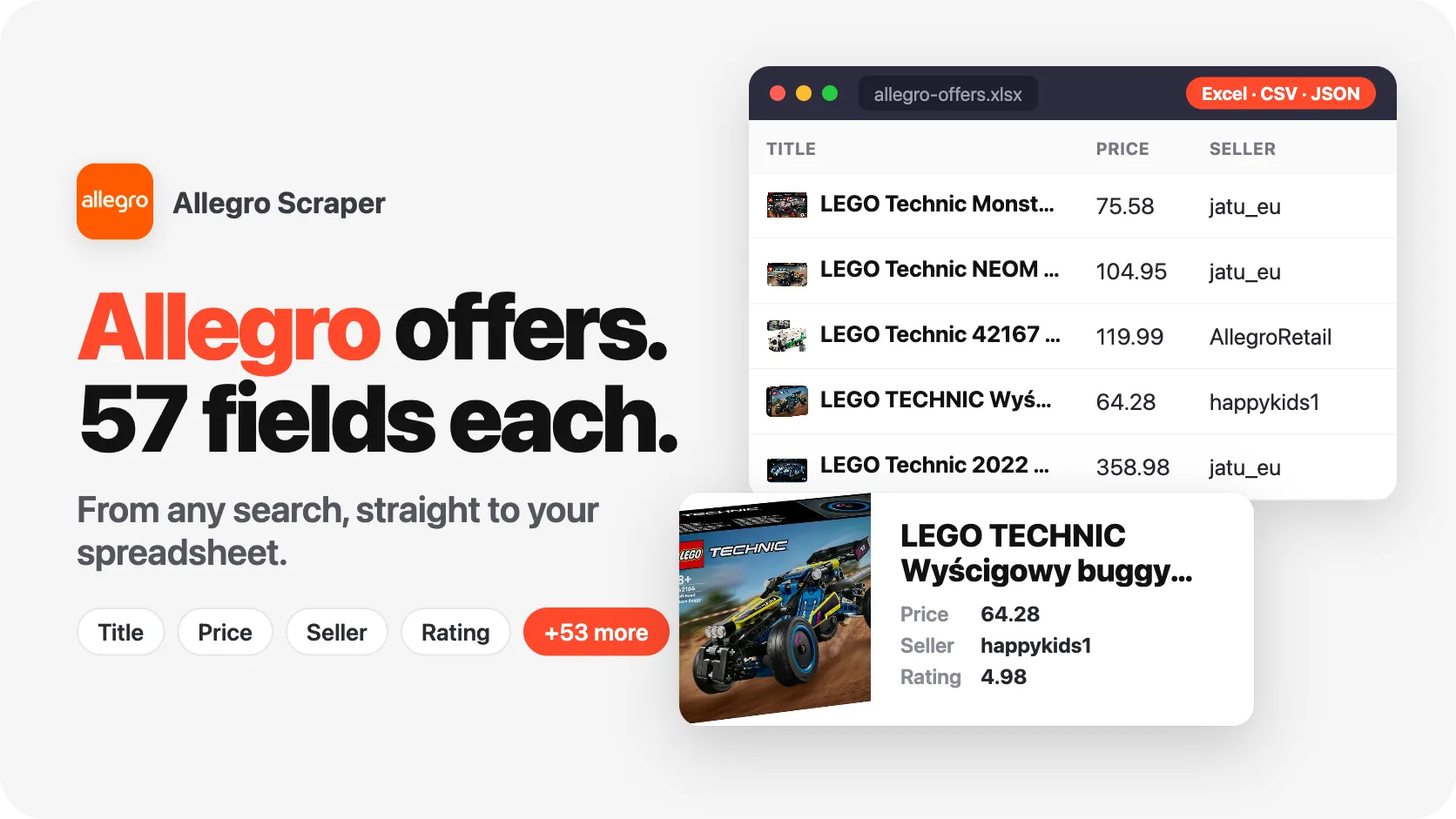
Every Allegro offer as one complete row: the brand, the price, the price per kilo or per litre, the price with delivery and the lowest price of the last 30 days, how many units sold recently, the deal campaign and how much of the deal stock is gone, how many other offers sell the same product, where the offer ranks in the search, the condition, the category path, every parameter with the EAN, the product rating with its star breakdown, the delivery date, the return terms, and the company behind the seller with its tax ID, REGON, KRS and address. Sort by price or newest, keep only offers delivered by tomorrow or shipped from China, or get one row per seller for a lead list. Our test run returned 100 offers in 11 seconds, each one read in full with the company behind its seller, without an Allegro account. Allegro Czechia, Slovakia and Hungary work the same way.
Why choose this actor?
Copying Allegro prices into a spreadsheet one offer at a time? Seeing an unknown login undercut your price and not knowing which company is behind it? Wondering which offers really sell, and which ones ship from China?
- Units sold, price per unit and deal campaigns in every row. On the default run (50 offers for
lego technicand 50 forkawa ziarnista), all 100 rows named their deal campaign (Black Weeks, Smart! deals) with the units put on sale and the units already sold, 81 rows gave how many units recent buyers took (6,033 units for 4,805 buyers on one coffee), and all 50 coffee rows came with their price per 100 g. Every row also counts the other offers of the same product (16 for that coffee) and ranks the offer in its search, overall and among unpaid results. The most used Allegro scraper has no field for the units sold, the price per unit or the deal campaign. - Delivery and origin filters the others do not have. Keep only offers delivered by tomorrow or within 2 days, with free delivery, free returns or Allegro Smart!, and pick where offers ship from: Poland, China, the USA, other EU countries or Allegro's own warehouse (allegro.pl). In our test,
etui iphoneshipped from China with free delivery returned 9 offers in 2 seconds, all from Chinese sellers. Sort by price or by newest: the 478 offers oflego technicwere read and sorted in 18 seconds, cheapest first. - Offers, sellers, offer numbers, four marketplaces. Search by keyword, paste any Allegro search, category or offer address, or paste bare offer numbers (
18583540376) to follow the same offers over time. Switch to one row per seller andkawa ziarnistagave 15 distinct sellers in 2 seconds, each with its company name and tax ID. Cap each keyword on its own so every keyword gets its share. Pick Czechia, Slovakia or Hungary and the same keyword returns that country's offers in its language and currency.

Try your first 100 offers
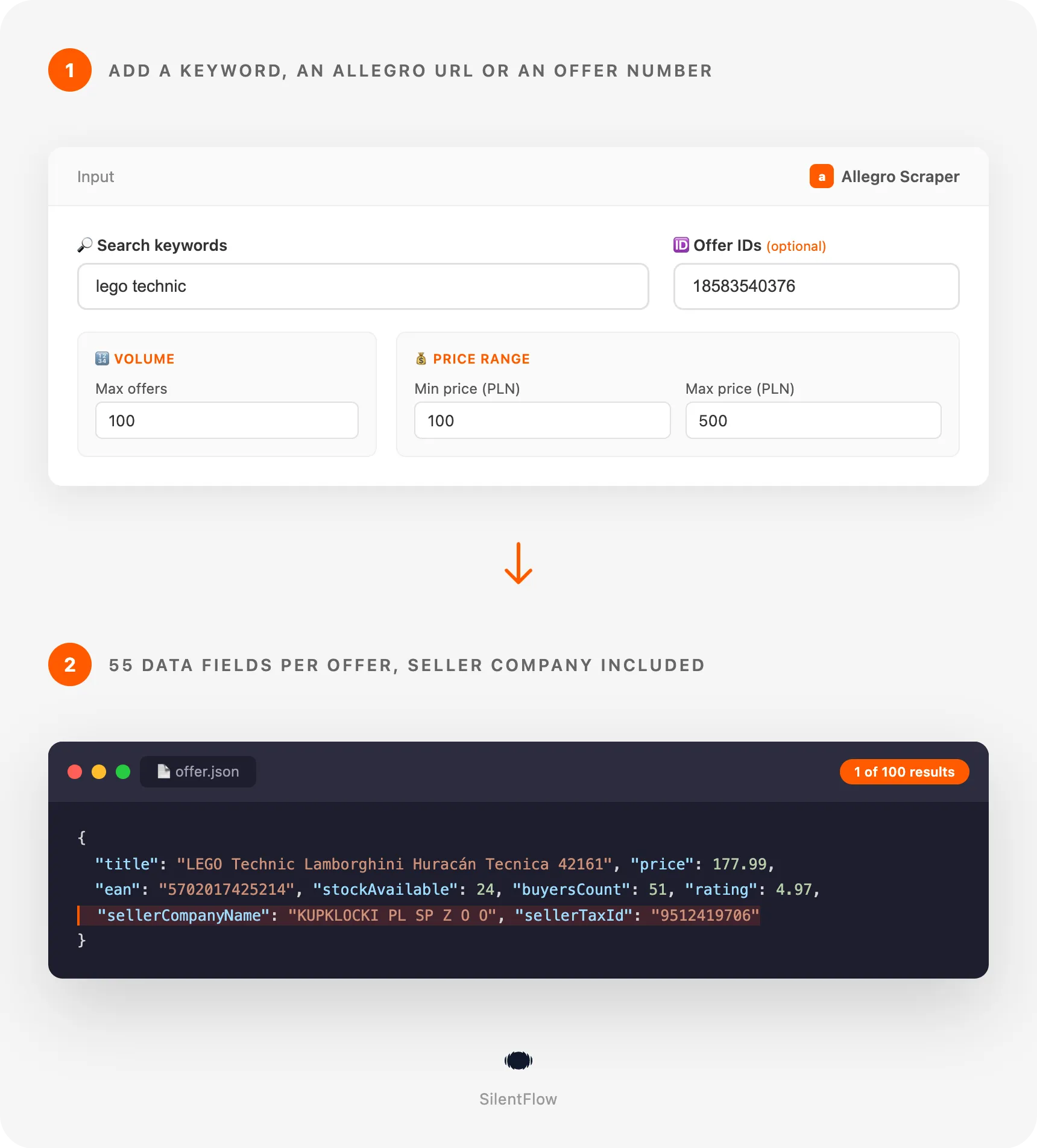
Paste this input in the JSON tab of the Input page and press Start. It reads 50 LEGO Technic offers and 50 coffee bean offers, each one in full, with its seller.
It runs on the Apify Free plan. Each offer becomes one row of your dataset: open the Output tab to see the table, switch to the Deals and prices view for units sold and price per unit, to the Search rank view for positions, to the Sellers view to compare the companies behind the offers, or export the rows as JSON, CSV or Excel.
Copy to your AI assistant
Paste this block into Claude, ChatGPT or Cursor to give it the full picture of this scraper:
How to scrape Allegro products
Three inputs, from the simplest to the most complete. Each one runs as is.
Get the top 100 offers for a keyword
The offers Allegro shows first for the keyword, each with its brand, price, price with delivery, the price before a discount, condition, parameters, stock, buyers count, product rating and star breakdown, delivery date, return terms and seller company. Polish keywords match more titles than English ones, because sellers write in Polish (ekspres do kawy rather than coffee machine).
Compare coffee machines between 500 and 3,000 PLN
In our test run this input returned 30 coffee machines priced between 599 and 2,599 PLN in 2 seconds, each with its brand (Philips, Krups, De'Longhi and others), stock, return terms and seller, and the seller's KRS number on 25 of the 30 rows. Sort the table by buyersCount to see which machines actually sell, or by rating to see which ones buyers like.
Read a category, a search page and two offers in one run
The category address keeps its keyword and its price ceiling, the search address keeps its price floor, and the two offer numbers are read directly. Rows found twice are kept once.
Input parameters
| Parameter | Type | Default | What it does |
|---|---|---|---|
searchQueries | array of strings | prefilled lego technic, kawa ziarnista | Keywords searched on Allegro, one search per keyword, results combined without duplicates. |
startUrls | array of URLs | none | Allegro search, category, offer or product-on-offer addresses, on allegro.pl, .cz, .sk or .hu. |
offerIds | array of strings | none | Offer numbers, read directly. A pasted offer address also works. |
country | string | pl | Marketplace of keywords and offer numbers: pl (Poland), cz (Czechia), sk (Slovakia), hu (Hungary). A name (czechia) or a domain (allegro.cz) also works. |
maxItems | integer | 100 | Maximum number of rows for the whole run: offers, or sellers. |
maxItemsPerQuery | integer | none (prefilled 50) | Maximum number of rows for each keyword or search address, so every keyword gets its share. |
sortBy | string | relevance | relevance (Allegro's order), price-asc, price-desc or newest (most recently listed first). A sorted search looks at up to the first 1,000 offers of each keyword or address. |
minPrice | integer | none | Keep offers priced at or above this amount, in the marketplace's currency. |
maxPrice | integer | none | Keep offers priced at or below this amount, in the marketplace's currency. |
deliveryOptions | array of strings | none | On allegro.pl: tomorrow (delivered by tomorrow), twoDays (within 2 days), freeDelivery, freeReturn, smart (Allegro Smart!). Every option picked must hold. |
shipsFrom | array of strings | none | On allegro.pl, where offers ship from: pl, cz, sk, hu, eu (other EU countries), us, cn, warehouse (Allegro's own warehouse). Several places add up. |
dataType | string | offers | offers for one row per offer, sellers for one row per seller. |
No field is required: the prefilled keywords are enough to start. Give at least one keyword, one address or one offer number. Inputs that leave out the new fields behave exactly as before.
| Country | Domain | Currency | Language of titles and parameters |
|---|---|---|---|
pl | allegro.pl | PLN | Polish |
cz | allegro.cz | CZK | Czech |
sk | allegro.sk | EUR | Slovak |
hu | allegro.hu | HUF | Hungarian |
Accepted address formats
| You paste | Example | You get |
|---|---|---|
| Search page | https://allegro.pl/listing?string=iphone%2015&price_from=1500 | The offers of that search, with its phrase and price band |
| Category | https://allegro.pl/kategoria/smartfony-i-telefony-komorkowe-165 | The offers of the category, most relevant first |
| Category with a keyword | https://allegro.pl/kategoria/laptopy-491?string=lenovo | The category narrowed to the keyword |
| Offer | https://allegro.pl/oferta/smartfon-apple-iphone-15-...-18583540376 | That one offer |
| Product page on an offer | https://allegro.pl/produkt/...?offerId=18583540376 | That one offer |
| Offer number | 18583540376 | That one offer |
| Czech, Slovak or Hungarian offer | https://allegro.cz/nabidka/...-18156342184, /ponuka/..., /ajanlat/... | That one offer, in that country's language and currency |
| Czech, Slovak or Hungarian search | https://allegro.sk/listing?string=lego%20technic | The offers of that search on that marketplace |
Seller storefronts (/uzytkownik/... and their Czech, Slovak and Hungarian versions), product pages without an offerId and searches for used offers (stan=używane) are named in the log and skipped. Every other address is read.
What data can you extract from Allegro?
78 fields per offer, flat, in seven groups. On the default run, 73 of them carry a value on at least half the rows (59 to 74 per row). The discount fields (originalPrice, discountPercent) fill when the offer is on sale, unitPrice on goods sold by weight or volume, endsAt when the offer has an end date, the auction fields (currentBid, bidsCount) on auctions, and the seller's REGON, KRS, representative and opening hours when Allegro publishes them for that seller.
| Group | Fields |
|---|---|
| Identity | id, url, title, productId, productUrl |
| Content | condition, brand, ean, manufacturerCode, categoryId, categoryName, categoryPath, parameters, sellingFormat, status |
| Seller | sellerId, sellerLogin, sellerUrl, isSuperSeller, sellerPositivePercent, sellerPositiveCount, sellerNegativeCount, sellerCompanyName, sellerTaxId, sellerStreet, sellerZipCode, sellerCity, sellerCountryCode, sellerRegon, sellerKrs, sellerRepresentative, sellerOpenHours, isSellerVerified |
| Price and demand | price, currency, originalPrice, discountPercent, unitPrice, unitPriceLabel, dealCampaign, lowestDeliveryPrice, priceWithDelivery, isSmart, isFreeReturn, returnPeriodDays, returnPolicyLabel, hasBestPriceGuarantee, isSponsored, promoted, productOffersCount, productOffersUrl, stockAvailable, purchaseLimit, dealStockTotal, dealUnitsSold, buyersCount, recentUnitsSold, popularityLabel, rating, ratingsCount, ratingLabel, ratingDistribution, currentBid, bidsCount |
| Time | deliveryLabel, estimatedDeliveryDate, endsAt |
| Media | imageUrl, images, imagesCount |
| Meta | marketplace, searchQuery, position, organicPosition, page, sponsoredAndOrganic, scrapedAt, dataType |
With dataType set to sellers, each row is one seller instead: id and url (the seller's number and storefront), the seller fields above, and offerId, offerUrl, offerTitle and offerPrice for the offer it was found on.
A few facts that help when you use the data:
idis Allegro's offer number and never changes;urlis the permanent offer address.productIdgroups every seller's offer of the same catalogue product, so you can compare sellers of one product.productOffersCountis how many offers Allegro lists for the same catalogue product ("porównaj 376 ofert"),productOffersUrlthe page that lists them. A product sold by one shop and a product sold by 376 do not face the same competition.price,originalPrice,lowestDeliveryPriceandpriceWithDeliveryare numbers in the marketplace's currency (currency), never text.originalPriceis the price Allegro strikes through next to a discount, the lowest price of the last 30 days before the cut.priceWithDeliveryis the price plus the cheapest delivery, what the buyer pays at least.unitPriceis the price per unit Allegro prints on goods sold by weight or volume,unitPriceLabelthe unit it is counted in ("6,50 zł/100 g"). It lets you compare a 250 g bag with a 1 kg one.brandcomes from the offer's brand parameter, or from the catalogue product when the seller left the parameter out (every LEGO set, for one). It was filled on all 100 rows of the default run.buyersCountis the number of people who bought the offer recently,recentUnitsSoldthe number of units they took, as Allegro prints it under the price ("4 805 osób kupiło 6 033 sztuki").stockAvailableis the quantity the seller has left,purchaseLimitthe most one buyer may take at this price ("Możesz kupić tylko 2 sztuki!"), on 59 of the 100 default rows.dealCampaignnames the Allegro campaign the offer's price belongs to (BLACK_WEEKS_2026_PL,SMART_DEALS_PL).dealStockTotalis the number of units put on sale in that deal anddealUnitsSoldhow many of them are gone ("Pozostało 9 z 24": 24 put on sale, 15 sold).promotedsays whether the seller paid to have the offer stand out in the results (emphasis, bold title or highlight), whatever the slot.ratingandratingsCountare the product's ratings across all its offers, out of 5.ratingLabelis Allegro's verdict ("Rewelacyjny") andratingDistributionthe five bars of the histogram, from 5 stars to 1, each with its count and share.returnPeriodDaysis the number of days the buyer has to send the item back (14 on 94 of the 100 default rows, up to 60 on others),returnPolicyLabelAllegro's own words,isFreeReturnwhether the return is free.sellerPositivePercent,sellerPositiveCountandsellerNegativeCountcover the seller's last 12 months.sellerCompanyName,sellerTaxId,sellerRegon,sellerKrs,sellerRepresentativeand the address are the trader details Allegro publishes for business sellers.sellerTaxIdis written without dashes or spaces (9482602184). A private seller has none, and those fields are null.estimatedDeliveryDateis Allegro's delivery promise turned into a date (2026-10-06for "dostawa we wtorek"), the latest day of a range.deliveryLabelkeeps Allegro's own words. Both work on the four marketplaces.isSponsoredsays whether the search slot was a paid one ("Promowane").positionis the offer's place in its search counting every result,organicPositionits place among the unpaid results only (null for an offer shown only as an ad),pagethe results page it was read on, 40 offers a page, andsponsoredAndOrganicis true when the same page showed the offer both as an ad and as an unpaid result: one row, both places. All of them are null for offers read by number, which were not found through a search. With a sort,positionis the place in the sorted list.- Image URLs point to Allegro's image server and stay valid while the offer exists.
- Titles, conditions, parameter names and labels are Allegro's original text, in the marketplace's language.
marketplacenames the domain the row was read on.
Output example
One row of the default run, a Black Weeks coffee deal, as it appears in the dataset (JSON view, three of its eleven photos shown):
Advanced usage
Watch your own offers every morning
Schedule this input daily in Apify (Schedules tab). Each run returns the current price, stock, buyers count and delivery promise of each offer, so a price cut or a stock-out shows up the next morning. An offer that has ended is named in the log.
Get the cheapest offers first
The search is read first, up to its first 1,000 offers, then sorted: in our test the 478 offers of lego technic were read and sorted in 18 seconds, and the 10 kept were single Technic parts at 1 PLN. Use price-desc for the most expensive first, or newest for the offers listed most recently. Add a minPrice to skip spare parts and accessories.
Keep offers delivered by tomorrow, or shipped from China
In our test this input returned 9 offers in 2 seconds, all 9 from sellers based in China, all with free delivery, most of them promising delivery in 15 to 20 days. Swap cn for pl to keep Polish stock only, or warehouse for the offers Allegro ships from its own warehouse. deliveryOptions also takes tomorrow, twoDays, freeReturn and smart; every option you pick must hold. These filters work on allegro.pl.
Build a list of the companies selling a product
One row per seller, each seller once: in our test the first 15 sellers of kawa ziarnista came in 2 seconds, each with its company name and tax ID. Every row names the seller's company, tax ID, REGON, KRS, representative, address, opening hours, rating share and Super Seller badge, and the offer it was found on. Look the KRS number up in the Polish court register, and filter sellerCountryCode to spot sellers based abroad.
Track where your offers rank
Open the Search rank view: each offer comes with its position, its organicPosition among unpaid results, the page it was on, and whether it was sponsored or promoted. Schedule the run daily and filter on your sellerLogin to follow your rank on each keyword.
Read Allegro Czechia, Slovakia or Hungary
In our test run this input returned 40 offers from allegro.cz in 6 seconds, with Czech titles and parameters, prices and delivery in CZK, the delivery date and the return terms ("Vrácení zdarma"). Set country to sk for euros on allegro.sk or hu for forints on allegro.hu, or paste an address from one of those domains: it is read on its own marketplace. Run the same keyword on each country to compare a product's price across the four markets.
Split a broad keyword into price bands
A popular keyword has more offers than one search ranks. Three price bands give three searches with their own ranking, so cheap and premium offers both make it into the dataset. Duplicates between bands are removed.
Send the rows to Google Sheets or your database
The dataset is also available as CSV or Excel from the Output tab, or at https://api.apify.com/v2/datasets/{DATASET_ID}/items?format=csv with your token, ready for Google Sheets, Looker Studio or a nightly import.
FAQ
What is Allegro? Allegro.pl is Poland's largest online marketplace, the Polish counterpart of Amazon and eBay, where shops, brands and private sellers list their products side by side. Most Polish online shops sell there too.
What does this scraper extract? One row per offer: price, price per unit, price with delivery, lowest price of the last 30 days and discount, deal campaign with its units put on sale and sold, condition, brand, EAN, manufacturer code, category path, every parameter, stock and the most one buyer may take, buyers count and units sold recently, number of offers of the same product, search position, organic position and page, product rating with its verdict, number of ratings and five-star breakdown, delivery price and date, return period and terms, Smart!, free return, best price guarantee, sponsored and promoted flags, the seller's login, company, tax ID, REGON, KRS, representative, address, country, opening hours, rating share and Super Seller badge, and every photo. Or one row per seller, with the same seller details.
Do I need an Allegro account or an API key? No. The scraper reads the offers any visitor can see. No login, no password, no Allegro developer app.
Can I search in English?
Yes, but sellers write their titles in Polish, so Polish keywords return more offers (telewizor 55 cali rather than 55 inch tv). Brand and model names work in both.
How many offers can I get per keyword?
It depends on the keyword. A narrow keyword returns a few hundred offers, a broad one (laptop) many more. To go further, split the keyword into price bands with search addresses, as shown in Advanced usage. maxItems caps the whole run, maxItemsPerQuery each keyword or address, so that ten keywords with a cap of 20 give 20 rows each.
Does it return used offers?
Keyword, search and category results list new offers. A used offer is read in full, like any other, when you paste its address or its number. Search addresses that ask for used offers (stan=używane) are named in the log and skipped, so you never get new offers when you asked for used ones.
Can I sort the results by price or by newest?
Yes. Set sortBy to price-asc, price-desc or newest. The search is read up to its first 1,000 offers, then sorted, and the first ones are kept: a narrow keyword is sorted in full, a broad one within its first 1,000 offers. For the very cheapest offers of a broad keyword, add a maxPrice as well. Without sortBy, Allegro's own order is kept and position gives the rank.
Can I filter by delivery time or by where the offer ships from?
Yes, on allegro.pl. deliveryOptions keeps offers delivered by tomorrow or within 2 days, with free delivery, free returns or Allegro Smart!. shipsFrom keeps offers shipped from Poland, Czechia, Slovakia, Hungary, other EU countries, the USA, China or Allegro's own warehouse. allegro.cz, allegro.sk and allegro.hu searches do not offer these filters, so they are run without them and the log says so.
What are dealStockTotal and dealUnitsSold?
On offers in an Allegro campaign (Black Weeks, Smart! deals), Allegro shows how much of the stock put on sale is left: "Pozostało 9 z 24 dostępnych". dealStockTotal is the 24 units put on sale and dealUnitsSold the 15 already sold, the campaign's sell-through. dealCampaign names the campaign.
Can I get one row per seller instead of one per offer?
Yes. Set dataType to sellers. Each seller found by your keywords, addresses or offer numbers comes once, with its company, tax ID, REGON, KRS, representative, address, opening hours, ratings and the offer it was found on. maxItems and maxItemsPerQuery then count sellers.
Does it return the offer description and the warranty?
No. The rows carry every parameter of the offer, the EAN, the return terms (returnPeriodDays, returnPolicyLabel, isFreeReturn) and the product's ratings, but not the seller's free-text description, the warranty terms or the text of individual reviews. When the warranty is one of the offer's parameters, it is in parameters.
Can I get the seller's email or phone number? Not from the rows: Allegro does not publish them with the offer. Each business seller comes with what identifies the company in the public registers: company name, tax ID, REGON, KRS, representative, street, city and country, plus the opening hours Allegro shows. The KRS and the tax ID lead to the company's own registered details.
How fresh is the data? Every run reads Allegro live, at the time of the run. Nothing is cached. Schedule the run to follow prices over time.
Can I track the same offers over time? Yes. Paste the offer numbers in Offer IDs and schedule the run. Each run returns the offers' current price, stock and buyers count.
Why is the seller's company empty on some rows? Allegro publishes trader details (company name, tax ID, address) for business sellers. Private sellers have none, and the fields are null on their rows. The REGON, KRS and representative appear when the seller entered them: on the default run, the KRS on 20 rows of 100, the representative on 76.
Why are isSponsored, position and page null on some rows?
Whether a slot is sponsored, and where it stands, are properties of a search result. Offers read from an offer address or an offer number were not found through a search, so these fields are null for them.
Does it work for allegro.cz, allegro.sk or allegro.hu?
Yes. Set country to cz, sk or hu, or paste an address from one of those domains. Titles, parameters and delivery terms come in that country's language, prices in CZK, EUR or HUF, and url points to the offer on that domain. In our tests the same keyword returned 40 offers from allegro.cz in 6 seconds, 20 from allegro.sk and 12 from allegro.hu in 2 seconds each.
Can I scrape a seller's whole storefront? Not directly. Search the seller's products by keyword, or collect their offer numbers and paste them.
Is it legal to scrape Allegro? The scraper reads public offer pages, the same data any visitor sees without logging in. Check the Legal compliance section below and Allegro's terms for your use case.
More SilentFlow scrapers
🛒 E-commerce
 Pinterest - Pinterest Scraper | Pins, Boards and Profiles
 Leboncoin - Leboncoin Scraper | Classified Ads, Prices and Sellers
 Leboncoin - Leboncoin Ad Details Scraper
 Back Market - Back Market Scraper | Refurbished Prices
 ImportYeti - US Customs Records, Suppliers & Trade Data - ImportYeti Scraper - US Customs Records, Suppliers & Trade Data
 TikTok Shop - TikTok Shop Scraper | Products, Sellers and Creator Videos
 1688 Wholesale - 1688 Wholesale Scraper
 Naver - Naver Scraper | Shopping Products, Prices and Reviews
 Udemy Course - Udemy Course Scraper
 JD - JD Products Scraper | Prices, Brands and Barcodes
 Store Leads Ecommerce - Store Leads Ecommerce Scraper
 Amazon Seller - Amazon Seller Scraper | Emails, Phones and Ratings
 Naver - Naver Reviews Scraper | Shopping Product Reviews
 Bring a Trailer - Bring a Trailer Scraper
 Lowes - Lowes Products Scraper | Prices, Stock and Specs
 Store Leads - Store Leads Scraper | Shopify Data
 Avito - Avito Scraper | Listings, Prices and Sellers
 Leboncoin - Leboncoin Scraper
 Mobile.de - Mobile.de Scraper
 Naver - Naver Products Scraper | Shopping Prices, Sellers and Ratings
 Taobao - Taobao Scraper | Products, Prices and Sellers
 Udemy - Udemy Scraper
 Agoda - Agoda Scraper | Hotel Prices and Guest Ratings
 Alibaba - Alibaba Products Scraper | Wholesale Prices and MOQ
 AliExpress - AliExpress Reviews Scraper | Feedback, Ratings and Photos
 AliExpress - AliExpress Scraper | Products, Prices and Sales
 Avito - Avito Profiles Scraper | Sellers, Ratings and Reviews
 Back Market - Back Market Scraper | Refurbished Electronics Prices
 BAUHAUS - BAUHAUS Scraper | Product Prices, EAN and Specs
 CARFAX - CARFAX Scraper | Used Cars, Prices and History
 Coupang - Coupang Detail Scraper | Product Prices and Options
 Ctrip - Ctrip Scraper | Attractions, Tickets and Reviews
 eBay Marketplace - eBay Marketplace Scraper
 Europages - Europages Scraper | Suppliers and B2B Companies
 Eventim - Eventim Scraper | Events, Ticket Prices and Venues
 GasBuddy - GasBuddy Scraper | Gas Prices by Station
 Google Hotels - Google Hotels Scraper | Prices, Offers and Ratings
 Homedepot - Homedepot Reviews Scraper | Customer Reviews and Ratings
 Leboncoin - Leboncoin Details Scraper | Full Ad Data and Sellers
 Mercari - Mercari Scraper | Listings, Sold Prices and Sellers
 Vinted Marketplace - Vinted Marketplace Scraper
 Walmart - Walmart Product Scraper
 Alibaba - Alibaba Scraper | Products, Prices and Suppliers
 Amazon - Amazon Product Scraper
 Amazon Marketplace - Amazon Marketplace Scraper
 AutoScout24 - AutoScout24 Scraper
 eBay Listings - eBay Listings Scraper
 Europages Deep Dive Extractor - Europages Deep Dive Extractor | VAT, Decision Makers, ISO Certs
 Pinterest - Pinterest Scraper
 Trip - Trip Scraper | Hotels, Prices and Reviews
 Vinted - Vinted Scraper
 Walmart - Walmart Scraper | Prices, Reviews, Sellers, Availability
💼 Jobs
 ZipRecruiter - ZipRecruiter Jobs Scraper | Salary, Company & Location Filters
 Indeed - Indeed Company Reviews Scraper
 Multi Board - Multi Board Job Scraper
 Glassdoor Job Listings - Glassdoor Job Listings Scraper
 🔥 Glassdoor - 🔥 Glassdoor Scraper
 LinkedIn Job Search - LinkedIn Job Search Scraper | Salaries & Seniority
 ATS - ATS Jobs Scraper | Greenhouse, Lever and Ashby
 Dice Tech - Dice Tech Jobs Scraper
 iimjobs - iimjobs Scraper | Jobs, Companies and Recruiters
 Jora - Jora Jobs Scraper
 Malt Freelancer - Malt Freelancer Scraper
 Malt - Malt Scraper | Freelance Profiles
 Welcome to the Jungle - Welcome to the Jungle Job Scraper
 All - All Jobs Scraper
 Arbeitsagentur - Arbeitsagentur Jobs Scraper
 Cutshort - Cutshort Jobs Scraper | Salaries, Skills and Companies
 Dice - Dice Jobs Scraper | US Tech Jobs, Salaries, Skills
 Glassdoor - Glassdoor Jobs Scraper
 Indeed - Indeed Jobs Scraper | Job Listings in 73 Countries
 Jora - Jora Scraper | Jobs in Australia, New Zealand, Singapore
 StepStone - StepStone Scraper
 YCombinator - YCombinator Jobs Scraper | Startup Jobs, Salaries and Founders
 Arbeitsagentur - Arbeitsagentur Scraper | German and Austrian Job Board
 Indeed - Indeed Companies Scraper | Reviews, Salaries, Interviews
 Indeed - Indeed Jobs Scraper | NLP Skills
 LinkedIn - LinkedIn Jobs Scraper
 Naukri & NaukriGulf - Naukri & NaukriGulf Jobs Scraper
 Seek - Seek Job Scraper
 Welcome to the Jungle - Welcome to the Jungle Scraper | Jobs and Company Data
 Ziprecruiter - Ziprecruiter Scraper
🏠 Real estate
 SeLoger - SeLoger Scraper | Real Estate Listings
 Anjuke - Anjuke Scraper | Rental Listings, Prices and Agents
 Realtor Rental Listings - Realtor Rental Listings Scraper
 Airbnb Pro Host Contact & - Airbnb Pro Host Contact & Email Scraper
 Bien'ici - Bien'ici Scraper | Property Listings
 Rightmove - Rightmove Scraper
 Trulia Rental Listings - Trulia Rental Listings Scraper
 Airbnb Professional Host - Airbnb Professional Host Scraper | Emails, Phones, SIRET
 Airbnb Search - Airbnb Search Scraper
 Bienici - Bienici Scraper
 Idealista - Idealista Scraper
 Realestate.com.au - Realestate.com.au Scraper
 SeLoger - SeLoger Scraper | French Property Listings and Agencies
 Zillow - Zillow Scraper
 Airbnb Search - Airbnb Search Scraper | Prices, Fees, Amenities, Hosts
 Idealista - Idealista Scraper
 Realtor Rental - Realtor Rental Scraper
 Trulia Rental - Trulia Rental Scraper | US Rentals, Prices, Pet Policy
📣 Social media
 LinkedIn Post Search - LinkedIn Post Search Scraper | Keywords, Hashtags & Profiles
 Facebook Search - Facebook Search Scraper
 Instagram - Instagram Story Scraper | Stories & Highlights
 LinkedIn Leads - LinkedIn Leads Scraper | Sales Navigator Export
 TikTok - TikTok Scraper
 YouTube - YouTube Channel Scraper | Videos, Shorts and Views
 Instagram Engagement - Instagram Engagement Scraper
 Facebook Search - Facebook Search Profiles Scraper | People by Name or Keyword
 Meta Ad Library - Meta Ad Library Scraper
 OnlyFans - OnlyFans Profile Scraper
 TikTok Trend - TikTok Trend Scraper | Trending Hashtags and Videos
 OnlyFans - OnlyFans Creator Scraper
 Skool Community - Skool Community Scraper
 Bilibili - Bilibili Scraper
 Facebook Thread - Facebook Thread Profiles Scraper | Followers, Bios & Engagement
 Kuaishou - Kuaishou Scraper | Videos, Comments and Creator Stats
 LinkedIn Event - LinkedIn Event Scraper
 Reddit - Reddit Scraper | Posts, Comments and Subreddits
 Reddit - Reddit Scraper | Comments, Posts and Users
 Snapchat - Snapchat Contacts Scraper | Phones, Emails and Websites
 Weibo - Weibo Scraper | Posts, Profiles and Engagement
 Xigua - Xigua Scraper | Videos, Creators and Downloads
 Discord - Discord Scraper | Servers, Member Counts and Invites
 Facebook - Facebook Company Scraper | Emails, Phones, Ratings
 Facebook Business Page - Facebook Business Page Scraper
 Kwai - Kwai Scraper | Videos, Creators and Hashtags
 LinkedIn Ads Library - No Cookies - LinkedIn Ads Library Scraper - No Cookies
 LinkedIn Hashtag & - LinkedIn Hashtag & Post Scraper | No Cookies
 Skool Group - Skool Group Scraper
 Snapchat - Snapchat Ads Scraper | Ad Library, Impressions & Targeting
 YouTube - YouTube Transcript Scraper
🏢 Business data
 Tencent - Tencent Scraper | Maps Places, Phones and Ratings
 LinkedIn People Search - LinkedIn People Search Scraper | Profiles & Companies
 LinkedIn Company Search - LinkedIn Company Search Scraper | Profiles & Firmographics
 Company Data - Company Data Scraper | Emails, Phones and Tech Stack
 FanDuel - FanDuel Scraper | Odds, Spreads and Player Props
 ForexFactory - ForexFactory Scraper | Economic Calendar and Forecasts
 Justdial - Justdial Companies Scraper | Business Leads, Phones and Emails
 Kakao - Kakao Scraper | Map Places, Reviews and Phones
 OpenTable - OpenTable Reviews Scraper | Restaurant Reviews and Ratings
 SoftwareAdvice - SoftwareAdvice Scraper | Reviews, Ratings and Pros & Cons
 Teachable Course - Teachable Course Scraper
 Zomato - Zomato Reviews Scraper | Restaurant Ratings and Replies
 2GIS - 2GIS Reviews Scraper | Ratings, Photos and Owner Replies
 LinkedIn Sales Navigator - LinkedIn Sales Navigator Scraper
 Teachable - Courses, Prices & Instructors - Teachable Scraper - Courses, Prices & Instructors
 Trustpilot - Trustpilot Scraper | Reviews, Ratings and Company Contacts
 Website Tech Stack - Website Tech Stack Scraper
✈️ Travel
 Google Maps - Google Maps Scraper
 Booking.com Hotel - Booking.com Hotel Scraper
 Flight Price - Flight Price Scraper
 Trip - Trip Reviews Scraper | Hotel Reviews and Ratings
 Booking - Booking Scraper | Hotel Prices, Photos, Availability
🎯 Lead generation
 Northdata - Northdata Company Scraper
 ZocDoc - ZocDoc Scraper | Doctors, Reviews and Availability
 UK Companies House - UK Companies House Enricher
 Dealroom - Dealroom Scraper | Companies and Investors
 CNPJ Brazilian - CNPJ Brazilian Company Enricher
 Google Ads Transparency - Google Ads Transparency Scraper
 SIRET - SIRET Company Enricher
 BuiltWith - BuiltWith Scraper | Tech Stacks and Top Sites
 Domain - Domain Enricher
 French Company Prospector - French Company Prospector
 SEC - SEC Scraper | EDGAR Filings and Company Data
 USPTO - USPTO Scraper | Trademark Search and Status
 ZocDoc - ZocDoc Scraper
 Clutch - Clutch Scraper | Agencies, Reviews, Ratings, Services
 Clutch Agency - Clutch Agency Scraper
 Dealroom Startup Data - Dealroom Startup Data Scraper
 G2 - G2 Reviews Scraper
 PagesJaunes - PagesJaunes Scraper | French Business Emails and SIRET
 PagesJaunes - PagesJaunes Business Scraper
 SIRET French - SIRET French Company Enricher
 ThomasNet Suppliers - ThomasNet Suppliers Scraper
🔎 SEO
 Similarweb - Similarweb Scraper | Website Traffic, Rankings and Competitors
 Google News - Google News Scraper
 Apple - Apple Scraper | App Store Apps, Ratings and Charts
📈 Marketing
 Pexels -
🧰 More tools
 PrizePicks - PrizePicks Scraper | Player Props, Lines and Projections
 Apple - Apple Reviews Scraper | App Store Reviews and Ratings
Support
Need something this scraper doesn't do yet? We ship features fast.
- Feature requests go straight to our backlog
- Enterprise needs? We do custom integrations and high-volume plans
- Pricing questions? Check the Monetization tab on the actor page
Response time: usually under 24 hours.
Legal compliance
This Actor extracts publicly available data from Allegro.pl, Allegro.cz, Allegro.sk and Allegro.hu. It does not bypass any login, paywall or CAPTCHA, and it never asks for your Allegro account. Users are responsible for complying with Allegro's terms of service and with the data protection laws that apply to them (GDPR in the European Union, CCPA in California, PIPL in China). Rows can contain personal data: a sole trader's company name is often the owner's name, sellerRepresentative names a person, and the address, tax ID, REGON and KRS identify the business. Handle such rows accordingly, keep only what your purpose needs, and do not use them for unsolicited marketing where the law forbids it. The data returned is informational; verify it before any regulated use.
Built for pricing teams, brand managers and analysts who need Allegro offers as data, not tabs.


