

ForexFactory Scraper | Economic Calendar and Forecasts
Pricing
from $15.73 / 1,000 events
ForexFactory Scraper | Economic Calendar and Forecasts
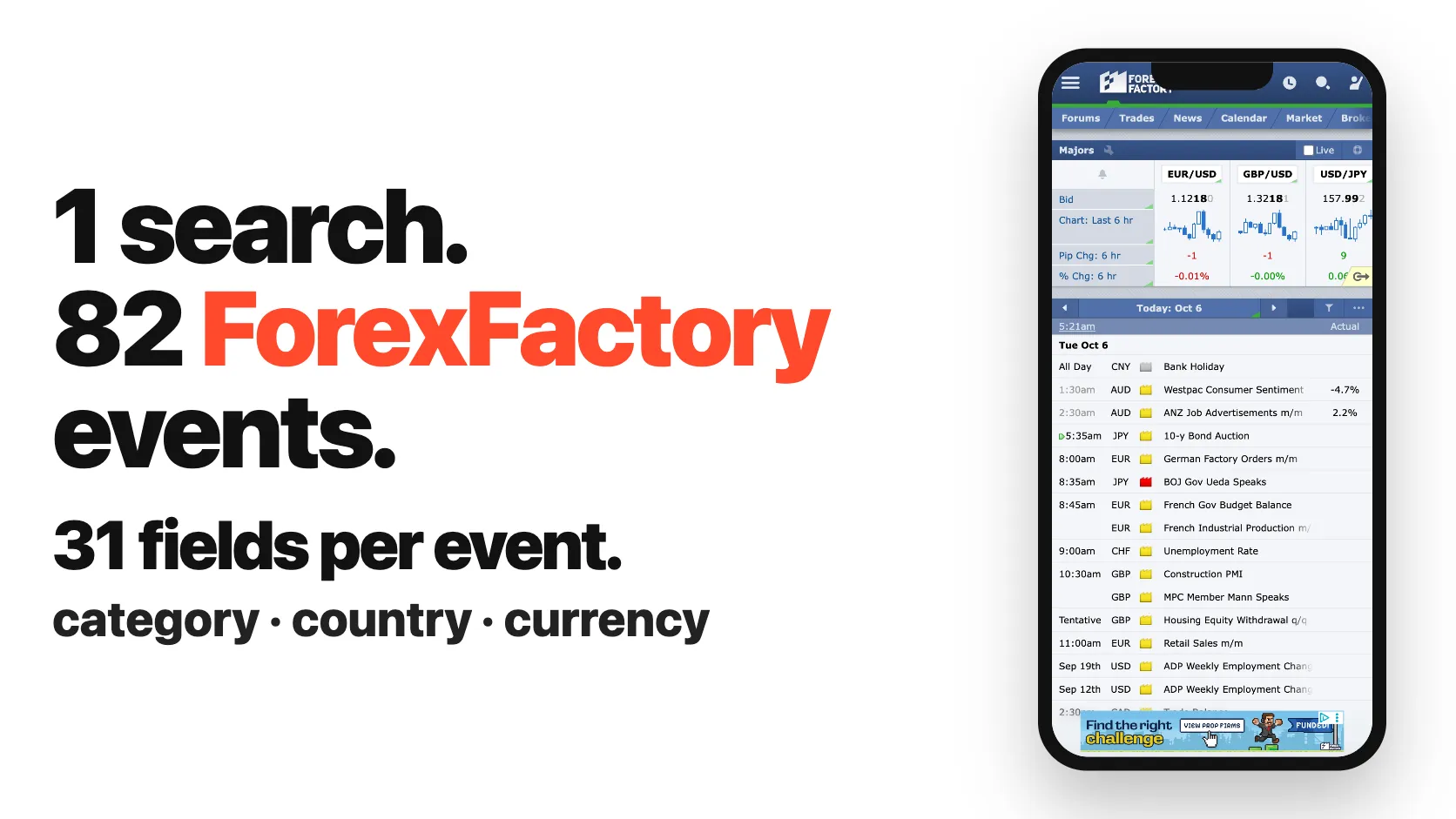
ForexFactory scraper for the Forex Factory economic calendar: actual, forecast, previous and revised figures as numbers, surprise, impact, currency and event type. 82 events in 17 seconds, 31 fields each. Filter by date, currency or keyword such as CPI or NFP. Built for traders, backtests and bots.
Pricing
from $15.73 / 1,000 events
Rating
0.0
(0)
Developer

SilentFlow
Maintained by CommunityActor stats
0
Bookmarked
16
Total users
4
Monthly active users
10 days ago
Last modified
Categories
Share
ForexFactory Scraper | Economic Calendar, Actuals and Forecasts (2026)
From SilentFlow. Creators of Pinterest Scraper and Leboncoin Scraper, with 420,000+ combined lifetime runs.
The Forex Factory economic calendar as a clean table: every release with its actual, forecast, previous and revised figures, already parsed as numbers, the surprise, the impact, the currency, the event type, the release time in your time zone, and the indicator's source agency and notes. Pick a week, type a keyword such as CPI or NFP, or paste a Forex Factory link, and get rows you can sort, chart, backtest or feed to a trading bot. This week's calendar (82 events) came back in 16 seconds on the default run, with no Forex Factory account.
Why choose this actor?
Copying the red-folder events of the week into a spreadsheet every Sunday night? Converting "175K" and "-0.4%" into numbers by hand before you can compute a surprise? Pulling one date window at a time when all you want is every CPI print of the year?
- 30 fields filled on a typical row, against the 22 data keys the most used ForexFactory scraper shows. On the default run of 6 Oct 2026 (this week, 82 events), 30 of the 45 fields of a row carried a value on at least half of the rows: the event type, the country and its ISO code, the impact label, the UTC release time and the local date and time, the all-day and tentative flags, the indicator's history page, the source agency with its website and latest release page, what the indicator measures, its usual effect on the currency, its release frequency, Forex Factory's notes, why traders care, and the acronyms. On a run of US CPI prints, 39 fields were filled. The output example of the most used ForexFactory scraper has 22 data keys and no event type, no country, no usual effect and no notes.
- Search the calendar by keyword, not only by date. The most used ForexFactory scraper only takes a date window. Here you can also type keywords:
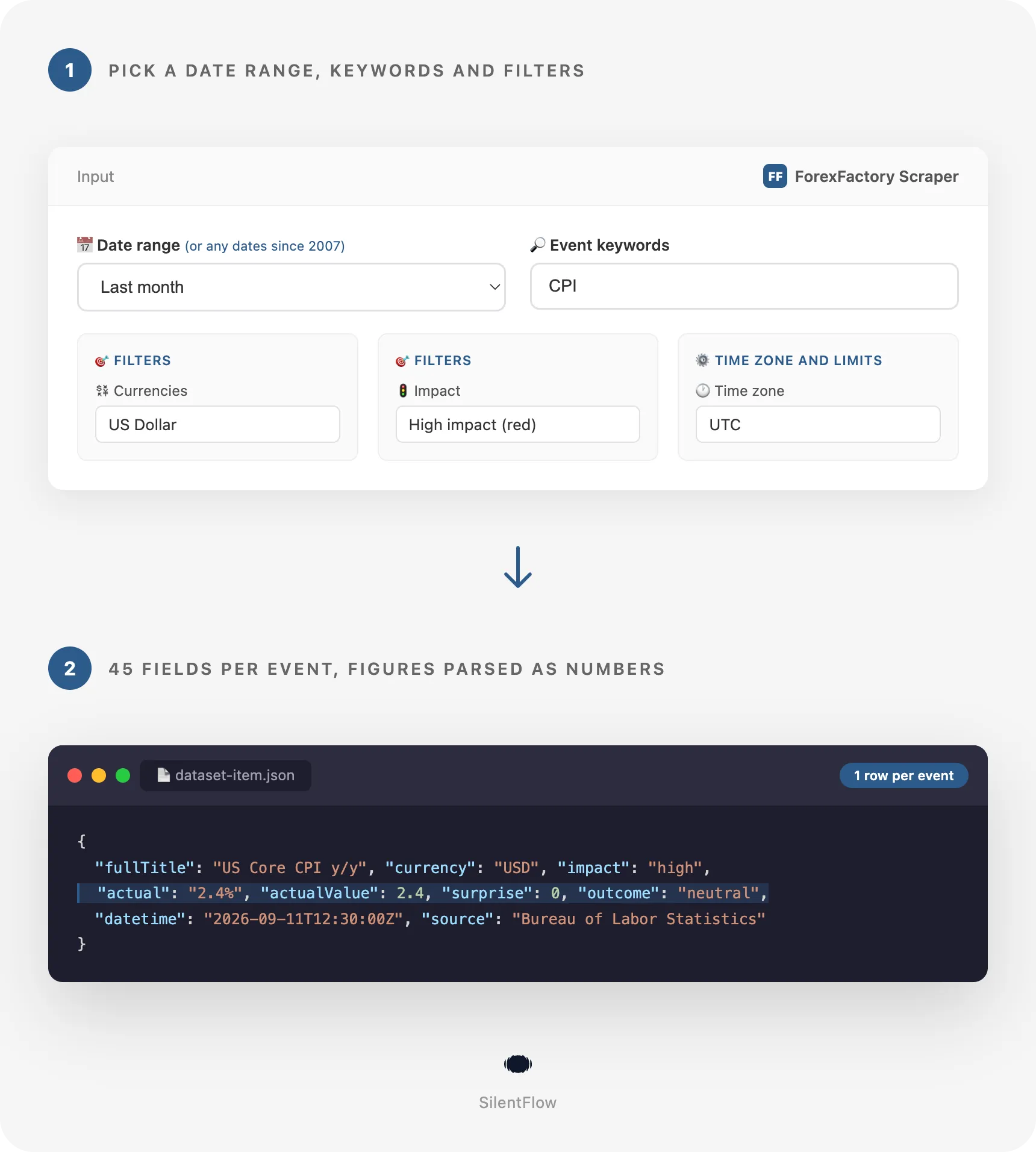
CPIpulled the 36 US CPI prints of January to September 2026 in 18 seconds, each with actual, forecast, surprise and whether it was better or worse for the dollar. Trader shorthand works too:NFPorpayrollsfor the jobs report,rate decisionfor every central bank rate call. - Paste Forex Factory links, including a whole indicator history. Calendar views (a day, a week, a month, a range, with the filters of a shared link), single events and indicator pages all work, mixed in one run with duplicates removed. One indicator link, the US Non-Farm Employment Change page, returned 239 releases from January 2007 to the next scheduled one in 4 seconds.

Try your first Forex Factory calendar week
Paste this input into the Input tab (JSON view) and press Start. It is the default input of the form: every event of the current Sunday-to-Saturday week, all currencies, all impacts, times in UTC.
The Apify Free plan is enough to run it and to try the actor on your own weeks, currencies and keywords: no credit card, no Forex Factory account, no setup. Each calendar event becomes one row of the dataset, which you can export as JSON, CSV or Excel, open in Google Sheets, or read from the API.
Copy to your AI assistant
Paste this block into Claude, ChatGPT or Cursor to give it the full context of this actor:
How to scrape Forex Factory economic calendar data
Get this week's high impact events in New York time
The red-folder events of the week, with the release time in Eastern time, ready for a Sunday prep sheet.
On 6 Oct 2026 it returned the 5 high impact events of the week in 3 seconds, from Bank of Japan Governor Ueda's speech to the Canadian jobs report.
Pull every US CPI print of a year
A keyword, a currency and a custom range. Each row carries actual, forecast, previous, the surprise as a number and whether the print was better or worse for the dollar.
On 6 Oct 2026 this input returned 36 rows (CPI m/m, CPI y/y, Core CPI m/m and Core CPI y/y, nine months each) in 18 seconds.
Build next week's central bank, inflation and jobs watchlist
Filters combine: impact, event type and time zone together.
On 6 Oct 2026 it returned the 11 matching events of 11 to 17 October in 3 seconds, among them the US CPI and PPI releases and the Australian jobs report.
Input parameters
| Field | Type | Default | What it does |
|---|---|---|---|
dateRange | string | this_week | Which days to read: today, tomorrow, yesterday, this, next or last week (Sunday to Saturday), this, next or last month, or custom. |
startDate | string | empty | First day of a custom range (YYYY-MM-DD), from 2007-01-01. Filling it switches to a custom range. |
endDate | string | empty | Last day of a custom range, included. Empty reads the From date alone. |
eventKeywords | array | empty | Keep events whose name holds the words of one keyword. Aliases for NFP, payrolls and rate decision. |
startUrls | array | empty | Forex Factory calendar links, event links or indicator pages. They replace the date range. |
currencies | array | all | AUD, CAD, CHF, CNY, EUR, GBP, JPY, NZD, USD. Codes, names and countries are read. |
impacts | array | all | high, medium, low, holiday. |
categories | array | all | The ten Forex Factory event types, from growth to speeches and misc. |
timeZone | string | UTC | Zone of the date and time fields and of the date range. |
maxItems | integer | 500 | Most rows for the whole run. There is no other limit. |
Accepted formats
- Dates:
YYYY-MM-DD, such as2026-09-01. The calendar starts on 1 January 2007; earlier days are skipped. Long ranges are read month by month, oldest first. - Calendar links:
https://www.forexfactory.com/calendar(this week),?week=oct5.2026(seven days from that day),?week=this,?week=next,?week=last,?day=sep4.2026,?day=today,?month=sep.2026,?month=last,?range=aug1.2026-sep30.2026. A shared link keeps its own impact, currency and event type filters. - Event links: any calendar link ending in
#detail=and the event id, as Forex Factory shares them. - Indicator pages:
https://www.forexfactory.com/calendar/66-us-non-farm-employment-changeand the like, for every release of that indicator, newest first, starting with the next scheduled one. - Currencies: a code (
usd), a name (US Dollar,yen,sterling,loonie,kiwi) or a country by name or ISO code (Germany,de,deuall read EUR). - Time zones: an IANA name in any case (
Europe/Madrid,america/new_york), an abbreviation (ET,CET,JST), a city (London,Tokyo) or an offset (UTC+2,GMT-5).
What data can you extract from Forex Factory?
Every row has the same 45 fields, in six groups. Absent values are null, never an empty string.
| Group | Fields | What you get |
|---|---|---|
| Identity (6) | id, url, title, fullTitle, indicatorId, indicatorUrl | The Forex Factory event id and link, the event name with and without its country prefix, the indicator id and its history page. |
| Event (6) | category, currency, country, countryCode, impact, impactLabel | One of the ten event types, the currency it moves, the country and its ISO code, and the expected impact. |
| Figures (13) | actual, forecast, previous, revised and their …Value numbers, unit, surprise, outcome, revisionOutcome, hasDataValues | The figures as Forex Factory prints them and as numbers, the unit, actual minus forecast, and whether the actual and the revision were better or worse for the currency. |
| Time (6) | date, time, datetime, timeZone, isAllDay, isTentative | Local date and time in your zone, the exact instant in UTC, and flags for all-day, multi-day and tentative events. |
| Indicator (13) | source, sourceWebsite, latestReleaseUrl, measures, usualEffect, frequency, notes, whyTradersCare, alsoCalled, acronyms, derivedVia, description, speaker | The agency that publishes it and its release page, what it measures, its usual effect on the currency, how often it comes out, Forex Factory's notes, why traders care, its other names, and for speeches and holidays, the speaker and the occasion. |
| Meta (1) | scrapedAt | When the row was read, in UTC. |
What the fields are good for:
datetimeis the exact release instant in UTC, the one to join with price candles.dateandtimeare the same instant in the zone you pick.actualValue,forecastValueandsurpriseare numbers: "175K" reads 175000, "-0.4%" reads -0.4, "4.4B" reads 4400000000. Figures that are not one number, such as a vote split "0-3-6", keep their text and get anullvalue.outcomefollows the green and red of the Forex Factory calendar:bettermeans the actual was good for the currency,worsebad,neutralin line or not rated.idandurlare stable: the same event keeps them from the first schedule to the release, so a scheduled run can update rows in place.- Releases yet to come have
nullactual figures andnulloutcome; they fill in once the figure is out.
Output example
A real row, read on 6 Oct 2026 (US Core CPI y/y, released 11 Sep 2026):
The dataset has three ready views: Economic calendar (date, time, currency, impact, event, actual, forecast, previous, like the site), Surprises (release instant, actual and forecast as numbers, surprise, outcome) and Indicators (type, source, frequency, usual effect, why traders care, history page).
Advanced usage
Download the full release history of one indicator
Paste the indicator page from Forex Factory. The run reads the next scheduled release, the latest one, then every release before it, newest first.
On 6 Oct 2026 this returned 239 Non-Farm Employment Change releases, from 5 January 2007 to the release scheduled for 6 November 2026, in 4 seconds. Each row has the actual, forecast, previous and revised figures as text and numbers, the surprise and the outcome. History rows carry the release date but no time of day, because the indicator history only lists dates.
Feed a news filter for a trading bot
Schedule this every Sunday evening and let your expert advisor or bot skip the minutes around each release. The datetime field is the exact instant in UTC.
Track every central bank decision of a quarter
The rate decision alias keeps the rate events of the central bank type (Federal Funds Rate, Official Bank Rate, Cash Rate and the like), across all nine currencies.
On 6 Oct 2026 it returned 29 rows for July to September 2026 in 9 seconds: the Fed, ECB, Bank of England, Bank of Japan, RBA, RBNZ, Bank of Canada, SNB and PBOC rate decisions, with the rate statements and the Bank of England vote split.
Send today's calendar to your team each morning, in London time
A daily schedule with today always reads the day of the run. Connect the dataset to Google Sheets, Slack or a webhook from the Integrations tab.
Reuse a filtered calendar link you already shared
Forex Factory adds your filters to a shared calendar link. Paste it as is: the run keeps that link's impacts, currencies and event types, and your keywords still apply.
On 6 Oct 2026 this link returned the 10 high impact events of 27 September to 3 October 2026, from the RBA cash rate to the US jobs report.
FAQ
What is Forex Factory? Forex Factory (forexfactory.com) is a forex trading site best known for its economic calendar: the schedule of macro releases, central bank decisions and speeches for the nine currencies traders watch most, with an impact rating and the actual, forecast and previous figures. Traders use it to know when the market can move.
Do I need a Forex Factory account? No. The actor reads the public calendar any visitor sees. No login, no Forex Factory account, no API key.
What does one row contain? One calendar event, with 45 fields: identity and links, event type, currency, country and impact, the figures as text and as numbers with the surprise and outcome, the release date and time, and the indicator's source, frequency, usual effect and notes. See the field table above.
When do the actual figures appear?
As soon as Forex Factory publishes them, usually seconds after the release. The calendar is read live when the run starts, with no cache: a run started after a release has its actual, a run started before it has null. Schedule a run a few minutes after the releases you follow.
Which time zone are the times in?
The one you pick in the Time zone field, UTC by default, for date and time. The datetime field is always in UTC, whatever you pick, so rows from runs in different zones still line up. The date range follows your zone too: "today" in New York and in Tokyo are not the same day.
How far back can I go? To 1 January 2007, the first day of the Forex Factory calendar. Use a custom range with keywords and filters, or an indicator link for the full history of one indicator. A month holds 400 to 450 events (408 in January 2025, 452 in September 2026), so set Max events accordingly.
Can I read several keywords, currencies or links in one run? Yes. Keywords are alternatives: an event is kept when it matches any one of them. Currencies, impacts and event types are lists too. Links are read one after another, and an event that two links share is delivered once.
Can I combine filters?
Yes, they stack. impacts: ["high"] with currencies: ["EUR"] and categories: ["inflation"] over a custom range gives the high impact euro area and member-country inflation releases of that range, and a keyword narrows it further.
Why are some fields empty on some rows?
Because the calendar has nothing to put there. Speeches, holidays and meetings have no figures. Releases yet to come have no actual. Some indicators have no forecast on Forex Factory. Indicator notes depend on the indicator: speeches have a speaker and a description but rarely a frequency, data releases have a frequency and a usual effect but no speaker. Absent values are always null.
What do All Day, Day 1 and Tentative mean?
Bank holidays and multi-day meetings are listed as all day (isAllDay is true), and some releases have no confirmed time yet (isTentative is true). These rows keep their date and have a null time and datetime.
Are the links permanent?
The event url and the indicatorUrl are the pages Forex Factory itself shares, and the id of an event does not change between its schedule and its release. Source agency links come from Forex Factory's notes and can move when an agency redesigns its site.
How do the keywords match?
An event is kept when its name holds every word of one keyword, in any order and any case: services pmi keeps "Spanish Services PMI" and "ISM Services PMI", CPI y/y keeps "CPI y/y" and "Core CPI y/y". NFP, payrolls and jobs report find the Non-Farm Employment Change, rate decision finds the central bank rate events, and an event type name (speeches, housing) keeps that whole type.
More SilentFlow scrapers
🛒 E-commerce
 Pinterest - Pinterest Scraper | Pins, Boards and Profiles
 Leboncoin - Leboncoin Scraper | Classified Ads, Prices and Sellers
 Leboncoin - Leboncoin Ad Details Scraper
 Back Market - Back Market Scraper | Refurbished Prices
 ImportYeti - US Customs Records, Suppliers & Trade Data - ImportYeti Scraper - US Customs Records, Suppliers & Trade Data
 TikTok Shop - TikTok Shop Scraper | Products, Sellers and Creator Videos
 1688 Wholesale - 1688 Wholesale Scraper
 Naver - Naver Scraper | Shopping Products, Prices and Reviews
 Udemy Course - Udemy Course Scraper
 JD - JD Products Scraper | Prices, Brands and Barcodes
 Store Leads Ecommerce - Store Leads Ecommerce Scraper
 Amazon Seller - Amazon Seller Scraper | Emails, Phones and Ratings
 Naver - Naver Reviews Scraper | Shopping Product Reviews
 Bring a Trailer - Bring a Trailer Scraper
 Lowes - Lowes Products Scraper | Prices, Stock and Specs
 Store Leads - Store Leads Scraper | Shopify Data
 Avito - Avito Scraper | Listings, Prices and Sellers
 Leboncoin - Leboncoin Scraper
 Mobile.de - Mobile.de Scraper
 Naver - Naver Products Scraper | Shopping Prices, Sellers and Ratings
 Taobao - Taobao Scraper | Products, Prices and Sellers
 Udemy - Udemy Scraper
 Agoda - Agoda Scraper | Hotel Prices and Guest Ratings
 Alibaba - Alibaba Products Scraper | Wholesale Prices and MOQ
 AliExpress - AliExpress Reviews Scraper | Feedback, Ratings and Photos
 AliExpress - AliExpress Scraper | Products, Prices and Sales
 Allegro - Allegro Scraper | Products, Prices and Sellers
 Avito - Avito Profiles Scraper | Sellers, Ratings and Reviews
 Back Market - Back Market Scraper | Refurbished Electronics Prices
 BAUHAUS - BAUHAUS Scraper | Product Prices, EAN and Specs
 CARFAX - CARFAX Scraper | Used Cars, Prices and History
 Coupang - Coupang Detail Scraper | Product Prices and Options
 Ctrip - Ctrip Scraper | Attractions, Tickets and Reviews
 eBay Marketplace - eBay Marketplace Scraper
 Europages - Europages Scraper | Suppliers and B2B Companies
 Eventim - Eventim Scraper | Events, Ticket Prices and Venues
 GasBuddy - GasBuddy Scraper | Gas Prices by Station
 Google Hotels - Google Hotels Scraper | Prices, Offers and Ratings
 Homedepot - Homedepot Reviews Scraper | Customer Reviews and Ratings
 Leboncoin - Leboncoin Details Scraper | Full Ad Data and Sellers
 Mercari - Mercari Scraper | Listings, Sold Prices and Sellers
 Vinted Marketplace - Vinted Marketplace Scraper
 Walmart - Walmart Product Scraper
 Alibaba - Alibaba Scraper | Products, Prices and Suppliers
 Amazon - Amazon Product Scraper
 Amazon Marketplace - Amazon Marketplace Scraper
 AutoScout24 - AutoScout24 Scraper
 eBay Listings - eBay Listings Scraper
 Europages Deep Dive Extractor - Europages Deep Dive Extractor | VAT, Decision Makers, ISO Certs
 Pinterest - Pinterest Scraper
 Trip - Trip Scraper | Hotels, Prices and Reviews
 Vinted - Vinted Scraper
 Walmart - Walmart Scraper | Prices, Reviews, Sellers, Availability
💼 Jobs
 ZipRecruiter - ZipRecruiter Jobs Scraper | Salary, Company & Location Filters
 Indeed - Indeed Company Reviews Scraper
 Multi Board - Multi Board Job Scraper
 Glassdoor Job Listings - Glassdoor Job Listings Scraper
 🔥 Glassdoor - 🔥 Glassdoor Scraper
 LinkedIn Job Search - LinkedIn Job Search Scraper | Salaries & Seniority
 ATS - ATS Jobs Scraper | Greenhouse, Lever and Ashby
 Dice Tech - Dice Tech Jobs Scraper
 iimjobs - iimjobs Scraper | Jobs, Companies and Recruiters
 Jora - Jora Jobs Scraper
 Malt Freelancer - Malt Freelancer Scraper
 Malt - Malt Scraper | Freelance Profiles
 Welcome to the Jungle - Welcome to the Jungle Job Scraper
 All - All Jobs Scraper
 Arbeitsagentur - Arbeitsagentur Jobs Scraper
 Cutshort - Cutshort Jobs Scraper | Salaries, Skills and Companies
 Dice - Dice Jobs Scraper | US Tech Jobs, Salaries, Skills
 Glassdoor - Glassdoor Jobs Scraper
 Indeed - Indeed Jobs Scraper | Job Listings in 73 Countries
 Jora - Jora Scraper | Jobs in Australia, New Zealand, Singapore
 StepStone - StepStone Scraper
 YCombinator - YCombinator Jobs Scraper | Startup Jobs, Salaries and Founders
 Arbeitsagentur - Arbeitsagentur Scraper | German and Austrian Job Board
 Indeed - Indeed Companies Scraper | Reviews, Salaries, Interviews
 Indeed - Indeed Jobs Scraper | NLP Skills
 LinkedIn - LinkedIn Jobs Scraper
 Naukri & NaukriGulf - Naukri & NaukriGulf Jobs Scraper
 Seek - Seek Job Scraper
 Welcome to the Jungle - Welcome to the Jungle Scraper | Jobs and Company Data
 Ziprecruiter - Ziprecruiter Scraper
🏠 Real estate
 SeLoger - SeLoger Scraper | Real Estate Listings
 Anjuke - Anjuke Scraper | Rental Listings, Prices and Agents
 Realtor Rental Listings - Realtor Rental Listings Scraper
 Airbnb Pro Host Contact & - Airbnb Pro Host Contact & Email Scraper
 Bien'ici - Bien'ici Scraper | Property Listings
 Rightmove - Rightmove Scraper
 Trulia Rental Listings - Trulia Rental Listings Scraper
 Airbnb Professional Host - Airbnb Professional Host Scraper | Emails, Phones, SIRET
 Airbnb Search - Airbnb Search Scraper
 Bienici - Bienici Scraper
 Idealista - Idealista Scraper
 Realestate.com.au - Realestate.com.au Scraper
 SeLoger - SeLoger Scraper | French Property Listings and Agencies
 Zillow - Zillow Scraper
 Airbnb Search - Airbnb Search Scraper | Prices, Fees, Amenities, Hosts
 Idealista - Idealista Scraper
 Realtor Rental - Realtor Rental Scraper
 Trulia Rental - Trulia Rental Scraper | US Rentals, Prices, Pet Policy
📣 Social media
 LinkedIn Post Search - LinkedIn Post Search Scraper | Keywords, Hashtags & Profiles
 Facebook Search - Facebook Search Scraper
 Instagram - Instagram Story Scraper | Stories & Highlights
 LinkedIn Leads - LinkedIn Leads Scraper | Sales Navigator Export
 TikTok - TikTok Scraper
 YouTube - YouTube Channel Scraper | Videos, Shorts and Views
 Facebook Search - Facebook Search Profiles Scraper | People by Name or Keyword
 Instagram Engagement - Instagram Engagement Scraper
 Meta Ad Library - Meta Ad Library Scraper
 OnlyFans - OnlyFans Profile Scraper
 TikTok Trend - TikTok Trend Scraper | Trending Hashtags and Videos
 OnlyFans - OnlyFans Creator Scraper
 Skool Community - Skool Community Scraper
 Bilibili - Bilibili Scraper
 Facebook Thread - Facebook Thread Profiles Scraper | Followers, Bios & Engagement
 Kuaishou - Kuaishou Scraper | Videos, Comments and Creator Stats
 LinkedIn Event - LinkedIn Event Scraper
 Reddit - Reddit Scraper | Posts, Comments and Subreddits
 Reddit - Reddit Scraper | Comments, Posts and Users
 Snapchat - Snapchat Contacts Scraper | Phones, Emails and Websites
 Weibo - Weibo Scraper | Posts, Profiles and Engagement
 Xigua - Xigua Scraper | Videos, Creators and Downloads
 Discord - Discord Scraper | Servers, Member Counts and Invites
 Facebook - Facebook Company Scraper | Emails, Phones, Ratings
 Facebook Business Page - Facebook Business Page Scraper
 Kwai - Kwai Scraper | Videos, Creators and Hashtags
 LinkedIn Ads Library - No Cookies - LinkedIn Ads Library Scraper - No Cookies
 LinkedIn Hashtag & - LinkedIn Hashtag & Post Scraper | No Cookies
 Skool Group - Skool Group Scraper
 Snapchat - Snapchat Ads Scraper | Ad Library, Impressions & Targeting
 YouTube - YouTube Transcript Scraper
🏢 Business data
 Tencent - Tencent Scraper | Maps Places, Phones and Ratings
 LinkedIn People Search - LinkedIn People Search Scraper | Profiles & Companies
 LinkedIn Company Search - LinkedIn Company Search Scraper | Profiles & Firmographics
 Company Data - Company Data Scraper | Emails, Phones and Tech Stack
 FanDuel - FanDuel Scraper | Odds, Spreads and Player Props
 Justdial - Justdial Companies Scraper | Business Leads, Phones and Emails
 Kakao - Kakao Scraper | Map Places, Reviews and Phones
 OpenTable - OpenTable Reviews Scraper | Restaurant Reviews and Ratings
 SoftwareAdvice - SoftwareAdvice Scraper | Reviews, Ratings and Pros & Cons
 Teachable Course - Teachable Course Scraper
 Zomato - Zomato Reviews Scraper | Restaurant Ratings and Replies
 2GIS - 2GIS Reviews Scraper | Ratings, Photos and Owner Replies
 LinkedIn Sales Navigator - LinkedIn Sales Navigator Scraper
 Teachable - Courses, Prices & Instructors - Teachable Scraper - Courses, Prices & Instructors
 Trustpilot - Trustpilot Scraper | Reviews, Ratings and Company Contacts
 Website Tech Stack - Website Tech Stack Scraper
✈️ Travel
 Google Maps - Google Maps Scraper
 Booking.com Hotel - Booking.com Hotel Scraper
 Flight Price - Flight Price Scraper
 Trip - Trip Reviews Scraper | Hotel Reviews and Ratings
 Booking - Booking Scraper | Hotel Prices, Photos, Availability
🎯 Lead generation
 Northdata - Northdata Company Scraper
 ZocDoc - ZocDoc Scraper | Doctors, Reviews and Availability
 UK Companies House - UK Companies House Enricher
 Dealroom - Dealroom Scraper | Companies and Investors
 CNPJ Brazilian - CNPJ Brazilian Company Enricher
 Google Ads Transparency - Google Ads Transparency Scraper
 SIRET - SIRET Company Enricher
 BuiltWith - BuiltWith Scraper | Tech Stacks and Top Sites
 Domain - Domain Enricher
 French Company Prospector - French Company Prospector
 SEC - SEC Scraper | EDGAR Filings and Company Data
 USPTO - USPTO Scraper | Trademark Search and Status
 ZocDoc - ZocDoc Scraper
 Clutch - Clutch Scraper | Agencies, Reviews, Ratings, Services
 Clutch Agency - Clutch Agency Scraper
 Dealroom Startup Data - Dealroom Startup Data Scraper
 G2 - G2 Reviews Scraper
 PagesJaunes - PagesJaunes Scraper | French Business Emails and SIRET
 PagesJaunes - PagesJaunes Business Scraper
 SIRET French - SIRET French Company Enricher
 ThomasNet Suppliers - ThomasNet Suppliers Scraper
🔎 SEO
 Similarweb - Similarweb Scraper | Website Traffic, Rankings and Competitors
 Google News - Google News Scraper
 Apple - Apple Scraper | App Store Apps, Ratings and Charts
📈 Marketing
 Pexels -
 🧰 More tools
 PrizePicks - PrizePicks Scraper | Player Props, Lines and Projections
 Apple - Apple Reviews Scraper | App Store Reviews and Ratings
Support
Need something this scraper doesn't do yet? We ship features fast.
- Feature requests go straight to our backlog
- Enterprise needs? We do custom integrations and high-volume plans
- Pricing questions? Check the Monetization tab on the actor page
Response time: usually under 24 hours.
Legal compliance
This actor extracts publicly available data from forexfactory.com: the economic calendar events, their figures and Forex Factory's notes on each indicator. It does not bypass any login, paywall or CAPTCHA. Users are responsible for complying with Forex Factory's terms of service and applicable data protection laws (GDPR, CCPA, and PIPL where relevant). Rows name public officials when an event is a speech; handle that data accordingly. The data returned is informational and is not investment advice; verify the figures with the publishing agency for regulated or trading use.
ForexFactory Scraper by SilentFlow: the Forex Factory economic calendar as a dataset, with the numbers, the surprise and the story behind each release.


