

Goofish Detail Scraper | Listings, Prices and Sellers
Pricing
from $4.24 / 1,000 listings
Goofish Detail Scraper | Listings, Prices and Sellers
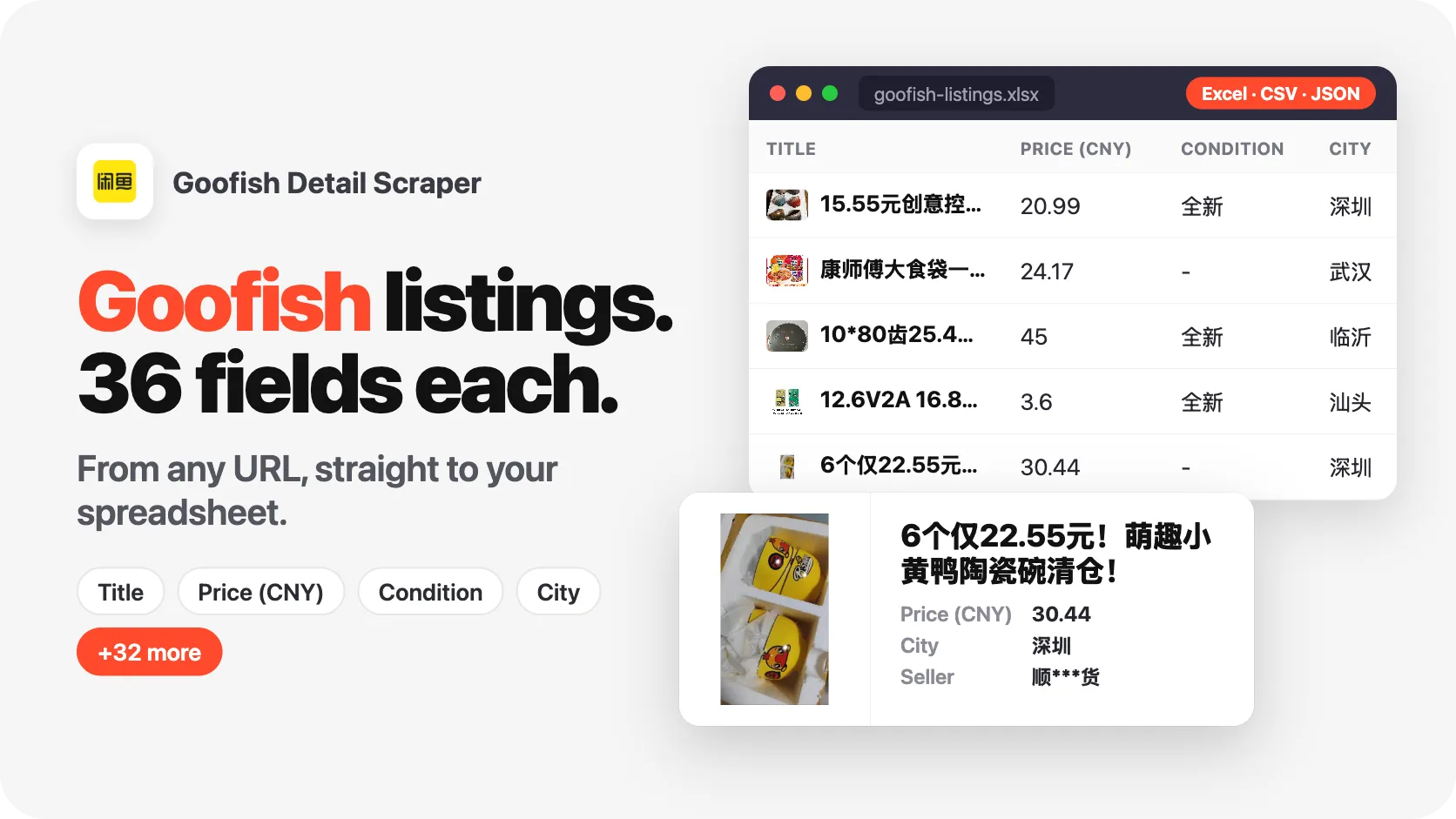
Goofish scraper (闲鱼, Xianyu) for listing details from links, listing IDs or a seller profile: price and original price, variants, condition, specs, photos, city with GPS, views, wants and the seller's sales and ratings. 20 listings in 5 seconds, 36 fields each. No login. Export to JSON, CSV, Excel.
Pricing
from $4.24 / 1,000 listings
Rating
0.0
(0)
Developer

SilentFlow
Maintained by CommunityActor stats
0
Bookmarked
1
Total users
0
Monthly active users
2 days ago
Last modified
Categories
Share
Goofish Detail Scraper (闲鱼) | Listings, Prices and Seller Profiles by Link or ID (2026)
From SilentFlow. Creators of Pinterest Scraper and Leboncoin Scraper, with 420,000+ combined lifetime runs.
Turn Goofish (闲鱼, Xianyu) listings into clean rows you can sort, filter and share: the title and full description, the asking price next to the original price, every variant with its own price and stock, condition, brand and specs, every photo, the city with its GPS point, the publish date, views, wants and favorites, and the seller's profile with sales, reviews and reply rate. Paste listing links, listing IDs or a seller's profile link, and press Start. The prefilled form reads two listings from their links, two from their IDs, then the shop of a home-goods seller: on our test run it returned 20 listings in 8 seconds, all 20 with the seller's profile and the view and want counts. A column of 12 listing IDs came back as 12 full rows in 4 seconds. No Goofish account, no Chinese phone number, nothing to configure.
Why choose this actor?
Copying prices and photos out of the Xianyu app one listing at a time? Rebuilding links by hand because your sourcing sheet only stores listing IDs? Asked to price a whole reseller's shop when the only thing you have is the link to their profile?
- Paste a column of listing IDs, straight from your sheet. Listing IDs have their own field next to the links, so a spreadsheet column goes in as it is, one ID per line, no link to rebuild. On our test run, 12 listing IDs pasted as they were, from a 1970s raincoat to a Fender strap lock, came back as 12 full rows in 4 seconds, each with its seller and counters.
- Give it a seller, get the shop. A seller's profile link (
goofish.com/personal?userId=…) is read listing by listing, each one in full detail, up to the number of listings you ask for. On our test run, one mobile listing link plus the profile link of a reseller of snacks and drinks returned 15 listings in 7 seconds, each with price, stock, city, wants and the seller's sales and ratings. - Nothing to fill in before the first run. No field is required: the form opens prefilled with two listings, two listing IDs and one seller, and runs as it is. Links alone start a run, IDs alone start a run. On our test run, the prefilled form returned 20 listings in 8 seconds without a single change.

Try your first listing
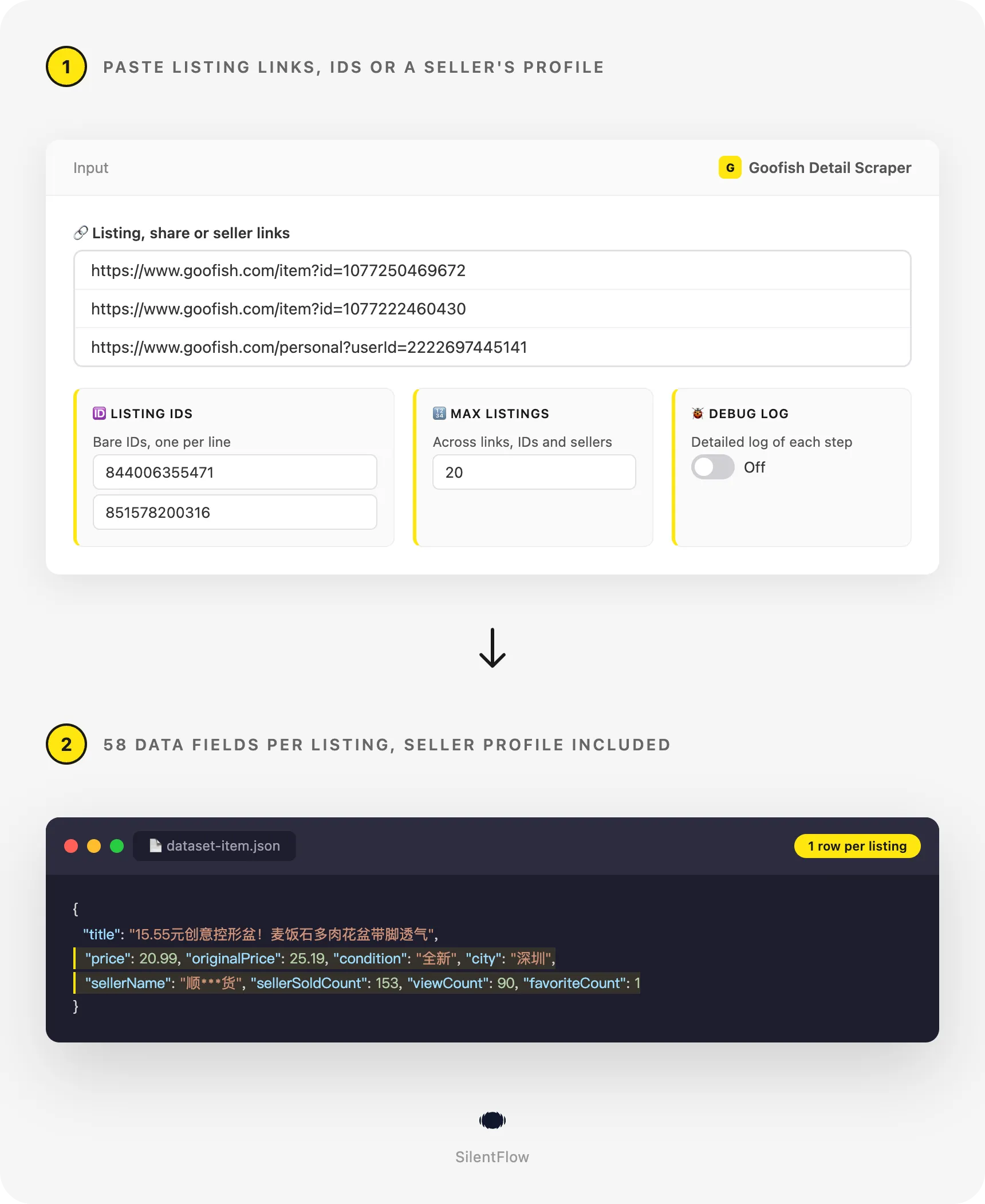
Paste this input in the JSON tab, or keep the prefilled form and press Start. It reads two listings from their links (a set of mineral-stone flower pots and a pack of instant noodles sold with 22 flavour and size options), two listings from their bare IDs, then the shop of a home-goods seller until the run holds 20 listings.
Runs on the Apify Free plan: sign up, open the actor, press Start. Each listing lands as one row of the dataset, which you can open as a table, download as CSV, Excel or JSON, or read from the API. Replace the links with the listings you care about, paste your own IDs, or swap the seller for the shop you follow.
Copy to your AI assistant
Paste this block into Claude, ChatGPT or Cursor to give it full context about this scraper:
How to scrape Goofish listings
Get the full detail of the listings you were sent
Paste the links as they came: desktop links, mobile links, or the text the Xianyu app copies when you press Share.
Turn a column of listing IDs into a table
Copy the ID column of your sheet into the Listing IDs field. Each ID becomes one row with the same columns as a link would give.
Export a reseller's shop with every listing in full
Paste the seller's profile link and set how many listings you want. The run reads the shop in the order the seller shows it.
Input parameters
| Field | Type | Default | What it does |
|---|---|---|---|
startUrls | list of strings | prefilled | Listing links, share links from the Xianyu app, and seller profile links, one per line. A seller profile returns that seller's listings. |
itemIds | list of strings | prefilled | Bare Goofish listing IDs, one per line: the number after id= in a listing link. |
maxItems | integer | 100 | The run stops after this many listings in total, across links, IDs and seller profiles. |
debugMode | boolean | false | Writes a detailed log of each step. Leave it off unless support asks for it. |
Formats accepted in startUrls and itemIds:
- Desktop listing links:
https://www.goofish.com/item?id=1077250469672(extra parameters such asspmorcategoryIdare fine). - Mobile listing links:
https://h5.m.goofish.com/item?id=1077250469672. - Older Xianyu links on
2.taobao.com/item.htm?id=…. - Share links from the Xianyu app:
https://m.tb.cn/h.…, alone or inside the full text the app copies (【闲鱼】https://m.tb.cn/h.… 「我在闲鱼发布了…」). - Seller profile links:
https://www.goofish.com/personal?userId=2222697445141. - Bare listing IDs:
1077250469672(9 to 20 digits).
Anything else (a search page, a keyword, a Taobao product link) is skipped and named in the log, and the rest of the run goes on. Listings you name by link or ID are always read before seller profiles, so a large shop never pushes them past your limit. A listing that appears twice, for example in a link and in a shop, is saved once.
What data can you extract from Goofish?
Each row is one listing, with 58 flat columns grouped the same way on every row, so a CSV or Excel export keeps one value per cell:
- Identity (3):
id,url,title. Theidis Goofish's listing number and theurlis the permanent listing page. - Listing content (16): the full
description,categoryandcategoryId,brand,conditionas Goofish words it (全新 for brand new, 几乎全新 for almost new, 轻微使用痕迹 for light signs of use),isBrandNew,specs(every attribute the seller filled in, such as brand, material or model),labels,topics,tradeMethod(线上交易 for an online sale),listingType,status,isAvailable,isFreeShipping,isBargainableandvariants, where each purchasable option comes with its own price and stock. - Seller (17):
sellerIdandsellerUrl,sellerName,sellerAvatarUrl,sellerCity,sellerRegisteredAt,sellerSoldCount(items sold so far),sellerItemCount(listings published),sellerPositiveRate,sellerGoodReviews,sellerBadReviews,sellerDefaultReviews,sellerReplyRate24h,sellerAvgReplyMinutes,sellerLastActive,sellerZhimaVerifiedandsellerVerifications(for example 实人认证已通过, real-name verified). - Prices and counters (11):
pricein yuan,currency,originalPricewhen the seller states one,priceMinandpriceMaxacross variants,quantity,soldQuantity,shippingFee,viewCount,wantCount(the "人想要" count shown on Goofish) andfavoriteCount. - Place and time (8):
province,city,district,latitudeandlongitudewhen the seller published a location,publishedAt,updatedAtandrefreshedAt(the last time the seller bumped the listing), all in RFC 3339 UTC. - Photos (2):
imageUrl(the cover) andimages(every photo in order, full size, https links). - Run (1):
scrapedAt.
On our test runs of 17 October 2026, 52 of these columns were filled on at least half of the rows of the prefilled run (20 listings), and 50 on the run of 12 listing IDs and on the run of a seller's shop. Brand, original price, variants and the GPS point appear when the seller filled them in; a value Goofish does not show is null, never an empty text.
Output example
One complete row from the prefilled run, a set of mineral-stone flower pots listed by a home-goods seller in Shenzhen:
Advanced usage
Check which listings are still for sale
Sold and removed listings keep their row: the run returns their last known details with status set to sold, offline or deleted, and isAvailable set to false. Run your watchlist every morning and filter on status to see what left the market and at what price.
Track a reseller's prices on a schedule
Save this input as a task and add a daily schedule in the Apify Console. Each run is a dated snapshot of the shop: compare price, soldQuantity and wantCount between runs to see what sells and what gets discounted.
Read links copied from phones and old bookmarks
Links from the mobile site and from the older Xianyu address on 2.taobao.com are read like desktop links, so a list collected on a phone or kept in an old sheet goes in as it is.
A share link copied from the Xianyu app (https://m.tb.cn/h.…) can go in the same list, alone or inside the text the app copies. One that no longer opens a listing is skipped with a message in the log, and the other entries of the run carry on.
Mix links, IDs and shops in one run
Links, IDs and seller profiles go in the same run. The listings you name come first, then the shops fill the run up to maxItems, and a listing found twice is saved once.
Feed a price sheet or a database
Every run's dataset can be pulled as CSV, Excel or JSON from the Apify API, which plugs into Google Sheets (IMPORTDATA), Make, Zapier or your own code:
For a lean sheet, add &fields=id,title,price,originalPrice,condition,city,sellerName,wantCount,url to keep the columns you need, or &view=overview for the same table as the Console. Run it with an input like this one to price a set of listings at once:
FAQ
What is Goofish (闲鱼)? Goofish, called Xianyu (闲鱼, "idle fish") in China, is Alibaba's second-hand marketplace, the Chinese counterpart of eBay or Mercari. Individuals and small shops sell used phones, cameras, designer bags, sneakers, collectibles and new surplus stock there. goofish.com is its web address.
Do I need a Goofish, Taobao or Alipay account? No. The actor reads the public listing data anyone can open, without logging in, without a Chinese phone number and without any key to set up.
What can I paste in the input? Listing links from the website or the mobile site, share links copied from the Xianyu app (the whole share text works), seller profile links, and bare listing IDs. The full list is under Input parameters.
Can I search Goofish by keyword? Not with this actor: it reads the listings you point it at, by link, ID or seller. To build a list from a keyword, run a Goofish search tool first, then paste its links or IDs here for the full detail.
Why is the seller name partly hidden?
Goofish itself shows seller names with stars in the middle (顺***货) to visitors who are not logged in, and the actor returns the name as Goofish shows it. sellerId and sellerUrl are exact, so you can group listings by seller and open the shop.
What happens to sold or removed listings?
They are still returned with their last known details: title, description, price, photos and place, with status set to sold, offline or deleted and isAvailable false. An ID Goofish has never had is skipped and named in the log, never returned as an empty row.
Why are the counters or seller columns empty on some rows?
Views, wants, favorites and the seller profile come from a second page of each listing that Goofish sometimes limits for a while. When that happens, the listing still ships with all its listing fields and only those columns are null; listings read from a seller profile still carry sellerId, sellerUrl and the wants count shown in the shop. On our three test runs of 17 October 2026, all 47 listings came with them. Earlier that day, after a long series of test reads from one connection, they were missing for about 50 minutes, and those runs still delivered every listing with all its listing fields.
How fresh is the data?
Live. Every run reads Goofish at that moment, nothing is cached, and scrapedAt records when each row was read. Prices, stock and counters change daily, so date your comparisons with it.
How many listings can one run read?
As many as you set in maxItems (100 by default), across links, IDs and seller profiles. On our test runs, 20 listings took 8 seconds, 15 listings 7 seconds and 12 listings 4 seconds. For large shops, raise maxItems and let the run page through the seller's listings.
Are the photo and listing links permanent?
url and sellerUrl are permanent pages. Photo links (imageUrl, images) point to Alibaba's image servers and stay valid while the listing exists; download the photos if you need to keep them after a listing is deleted.
Can AI agents use this actor? Yes. It runs from the Apify API and the Apify MCP server, needs no required field, and the "Copy to your AI assistant" block above gives an assistant the whole input and output in one paste.
More SilentFlow scrapers
🛒 E-commerce
 Pinterest - Pinterest Scraper | Pins, Boards and Profiles
 Leboncoin - Leboncoin Scraper | Classified Ads, Prices and Sellers
 Leboncoin - Leboncoin Ad Details Scraper
 ImportYeti - US Customs Records, Suppliers & Trade Data - ImportYeti Scraper - US Customs Records, Suppliers & Trade Data
 Back Market - Back Market Scraper | Refurbished Prices
 TikTok Shop - TikTok Shop Scraper | Products, Sellers and Creator Videos
 Naver - Naver Scraper | Shopping Products, Prices and Reviews
 1688 - 1688 Scraper | Products, Details, Wholesale Prices, Suppliers
 Udemy Course - Udemy Course Scraper
 JD - JD Products Scraper | JD.com Prices, Brands and Barcodes
 Amazon Seller - Amazon Seller Scraper | Emails, Phones and Ratings
 Store Leads Ecommerce - Store Leads Ecommerce Scraper
 Naver - Naver Reviews Scraper | Shopping Product Reviews
 Naver - Naver Products Scraper | Shopping Prices, Sellers and Ratings
 Bring a Trailer - Bring a Trailer Scraper
 CARFAX - CARFAX Scraper | Used Cars, Prices and History
 Leboncoin - Leboncoin Scraper
 Lowes - Lowes Products Scraper | Prices, Stock and Specs
 Store Leads - Store Leads Scraper | Shopify Data
 Avito - Avito Scraper | Listings, Prices and Sellers
 GasBuddy - GasBuddy Scraper | Gas Prices by Station
 Mobile.de - Mobile.de Scraper
 Taobao - Taobao Scraper | Products, Details, Prices and Sellers
 Udemy - Udemy Scraper
 Agoda - Agoda Scraper | Hotel Prices and Guest Ratings
 Alibaba - Alibaba Products Scraper | Wholesale Prices and MOQ
 AliExpress - AliExpress Reviews Scraper | Feedback, Ratings and Photos
 AliExpress - AliExpress Scraper | Products, Prices and Sales
 Allegro - Allegro Scraper | Products, Prices and Sellers
 Avito - Avito Profiles Scraper | Sellers, Ratings and Reviews
 Back Market - Back Market Scraper | Refurbished Electronics Prices
 BAUHAUS - BAUHAUS Scraper | Product Prices, EAN and Specs
 Coupang - Coupang Detail Scraper | Product Prices and Options
 Ctrip - Ctrip Scraper | Attractions, Tickets and Reviews
 eBay Marketplace - eBay Marketplace Scraper
 Europages - Europages Scraper | Suppliers and B2B Companies
 Eventim - Eventim Scraper | Events, Ticket Prices and Venues
 Google Hotels - Google Hotels Scraper | Prices, Offers and Ratings
 Homedepot - Homedepot Reviews Scraper | Customer Reviews and Ratings
 Leboncoin - Leboncoin Details Scraper | Full Ad Data and Sellers
 Mafengwo - Mafengwo Scraper | Attractions, Ratings and Tickets
 Mercari - Mercari Scraper | Listings, Sold Prices and Sellers
 Pinterest - Pinterest Scraper
 Vinted Marketplace - Vinted Marketplace Scraper
 Walmart - Walmart Product Scraper
 Alibaba - Alibaba Scraper | Products, Supplier Companies and Prices
 Amazon - Amazon Product Scraper
 Amazon Marketplace - Amazon Marketplace Scraper
 AutoScout24 - AutoScout24 Scraper
 eBay Listings - eBay Listings Scraper
 Europages Deep Dive Extractor - Europages Deep Dive Extractor | VAT, Decision Makers, ISO Certs
 Trip - Trip Scraper | Hotels, Prices and Reviews
 Vinted - Vinted Scraper
 Walmart - Walmart Scraper | Prices, Reviews, Sellers, Availability
💼 Jobs
 ZipRecruiter - ZipRecruiter Jobs Scraper | Salary, Company & Location Filters
 Indeed - Indeed Company Reviews Scraper
 Multi Board - Multi Board Job Scraper
 Glassdoor Job Listings - Glassdoor Job Listings Scraper
 ATS - ATS Jobs Scraper | Greenhouse, Lever and Ashby
 🔥 Glassdoor - 🔥 Glassdoor Scraper
 Jora - Jora Jobs Scraper
 Glassdoor - Glassdoor Jobs Scraper
 LinkedIn Job Search - LinkedIn Job Search Scraper | Salaries & Seniority
 Malt Freelancer - Malt Freelancer Scraper
 Malt - Malt Scraper | Freelance Profiles
 Welcome to the Jungle - Welcome to the Jungle Job Scraper
 All - All Jobs Scraper
 Arbeitsagentur - Arbeitsagentur Jobs Scraper
 Cutshort - Cutshort Jobs Scraper | Salaries, Skills and Companies
 Dice - Dice Jobs Scraper | US Tech Jobs, Salaries, Skills
 Dice Tech - Dice Tech Jobs Scraper
 iimjobs - iimjobs Jobs Scraper | MBA, Finance and Hirist Tech Jobs
 Indeed - Indeed Jobs Scraper | Job Listings in 73 Countries
 Jora - Jora Scraper | Jobs in Australia, New Zealand, Singapore
 StepStone - StepStone Scraper
 YCombinator - YCombinator Jobs Scraper | Startup Jobs, Salaries and Founders
 Arbeitsagentur - Arbeitsagentur Scraper | German and Austrian Job Board
 iimjobs - iimjobs Scraper | Jobs, Companies and Recruiters
 Indeed - Indeed Companies Scraper | Reviews, Salaries, Interviews
 Indeed - Indeed Jobs Scraper | NLP Skills
 LinkedIn - LinkedIn Jobs Scraper
 Naukri & NaukriGulf - Naukri & NaukriGulf Jobs Scraper
 Seek - Seek Job Scraper
 Welcome to the Jungle - Welcome to the Jungle Scraper | Jobs and Company Data
 Ziprecruiter - Ziprecruiter Scraper
🏠 Real estate
 SeLoger - SeLoger Scraper | Real Estate Listings
 Realtor Rental Listings - Realtor Rental Listings Scraper
 Airbnb Pro Host Contact & - Airbnb Pro Host Contact & Email Scraper
 Bien'ici - Bien'ici Scraper | Property Listings
 Rightmove - Rightmove Scraper
 Trulia Rental Listings - Trulia Rental Listings Scraper
 Airbnb Professional Host - Airbnb Professional Host Scraper | Emails, Phones, SIRET
 Airbnb Search - Airbnb Search Scraper
 Bienici - Bienici Scraper
 Idealista - Idealista Scraper
 Realestate.com.au - Realestate.com.au Scraper
 SeLoger - SeLoger Scraper | French Property Listings and Agencies
 Airbnb Search - Airbnb Search Scraper | Prices, Fees, Amenities, Hosts
 Anjuke - Anjuke Scraper | Rental Listings, Prices and Agents
 Idealista - Idealista Scraper
 Realtor Rental - Realtor Rental Scraper
 Trulia Rental - Trulia Rental Scraper | US Rentals, Prices, Pet Policy
 Zillow - Zillow Scraper
📣 Social media
 LinkedIn Post Search - LinkedIn Post Search Scraper | Keywords, Hashtags & Profiles
 Facebook Search - Facebook Search Scraper
 Instagram - Instagram Story Scraper | Stories & Highlights
 LinkedIn Leads - LinkedIn Leads Scraper | Sales Navigator Export
 TikTok - TikTok Scraper
 YouTube - YouTube Channel Scraper | Videos, Shorts and Views
 Facebook Search - Facebook Search Profiles Scraper | People by Name or Keyword
 Instagram Engagement - Instagram Engagement Scraper
 Meta Ad Library - Meta Ad Library Scraper
 OnlyFans - OnlyFans Profile Scraper
 TikTok Trend - TikTok Trend Scraper | Trending Hashtags and Videos
 OnlyFans - OnlyFans Creator Scraper
 Pinterest - Pinterest Ads Scraper | Ad Library, Reach & Targeting
 Pinterest - Pinterest Profiles Scraper | Followers, Emails and Bios
 Skool Community - Skool Community Scraper
 Douyin - Douyin Comments Scraper | Comments, Likes and IP Regions
 Facebook Thread - Facebook Thread Profiles Scraper | Followers, Bios & Engagement
 Kuaishou - Kuaishou Scraper | Videos, Comments and Creator Stats
 LinkedIn Ads Library - No Cookies - LinkedIn Ads Library Scraper - No Cookies
 LinkedIn Event - LinkedIn Event Scraper
 LinkedIn Hashtag & - LinkedIn Hashtag & Post Scraper | No Cookies
 Pinterest - Pinterest Videos Scraper | Video Downloader, MP4 Links, Stats
 Reddit - Reddit Comments Scraper | Search, Threads and Replies
 Reddit - Reddit Profiles Scraper | User Karma, Activity and Communities
 Reddit - Reddit Scraper | Posts, Comments and Subreddits
 Reddit - Reddit Scraper | Comments, Posts and Users
 RedNote - RedNote Detail Scraper | Notes, Images and Videos
 RedNote - RedNote Videos Scraper | Downloader, Transcripts and Stats
 Snapchat - Snapchat Contacts Scraper | Phones, Emails and Websites
 Snapchat - Snapchat Videos Scraper | Spotlight Videos, MP4 and Stats
 TwitchTracker - TwitchTracker Scraper | Twitch Streamer Stats and Rankings
 Weibo - Weibo Scraper | Posts, Profiles and Engagement
 Xigua - Xigua Scraper | Videos, Creators and Downloads
 Discord - Discord Scraper | Servers, Member Counts and Invites
 Facebook - Facebook Company Scraper | Emails, Phones, Ratings
 Facebook Business Page - Facebook Business Page Scraper
 Kwai - Kwai Scraper | Videos, Creators and Hashtags
 Skool Group - Skool Group Scraper
 Snapchat - Snapchat Ads Scraper | Ad Library, Impressions & Targeting
 YouTube - YouTube Transcript Scraper
🏢 Business data
 Tencent - Tencent Scraper | Maps Places, Phones and Ratings
 LinkedIn Company Search - LinkedIn Company Search Scraper | Profiles & Firmographics
 LinkedIn People Search - LinkedIn People Search Scraper | Profiles & Companies
 Justdial - Justdial Companies Scraper | Business Leads, Phones and Emails
 Bilibili - Bilibili Scraper | Videos, Profiles, Comments, Danmaku
 Company Data - Company Data Scraper | Emails, Phones and Tech Stack
 FanDuel - FanDuel Scraper | Odds, Spreads and Player Props
 ForexFactory - ForexFactory Scraper | Economic Calendar and Forecasts
 Kakao - Kakao Scraper | Map Places, Reviews and Phones
 OpenTable - OpenTable Reviews Scraper | Restaurant Reviews and Ratings
 SoftwareAdvice - SoftwareAdvice Scraper | Reviews, Ratings and Pros & Cons
 Teachable Course - Teachable Course Scraper
 Zomato - Zomato Reviews Scraper | Restaurant Ratings and Replies
 2GIS - 2GIS Reviews Scraper | Ratings, Photos and Owner Replies
 LinkedIn Sales Navigator - LinkedIn Sales Navigator Scraper
 Teachable - Courses, Prices & Instructors - Teachable Scraper - Courses, Prices & Instructors
 Trustpilot - Trustpilot Scraper | Reviews, Ratings and Company Contacts
 Website Tech Stack - Website Tech Stack Scraper
✈️ Travel
 Google Maps - Google Maps Scraper
 Flight Price - Flight Price Scraper
 Booking.com Hotel - Booking.com Hotel Scraper
 Trip - Trip Reviews Scraper | Hotel Reviews and Ratings
 Booking - Booking Scraper | Hotel Prices, Photos, Availability
🎯 Lead generation
 Northdata - Northdata Company Scraper
 ZocDoc - ZocDoc Scraper | Doctors, Reviews and Availability
 Dealroom - Dealroom Scraper | Companies and Investors
 UK Companies House - UK Companies House Enricher
 CNPJ Brazilian - CNPJ Brazilian Company Enricher
 Google Ads Transparency - Google Ads Transparency Scraper
 SIRET - SIRET Company Enricher
 BuiltWith - BuiltWith Scraper | Tech Stacks and Top Sites
 Domain - Domain Enricher
 French Company Prospector - French Company Prospector
 PagesJaunes - PagesJaunes Scraper | French Business Emails and SIRET
 SEC - SEC Scraper | EDGAR Filings and Company Data
 USPTO - USPTO Scraper | Trademark Search and Status
 ZocDoc - ZocDoc Scraper
 Clutch - Clutch Scraper | Agencies, Reviews, Ratings, Services
 Clutch Agency - Clutch Agency Scraper
 Dealroom Startup Data - Dealroom Startup Data Scraper
 G2 - G2 Reviews Scraper
 PagesJaunes - PagesJaunes Business Scraper
 SIRET French - SIRET French Company Enricher
 ThomasNet Suppliers - ThomasNet Suppliers Scraper
🔎 SEO
 Similarweb - Similarweb Scraper | Website Traffic, Rankings and Competitors
 Apple - Apple Scraper | App Store Apps, Ratings and Charts
 Google News - Google News Scraper
📈 Marketing
 Pexels -
 🧰 More tools
 Apple - Apple Reviews Scraper | App Store Reviews and Ratings
 PrizePicks - PrizePicks Scraper | Player Props, Lines and Projections
Support
Need something this scraper doesn't do yet? We ship features fast.
- Feature requests go straight to our backlog
- Enterprise needs? We do custom integrations and high-volume plans
- Pricing questions? Check the Monetization tab on the actor page
Response time: usually under 24 hours.
Legal compliance
This Actor extracts publicly available data from Goofish (闲鱼, Xianyu). It does not bypass any login, paywall or CAPTCHA. Users are responsible for complying with Goofish's terms of service and with applicable data protection laws (GDPR in the European Union, CCPA in California, and PIPL in China where relevant). Rows carry sellers' public profile details (masked name, avatar, city, registration date and ratings) and the place a listing was published from, which are personal data when the seller is an individual: handle them accordingly when you store, analyse or contact them. Photos and descriptions belong to their sellers; check your rights before you republish them. The data returned is informational: prices and stock change every day, so date your analyses with scrapedAt.
Goofish Detail Scraper by SilentFlow: every listing you link, list or find in a seller's shop, with its price, condition, photos, place and seller, in one table.


