

ThomasNet Suppliers Scraper
Pricing
from $1.60 / 1,000 results
ThomasNet Suppliers Scraper
Extract 70+ ThomasNet supplier fields including phone numbers, certifications, locations, products, and company data. Build B2B supplier shortlists, generate leads, or analyze industrial markets. No login needed. Thousands of results in seconds.
Pricing
from $1.60 / 1,000 results
Rating
0.0
(0)
Developer

SilentFlow
Maintained by CommunityActor stats
3
Bookmarked
30
Total users
2
Monthly active users
6 days ago
Last modified
Categories
Features
Share
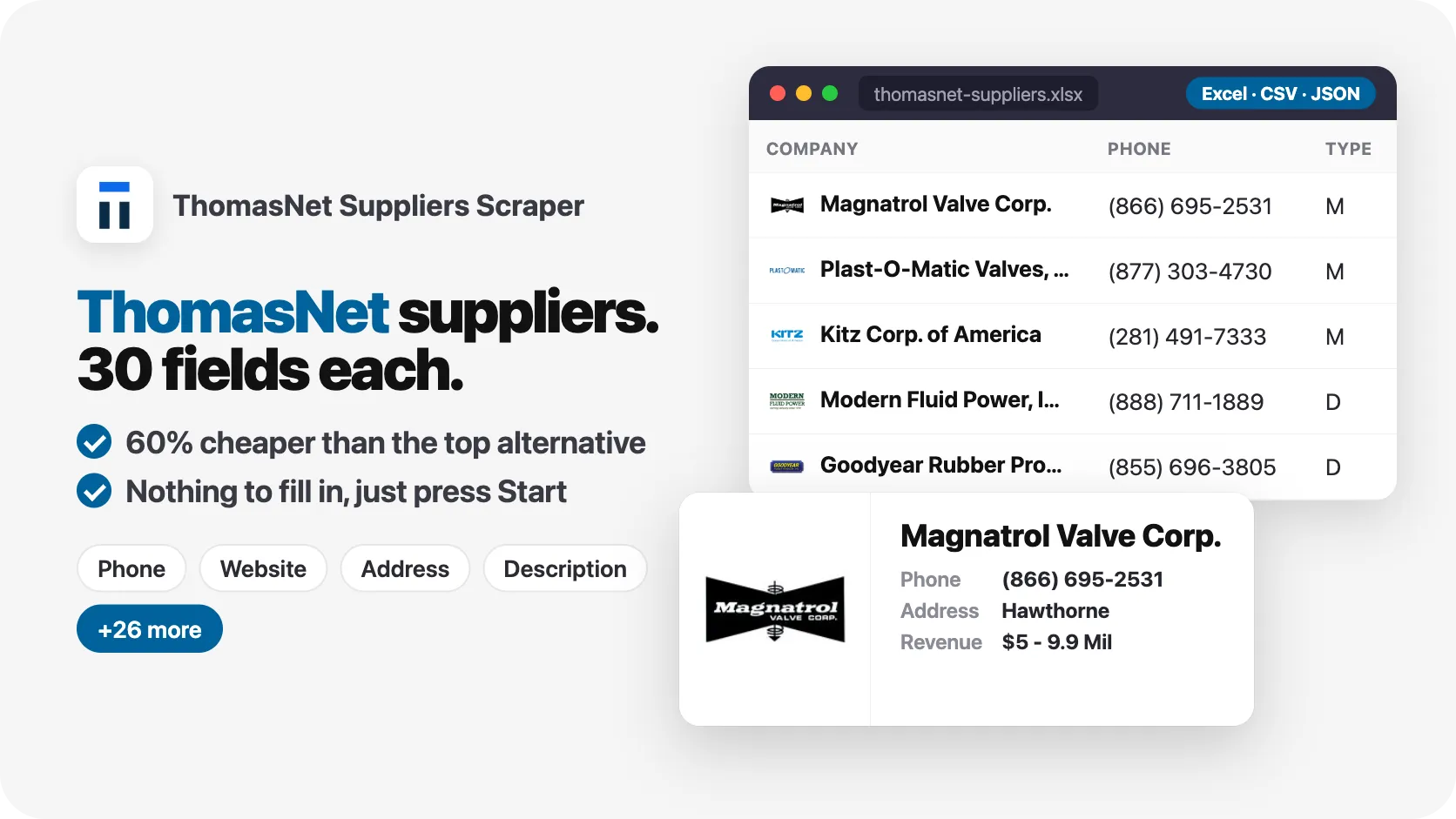
From SilentFlow. Creators of Facebook Search Scraper and JD Products Scraper (#1 for “jd scraper” in Apify Store search), with 800,000+ combined lifetime runs.
by SilentFlow
Turn ThomasNet's 200,000+ industrial suppliers into a structured database. Get emails published on each supplier's own website, phone numbers, certifications, personnel, locations, and 70+ fields per supplier. No login, no account, no cookies needed.
✨ Why teams choose this over other ThomasNet scrapers
Copying supplier details from ThomasNet one tab at a time? Rebuilding sourcing lists every time procurement asks for a backup vendor? Losing deals because you can't find ISO-certified alternatives fast enough?
- 📧 Get the emails suppliers publish on their own websites. Turn on emails and each supplier's website (home, contact and about pages) is checked for the addresses it shows, each with the page it came from, plus extra phone numbers and social profiles. In a 100-supplier "valve" run, 84 suppliers came back with at least one email and 92 with website phone numbers.
- 📞 Get direct contact data for every supplier. Phone numbers, websites, the ThomasNet profile link, and key personnel with titles. No digging through profile pages to find who to call.
- 📜 Keep only the suppliers you can buy from. Ask for ISO 9001, AS9100, ITAR or Woman Owned suppliers, or only manufacturers, and the run returns just those, with your result count spent on matches only.
- ⏭️ Never pull the same supplier twice. Paste the IDs you already have and they are skipped, so a monthly refresh asking for 100 suppliers returns 100 new ones where they exist.
- 🏭 Get 70+ fields per supplier. Revenue range, employee count, year founded, product lines, brands, branch locations, certifications, personnel. Other ThomasNet scrapers stop at name and phone number.
- 📍 Every branch location with GPS coordinates. Multi-location suppliers return all offices, not just headquarters. Build geographic coverage maps without manual geocoding.
- 🏷️ Complete product catalogs included. Product names, descriptions, images, brand portfolios, and family categories. See exactly what each supplier manufactures.
- 🔓 No login required. No ThomasNet account, no API key, no cookies. Paste a query and run it.

🎯 What you can do with ThomasNet data
| Team | What they build |
|---|---|
| Procurement | Shortlists of ISO-certified valve manufacturers within 200 miles of their plant |
| Sales | CRM-ready lead lists with emails, phone numbers, company size, and decision-maker names |
| Market research | Regional supplier density maps by product category and revenue tier |
| Supply chain | Backup supplier databases filtered by certification, location, and capability |
| Competitive intelligence | Competitor supplier networks mapped by product family and geography |
📥 Input parameters
Search
| Parameter | Type | Description | Default |
|---|---|---|---|
query | String | Product, service, or company name (e.g. "valve", "CNC machining", "Siemens") | valve |
mode | Select | All Suppliers searches by product/service category. Suppliers by Name searches company names. Ignored when supplierIds is set. | All Suppliers |
supplierIds | String list | ThomasNet supplier IDs (tgramsId) to pull directly, e.g. ["567647", "566251"]. Takes precedence over the search query. Every ID listed is returned, whatever maxResults says. | Empty |
Region
| Parameter | Type | Description | Default |
|---|---|---|---|
area | Select | Filter by US state or Canadian province | All Regions |
Limits
| Parameter | Type | Description | Default |
|---|---|---|---|
maxResults | Integer | Maximum number of suppliers to return. Set 0 for every supplier ThomasNet lists for your search. | 100 |
Filters
| Parameter | Type | Description | Default |
|---|---|---|---|
supplierTypes | Multi-select | Keep only these supplier types: Manufacturer (M), Custom Manufacturer (C), Distributor (D), Service Company (S), Manufacturers' Rep (R), Turnkey Systems Integrator (I), Finishing Service Company (F), Remanufacturer (Q). | All types |
requiredCertifications | String list | Keep only suppliers holding at least one of these certifications, e.g. ["ISO 9001", "AS9100", "ITAR"]. maxResults counts certified suppliers only. | Empty |
excludeIds | String list | Supplier IDs (tgramsId) you already have. They are never returned and do not use up maxResults. | Empty |
Filters apply to searches. Suppliers pulled through supplierIds are returned as listed, minus any ID in excludeIds.
Extra data
| Parameter | Type | Description | Default |
|---|---|---|---|
includeEmails | Boolean | Visit each supplier's own website (home, contact and about pages) and add every email it publishes, plus its phone numbers and social profiles. Runs take longer. | Off (on in the Console form) |
includeFamilies | Boolean | Add each supplier's full product family map with nested sub-categories. | Off |
📊 Output data
Each supplier record contains 70+ fields. Here is a typical result:
🗂️ Data fields
| Category | Fields |
|---|---|
| Company | tgramsId, name, url (ThomasNet profile), description, descriptionByCompany, tier, type, typeLabel, yearFounded, annualSales, numberEmployees, logoUrl, logoTitle, isClaimed, xometryVerified, isAdvertiser, isAffiliationPage, catalogType, otherActivities |
| Contact | primaryPhone, website, personnel[].name, personnel[].title, social[].type, social[].accountId, isTopResponder |
Published contacts (with includeEmails) | email (best address for outreach), emails[].email, emails[].foundOn, emails[].sourceUrl, emails[].sourceField, emails[].domainClass, emails[].domainAcceptsMail, emails[].roleAddress, emailsStatus, websitePhones[].phone, websitePhones[].sourceUrl, websiteSocialLinks[].platform, websiteSocialLinks[].url, contactPageUrl |
| Location | address.address1, address.city, address.state, address.stateName, address.zip, address.country, address.latitude, address.longitude, isMultiLocation, locationCount, locationTypes, mainLocationTgramsId, mainLocationName |
| Certifications | certifications[].title, certifications[].type, certifications[].group, certifications[].scope, certifications[].date, certifications[].isActive, certificationTotals[].type, certificationTotals[].count |
| Products & Brands | products[].name, products[].description, products[].imageUrl, brands[].name, headingBrands[].name, families[].name, headings[].name |
| Branches | locations[].name, locations[].primaryPhone, locations[].website, locations[].address, locations[].locationTypes |
| Media | videos[].title, videos[].url, videoTypes, news[].headline, news[].summary, whitepapers[].title, whitepapers[].docUrl |
| Metadata | searchMode, scrapedAt |
🚀 Examples
Find valve manufacturers across the US
Build a lead list of certified manufacturers with emails
Each row comes with the best email in email, every published address in emails with the page it was found on, and emailsStatus telling you why a supplier has none (no website listed, website could not be reached, no email published).
Refresh a list without paying twice
Suppliers in excludeIds are skipped and do not count toward maxResults, so you get 100 suppliers you do not have yet, where ThomasNet lists that many.
Look up a specific company by name
Pull full profiles for suppliers you already have IDs for
Every result row carries a tgramsId. Save the IDs from any search, then feed them back through supplierIds to refresh the full profile (certifications, personnel, branch locations, news) without searching again.
Find injection molding suppliers in Michigan
Pull all CNC machining shops in California
Get FDA-approved packaging suppliers in New Jersey
💻 Integrations
Use the Apify API to access results programmatically. Export as JSON, CSV, or Excel.
Python: Feed supplier data into your sourcing pipeline
JavaScript: Build a supplier database from ThomasNet results
📈 Performance
| Metric | Value |
|---|---|
| Speed | About 900 suppliers per minute, about 200 per minute with emails from supplier websites |
| Fields per supplier | 70+ |
| Max results | Unlimited (set maxResults: 0) |
| Enrichment | Full profile: certifications, locations, personnel, products, published emails |
| Output formats | JSON, CSV, Excel |
💡 Tips for best results
-
Use specific search terms. "FDA-approved silicone tubing" returns a focused list of matching manufacturers, while "tubing" mixes many categories. Narrow queries map to specific ThomasNet categories.
-
Deduplicate across queries with
tgramsId. Each supplier has a permanent ThomasNet ID. Use it as your unique key when merging results from multiple searches. -
Filter by certification in the run. Put
ISO 9001,AS9100,ITAR RegisteredorWoman OwnedinrequiredCertificationsand only certified suppliers come back. The fullcertificationsarray stays on every row for finer filtering. -
Use
areafor regional sourcing. Narrow by state or province when proximity matters, or leave "All Regions" and filter results byaddress.statelater for more flexibility. -
Set
maxResults: 0for full category coverage. When building comprehensive supplier databases, remove the limit to get every matching company in the category. -
Use the
emailcolumn for outreach. It holds the best address per supplier, on the supplier's own domain first.roleAddresstells shared inboxes (sales@, info@) apart from named people, anddomainClassflags addresses that belong to another organization, such as a sales rep.
❓ FAQ
Do I need a ThomasNet account? No. No login, no API key, no cookies. The scraper extracts publicly available supplier data directly.
How many suppliers can I extract?
No hard limit. Set maxResults: 0 to get every supplier ThomasNet lists for the categories your query matches, and run several queries to cover related categories.
What is the difference between search modes? "All Suppliers" searches by product and service category. It returns the broadest results. "Suppliers by Name" matches company names directly, useful when you know which company you are looking for.
I already have a list of supplier IDs. Can I skip the search?
Yes. Paste the tgramsId values into the supplierIds field and the scraper pulls each supplier's full profile directly. Leave query empty or ignore it, supplierIds takes precedence.
Can I filter suppliers by certification?
Yes. List the certifications you need in requiredCertifications (for example ISO 9001 or AS9100) and only suppliers holding at least one of them are returned. Matching ignores case and punctuation, so ISO 9001 also finds ISO 9001:2015.
Does it get supplier emails?
Yes, with includeEmails on. Each supplier's own website is checked (home, contact and about pages) and every email it publishes is added with the page it appears on. Addresses ThomasNet shows in the supplier's news and video texts are added too. Nothing is guessed from names. When a supplier has no email, emailsStatus says why.
How do I avoid paying for suppliers I already have?
Put their tgramsId values in excludeIds. They are skipped and do not use up maxResults.
How do I identify unique suppliers across multiple runs?
Use the tgramsId field. It is the permanent ThomasNet company identifier and stays consistent across searches.
Does this scraper get contact names?
The personnel array includes names and titles of key contacts listed on each supplier's ThomasNet profile.
What supplier types are available?
The type field holds ThomasNet's one-letter code and typeLabel its name: Manufacturer (M), Custom Manufacturer (C), Distributor (D), Service Company (S), Manufacturers' Rep (R), Turnkey Systems Integrator (I), Finishing Service Company (F) and Remanufacturer (Q). Use supplierTypes to keep only the ones you want.
More SilentFlow scrapers
🛒 E-commerce
 JD - JD Products Scraper | JD.com Prices, Brands and Barcodes
 Pinterest - Pinterest Scraper | Pins, Boards and Profiles
 Leboncoin - Leboncoin Scraper | Classified Ads, Prices and Sellers
 TikTok Shop - TikTok Shop Scraper | Products, Sellers and Creator Videos
 Back Market - Back Market Scraper | Refurbished Prices
 Leboncoin - Leboncoin Ad Details Scraper
 Naver - Naver Scraper | Shopping Products, Prices and Reviews
 ImportYeti - ImportYeti Scraper | Suppliers, Importers and Bills of Lading
 Amazon Seller - Amazon Seller Scraper | Emails, Phones and Ratings
 Udemy Course - Udemy Course Scraper
 Allegro - Allegro Scraper | Products, Prices and Sellers
 Naver - Naver Products Scraper | Shopping Prices, Sellers and Ratings
 Naver - Naver Reviews Scraper | Shopping Product Reviews
 1688 - 1688 Scraper | Products, Reviews, Details, Wholesale Prices
 Store Leads Ecommerce - Store Leads Ecommerce Scraper
 Store Leads - Store Leads Scraper | Shopify Data
 Coupang - Coupang Detail Scraper | Product Prices and Options
 Avito - Avito Scraper | Listings, Prices and Sellers
 Bring a Trailer - Bring a Trailer Scraper
 Leboncoin - Leboncoin Scraper
 Lowes - Lowes Products Scraper | Prices, Stock and Specs
 Mobile.de - Mobile.de Scraper
 Pinterest - Pinterest Scraper
 Taobao - Taobao Scraper | Products, Details, Prices and Sellers
 Alibaba - Alibaba Products Scraper | Wholesale Prices and MOQ
 Avito - Avito Profiles Scraper | Sellers, Ratings and Reviews
 Eventim - Eventim Scraper | Events, Ticket Prices and Venues
 Leboncoin - Leboncoin Details Scraper | Full Ad Data and Sellers
 Udemy - Udemy Scraper
 Vinted Marketplace - Vinted Marketplace Scraper
 Agoda - Agoda Scraper | Hotel Prices and Guest Ratings
 Alibaba - Alibaba Scraper | Products, Supplier Companies and Prices
 AliExpress - AliExpress Reviews Scraper | Feedback, Ratings and Photos
 AliExpress - AliExpress Scraper | Products, Prices and Sales
 Back Market - Back Market Scraper | Refurbished Electronics Prices
 BAUHAUS - BAUHAUS Scraper | Product Prices, EAN and Specs
 CARFAX - CARFAX Scraper | Used Cars, Prices and History
 eBay Marketplace - eBay Marketplace Scraper
 Europages - Europages Scraper | Suppliers and B2B Companies
 Google Hotels - Google Hotels Scraper | Prices, Offers and Ratings
 Homedepot - Homedepot Reviews Scraper | Customer Reviews and Ratings
 Judge - Judge Scraper | Reviews, Ratings and Store Profiles
 Keepa - Keepa Scraper | Amazon Price History and Offers
 MakersRow - MakersRow Scraper | Manufacturers, Capabilities and Reviews
 Mercari - Mercari Scraper | Listings, Sold Prices and Sellers
 Sahibinden - Sahibinden Scraper | Real Estate and Car Listings
 Ticombo - Ticombo Scraper | Ticket Prices and Listings
 Trip - Trip Scraper | Hotels, Prices and Reviews
 Walmart - Walmart Scraper | Prices, Reviews, Sellers, Availability
 Webmotors - Webmotors Scraper | Car Listings, Prices and FIPE
 Woolworths - Woolworths Products Scraper | Prices, Specials and Nutrition
 Amazon - Amazon Product Scraper
 Amazon Marketplace - Amazon Marketplace Scraper
 AutoScout24 - AutoScout24 Scraper
 eBay Listings - eBay Listings Scraper
 Europages Deep Dive Extractor - Europages Deep Dive Extractor | VAT, Decision Makers, ISO Certs
 GasBuddy - GasBuddy Scraper | Gas Prices by Station
 Goofish - Goofish Detail Scraper | Listings, Prices and Sellers
 Mafengwo - Mafengwo Scraper | Attractions, Ratings and Tickets
 Vinted - Vinted Scraper
 Walmart - Walmart Product Scraper
💼 Jobs
 ZipRecruiter - ZipRecruiter Jobs Scraper | Salary, Company & Location Filters
 Multi Board - Multi Board Job Scraper
 Indeed - Indeed Company Reviews Scraper
 Jobright - Jobright Scraper | Jobs, Salaries and H1B Sponsors
 Malt Freelancer - Malt Freelancer Scraper
 Glassdoor - Glassdoor Jobs Scraper
 Malt - Malt Scraper | Freelance Profiles
 Glassdoor Job Listings - Glassdoor Job Listings Scraper
 Jora - Jora Jobs Scraper
 LinkedIn Job Search - LinkedIn Job Search Scraper | Salaries & Seniority
 ATS - ATS Jobs Scraper | Greenhouse, Lever and Ashby
 🔥 Glassdoor - 🔥 Glassdoor Scraper
 Dice - Dice Jobs Scraper | US Tech Jobs, Salaries, Skills
 Dice Tech - Dice Tech Jobs Scraper
 iimjobs - iimjobs Jobs Scraper | MBA, Finance and Hirist Tech Jobs
 Instahyre - Instahyre Jobs Scraper | Companies, Recruiters and Ratings
 Jora - Jora Scraper | Jobs in Australia, New Zealand, Singapore
 StepStone - StepStone Scraper
 Welcome to the Jungle - Welcome to the Jungle Job Scraper
 YCombinator - YCombinator Jobs Scraper | Startup Jobs, Salaries and Founders
 All - All Jobs Scraper
 Arbeitsagentur - Arbeitsagentur Scraper | German and Austrian Job Board
 Arbeitsagentur - Arbeitsagentur Jobs Scraper
 Cutshort - Cutshort Jobs Scraper | Salaries, Skills and Companies
 iimjobs - iimjobs Scraper | Jobs, Companies and Recruiters
 Indeed - Indeed Companies Scraper | Reviews, Salaries, Interviews
 Indeed - Indeed Jobs Scraper | NLP Skills
 Indeed - Indeed Jobs Scraper | Job Listings in 73 Countries
 LinkedIn - LinkedIn Jobs Scraper
 Naukri & NaukriGulf - Naukri & NaukriGulf Jobs Scraper
 Seek - Seek Job Scraper
 Welcome to the Jungle - Welcome to the Jungle Scraper | Jobs and Company Data
 Ziprecruiter - Ziprecruiter Scraper
🏠 Real estate
 SeLoger - SeLoger Scraper | Real Estate Listings
 Realtor Rental Listings - Realtor Rental Listings Scraper
 Airbnb Professional Host - Airbnb Professional Host Scraper | Emails, Phones, SIRET
 Airbnb Pro Host Contact & - Airbnb Pro Host Contact & Email Scraper
 Bien'ici - Bien'ici Scraper | Property Listings
 Idealista - Idealista Scraper
 SeLoger - SeLoger Scraper | French Property Listings and Agencies
 Trulia Rental Listings - Trulia Rental Listings Scraper
 Rightmove - Rightmove Scraper
 Airbnb Search - Airbnb Search Scraper
 Bienici - Bienici Scraper
 Realestate.com.au - Realestate.com.au Scraper
 Zapimoveis - Zapimoveis Scraper | Real Estate Listings and Prices
 Zillow - Zillow Scraper
 Airbnb Search - Airbnb Search Scraper | Prices, Fees, Amenities, Hosts
 Anjuke - Anjuke Scraper | Rental Listings, Prices and Agents
 Idealista - Idealista Scraper
 Realtor Rental - Realtor Rental Scraper
 Trulia Rental - Trulia Rental Scraper | US Rentals, Prices, Pet Policy
📣 Social media
 LinkedIn Post Search - LinkedIn Post Search Scraper | Keywords, Hashtags & Profiles
 Facebook Search - Facebook Search Scraper
 Instagram - Instagram Story Scraper | Stories & Highlights
 LinkedIn Leads - LinkedIn Leads Scraper | Sales Navigator Export
 Facebook Search - Facebook Search Profiles Scraper | People by Name or Keyword
 TikTok Trend - TikTok Trend Scraper | Trending Hashtags and Videos
 YouTube - YouTube Channel Scraper | Videos, Shorts and Views
 TikTok - TikTok Scraper
 LinkedIn Sales Navigator - LinkedIn Sales Navigator Scraper
 Pinterest - Pinterest Ads Scraper | Ad Library, Reach & Targeting
 Reddit - Reddit Scraper | Posts, Comments and Subreddits
 Snapchat - Snapchat Videos Scraper | Spotlight Videos, MP4 and Stats
 TikTok Creative - TikTok Creative Ads Scraper | Top Ads, Landing Pages & Metrics
 Discord - Discord Scraper | Servers, Member Counts and Invites
 Kwai - Kwai Scraper | Videos, Creators and Hashtags
 Likee - Likee Scraper | Videos, Hashtags and Creators
 LinkedIn Event - LinkedIn Event Scraper
 LinkedIn Hashtag & - LinkedIn Hashtag & Post Scraper | No Cookies
 Meta Ad Library - Meta Ad Library Scraper
 Bandsintown - Bandsintown Scraper | Concerts and Tour Dates
 Bilibili - Bilibili Scraper | Videos, Profiles, Comments, Danmaku
 Discord - Discord Profiles Scraper | Users, Badges and Server Tags
 Facebook Thread - Facebook Thread Profiles Scraper | Followers, Bios & Engagement
 Instagram Engagement - Instagram Engagement Scraper
 Kuaishou - Kuaishou Scraper | Videos, Comments and Creator Stats
 LinkedIn Ads Library - No Cookies - LinkedIn Ads Library Scraper - No Cookies
 OnlyFans - OnlyFans Profile Scraper
 Pinterest - Pinterest Profiles Scraper | Followers, Emails and Bios
 Pinterest - Pinterest Videos Scraper | Video Downloader, MP4 Links, Stats
 Reddit - Reddit Comments Scraper | Search, Threads and Replies
 Reddit - Reddit Profiles Scraper | User Karma, Activity and Communities
 RedNote - RedNote Videos Scraper | Downloader, Transcripts and Stats
 Snapchat - Snapchat Contacts Scraper | Phones, Emails and Websites
 TikTok Lookalike - TikTok Lookalike Scraper | Influencers, Emails and Engagement
 TwitchTracker - TwitchTracker Scraper | Twitch Streamer Stats and Rankings
 X Timeline - X Timeline Scraper | Tweets and Engagement Stats
 Xigua - Xigua Scraper | Videos, Creators and Downloads
 YouTube Autocomplete - YouTube Autocomplete Scraper | Keyword Suggestions
 Douyin - Douyin Comments Scraper | Comments, Likes and IP Regions
 Facebook - Facebook Company Scraper | Emails, Phones, Ratings
 Facebook Business Page - Facebook Business Page Scraper
 OnlyFans - OnlyFans Creator Scraper
 Reddit - Reddit Scraper | Comments, Posts and Users
 RedNote - RedNote Detail Scraper | Xiaohongshu Details, Images, Videos
 Skool Group - Skool Group Scraper
 Skool Community - Skool Community Scraper
 Snapchat - Snapchat Ads Scraper | Ad Library, Impressions & Targeting
 Weibo - Weibo Scraper | Posts, Profiles and Engagement
 YouTube - YouTube Transcript Scraper
🏢 Business data
 LinkedIn Company Search - LinkedIn Company Search Scraper | Profiles & Firmographics
 Ctrip - Ctrip Scraper | Attractions, Tickets and Reviews
 LinkedIn People Search - LinkedIn People Search Scraper | Profiles & Companies
 2GIS - 2GIS Reviews Scraper | Ratings, Photos and Owner Replies
 Teachable Course - Teachable Course Scraper
 Website Tech Stack - Website Tech Stack Scraper
 Teachable - Courses, Prices & Instructors - Teachable Scraper - Courses, Prices & Instructors
 Trustpilot - Trustpilot Scraper | Reviews, Ratings and Company Contacts
✈️ Travel
 Tencent - Tencent Scraper | Maps Places, Phones and Ratings
 Flight Price - Flight Price Scraper
 Zomato - Zomato Reviews Scraper | Restaurant Ratings and Replies
 Booking.com Hotel - Booking.com Hotel Scraper
 Despegar - Despegar Reviews Scraper | Hotel Reviews and Ratings
 Google Maps - Google Maps Scraper
 Kakao - Kakao Scraper | Map Places, Reviews and Phones
 OpenTable - OpenTable Reviews Scraper | Restaurant Reviews and Ratings
 TheFork - TheFork Scraper | Restaurants, Menus and Ratings
 Booking - Booking Scraper | Hotel Prices, Photos, Availability
 Trip - Trip Reviews Scraper | Hotel Reviews and Ratings
🎯 Lead generation
 Northdata - Northdata Company Scraper
 Dealroom - Dealroom Scraper | Companies and Investors
 ZocDoc - ZocDoc Scraper | Doctors, Reviews and Availability
 UK Companies House - UK Companies House Enricher
 BuiltWith - BuiltWith Scraper | Tech Stacks and Top Sites
 CNPJ Brazilian - CNPJ Brazilian Company Enricher
 Justdial - Justdial Companies Scraper | Business Leads, Phones and Emails
 PagesJaunes - PagesJaunes Scraper | French Business Emails and SIRET
 PagesJaunes - PagesJaunes Business Scraper
 SIRET - SIRET Company Enricher
 SoftwareAdvice - SoftwareAdvice Scraper | Reviews, Ratings and Pros & Cons
 Company Data - Company Data Scraper | Emails, Phones and Tech Stack
 Dealroom Startup Data - Dealroom Startup Data Scraper
 Delaware - Delaware Scraper | Corporations, LLCs and Registered Agents
 French Company Prospector - French Company Prospector
 G2 - G2 Reviews Scraper
 Pappers - Pappers Scraper | French Companies, Directors & Financials
 SEC - SEC Scraper | EDGAR Filings and Company Data
 Sunbiz - Sunbiz Companies Scraper | New Florida Business Leads
 Sunbiz - Sunbiz Scraper | Florida Companies and Officers
 USPTO - USPTO Scraper | Trademark Search and Status
 Clutch - Clutch Scraper | Agencies, Reviews, Ratings, Services
 Clutch Agency - Clutch Agency Scraper
 Domain - Domain Enricher
 Google Ads Transparency - Google Ads Transparency Scraper
 KVK - KVK Scraper | Dutch Companies and SBI Codes
 SIRET French - SIRET French Company Enricher
 ZocDoc - ZocDoc Scraper
🔎 SEO
 Similarweb - Similarweb Scraper | Website Traffic, Rankings and Competitors
 Scribd - Scribd Scraper | Documents, Authors and Views
 SpyFu - SpyFu Scraper | SEO, PPC and Competitor Data
 Apple - Apple Reviews Scraper | App Store Reviews and Ratings
 Apple - Apple Scraper | App Store Apps, Ratings and Charts
 Bing - Bing Enricher Scraper | Mobile Friendly Test and Indexing
 Google News - Google News Scraper
📈 Marketing
 Douyin -
🎬 Video
 Pexels -
📰 News
 ForexFactory - ForexFactory Scraper | Economic Calendar and Forecasts
🧰 More tools
 Maersk - Maersk Scraper | Vessel Schedules and Port Calls
 FanDuel - FanDuel Scraper | Odds, Spreads and Player Props
 PrizePicks - PrizePicks Scraper | Player Props, Lines and Projections
📬 Support
Need something this scraper doesn't do yet? We ship features fast.
- Feature requests go straight to our backlog
- Enterprise needs? We do custom integrations
Response time: usually under 24 hours.


