

Telegram Comments Scraper | Replies, Authors and Reactions
Pricing
from $0.96 / 1,000 comments
Telegram Comments Scraper | Replies, Authors and Reactions
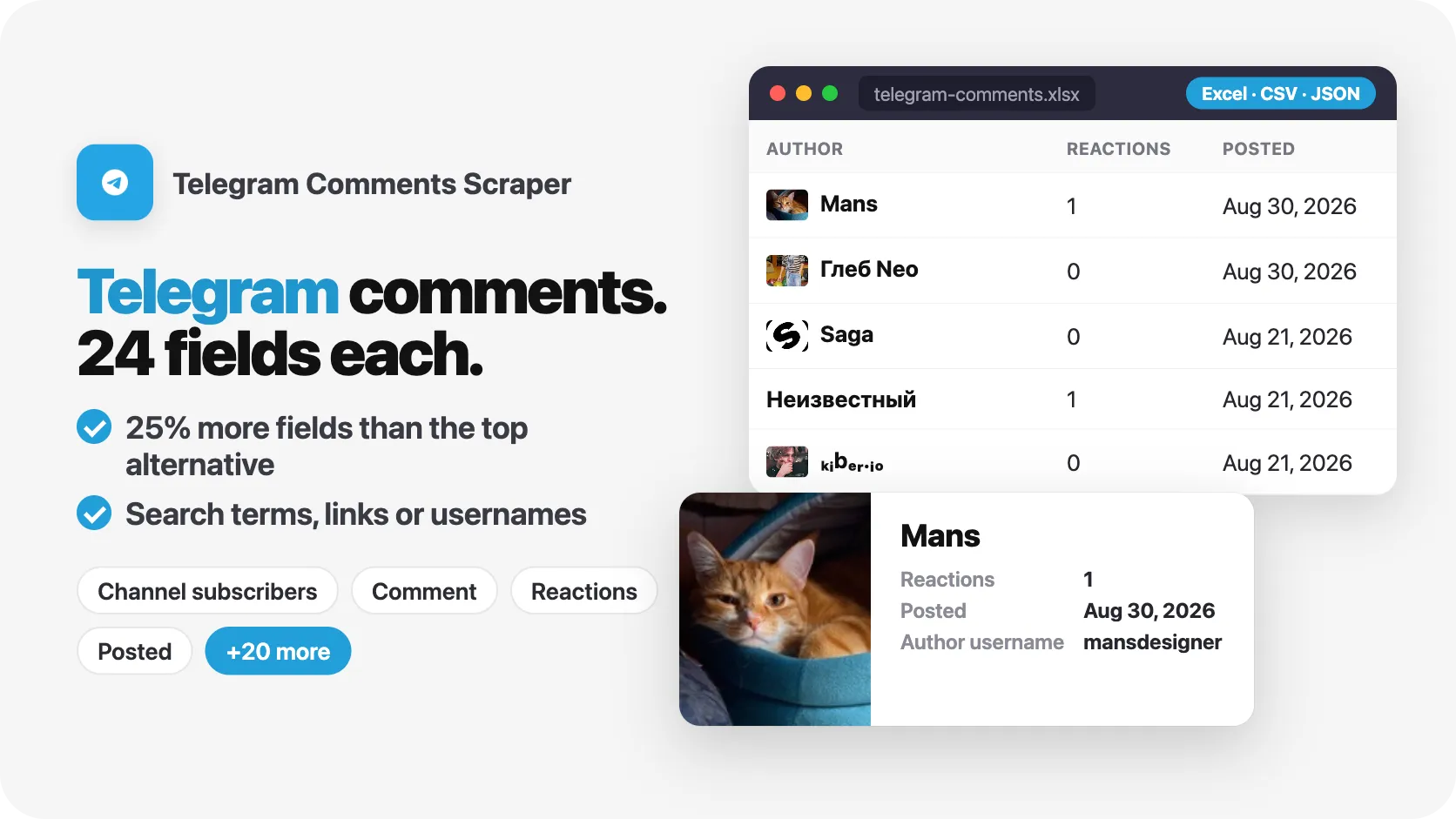
Telegram comments scraper (Парсер комментариев Телеграм): export replies under any public post with author name, text, reactions and date, plus post views and channel subscribers. 124 comments in 8 seconds, 24 fields each, no Telegram account. Paste post links, sweep channels or search keywords.
Pricing
from $0.96 / 1,000 comments
Rating
0.0
(0)
Developer

SilentFlow
Maintained by CommunityActor stats
0
Bookmarked
3
Total users
1
Monthly active users
5 days ago
Last modified
Categories
Features
Share
Telegram Comments Scraper (Телеграм) | Replies, Authors and Reactions Under Any Post (2026)
From SilentFlow. Creators of Facebook Search Scraper and JD Products Scraper (#1 for “jd scraper” in Apify Store search), with 920,000+ combined lifetime runs.
Turn the discussion under any public Telegram post into a clean table: who wrote each comment, what they said, who they answered, the reactions it got and when, right next to the post it answers. 124 comments from 4 posts in 7 seconds in our test, without a Telegram account.
Why choose this actor?
Reading a post's comments 50 at a time in a tiny widget? Pasting them into a sheet, then going back to copy the post they were about? Watching a channel's audience react to every announcement, but with no way to export it?
- 23 fields filled per comment, not 16. On our default run (124 comments under
tginfo/4430and the 3 newest posts ofbinance_announcements), 23 data fields carry a value on at least half the rows and 19 on every single row: the comment id, link and number, its text, media type, reply and edited flags, author name, reaction count, date, the post's id, link, text, date, views and comment count, and the channel's username, title, link and exact subscriber count. Author username, profile link and photo, the comment it answers, every reaction with its emoji and any photos fill in when the comment has them. The most used Telegram comments scraper shows 16 fields in its example row, with no post text, no post views and no channel audience. - Every comment arrives with the post it answers. All 124 rows of our test carried the post's text, publication date, view count and total comments, plus the channel title and its exact subscriber count (3,225,651 for Binance Announcements). Sentiment, topic and influence analysis need that context, and you no longer have to join two exports to get it.
- Three ways in: post links, channels and keywords. Paste the posts you care about (
https://t.me/tginfo/4430), sweep the newest posts of whole channels (binance_announcements,@tginfo), or let a keyword pick the posts for you:bitcoinin Binance Announcements found the 2 latest matching posts and their 7 comments in 3 seconds. The most used Telegram comments scraper takes post links and a single channel, with no keyword search. No field is required here, and a comment link works as well as a post link.

Try your first 124 comments
Paste this input in the Input tab, or keep the prefilled form, and press Start:
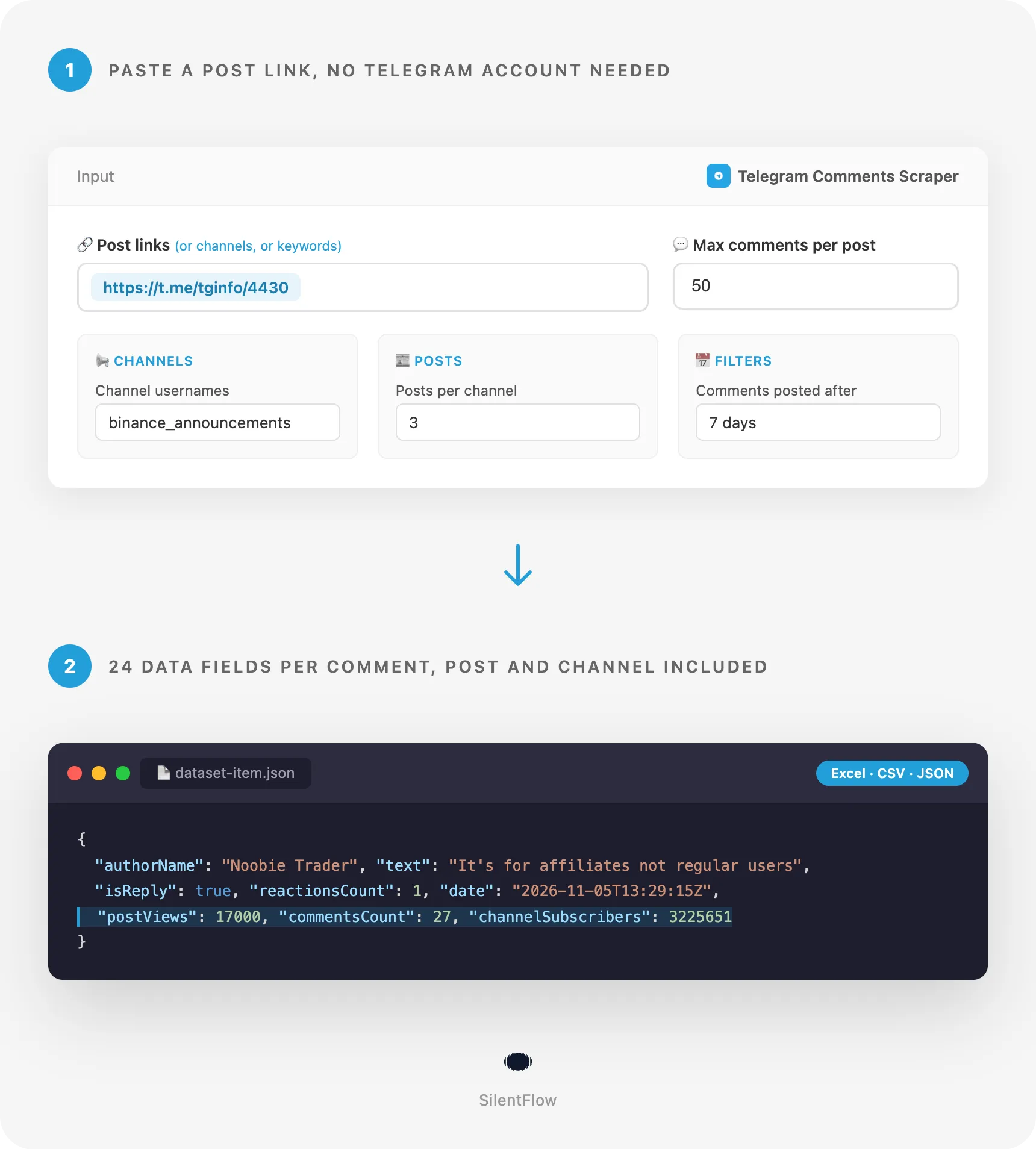
You get the 50 newest comments under a Telegram Info post about Australia's online safety regulator taking Telegram to court, then every comment under the 3 newest posts of Binance Announcements, newest comment first, each with its author, reply target, reactions and date, and the post and channel beside it. Our run on 5 November 2026 returned 124 comments in 7 seconds. Swap the link and the channel for your own, raise maxCommentsPerPost to read whole threads.
The Apify Free plan is enough to try it: no credit card, no Telegram account, no phone number, no API key.
| SilentFlow · Telegram suite | |
 Telegram Scraper Channel Posts, Views and | Telegram Comments Scraper You are here |
Copy to your AI assistant
Paste this block into Claude, ChatGPT or Cursor to give it full context about this scraper:
How to scrape Telegram comments
Three inputs, from the simplest to the most targeted. Each one runs as it is.
Get every comment of one post
Use Copy Post Link in Telegram and paste it. The whole discussion is read, newest comment first, until the post's last comment or your maximum. This post had 137 comments; all of them came back, each with the post's text and views.
Sweep the newest posts of a channel
The 5 newest posts of each channel are read, then the comments under each one. A channel that turned comments off is noticed after 3 posts and skipped, and the log names it, so one channel without comments does not hold up the others.
Collect the comments under posts that mention a word, this month only
The keyword picks the posts: Telegram's own search inside the channel gives the latest matches, then older posts are checked for the word. Each row keeps searchKeyword, so one run with several keywords stays easy to split. The date keeps only the comments written in the last 30 days.
Input parameters
| Field | Type | Default | What it does |
|---|---|---|---|
postUrls | list of text | prefilled https://t.me/tginfo/4430 | Channel posts whose comments you want |
channelUsernames | list of text | prefilled binance_announcements | Public channels whose newest posts are read |
keywords | list of text | empty | Words that pick the posts inside every channel listed |
maxPosts | integer | 10 | Newest posts per channel, or matching posts per keyword |
maxCommentsPerPost | integer | 100 | Comments kept per post, newest first |
oldestCommentDate | date or age | empty | Keep comments posted after this date |
onlyTopLevelComments | yes or no | no | Skip comments that answer another comment |
debugMode | yes or no | no | Detailed logs |
No field is required. An empty input stops at once with a message that says what to add. The number of rows is at most the number of posts read times maxCommentsPerPost, so set both to what you need.
Formats accepted for posts: https://t.me/tginfo/4430, t.me/tginfo/4430, https://t.me/s/tginfo/4430, a comment link (https://t.me/tginfo/4430?comment=1828127, which gives its whole post), telegram.me links and tg://resolve?domain=tginfo&post=4430 links.
Formats accepted for channels: a username (tginfo), an @handle (@binance_announcements), a channel link (https://t.me/nexta_live), its web preview (https://t.me/s/nexta_live) and tg://resolve?domain=tginfo. A search link made on a channel's web page (https://t.me/s/cointelegraph?q=ETF) reads the comments of the posts it finds.
Formats accepted for dates: a day (2026-10-01), a full timestamp (2026-10-01T18:00:00Z) or an age (12 hours, 7 days, 2 weeks, 1 month, 1 year).
Inputs from other tools: the field names other Telegram tools use (channel, channels, startUrls, urls) are read too, and a list of {"url": "..."} objects works like a list of links.
What is skipped: groups, private chats, bots and invite links (t.me/+..., t.me/c/...) have no public comments on the web. They are named in the log, and the rest of the input runs.
What data can you extract from Telegram?
One row per comment, 31 fields, flat and typed, in this order:
| Group | Fields |
|---|---|
| Identity | id (channel/postId/commentId, stable), url (opens the comment in Telegram), commentId |
| Content | text, mediaType (text, photo, or other for stickers, videos, voice and files shown in the app), imageUrls, links, isEdited |
| Thread | isReply, replyToCommentId, replyToAuthor, replyToText |
| Author | authorName, authorUsername, authorUrl, authorPhotoUrl |
| Measures | reactions (each with emoji, emojiId for custom emoji, count, isPaid for star reactions), reactionsCount |
| Time | date (RFC 3339, UTC) |
| Post | postId, postUrl, postText, postDate, postViews, commentsCount |
| Channel | channelUsername, channelTitle, channelUrl, channelSubscribers |
| Meta | searchKeyword, scrapedAt |
A few facts that help when you use the data:
idandurlnever change: the same comment read twice has the same id, which makes merging scheduled runs simple.replyToCommentIdpoints at another row'scommentIdunder the same post: a group-by rebuilds the conversation tree.commentsCountis the post's total, so you can see how much of a thread a capped run covered.postViewsis the view count Telegram shows for the post at run time;channelSubscribersis exact, not rounded.authorUsernameandauthorUrlarenullfor people who publish no @username: Telegram shows their display name only.- Profile photos and comment photos are links to Telegram's image servers. Save the images you need: these links can change over time, while
urlstays. - A missing value is always
null, never an empty string. Numbers are numbers, booleans are booleans.
Output example
A real row from our test run, a reply with a reaction under a Binance Announcements post:
Advanced usage
Collect yesterday's comments every morning
Save this input as a task and schedule it daily in Apify. Each run returns only what people wrote in the last 24 hours under the 10 newest posts of each channel, and older comments are never read, so the run stays short. In our test, the last 3 days under the 2 newest posts of these two channels gave 60 comments in 6 seconds. Merge runs on id.
Keep distinct opinions on a launch, without the back-and-forth
Only the comments written straight to the post are kept. On this post of 137 comments, 91 top-level comments came back and 46 replies were skipped, in 3 seconds. The maximum counts the comments kept, so a thread full of replies still fills your quota.
Follow a ticker across several channels
Each channel is searched for each keyword: here 4 searches, up to 5 matching posts each, and up to 200 comments per post. A post found by two keywords is read once. Filter the dataset on searchKeyword to compare how readers react to each topic.
Read a very long discussion to the first comment
Busy posts carry thousands of comments. The thread is read newest first, page after page, until its first comment or your maximum. commentsCount on every row tells you the post's total, so you can check the run covered all of it.
Feed a sentiment model or a spreadsheet
The dataset also downloads as CSV, Excel, JSON or XML from the run page, or from https://api.apify.com/v2/datasets/{DATASET_ID}/items?format=csv with your token.
FAQ
What does this scraper extract? One row per public comment under a Telegram channel post: the comment's text, photos and links, its author (name, @username, profile link and photo), the comment it answers, its reactions and date, plus the post it is under (text, date, views, total comments) and the channel (title, exact subscribers).
Do I need a Telegram account, a phone number or an API key? No. You give post links, channel usernames or keywords, and the run starts. Nothing is signed in and no account of yours is involved.
Which posts have comments? Only posts of channels that opened a discussion. Many news channels turned comments off: their posts are counted in the log and skipped, and a channel without comments is dropped after 3 posts so the rest of your input runs. Comments of group chats are not public on the web.
How fresh is the data? Live. Every run reads Telegram at that moment: new comments, new reactions and view counts appear as soon as Telegram shows them. Deleted comments are gone.
How many comments can I get?
Every public comment of a post, newest first, up to maxCommentsPerPost. A channel gives its maxPosts newest posts, a keyword its maxPosts latest matching posts. There is no fixed limit per run beyond the numbers you set.
Can I read several posts, channels and keywords in one run? Yes. Mix post links, channels and keywords in one input. Duplicates are removed: the same post typed twice, or found by two keywords, is read once, and every comment appears once.
Why do some rows have no @username or photo?
People who publish no @username are shown by Telegram with their display name only, and some have no profile photo. Those fields are then null. If you read the same post twice within a couple of minutes, Telegram can also leave the author names out of the second read; the comments, dates and replies still arrive, and a run a few minutes later brings the names back.
What does mediaType: "other" mean?
The comment holds a sticker, video, voice message or file that Telegram only shows in its app. The row keeps its text, author and date, and url opens it in Telegram.
What is Telegram, and what are its comments? Telegram (Телеграм) is a messaging app with public channels: one-way feeds that news outlets, exchanges, creators and brands use to reach millions of subscribers. When a channel links a discussion group, every post gets a comment thread where readers answer, quote each other and react with emoji. This actor reads those threads; Russian-speaking teams know it as a «Парсер комментариев Телеграм».
Do the filters combine?
Yes. keywords picks the posts, oldestCommentDate keeps only recent comments, onlyTopLevelComments drops replies and maxCommentsPerPost caps each post. For example, bitcoin + 7 days + top-level only gives the fresh opinions written straight under the bitcoin posts of the channels you list.
Which links last?
url, postUrl, authorUrl and channelUrl are permanent t.me links. Photo links (authorPhotoUrl, imageUrls) point to Telegram's image servers and can change: download what you want to keep.
More SilentFlow scrapers
🛒 E-commerce
- JD - JD Products Scraper | JD.com Prices, Brands and Barcodes
- Pinterest - Pinterest Scraper | Pins, Boards and Profiles
- TikTok Shop - TikTok Shop Scraper | Products, Sellers and Creator Videos
- Leboncoin - Leboncoin Scraper | Classified Ads, Prices and Sellers
- Back Market - Back Market Scraper | Refurbished Prices
- Naver - Naver Scraper | Shopping Products, Prices and Reviews
- ImportYeti - ImportYeti Scraper | Suppliers, Importers and Bills of Lading
- Leboncoin - Leboncoin Ad Details Scraper
- Allegro - Allegro Scraper | Products, Prices and Sellers
- Udemy Course - Udemy Course Scraper
- Amazon Seller - Amazon Seller Scraper | Emails, Phones and Ratings
- Keepa - Keepa Scraper | Amazon Price History and Offers
- Naver - Naver Reviews Scraper | Shopping Product Reviews
- Naver - Naver Products Scraper | Shopping Prices, Sellers and Ratings
- 1688 - 1688 Scraper | Products, Reviews, Details, Wholesale Prices
- Coupang - Coupang Detail Scraper | Product Prices and Options
- Store Leads Ecommerce - Store Leads Ecommerce Scraper
- Taobao - Taobao Scraper | Products, Details, Prices and Sellers
- Avito - Avito Scraper | Listings, Prices and Sellers
- Bring a Trailer - Bring a Trailer Scraper
- Lowes - Lowes Products Scraper | Prices, Stock and Specs
- Pinterest - Pinterest Scraper
- Store Leads - Store Leads Scraper | Shopify Data
- Ctrip - Ctrip Scraper | Attractions, Tickets and Reviews
- Eventim - Eventim Scraper | Events, Ticket Prices and Venues
- Leboncoin - Leboncoin Scraper
- Alibaba - Alibaba Products Scraper | Wholesale Prices and MOQ
- Alibaba - Alibaba Scraper | Products, Supplier Companies and Prices
- Avito - Avito Profiles Scraper | Sellers, Ratings and Reviews
- Back Market - Back Market Scraper | Refurbished Electronics Prices
- BAUHAUS - BAUHAUS Scraper | Product Prices, EAN and Specs
- Leboncoin - Leboncoin Details Scraper | Full Ad Data and Sellers
- Mobile.de - Mobile.de Scraper
- Vinted Marketplace - Vinted Marketplace Scraper
- 1688 - 1688 Reviews Scraper | Ratings, Buyer Photos and Variants
- Acquire - Acquire Scraper | Startups for Sale & Prices
- Agoda - Agoda Scraper | Hotel Prices and Guest Ratings
- AliExpress - AliExpress Reviews Scraper | Feedback, Ratings and Photos
- AliExpress - AliExpress Scraper | Products, Prices and Sales
- Apple - Apple Scraper | App Store Apps, Ratings and Charts
- CARFAX - CARFAX Scraper | Used Cars, Prices and History
- Che168 - Che168 Scraper | Used Car Listings and Prices
- Coles - Coles Products Scraper | Prices, Specials and Nutrition
- eBay Marketplace - eBay Marketplace Scraper
- Europages - Europages Scraper | Suppliers and B2B Companies
- GasBuddy - GasBuddy Scraper | Gas Prices by Station
- Goofish - Goofish Detail Scraper | Listings, Prices and Sellers
- Google Hotels - Google Hotels Scraper | Prices, Offers and Ratings
- Homedepot - Homedepot Reviews Scraper | Customer Reviews and Ratings
- Judge - Judge Scraper | Reviews, Ratings and Store Profiles
- Mafengwo - Mafengwo Scraper | Attractions, Ratings and Tickets
- MakersRow - MakersRow Scraper | Manufacturers, Capabilities and Reviews
- Mercari - Mercari Scraper | Listings, Sold Prices and Sellers
- RA - RA Scraper | Events, Lineups and Tickets
- Sahibinden - Sahibinden Scraper | Real Estate and Car Listings
- Ticombo - Ticombo Scraper | Ticket Prices and Listings
- Trip - Trip Scraper | Hotels, Prices and Reviews
- Udemy - Udemy Scraper
- VividSeats - VividSeats Scraper | Tickets, Prices and Events
- Walmart - Walmart Scraper | Prices, Reviews, Sellers, Availability
- Webmotors - Webmotors Scraper | Car Listings, Prices and FIPE
- Wildberries - Wildberries Detail Scraper | Product Data, Prices & Sellers
- Woolworths - Woolworths Products Scraper | Prices, Specials and Nutrition
- YandexMarket - YandexMarket Scraper | Products, Prices and Sellers
- Zap - Zap Scraper | Prices and Store Offers
- Amazon - Amazon Product Scraper
- Amazon Marketplace - Amazon Marketplace Scraper
- AutoScout24 - AutoScout24 Scraper
- Carousell - Carousell Scraper | Listings, Prices and Sellers
- eBay Listings - eBay Listings Scraper
- Europages Deep Dive Extractor - Europages Deep Dive Extractor | VAT, Decision Makers, ISO Certs
- Vinted - Vinted Scraper
- Walmart - Walmart Product Scraper
💼 Jobs
- ZipRecruiter - ZipRecruiter Jobs Scraper | Salary, Company & Location Filters
- Jobright - Jobright Scraper | Jobs, Salaries and H1B Sponsors
- Indeed - Indeed Company Reviews Scraper
- Multi Board - Multi Board Job Scraper
- Malt Freelancer - Malt Freelancer Scraper
- Glassdoor Job Listings - Glassdoor Job Listings Scraper
- Glassdoor - Glassdoor Jobs Scraper
- Jora - Jora Jobs Scraper
- LinkedIn Job Search - LinkedIn Job Search Scraper | Salaries & Seniority
- Malt - Malt Scraper | Freelance Profiles
- 🔥 Glassdoor - 🔥 Glassdoor Scraper
- ATS - ATS Jobs Scraper | Greenhouse, Lever and Ashby
- Dice - Dice Jobs Scraper | US Tech Jobs, Salaries, Skills
- Dice Tech - Dice Tech Jobs Scraper
- Francetravail - Francetravail Scraper | Job Offers and Salaries
- Freelancermap - Freelancermap Scraper | Projects, Skills and Companies
- Gupy - Gupy Jobs Scraper | Brazil Jobs and Employers
- iimjobs - iimjobs Jobs Scraper | MBA, Finance and Hirist Tech Jobs
- Instahyre - Instahyre Jobs Scraper | Companies, Recruiters and Ratings
- Jora - Jora Scraper | Jobs in Australia, New Zealand, Singapore
- Kununu - Kununu Reviews Scraper | Employee Ratings and Interviews
- StepStone - StepStone Scraper
- Welcome to the Jungle - Welcome to the Jungle Job Scraper
- YCombinator - YCombinator Jobs Scraper | Startup Jobs, Salaries and Founders
- Zhaopin - Zhaopin Scraper | Jobs, Salaries and Companies
- All - All Jobs Scraper
- Arbeitsagentur - Arbeitsagentur Scraper | German and Austrian Job Board
- Arbeitsagentur - Arbeitsagentur Jobs Scraper
- Cutshort - Cutshort Jobs Scraper | Salaries, Skills and Companies
- iimjobs - iimjobs Scraper | Jobs, Companies and Recruiters
- Indeed - Indeed Companies Scraper | Reviews, Salaries, Interviews
- Indeed - Indeed Jobs Scraper | NLP Skills
- Indeed - Indeed Jobs Scraper | Job Listings in 73 Countries
- LinkedIn - LinkedIn Jobs Scraper
- Naukri & NaukriGulf - Naukri & NaukriGulf Jobs Scraper
- Seek - Seek Job Scraper
- Welcome to the Jungle - Welcome to the Jungle Scraper | Jobs and Company Data
- Ziprecruiter - Ziprecruiter Scraper
🏠 Real estate
- SeLoger - SeLoger Scraper | Real Estate Listings
- Realtor Rental Listings - Realtor Rental Listings Scraper
- Airbnb Professional Host - Airbnb Professional Host Scraper | Emails, Phones, SIRET
- Airbnb Pro Host Contact & - Airbnb Pro Host Contact & Email Scraper
- Bien'ici - Bien'ici Scraper | Property Listings
- Idealista - Idealista Scraper
- Realestate.com.au - Realestate.com.au Scraper
- Trulia Rental Listings - Trulia Rental Listings Scraper
- Rightmove - Rightmove Scraper
- SeLoger - SeLoger Scraper | French Property Listings and Agencies
- Airbnb - Airbnb Detail Scraper | Listings, Hosts and Availability
- Bienici - Bienici Scraper
- Domclick - Domclick Scraper | Real Estate Listings
- Imovelweb - Imovelweb Scraper | Real Estate Listings
- OpenRent - OpenRent Scraper | Rental Listings and Landlords
- Propwire - Propwire Scraper | Property Owner Leads
- Realtor - Realtor Detail Scraper | Property Details and Price History
- Redfin - Redfin Detail Scraper | Property Data, Estimates and Flood Risk
- Redfin - Redfin Scraper | Listings, Sold Homes and Agents
- Zapimoveis - Zapimoveis Scraper | Real Estate Listings and Prices
- Zillow - Zillow Scraper
- Airbnb Search - Airbnb Search Scraper | Prices, Fees, Amenities, Hosts
- Airbnb Search - Airbnb Search Scraper
- Anjuke - Anjuke Scraper | Rental Listings, Prices and Agents
- Idealista - Idealista Scraper
- Realtor Rental - Realtor Rental Scraper
- Trulia Rental - Trulia Rental Scraper | US Rentals, Prices, Pet Policy
📣 Social media
- LinkedIn Post Search - LinkedIn Post Search Scraper | Keywords, Hashtags & Profiles
- Facebook Search - Facebook Search Scraper
- Instagram - Instagram Story Scraper | Stories & Highlights
- Douyin - Douyin Transcript Scraper | Subtitles and Speech to Text
- Facebook Search - Facebook Search Profiles Scraper | People by Name or Keyword
- LinkedIn Leads - LinkedIn Leads Scraper | Sales Navigator Export
- TikTok Creative - TikTok Creative Ads Scraper | Top Ads, Landing Pages & Metrics
- TikTok Trend - TikTok Trend Scraper | Trending Hashtags and Videos
- Discord - Discord Scraper | Servers, Member Counts and Invites
- Pinterest - Pinterest Ads Scraper | Ad Library, Reach & Targeting
- Reddit - Reddit Scraper | Posts, Comments and Subreddits
- TikTok - TikTok Scraper
- YouTube - YouTube Channel Scraper | Videos, Shorts and Views
- Discord - Discord Profiles Scraper | Users, Badges and Server Tags
- LinkedIn Ads Library - No Cookies - LinkedIn Ads Library Scraper - No Cookies
- LinkedIn Hashtag & - LinkedIn Hashtag & Post Scraper | No Cookies
- LinkedIn Sales Navigator - LinkedIn Sales Navigator Scraper
- Snapchat - Snapchat Videos Scraper | Spotlight Videos, MP4 and Stats
- Bilibili - Bilibili Scraper | Videos, Profiles, Comments, Danmaku
- Kwai - Kwai Scraper | Videos, Creators and Hashtags
- Likee - Likee Scraper | Videos, Hashtags and Creators
- LinkedIn Event - LinkedIn Event Scraper
- LinkedIn People Search - LinkedIn People Search Scraper | Profiles & Companies
- Meta Ad Library - Meta Ad Library Scraper
- OnlyFans - OnlyFans Profile Scraper
- Snapchat - Snapchat Contacts Scraper | Phones, Emails and Websites
- TwitchTracker - TwitchTracker Scraper | Twitch Streamer Stats and Rankings
- Bandsintown - Bandsintown Scraper | Concerts and Tour Dates
- Douyin - Douyin Comments Scraper | Comments, Likes and IP Regions
- Douyin - Douyin Hashtags Scraper | Views, Creators and Topics
- Facebook Business Page - Facebook Business Page Scraper
- Facebook Thread - Facebook Thread Profiles Scraper | Followers, Bios & Engagement
- Kuaishou - Kuaishou Scraper | Videos, Comments and Creator Stats
- Pinterest - Pinterest Profiles Scraper | Followers, Emails and Bios
- Pinterest - Pinterest Videos Scraper | Video Downloader, MP4 Links, Stats
- Reddit - Reddit Comments Scraper | Search, Threads and Replies
- Reddit - Reddit Profiles Scraper | User Karma, Activity and Communities
- RedNote - RedNote Videos Scraper | Downloader, Transcripts and Stats
- Skool Community - Skool Community Scraper
- TikTok Lookalike - TikTok Lookalike Scraper | Influencers, Emails and Engagement
- YouTube Autocomplete - YouTube Autocomplete Scraper | Keyword Suggestions
- Facebook - Facebook Company Scraper | Emails, Phones, Ratings
- Instagram Engagement - Instagram Engagement Scraper
- OnlyFans - OnlyFans Profiles Scraper | Creator Prices, Stats & Links
- OnlyFans - OnlyFans Creator Scraper
- Reddit - Reddit Scraper | Comments, Posts and Users
- RedNote - RedNote Detail Scraper | Xiaohongshu Details, Images, Videos
- Skool Group - Skool Group Scraper
- Snapchat - Snapchat Ads Scraper | Ad Library, Impressions & Targeting
- Weibo - Weibo Scraper | Posts, Profiles, Followers and Engagement
- X Timeline - X Timeline Scraper | Tweets and Engagement Stats
- Xigua - Xigua Scraper | Videos, Creators and Downloads
- YouTube - YouTube Transcript Scraper
🏢 Business data
- LinkedIn Company Search - LinkedIn Company Search Scraper | Profiles & Firmographics
- Teachable Course - Teachable Course Scraper
- Website Tech Stack - Website Tech Stack Scraper
- Teachable - Courses, Prices & Instructors - Teachable Scraper - Courses, Prices & Instructors
- Trustpilot - Trustpilot Scraper | Reviews, Ratings and Company Contacts
✈️ Travel
- Tencent - Tencent Scraper | Maps Places, Phones and Ratings
- Viator - Viator Reviews Scraper | Tour Reviews and Ratings
- Zomato - Zomato Reviews Scraper | Restaurant Ratings and Replies
- 2GIS - 2GIS Reviews Scraper | Ratings, Photos and Owner Replies
- Apple Maps - Apple Maps Scraper | Places, Phones and Emails
- Booking.com Hotel - Booking.com Hotel Scraper
- Despegar - Despegar Reviews Scraper | Hotel Reviews and Ratings
- Flight Price - Flight Price Scraper
- Kakao - Kakao Scraper | Map Places, Reviews and Phones
- OpenTable - OpenTable Reviews Scraper | Restaurant Reviews and Ratings
- TheFork - TheFork Scraper | Restaurants, Menus and Ratings
- Trip - Trip Reviews Scraper | Hotel Reviews and Ratings
- Booking - Booking Scraper | Hotel Prices, Photos, Availability
- Google Maps - Google Maps Scraper
🎯 Lead generation
- Northdata - Northdata Company Scraper
- Dealroom - Dealroom Scraper | Companies and Investors
- ZocDoc - ZocDoc Scraper | Doctors, Reviews and Availability
- PagesJaunes - PagesJaunes Scraper | French Business Emails and SIRET
- SIRET - SIRET Company Enricher
- BuiltWith - BuiltWith Scraper | Tech Stacks and Top Sites
- Similarweb - Similarweb Scraper | Website Traffic, Rankings and Competitors
- UK Companies House - UK Companies House Enricher
- Dealroom Startup Data - Dealroom Startup Data Scraper
- Justdial - Justdial Companies Scraper | Business Leads, Phones and Emails
- PagesJaunes - PagesJaunes Business Scraper
- ThomasNet Suppliers - ThomasNet Suppliers Scraper
- CNPJ Brazilian - CNPJ Brazilian Company Enricher
- Company Data - Company Data Scraper | Emails, Phones and Tech Stack
- CSLB - CSLB Scraper | Contractor Licenses, Bonds and Leads
- Delaware - Delaware Scraper | Corporations, LLCs and Registered Agents
- French Company Prospector - French Company Prospector
- G2 - G2 Reviews Scraper
- KVK - KVK Scraper | Dutch Companies and SBI Codes
- Paginasamarillas - Paginasamarillas Scraper | Business Leads, Emails and Phones
- Pappers - Pappers Scraper | French Companies, Directors & Financials
- SEC - SEC Scraper | EDGAR Filings and Company Data
- SoftwareAdvice - SoftwareAdvice Scraper | Reviews, Ratings and Pros & Cons
- Sunbiz - Sunbiz Companies Scraper | New Florida Business Leads
- Sunbiz - Sunbiz Scraper | Florida Companies and Officers
- USPTO - USPTO Scraper | Trademark Search and Status
- Clutch - Clutch Scraper | Agencies, Reviews, Ratings, Services
- Clutch Agency - Clutch Agency Scraper
- Domain - Domain Enricher
- Google Ads Transparency - Google Ads Transparency Scraper
- SIRET French - SIRET French Company Enricher
- ZocDoc - ZocDoc Scraper
🔎 SEO
- Scribd - Scribd Scraper | Documents, Authors and Views
- SpyFu - SpyFu Scraper | SEO, PPC and Competitor Data
- Apple - Apple Reviews Scraper | App Store Reviews and Ratings
- Bing - Bing Enricher Scraper | Mobile Friendly Test and Indexing
- Google News - Google News Scraper
- Yandexsearch - Yandexsearch Scraper | Search Results and Rankings
🎬 Video
📰 News
- ForexFactory - ForexFactory Scraper | Economic Calendar and Forecasts
- FT - FT Scraper | Financial Times Articles, Authors and Topics
- OpenAI - OpenAI Scraper | News, Blog Posts and Research
🧰 More tools
- PrizePicks - PrizePicks Scraper | Player Props, Lines and Projections
- Equibase - Equibase Scraper | Horse Racing Entries and Results
- FanDuel - FanDuel Scraper | Odds, Spreads and Player Props
- Maersk - Maersk Scraper | Vessel Schedules and Port Calls
- Screener - Screener Scraper | Stock Fundamentals, NSE & BSE
Support
Need something this scraper doesn't do yet? We ship features fast.
- Feature requests go straight to our backlog
- Enterprise needs? We do custom integrations and high-volume plans
- Pricing questions? Check the Monetization tab on the actor page
Response time: usually under 24 hours.
Legal compliance
This Actor extracts publicly available data from Telegram's public pages on t.me: the comment threads Telegram shows to anyone under channel posts. It does not bypass any login, paywall or CAPTCHA, and never uses a Telegram account. Users are responsible for complying with Telegram's terms of service and applicable data protection laws (GDPR, CCPA, and PIPL where relevant). Comments are written by ordinary people, and their names, @usernames, profile photos and words are personal data: handle them accordingly, keep only what you need, and honor removal requests. The data returned is informational; verify accuracy for regulated use cases.
Telegram Comments Scraper by SilentFlow: every public comment under a Telegram post, with its author and the post beside it.


