

Tradeindia Scraper | Suppliers, Products and Contacts
Pricing
from $3.36 / 1,000 products
Tradeindia Scraper | Suppliers, Products and Contacts
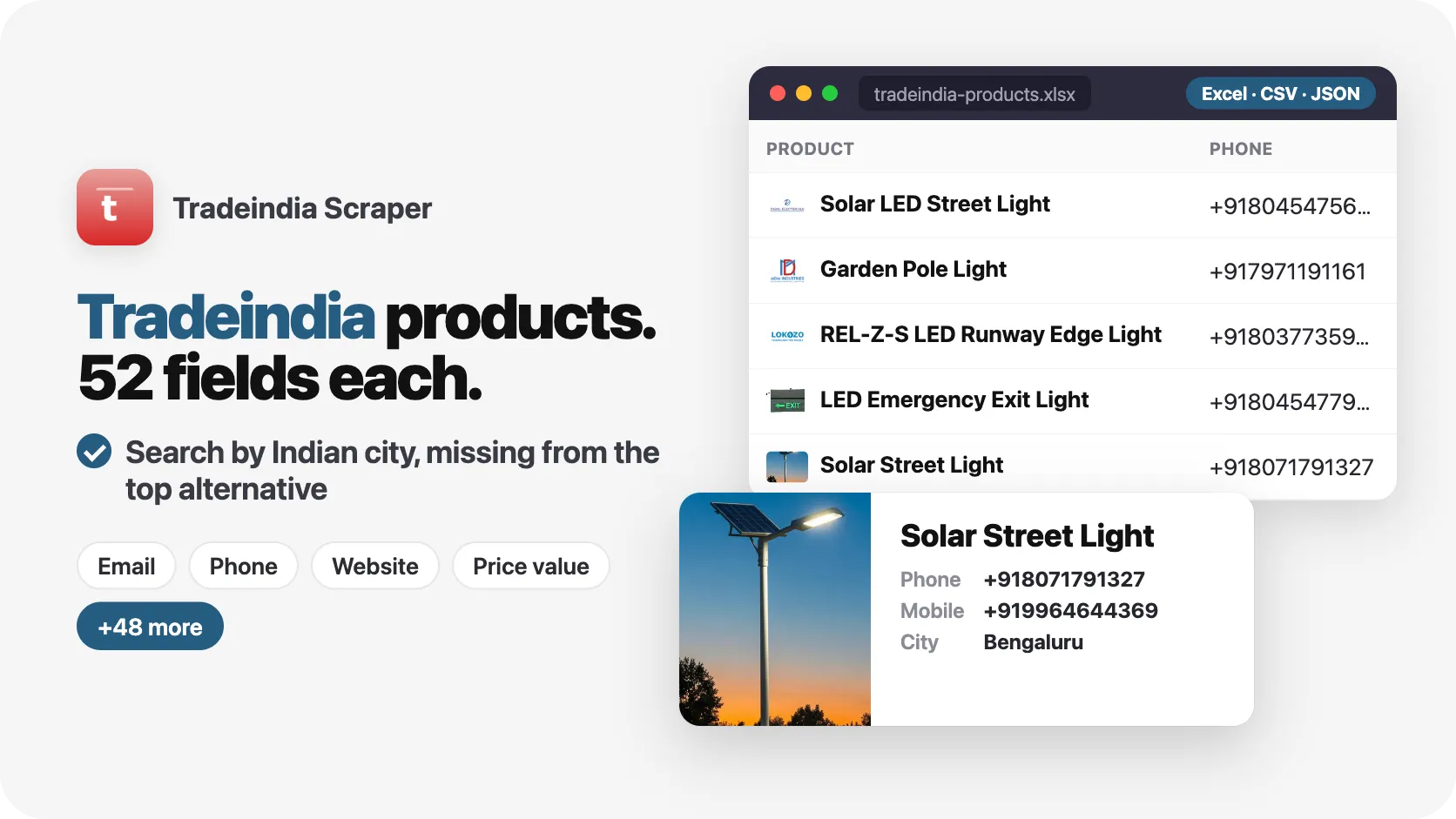
Tradeindia scraper for Indian suppliers and B2B products: 30 products in 9 seconds, 52 fields each. Search by keyword, city or link and get price, minimum order, specifications, plus the supplier contact person, email, phone, GST number, website, staff and address. No Tradeindia account needed.
Pricing
from $3.36 / 1,000 products
Rating
0.0
(0)
Developer

SilentFlow
Maintained by CommunityActor stats
0
Bookmarked
2
Total users
1
Monthly active users
7 days ago
Last modified
Categories
Features
Share
Tradeindia Scraper | Indian Suppliers, Products, Prices and Contacts (2026)
From SilentFlow. Creators of Facebook Search Scraper and JD Products Scraper (#1 for “jd scraper” in Apify Store search), with 960,000+ combined lifetime runs.
Turn any product keyword, Indian city or Tradeindia link into a list of suppliers you can call today: the product, its price and minimum order, and the company behind it with a named contact person, email, phone, GST number, staff and turnover. 30 products from 30 suppliers in 10 seconds, without a Tradeindia account.
Why choose this actor?
Copying supplier names from Tradeindia into a sheet, then hunting for who to ask for? Calling a company without knowing if it is a real manufacturer or a two-person trading desk? Searching all of India when you only buy from Ahmedabad or Mumbai?
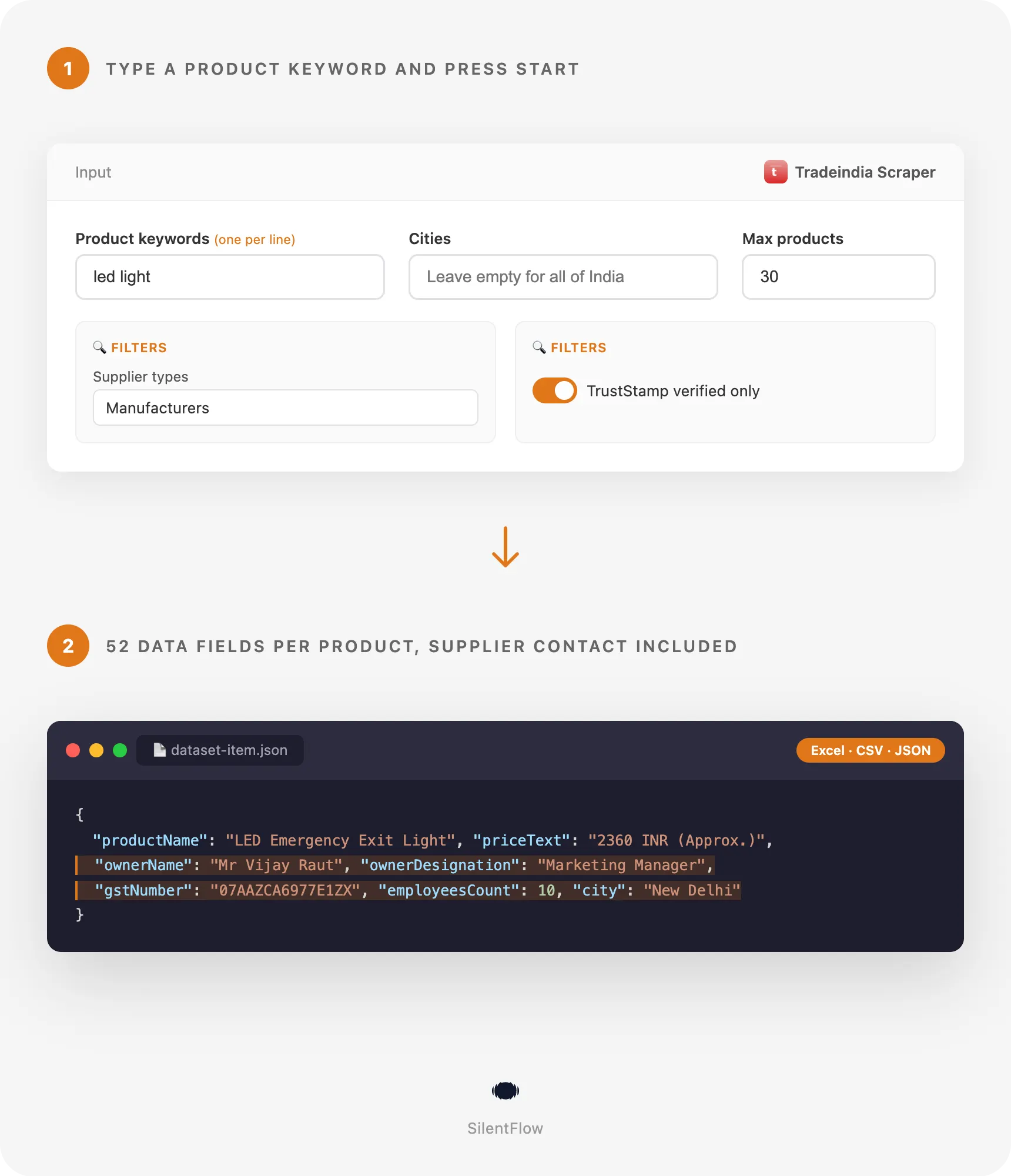
- A named person to ask for, with the company's GST number. Every product row carries the supplier's contact person and job title, next to the email and phone, and the company's GST number to check it on the GST portal before you send a purchase order. In our default run (led light, 30 products), all 30 rows came with a contact name and title, such as "Mr Vijay Raut, Marketing Manager", and all 30 with a GST number.
- The full specification table and the size of the supplier. Each row lists the product's specifications as label and value (material, voltage, grade, size, warranty...), 12.9 specifications per product on average in the default run, where 29 of 30 rows have them, with the supplier's headcount on 30 of 30 rows and its annual turnover where the supplier declares it (12 of 30). Shortlist the factories that make what you need at the scale you need.
- Search one city, or paste a supplier, product or category link. Add cities to your keywords and Tradeindia's own city search does the filtering: steel pipes in Mumbai returned 25 products, all 25 from Mumbai suppliers, in 14 seconds. Paste a supplier profile to get its whole catalogue, a product page to get that one product, or a category page: one supplier link, one product link and one category link gave 25 products from 14 suppliers in 12 seconds.

Try your first 30 products
Paste this input in the Input tab, or keep the prefilled form, and press Start:
You get the first 30 products Tradeindia lists for led light, each with its price, minimum order, unit, specifications, supply ability, delivery time and payment terms, and the supplier with its contact person, email, phone, website, GST number, business types, staff, year of establishment, address and map coordinates. That took 10 seconds in our run. Swap the keyword for the product you source or sell to, add a city, and raise maxItems to go deeper.
The Apify Free plan is enough to try it: no credit card, no Tradeindia account.
Copy to your AI assistant
Paste this block into Claude, ChatGPT or Cursor to give it full context about this scraper:
How to scrape Tradeindia suppliers and products
Get the suppliers of a product across India
The prefilled run: the products Tradeindia lists first for the keyword, one row each with the supplier's full profile. Add several keywords, one per line, to cover a product family (led light, led panel light, led street light).
Find manufacturers in one city that show a price
Steel pipe manufacturers based in Mumbai, with a listed price to compare. In our run: 25 products from 25 Mumbai manufacturers, every one priced, with 4 products left out by the filters, in 14 seconds. Every row came with a contact name, email, phone, website and GST number.
Read a supplier's catalogue, a product and a category at once
Twelve products from one steel supplier's catalogue, one solar street light product page, and twelve basmati rice products from the category page. In our run: 25 products from 14 suppliers in 12 seconds, each product of the catalogue with its description, category and specifications.
Input parameters
| Parameter | Type | Default | What it does |
|---|---|---|---|
searchQueries | array of strings | prefill ["led light"] | Products or services to search on Tradeindia, one search per line. |
startUrls | array of links | none | Tradeindia searches, categories, city pages, product pages or supplier profiles. |
cities | array of strings | none (all India) | Indian cities to search in. Each keyword is searched once per city. |
maxItems | integer | 100 (prefill 30) | Total products saved across all keywords, cities and links. |
supplierTypes | array | none (all) | Keep suppliers of at least one type: manufacturer, exporter, supplier, trader, distributor. |
onlyTrustStamp | boolean | false | Keep only TrustStamp verified suppliers. |
onlyWithPrice | boolean | false | Keep only products that show a price. |
maxItemsPerSearch | integer | 0 (no cap) | Cap each keyword, keyword and city pair, and supplier link. |
debugMode | boolean | false | Detailed logs for support. |
Accepted links in startUrls:
- Search:
https://www.tradeindia.com/search.html?keyword=led+light, with&city=mumbaiorled light in mumbaito stay in one city - Category:
https://www.tradeindia.com/manufacturers/led-light.html(also/suppliers/,/exporters/and/seller/...category pages) - City page:
https://www.tradeindia.com/mumbai/flexible-stainless-steel-pipes-city-207486.html - Product:
https://www.tradeindia.com/products/solar-led-street-light-c6823179.html(Hindi/hi/products/...links work too) - Supplier profile:
https://www.tradeindia.com/niko-steel-engineering-llp-342191/or its TrustStamp page, for every product the supplier lists
Cities are typed as Tradeindia spells them (Mumbai, New Delhi, Ahmedabad, Tirupur, Ludhiana, Coimbatore): a spelling Tradeindia does not know returns no product for that city, and the log names it. Supplier types also accept plurals and common words (manufacturers, wholesalers, trading company). A plain phrase pasted in startUrls is searched as a keyword.
What data can you extract from Tradeindia?
Each row is one product with the supplier behind it, 61 fields in six groups:
| Group | Fields |
|---|---|
| Product (9) | id, url, productName, description, category, subcategory, brandName, specifications (label and value), keywords |
| Price and trade terms (13) | priceValue, priceText, currency, priceUnit, minOrderQuantity, orderUnit, supplyAbility, deliveryTime, paymentTerms, mainExportMarkets, mainDomesticMarket, inStock, madeInIndia |
| Supplier and contact (28) | companyId, companyName, companyProfileUrl, website, ownerName, ownerDesignation, email, phone, phoneExtension, mobile, hasWhatsApp, gstNumber, businessTypes, isManufacturer, isExporter, isTrader, isDistributor, hasTrustStamp, isVerified, rating, memberSinceYears, yearEstablished, employeesCount, annualTurnover, paymentModes, certifications, companyDescription, companyLogo |
| Place (7) | address, city, state, country, countryCode, latitude, longitude |
| Media (2) | imageUrl, videoUrl |
| Meta (2) | searchQuery, scrapedAt |
How full the rows are, measured on the default run (led light, 30 products): contact person, title, email, phone, GST number, staff, year of establishment, address and coordinates on 30 of 30 rows; website on 29; specifications on 29; minimum order on 29; delivery time on 29; supply ability on 27; price on 24; annual turnover on 12; payment terms on 12. A field the supplier never filled in is null, never an empty string or a made-up value.
The dataset has three ready views: Products (product, supplier, city, price, minimum order, email, phone, link), Supplier leads (company, contact person, title, email, phone, website, GST number, city, staff, turnover, profile) and Prices and trade terms.
Output example
One real row from the default run (the two long texts are shortened here):
id is Tradeindia's product number and companyId its supplier number: both are stable, use them to deduplicate across runs. url and companyProfileUrl are the permanent Tradeindia pages. scrapedAt is the moment the row was read, in RFC 3339 UTC.
Advanced usage
Build a lead list of exporters in three industrial cities
Each keyword is searched once per city, capped at 50 products per city, so one large cluster does not crowd out the others. Open the Supplier leads view and export it: contact person, title, email, phone, website and GST number are one column each, ready for a CRM import.
Shortlist verified manufacturers for a sourcing request
Only suppliers Tradeindia checked and awarded its TrustStamp badge, only factories, only products with a price. Sort by priceValue and minOrderQuantity, then read supplyAbility and deliveryTime to see who can deliver your volume.
Map a competitor's full catalogue
Every product the supplier lists, with its price, minimum order, specifications and category, in catalogue order. Run it monthly and compare id and priceValue between runs to spot new products and price changes.
Benchmark asking prices for one product
Two hundred priced offers for one commodity, each with priceValue, currency, priceUnit and minOrderQuantity as separate columns. Group by priceUnit (kilogram, ton, bag) before you average: suppliers quote in different units.
Enrich a list of product pages you already track
Paste the product pages your team follows to refresh their price, stock flag and supplier details on a schedule. A page Tradeindia removed is reported in the log and skipped, the run goes on.
FAQ
What is Tradeindia? Tradeindia (tradeindia.com) is one of India's largest B2B marketplaces, alongside IndiaMART: Indian manufacturers, exporters, traders and distributors list their products there so that buyers in India and abroad can find and contact them.
Do I need a Tradeindia account? No. The scraper reads the product listings and supplier profiles Tradeindia shows to any visitor. No login, no API key.
What does one row contain? One product and the supplier behind it: the product, its price, minimum order, specifications and trade terms, the supplier's contact person, email, phone, website, GST number, business types, staff, turnover, address and coordinates. 61 fields in all.
Where do the email and phone come from?
They are the contact details Tradeindia gives buyers for the supplier. phone is the number Tradeindia shows buyers, with phoneExtension when the line needs one; mobile is the supplier's own mobile number when Tradeindia lists it (on all 30 rows of our default run, on none of the Mumbai steel pipes rows). hasWhatsApp tells whether the supplier accepts WhatsApp messages.
Can I search in one city?
Yes. Add one or more cities to cities: each keyword is searched once per city with Tradeindia's own city search. Steel pipes in Mumbai returned only Mumbai suppliers in our run.
Do the filters combine?
Yes. supplierTypes = manufacturer, onlyTrustStamp = true and onlyWithPrice = true on the keyword packaging machine returns priced products from verified factories only. Supplier types are alternatives: choosing manufacturer and exporter keeps suppliers that are either.
How many products can I get?
maxItems has no fixed upper limit. A broad keyword lists thousands of products (led light lists over 23,000), and the run reads page after page until maxItems is reached or the keyword runs out of products. A supplier link gives every product in its catalogue.
Why are some fields empty?
Suppliers fill their profile themselves. A supplier that never stated its turnover, export markets or certifications has null there. Prices are optional on Tradeindia too: 24 of 30 products had one in our default run. Use onlyWithPrice when you only want priced offers.
How fresh is the data? Live. Every run reads Tradeindia at the moment it runs, so prices, stock flags and contacts are the ones shown at that time. Schedule the actor to follow them over time.
Are the links permanent?
url and companyProfileUrl are the permanent Tradeindia pages and id and companyId are stable. Image links point to Tradeindia's image servers: download them if you need a copy, as a removed product can take its pictures with it.
Can I run several keywords and links at once?
Yes. Fill any mix of keywords, cities and links. Links are read first, then keywords in order, until maxItems products are saved. A product found by two inputs is delivered once.
More SilentFlow scrapers
🛒 E-commerce
- JD - JD Products Scraper | JD.com Prices, Brands and Barcodes
- Pinterest - Pinterest Scraper | Pins, Boards and Profiles
- Udemy Course - Udemy Course Scraper
- TikTok Shop - TikTok Shop Scraper | Products, Sellers and Creator Videos
- Leboncoin - Leboncoin Scraper | Classified Ads, Prices and Sellers
- Back Market - Back Market Scraper | Refurbished Prices
- Leboncoin - Leboncoin Ad Details Scraper
- Allegro - Allegro Scraper | Products, Prices and Sellers
- Naver - Naver Scraper | Shopping Products, Prices and Reviews
- ImportYeti - ImportYeti Scraper | Suppliers, Importers and Bills of Lading
- Naver - Naver Reviews Scraper | Shopping Product Reviews
- Coupang - Coupang Detail Scraper | Product Prices and Options
- Amazon Seller - Amazon Seller Scraper | Emails, Phones and Ratings
- Naver - Naver Products Scraper | Shopping Prices, Sellers and Ratings
- Taobao - Taobao Scraper | Products, Details, Prices and Sellers
- 1688 - 1688 Scraper | Products, Reviews, Details, Wholesale Prices
- Keepa - Keepa Scraper | Amazon Price History and Offers
- Avito - Avito Scraper | Listings, Prices and Sellers
- Pinterest - Pinterest Scraper
- Store Leads - Store Leads Scraper | Shopify Data
- Bring a Trailer - Bring a Trailer Scraper
- Ctrip - Ctrip Scraper | Attractions, Tickets and Reviews
- Eventim - Eventim Scraper | Events, Ticket Prices and Venues
- GasBuddy - GasBuddy Scraper | Gas Prices by Station
- Leboncoin - Leboncoin Scraper
- Store Leads Ecommerce - Store Leads Ecommerce Scraper
- 1688 - 1688 Reviews Scraper | Ratings, Buyer Photos and Variants
- Alibaba - Alibaba Scraper | Products, Supplier Companies and Prices
- Avito - Avito Profiles Scraper | Sellers, Ratings and Reviews
- Back Market - Back Market Scraper | Refurbished Electronics Prices
- BAUHAUS - BAUHAUS Scraper | Product Prices, EAN and Specs
- CARFAX - CARFAX Scraper | Used Cars, Prices and History
- Leboncoin - Leboncoin Details Scraper | Full Ad Data and Sellers
- Lowes - Lowes Products Scraper | Prices, Stock and Specs
- Mobile.de - Mobile.de Scraper
- Ticombo - Ticombo Scraper | Ticket Prices and Listings
- Uniqlo - Uniqlo Scraper | Products, Prices and Stock
- VividSeats - VividSeats Scraper | Tickets, Prices and Events
- Acquire - Acquire Scraper | Startups for Sale & Prices
- Agoda - Agoda Scraper | Hotel Prices and Guest Ratings
- Alibaba - Alibaba Products Scraper | Wholesale Prices and MOQ
- AliExpress - AliExpress Reviews Scraper | Feedback, Ratings and Photos
- Apple - Apple Scraper | App Store Apps, Ratings and Charts
- Che168 - Che168 Scraper | Used Car Listings and Prices
- Coles - Coles Products Scraper | Prices, Specials and Nutrition
- eBay Marketplace - eBay Marketplace Scraper
- Europages - Europages Scraper | Suppliers and B2B Companies
- GetYourGuide - GetYourGuide Scraper | Tours, Activities, Prices & Reviews
- Goofish - Goofish Detail Scraper | Listings, Prices and Sellers
- Google Hotels - Google Hotels Scraper | Prices, Offers and Ratings
- Homedepot - Homedepot Reviews Scraper | Customer Reviews and Ratings
- Judge - Judge Scraper | Reviews, Ratings and Store Profiles
- MakersRow - MakersRow Scraper | Manufacturers, Capabilities and Reviews
- OfferUp - OfferUp Scraper | Listings, Prices and Sellers
- OLX - OLX Scraper | Brazil Listings, Prices and Sellers
- RA - RA Scraper | Events, Lineups and Tickets
- Sahibinden - Sahibinden Scraper | Real Estate and Car Listings
- Trip - Trip Scraper | Hotels, Prices and Reviews
- Udemy - Udemy Scraper
- Vinted Marketplace - Vinted Marketplace Scraper
- Walmart - Walmart Scraper | Prices, Reviews, Sellers, Availability
- Webmotors - Webmotors Scraper | Car Listings, Prices and FIPE
- Wildberries - Wildberries Detail Scraper | Product Data, Prices & Sellers
- Woolworths - Woolworths Products Scraper | Prices, Specials and Nutrition
- YandexMarket - YandexMarket Scraper | Products, Prices and Sellers
- Zap - Zap Scraper | Prices and Store Offers
- AliExpress - AliExpress Scraper | Products, Prices and Sales
- Amazon - Amazon Product Scraper
- Amazon Marketplace - Amazon Marketplace Scraper
- AutoScout24 - AutoScout24 Scraper
- Carousell - Carousell Scraper | Listings, Prices and Sellers
- eBay Listings - eBay Listings Scraper
- Europages Deep Dive Extractor - Europages Deep Dive Extractor | VAT, Decision Makers, ISO Certs
- Mercari - Mercari Scraper | Listings, Sold Prices and Sellers
- TickPick - TickPick Scraper | Ticket Prices and Events
- Vinted - Vinted Scraper
- Walmart - Walmart Product Scraper
💼 Jobs
- ZipRecruiter - ZipRecruiter Jobs Scraper | Salary, Company & Location Filters
- Jobright - Jobright Scraper | Jobs, Salaries and H1B Sponsors
- Malt Freelancer - Malt Freelancer Scraper
- Multi Board - Multi Board Job Scraper
- Glassdoor Job Listings - Glassdoor Job Listings Scraper
- Indeed - Indeed Company Reviews Scraper
- Glassdoor - Glassdoor Jobs Scraper
- Jora - Jora Jobs Scraper
- LinkedIn Job Search - LinkedIn Job Search Scraper | Salaries & Seniority
- Malt - Malt Scraper | Freelance Profiles
- Cutshort - Cutshort Jobs Scraper | Salaries, Skills and Companies
- Dice - Dice Jobs Scraper | US Tech Jobs, Salaries, Skills
- Dice Tech - Dice Tech Jobs Scraper
- Francetravail - Francetravail Scraper | Job Offers and Salaries
- Freelancermap - Freelancermap Scraper | Projects, Skills and Companies
- 🔥 Glassdoor - 🔥 Glassdoor Scraper
- Gupy - Gupy Jobs Scraper | Brazil Jobs and Employers
- iimjobs - iimjobs Jobs Scraper | MBA, Finance and Hirist Tech Jobs
- Indeed - Indeed Companies Scraper | Reviews, Salaries, Interviews
- Instahyre - Instahyre Jobs Scraper | Companies, Recruiters and Ratings
- Jora - Jora Scraper | Jobs in Australia, New Zealand, Singapore
- Kununu - Kununu Reviews Scraper | Employee Ratings and Interviews
- Naukri & NaukriGulf - Naukri & NaukriGulf Jobs Scraper
- StepStone - StepStone Scraper
- Welcome to the Jungle - Welcome to the Jungle Job Scraper
- YCombinator - YCombinator Jobs Scraper | Startup Jobs, Salaries and Founders
- All - All Jobs Scraper
- Arbeitsagentur - Arbeitsagentur Scraper | German and Austrian Job Board
- Arbeitsagentur - Arbeitsagentur Jobs Scraper
- ATS - ATS Jobs Scraper | Greenhouse, Lever and Ashby
- iimjobs - iimjobs Scraper | Jobs, Companies and Recruiters
- Indeed - Indeed Jobs Scraper | NLP Skills
- Indeed - Indeed Jobs Scraper | Job Listings in 73 Countries
- LinkedIn - LinkedIn Jobs Scraper
- Seek - Seek Job Scraper
- Welcome to the Jungle - Welcome to the Jungle Scraper | Jobs and Company Data
- Zhaopin - Zhaopin Scraper | Jobs, Salaries and Companies
- Ziprecruiter - Ziprecruiter Scraper
🏠 Real estate
- SeLoger - SeLoger Scraper | Real Estate Listings
- Realtor Rental Listings - Realtor Rental Listings Scraper
- Airbnb Pro Host Contact & - Airbnb Pro Host Contact & Email Scraper
- Airbnb Professional Host - Airbnb Professional Host Scraper | Emails, Phones, SIRET
- Bien'ici - Bien'ici Scraper | Property Listings
- Idealista - Idealista Scraper
- Realestate.com.au - Realestate.com.au Scraper
- SeLoger - SeLoger Scraper | French Property Listings and Agencies
- Trulia Rental Listings - Trulia Rental Listings Scraper
- Bienici - Bienici Scraper
- Rightmove - Rightmove Scraper
- Airbnb - Airbnb Detail Scraper | Listings, Hosts and Availability
- Domclick - Domclick Scraper | Real Estate Listings
- Imovelweb - Imovelweb Scraper | Real Estate Listings
- OpenRent - OpenRent Scraper | Rental Listings and Landlords
- Propwire - Propwire Scraper | Property Owner Leads
- Realtor - Realtor Detail Scraper | Property Details and Price History
- Redfin - Redfin Detail Scraper | Property Data, Estimates and Flood Risk
- Redfin - Redfin Scraper | Listings, Sold Homes and Agents
- Zapimoveis - Zapimoveis Scraper | Real Estate Listings and Prices
- Zillow - Zillow Scraper
- Airbnb Search - Airbnb Search Scraper | Prices, Fees, Amenities, Hosts
- Airbnb Search - Airbnb Search Scraper
- Anjuke - Anjuke Scraper | Rental Listings, Prices and Agents
- Idealista - Idealista Scraper
- Realtor Rental - Realtor Rental Scraper
- SeLoger - SeLoger Products Scraper | Property Listings and Agencies
- Trulia Rental - Trulia Rental Scraper | US Rentals, Prices, Pet Policy
📣 Social media
- Douyin - Douyin Transcript Scraper | Subtitles and Speech to Text
- Facebook Search - Facebook Search Scraper
- LinkedIn Post Search - LinkedIn Post Search Scraper | Keywords, Hashtags & Profiles
- Instagram - Instagram Story Scraper | Stories & Highlights
- Facebook Search - Facebook Search Profiles Scraper | People by Name or Keyword
- LinkedIn Leads - LinkedIn Leads Scraper | Sales Navigator Export
- TikTok Creative - TikTok Creative Ads Scraper | Top Ads, Landing Pages & Metrics
- TikTok Trend - TikTok Trend Scraper | Trending Hashtags and Videos
- OnlyFans - OnlyFans Profile Scraper
- Discord - Discord Scraper | Servers, Member Counts and Invites
- Pinterest - Pinterest Ads Scraper | Ad Library, Reach & Targeting
- Discord - Discord Profiles Scraper | Users, Badges and Server Tags
- LinkedIn Ads Library - No Cookies - LinkedIn Ads Library Scraper - No Cookies
- LinkedIn Hashtag & - LinkedIn Hashtag & Post Scraper | No Cookies
- LinkedIn Sales Navigator - LinkedIn Sales Navigator Scraper
- Reddit - Reddit Scraper | Posts, Comments and Subreddits
- Snapchat - Snapchat Contacts Scraper | Phones, Emails and Websites
- Snapchat - Snapchat Videos Scraper | Spotlight Videos, MP4 and Stats
- TwitchTracker - TwitchTracker Scraper | Twitch Streamer Stats and Rankings
- YouTube - YouTube Channel Scraper | Videos, Shorts and Views
- Bilibili - Bilibili Scraper | Videos, Profiles, Comments, Danmaku
- Facebook Business Page - Facebook Business Page Scraper
- Kwai - Kwai Scraper | Videos, Creators and Hashtags
- Likee - Likee Scraper | Videos, Hashtags and Creators
- LinkedIn Event - LinkedIn Event Scraper
- LinkedIn People Search - LinkedIn People Search Scraper | Profiles & Companies
- Meta Ad Library - Meta Ad Library Scraper
- Telegram - Telegram Posts Scraper | Views, Reactions and Comments
- X Timeline - X Timeline Scraper | Tweets and Engagement Stats
- Bandsintown - Bandsintown Scraper | Concerts and Tour Dates
- Bluesky - Bluesky Scraper | Posts, Profiles and Followers
- Douyin - Douyin Comments Scraper | Comments, Likes and IP Regions
- Douyin - Douyin Hashtags Scraper | Views, Creators and Topics
- Facebook Thread - Facebook Thread Profiles Scraper | Followers, Bios & Engagement
- Kuaishou - Kuaishou Scraper | Videos, Comments and Creator Stats
- LoyalFans - LoyalFans Scraper | Creator Profiles and Prices
- Pikabu - Pikabu Scraper | Posts, Comments and Views
- Pinterest - Pinterest Profiles Scraper | Followers, Emails and Bios
- Pinterest - Pinterest Videos Scraper | Video Downloader, MP4 Links, Stats
- Pornhub - Pornhub Videos Scraper | Search, Tags and Stream Links
- Reddit - Reddit Comments Scraper | Search, Threads and Replies
- Reddit - Reddit Profiles Scraper | User Karma, Activity and Communities
- RedNote - RedNote Videos Scraper | Downloader, Transcripts and Stats
- Skool Community - Skool Community Scraper
- Telegram - Telegram Comments Scraper | Replies, Authors and Reactions
- Telegram - Telegram Scraper | Channel Posts, Views and Reactions
- TikTok Lookalike - TikTok Lookalike Scraper | Influencers, Emails and Engagement
- TikTok - TikTok Scraper
- Twitch - Twitch Contacts Scraper | Emails and Social Links
- Twitch - Twitch Scraper | Streamers, Emails and Clips
- Xigua - Xigua Scraper | Videos, Creators and Downloads
- YouTube Autocomplete - YouTube Autocomplete Scraper | Keyword Suggestions
- Facebook - Facebook Company Scraper | Emails, Phones, Ratings
- Instagram Engagement - Instagram Engagement Scraper
- OnlyFans - OnlyFans Profiles Scraper | Creator Prices, Stats & Links
- OnlyFans - OnlyFans Creator Scraper
- Reddit - Reddit Scraper | Comments, Posts and Users
- RedNote - RedNote Detail Scraper | Xiaohongshu Details, Images, Videos
- Skool Group - Skool Group Scraper
- Snapchat - Snapchat Ads Scraper | Ad Library, Impressions & Targeting
- Weibo - Weibo Scraper | Posts, Profiles, Followers and Engagement
- YouTube - YouTube Transcript Scraper
🏢 Business data
- LinkedIn Company Search - LinkedIn Company Search Scraper | Profiles & Firmographics
- Teachable Course - Teachable Course Scraper
- Website Tech Stack - Website Tech Stack Scraper
- Teachable - Courses, Prices & Instructors - Teachable Scraper - Courses, Prices & Instructors
- Trustpilot - Trustpilot Scraper | Reviews, Ratings and Company Contacts
✈️ Travel
- Tencent - Tencent Scraper | Maps Places, Phones and Ratings
- Booking.com Hotel - Booking.com Hotel Scraper
- Viator - Viator Reviews Scraper | Tour Reviews and Ratings
- 2GIS - 2GIS Reviews Scraper | Ratings, Photos and Owner Replies
- Apple Maps - Apple Maps Scraper | Places, Phones and Emails
- Despegar - Despegar Reviews Scraper | Hotel Reviews and Ratings
- Flight Price - Flight Price Scraper
- Kakao - Kakao Scraper | Map Places, Reviews and Phones
- Mafengwo - Mafengwo Scraper | Attractions, Ratings and Tickets
- OpenTable - OpenTable Reviews Scraper | Restaurant Reviews and Ratings
- TheFork - TheFork Scraper | Restaurants, Menus and Ratings
- Trip - Trip Reviews Scraper | Hotel Reviews and Ratings
- Zomato - Zomato Reviews Scraper | Restaurant Ratings and Replies
- Booking - Booking Scraper | Hotel Prices, Photos, Availability
- Google Maps - Google Maps Scraper
🎯 Lead generation
- Northdata - Northdata Company Scraper
- Dealroom - Dealroom Scraper | Companies and Investors
- ZocDoc - ZocDoc Scraper | Doctors, Reviews and Availability
- UK Companies House - UK Companies House Enricher
- KVK - KVK Scraper | Dutch Companies and SBI Codes
- SIRET - SIRET Company Enricher
- PagesJaunes - PagesJaunes Scraper | French Business Emails and SIRET
- Similarweb - Similarweb Scraper | Website Traffic, Rankings and Competitors
- BuiltWith - BuiltWith Scraper | Tech Stacks and Top Sites
- Dealroom Startup Data - Dealroom Startup Data Scraper
- Justdial - Justdial Companies Scraper | Business Leads, Phones and Emails
- PagesJaunes - PagesJaunes Business Scraper
- ThomasNet Suppliers - ThomasNet Suppliers Scraper
- ALEO - ALEO Scraper | Polish Companies and Financials
- BBB - BBB Scraper | Ratings, Reviews and Complaints
- BetaList - BetaList Scraper | Startups, Websites and Contacts
- Clutch - Clutch Scraper | Agencies, Reviews, Ratings, Services
- CNPJ Brazilian - CNPJ Brazilian Company Enricher
- Company Data - Company Data Scraper | Emails, Phones and Tech Stack
- CSLB - CSLB Scraper | Contractor Licenses, Bonds and Leads
- Delaware - Delaware Scraper | Corporations, LLCs and Registered Agents
- French Company Prospector - French Company Prospector
- G2 - G2 Reviews Scraper
- Paginasamarillas - Paginasamarillas Scraper | Business Leads, Emails and Phones
- Pappers - Pappers Scraper | French Companies, Directors & Financials
- SEC - SEC Scraper | EDGAR Filings and Company Data
- SoftwareAdvice - SoftwareAdvice Scraper | Reviews, Ratings and Pros & Cons
- Sunbiz - Sunbiz Scraper | Florida Companies and Officers
- TrustRadius - TrustRadius Reviews Scraper | Ratings, Pros and Cons
- USPTO - USPTO Scraper | Trademark Search and Status
- Clutch Agency - Clutch Agency Scraper
- Domain - Domain Enricher
- Google Ads Transparency - Google Ads Transparency Scraper
- SIRET French - SIRET French Company Enricher
- Sunbiz - Sunbiz Companies Scraper | New Florida Business Leads
- ZocDoc - ZocDoc Scraper
🔎 SEO
- SpyFu - SpyFu Scraper | SEO, PPC and Competitor Data
- Scribd - Scribd Scraper | Documents, Authors and Views
- Apple - Apple Reviews Scraper | App Store Reviews and Ratings
- Bing - Bing Enricher Scraper | Mobile Friendly Test and Indexing
- Google News - Google News Scraper
- Yandexsearch - Yandexsearch Scraper | Search Results and Rankings
🎬 Video
📰 News
- ForexFactory - ForexFactory Scraper | Economic Calendar and Forecasts
- FT - FT Scraper | Financial Times Articles, Authors and Topics
- OpenAI - OpenAI Scraper | News, Blog Posts and Research
- Bloomberg - Bloomberg Scraper | News Articles and Full Text
- DEV - DEV Scraper | Articles, Full Text and Authors
- Reuters - Reuters Scraper | News Articles, Tickers and Journalists
🧰 More tools
- FanDuel - FanDuel Scraper | Odds, Spreads and Player Props
- PrizePicks - PrizePicks Scraper | Player Props, Lines and Projections
- Equibase - Equibase Scraper | Horse Racing Entries and Results
- Maersk - Maersk Scraper | Vessel Schedules and Port Calls
- Screener - Screener Scraper | Stock Fundamentals, NSE & BSE
Support
Need something this scraper doesn't do yet? We ship features fast.
- Feature requests go straight to our backlog
- Enterprise needs? We do custom integrations and high-volume plans
- Pricing questions? Check the Monetization tab on the actor page
Response time: usually under 24 hours.
Legal compliance
This Actor extracts publicly available data from Tradeindia, as shown to visitors who are not logged in. It does not bypass any login, paywall or CAPTCHA and never uses a Tradeindia account. Users are responsible for complying with Tradeindia's terms of service and applicable data protection and marketing laws (GDPR, CCPA, PIPL where relevant, and India's Digital Personal Data Protection Act). Contact person names, emails and phone numbers are personal data: process them on a lawful basis, keep only what you need, respect opt-outs and do-not-call rules in your outreach, and honor removal requests. The data returned is informational; verify accuracy for regulated use cases.
Tradeindia Scraper by SilentFlow: Indian suppliers and their products, with contact person, email, phone, GST number and trade terms, from any keyword, city or link.


