

IPinfo Scraper | IP Geolocation and Abuse Contacts
Pricing
from $0.23 / 1,000 ip addresses
IPinfo Scraper | IP Geolocation and Abuse Contacts
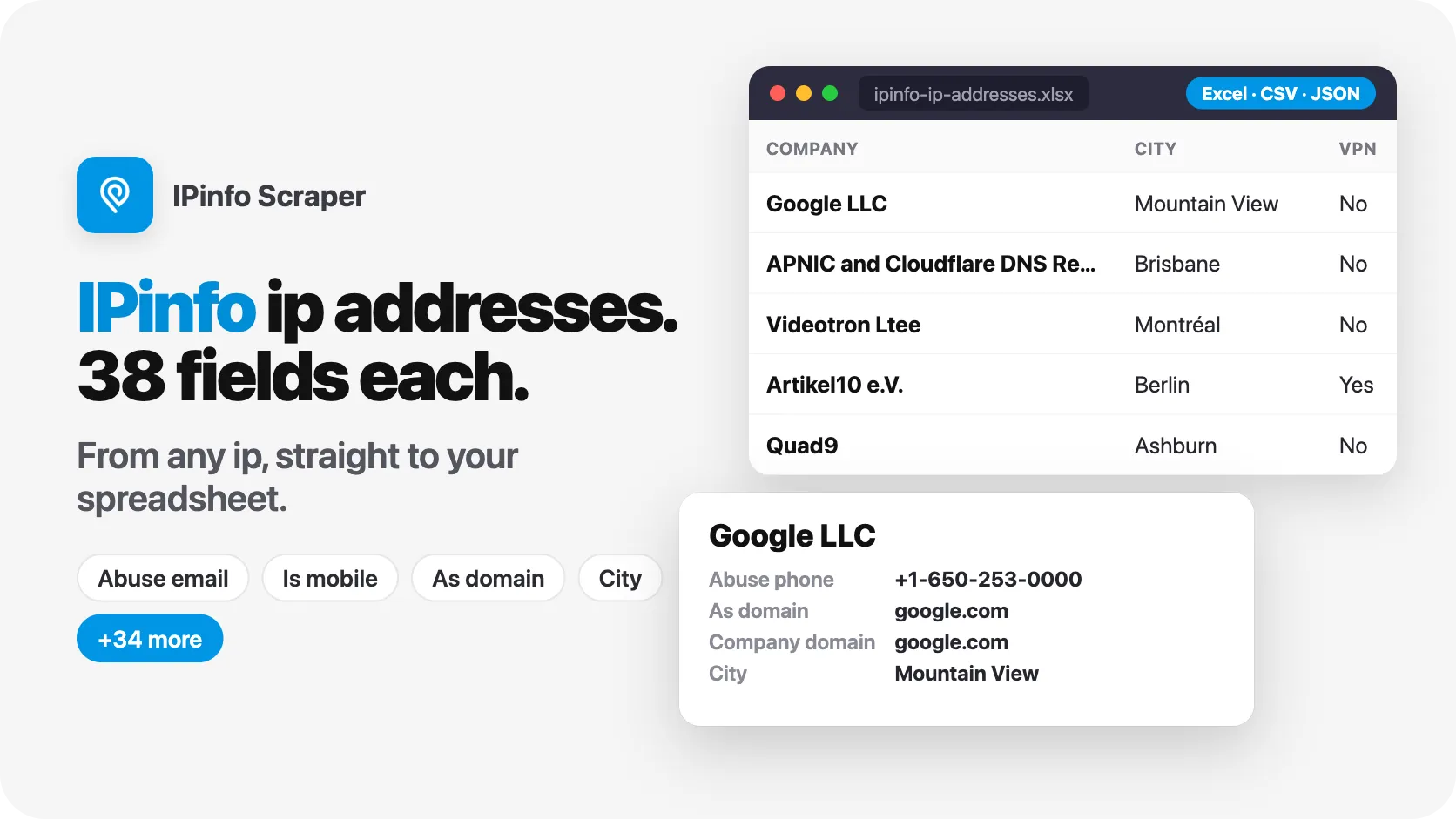
IPinfo scraper for ipinfo.io IP lookups, no account or API key. Paste IP addresses, domains or CIDR ranges and get geolocation, ASN, company, VPN, proxy and Tor flags plus the abuse email and phone of every IP. Our test run: 12 IPs in 5 seconds, 38 fields each. Built for fraud and security teams.
Pricing
from $0.23 / 1,000 ip addresses
Rating
0.0
(0)
Developer

SilentFlow
Maintained by CommunityActor stats
0
Bookmarked
2
Total users
1
Monthly active users
3 days ago
Last modified
Categories
Features
Share
IPinfo Scraper | IP Geolocation, ASN, VPN Detection and Abuse Contacts (2026)
From SilentFlow. Creators of Facebook Search Scraper and JD Products Scraper (#1 for “jd” in Apify Store search), with 1,000,000+ combined lifetime runs.
Paste the IP addresses from your logs, alerts or sign-ups and get one flat row per IP: where it is, which network and company it belongs to, whether it is a VPN, proxy, Tor exit or hosting server, and who to email or call to report abuse. 12 IPs in 16 seconds on our test run, no ipinfo.io account and no API key.
Why choose this actor?
Looking up suspicious IPs one browser tab at a time during an incident? Sending takedown requests to a generic contact because you could not find the right abuse desk? Running fraud rules that cannot tell a home connection from a VPN exit?
- The abuse contact and the company behind every IP. Each row carries the abuse desk name, email, phone, postal address, country and the network it covers, plus the company name, domain and type behind the address. On our default run of 12 IPs, the abuse email, the company name and the network type were filled on 12 of 12 rows, and the abuse phone on 10 of 12.
- Seven anonymisation flags on every row. Anonymous, VPN, proxy, Tor, relay, hosting and residential proxy, each a true or false value you can filter on. When we read the range
185.220.101.0/29, all 8 addresses came back flagged as Tor exits and VPN, with the abuse contactabuse@artikel10.orgon each. - Paste what you have: IPs, log lines, links, domains or ranges. Ports (
193.0.6.139:443), defanged indicators (212.27.48[.]10), ipinfo.io links, domains and CIDR blocks all go in the same run. With a cap of 2 addresses per domain, three domains, one of them a defanged URL, returned 5 IP addresses, each with its hosting company and abuse contact. Every row keeps the entry it came from ininput, so you can join the results back to your list.

Try your first IP addresses
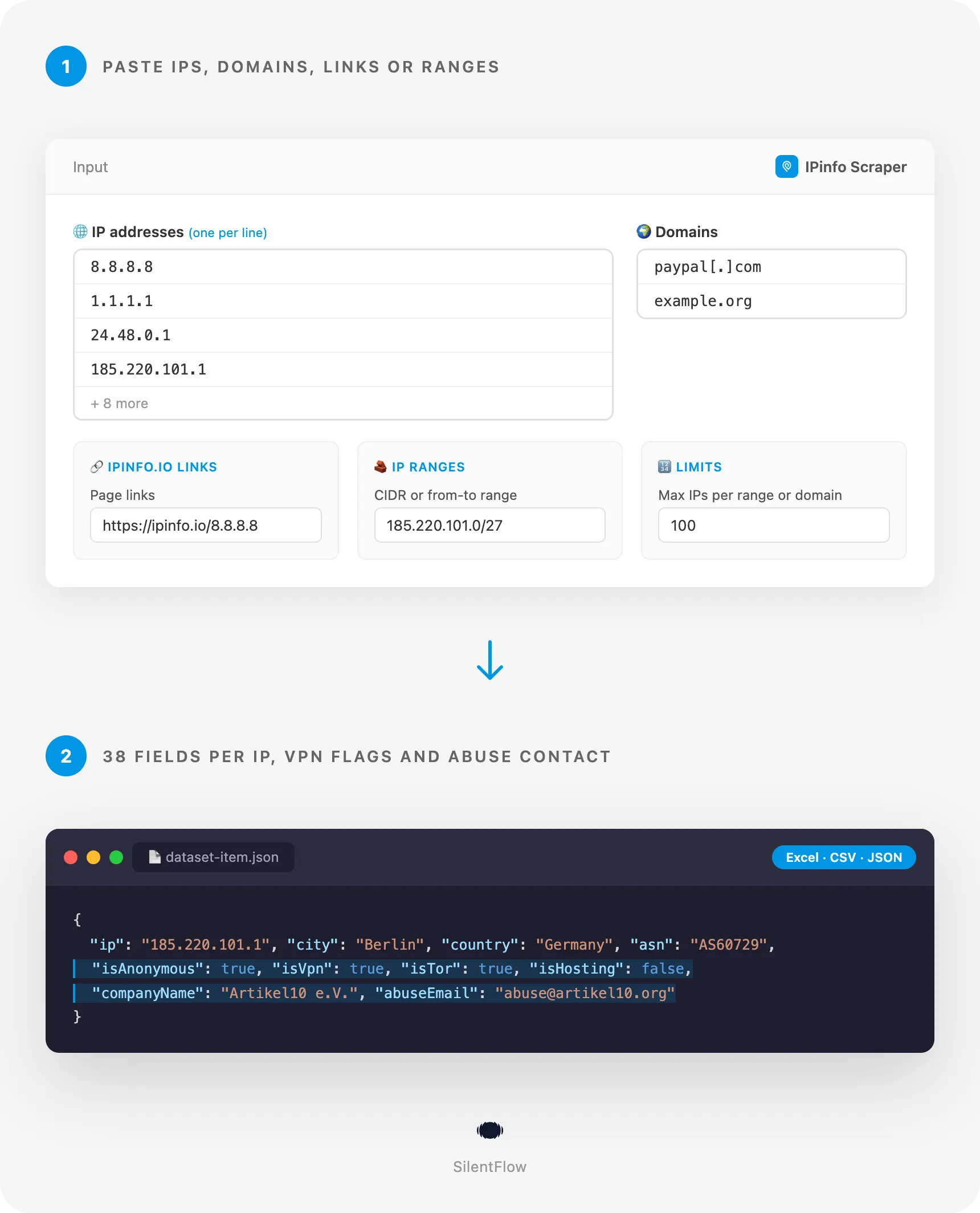
Paste this input in the Input tab, or send it from the API, and run. You get 12 rows: Google and Cloudflare DNS resolvers, a Tor exit node in Berlin, home connections in Canada, the US and the UK, a French mobile network, a Linode server and more. Our test run returned the 12 rows in 16 seconds, covering 6 countries.
The Apify Free plan is enough to run it: no credit card, no ipinfo.io account, no API key.
Copy to your AI assistant
Paste this block into Claude, ChatGPT, Cursor or any coding assistant to give it the full picture of this actor:
How to look up IP addresses on IPinfo
Look up a list of IP addresses
Paste the addresses, one per line. Each public IP returns one row.
Find who hosts a phishing site and where to report it
Give the domain or the full URL, defanged or not. The actor finds the IP addresses it points to and returns the hosting company and its abuse desk for each. This input returned 6 rows on our test: 2 addresses for paypal.com and 4 for example.org, IPv4 first.
Map every address of a suspicious network block
Give a CIDR block or a from-to range. The addresses are read in order, up to maxItems per range, so you see which hosts of the block are VPN exits, Tor nodes or servers.
Input parameters
| Parameter | Type | Default | What it does |
|---|---|---|---|
ips | array of strings | IPv4 or IPv6 addresses to look up, all in one run. Every public address returns one row, whatever maxItems is. | |
startUrls | array of links | ipinfo.io IP pages such as https://ipinfo.io/8.8.8.8. You can upload a text file of links. One row per link. | |
domains | array of strings | Domains or URLs. Each returns one row per IP address it points to, up to maxItems. | |
ipRanges | array of strings | CIDR blocks or from-to ranges. Each returns its addresses in order, up to maxItems. | |
maxItems | integer | 100 | The most IP addresses each range or domain returns. |
debugMode | boolean | false | Writes detailed progress to the log. |
Give at least one of ips, startUrls, domains or ipRanges. All four can be combined in one run: addresses come first, then links, domains and ranges. An address found by two entries is saved once, with the first entry in input.
What you can put in IP addresses
| You paste | The actor reads |
|---|---|
8.8.8.8 or 2606:4700:4700::1111 | That address |
2001:4860:4860:0000:0000:0000:0000:8888 | The short form 2001:4860:4860::8888 |
193.0.6.139:443 or [2001:db8:85a3::1]:443 | The address, without the port |
185.220.101[.]1, 185[.]220[.]101[.]1 | Defanged forms, read as the real address |
8.8.8.8, 1.1.1.1; 9.9.9.9 | Three addresses from one line |
https://ipinfo.io/8.8.8.8 | The address of the link |
185.220.101.0/29 | Every address of the block, up to maxItems |
github.com | The addresses the domain points to, up to maxItems |
10.0.0.1, 192.168.1.1, 127.0.0.1 | Skipped with a note in the log: private and reserved addresses have no public data |
Values that are none of these are skipped with a note in the log, and the rest of the run goes on.
What you can put in IP ranges
A CIDR block (185.220.101.0/24, 2606:4700:4700::/120), a from-to range (1.1.1.1-1.1.1.50, spaces allowed around the dash) or a single address. A block given with host bits set (185.220.101.7/30) is read from the start of its network. Private and reserved addresses inside a range are left out. A /24 block holds 256 addresses: set maxItems to 256 to read all of them.
What data can you extract from IPinfo?
Every row is one IP address with 39 fields, in the same order on every row. A value ipinfo.io does not show for that address is null, never an empty string.
| Group | Fields | Count |
|---|---|---|
| Identity | ip, url, hostname, tags | 4 |
| Location | city, region, country, countryCode, postal, timezone, latitude, longitude | 8 |
| Network | asn, asName, asDomain, asType, route, isAnycast, isMobile, carrierName | 8 |
| Company | companyName, companyDomain, companyType | 3 |
| Anonymisation | isAnonymous, isVpn, isProxy, isTor, isRelay, isHosting, isResidentialProxy | 7 |
| Abuse contact | abuseName, abuseEmail, abusePhone, abuseAddress, abuseCountryCode, abuseNetwork | 6 |
| Measures | hostedDomainsCount | 1 |
| Meta | input, scrapedAt | 2 |
What the fields mean in practice:
asTypeandcompanyTypesay what kind of network owns the address:isp(a home or office connection),hosting(a data center or cloud),business,educationorgovernment. On our default run: 5 hosting networks, 4 ISPs, 2 businesses and 1 education network.tagsare the labels ipinfo.io shows on the page:anycast,cdn,hosting,resolver,nameserver,webserver,tor,vpn,mobile,ssh,cloudand more.8.8.8.8carries six of them.hostedDomainsCountis how many domains ipinfo.io sees on the address: 57,259 for8.8.8.8, 0 for a home connection.routeis the announced prefix that contains the address,abuseNetworkthe block the abuse contact is responsible for. They are often different:185.220.101.1sits in the route185.220.101.0/24and the abuse block185.220.101.0/27.carrierNameis filled for mobile networks only (Orangefor86.245.1.1), andhostnameonly when the address has a reverse DNS name (11 of the 12 default IPs).urlis the permanent ipinfo.io page of the address.scrapedAtis the moment the row was read, in RFC 3339 UTC.
Output example
A Tor exit node in Berlin, from our default run:
The dataset has five ready-made views: IP addresses (overview), VPN, proxy and Tor, Abuse contacts, Geolocation, and Network and company. Export any of them as JSON, CSV, Excel or HTML from the run page, or pull them from the API.
Advanced usage
Enrich a firewall or WAF log export as it is
Copy the source addresses column of your export, ports and duplicates included. Ports are dropped, duplicates are read once, private addresses are skipped with a note.
This input returns 3 rows: the RIPE NCC server, the Linode host (once) and the Tor exit. 10.12.0.7 is a private address and is skipped.
Flag yesterday's sign-ups that came through a VPN or a proxy
Schedule the actor every morning with the IPs of the previous day's sign-ups or payments, then filter the privacy view on isVpn, isProxy, isTor or isResidentialProxy, and compare countryCode with the country the user declared.
On this list, 185.220.101.1 comes back as a Tor exit and VPN, 45.33.32.156 as a hosting server, and the two others as ISP connections in the US and France.
Put a company name on the IPs that visit your website
Send the visitor IPs of your landing pages and keep the rows whose asType is business, education or government: companyName and companyDomain give you an account to look up in your CRM or in Clay.
Watch a list of known addresses every day
An address can change hands, start hosting a VPN or turn into a Tor exit. Save your watch list as a text file of ipinfo.io links, upload it in startUrls, and schedule the run daily. Compare isAnonymous, asName and companyName with the day before to see what changed.
Send abuse reports for a whole campaign from Python
Run the actor on the domains of a phishing campaign, then group the hosting IPs by abuse desk so each provider gets one email with all its addresses.
FAQ
What is ipinfo.io? IPinfo is a US provider of IP address data. Its public website has one page per IP address with the location, the network, the company, privacy detection and the abuse contact. This actor reads those public pages and turns them into rows.
Do I need an ipinfo.io account or API token? No. The actor reads the public IP pages, the ones anyone sees in a browser without logging in. You do not need an ipinfo.io account, a token or an API plan.
Which fields does it return? 39 fields per IP: hostname and tags, city, region, country and country code, postal code, time zone and coordinates, ASN, AS name, domain, type and route, anycast and mobile carrier, the company name, domain and type, seven anonymisation flags, the full abuse contact and the number of hosted domains. See the table above.
How fresh is the data? Each page is read live when your run reaches it. Nothing comes from a stored copy, so a run today returns what ipinfo.io shows today.
Can I send thousands of IP addresses? Yes. There is no fixed limit on the number of addresses per run. Larger lists take longer to read, so for daily volumes, schedule the actor on each new batch rather than resending your full history.
Why is a field null on some rows?
Because ipinfo.io shows nothing for it on that address. hostname is null when the address has no reverse DNS name, carrierName outside mobile networks, abusePhone when the abuse desk lists no phone (10 of our 12 default IPs had one). The row is still delivered with every other field.
Why did an address return no row?
Private and reserved addresses (10.x, 172.16.x to 172.31.x, 192.168.x, 127.x, fc00::/7, documentation ranges) have no public data: they are skipped with a note in the log and never become a row. An entry that is not an address, a link, a domain or a range is skipped the same way.
Does it detect VPNs, proxies and Tor? It returns the flags ipinfo.io shows on each page: anonymous, VPN, proxy, Tor, relay, hosting and residential proxy. "False" means ipinfo.io found no match on the day of the run, not a guarantee. The name of the VPN provider is not on the public page and is not returned.
Can I look up a domain instead of an IP?
Yes. Put it in domains (a full URL or a defanged one works too). The actor finds the IP addresses the domain points to and returns one row per address, IPv4 first, up to maxItems. The input field keeps the domain name.
Can I get the list of domains hosted on an IP, or the AS page?
The row gives the number of hosted domains. The list itself and the WHOIS of an AS are not public on ipinfo.io, so they are not part of the output. AS pages (ipinfo.io/AS15169) are not read by this actor.
Will the rows match the order of my list?
Each row carries the entry that produced it in input, so you can join the results back to your list whatever the order.
More SilentFlow scrapers
🛒 E-commerce
- JD - JD Products Scraper | JD.com Prices, Brands and Barcodes
- Pinterest - Pinterest Scraper | Pins, Boards and Profiles
- Udemy Course - Udemy Course Scraper
- TikTok Shop - TikTok Shop Scraper | Products, Sellers and Creator Videos
- Leboncoin - Leboncoin Scraper | Classified Ads, Prices and Sellers
- Leboncoin - Leboncoin Ad Details Scraper
- Allegro - Allegro Scraper | Products, Prices and Sellers
- Back Market - Back Market Scraper | Refurbished Prices
- Naver - Naver Scraper | Shopping Products, Prices and Reviews
- Coupang - Coupang Scraper | Product Details, Prices and Options
- Naver - Naver Reviews Scraper | Shopping Product Reviews
- Taobao - Taobao Scraper | Products, Details, Prices and Sellers
- ImportYeti - ImportYeti Scraper | Suppliers, Importers and Bills of Lading
- Keepa - Keepa Scraper | Amazon Price History and Offers
- Amazon Seller - Amazon Seller Scraper | Emails, Phones and Ratings
- Eventim - Eventim Scraper | Events, Ticket Prices and Venues
- Naver - Naver Products Scraper | Shopping Prices, Sellers and Ratings
- 1688 - 1688 Scraper | Products, Reviews, Details, Wholesale Prices
- Wildberries - Wildberries Scraper | Product Details, Prices and Sellers
- Avito - Avito Scraper | Listings, Prices and Sellers
- GasBuddy - GasBuddy Scraper | Gas Prices by Station
- Leboncoin - Leboncoin Scraper
- Pinterest - Pinterest Scraper
- 1688 - 1688 Reviews Scraper | Product Reviews, Ratings, Buyer Photos
- Alibaba - Alibaba Scraper | Products, Supplier Companies and Prices
- Back Market - Back Market Scraper | Refurbished Electronics Prices
- Bring a Trailer - Bring a Trailer Scraper
- Ctrip - Ctrip Scraper | Attractions, Tickets and Reviews
- Store Leads Ecommerce - Store Leads Ecommerce Scraper
- Store Leads - Store Leads Scraper | Shopify Data
- Vinted Marketplace - Vinted Marketplace Scraper
- Avito - Avito Profiles Scraper | Sellers, Ratings and Reviews
- BAUHAUS - BAUHAUS Scraper | Product Prices, EAN and Specs
- CARFAX - CARFAX Scraper | Used Cars, Prices and History
- Che168 - Che168 Scraper | Used Car Listings and Prices
- Goofish - Goofish Detail Scraper | Xianyu Details, Prices and Sellers
- Homedepot - Homedepot Reviews Scraper | Customer Reviews and Ratings
- Leboncoin - Leboncoin Details Scraper | Full Ad Data and Sellers
- Lowes - Lowes Products Scraper | Prices, Stock and Specs
- Sahibinden - Sahibinden Scraper | Real Estate and Car Listings
- VividSeats - VividSeats Scraper | Tickets, Prices and Events
- Acquire - Acquire Scraper | Startups for Sale & Prices
- Agoda - Agoda Scraper | Hotel Prices and Guest Ratings
- Alibaba - Alibaba Products Scraper | Products, Suppliers, Prices and MOQ
- Barnes and Noble - Barnes and Noble Scraper | Book Prices and Availability
- Boohoo - Boohoo Scraper | Products, Prices and Stock
- Coles - Coles Products Scraper | Prices, Specials and Nutrition
- eBay Marketplace - eBay Marketplace Scraper
- Encar - Encar Scraper | Used Car Listings and Accident History
- Europages - Europages Scraper | Suppliers and B2B Companies
- Fashionphile - Fashionphile Scraper | Listings, Prices and Sold Items
- GetYourGuide - GetYourGuide Scraper | Tours, Activities, Prices & Reviews
- Google Hotels - Google Hotels Scraper | Prices, Offers and Ratings
- Judge - Judge Scraper | Reviews, Ratings and Store Profiles
- MakersRow - MakersRow Scraper | Manufacturers, Capabilities and Reviews
- Mobile.de - Mobile.de Scraper
- OfferUp - OfferUp Scraper | Listings, Prices and Sellers
- OLX - OLX Scraper | Brazil Listings, Prices and Sellers
- RA - RA Scraper | Events, Lineups and Tickets
- Ticombo - Ticombo Scraper | Ticket Prices and Listings
- Tradeindia - Tradeindia Scraper | Suppliers, Products and Contacts
- Trip - Trip Scraper | Hotels, Prices and Reviews
- Turo - Turo Scraper | Car Rentals, Prices and Reviews
- Udemy - Udemy Scraper
- Walmart - Walmart Scraper | Prices, Reviews, Sellers, Availability
- Webmotors - Webmotors Scraper | Car Listings, Prices and FIPE
- Woolworths - Woolworths Products Scraper | Prices, Specials and Nutrition
- YandexMarket - YandexMarket Scraper | Products, Prices and Sellers
- Zap - Zap Scraper | Prices and Store Offers
- AliExpress - AliExpress Reviews Scraper | Product Reviews, Ratings, Feedback
- AliExpress - AliExpress Scraper | Products, Prices and Sales
- Amazon - Amazon Product Scraper
- Amazon Marketplace - Amazon Marketplace Scraper
- Apple - Apple Scraper | App Store Apps, Ratings and Charts
- AutoScout24 - AutoScout24 Scraper
- Carousell - Carousell Scraper | Listings, Prices and Sellers
- eBay Listings - eBay Listings Scraper
- Europages Deep Dive Extractor - Europages Deep Dive Extractor | VAT, Decision Makers, ISO Certs
- Mercari - Mercari Scraper | Listings, Sold Prices and Sellers
- TickPick - TickPick Scraper | Ticket Prices and Events
- Uniqlo - Uniqlo Scraper | Products, Prices and Stock
- Vinted - Vinted Scraper
- Walmart - Walmart Product Scraper
💼 Jobs
- ZipRecruiter - ZipRecruiter Jobs Scraper | Salary, Company & Location Filters
- Jobright - Jobright Scraper | Jobs, Salaries and H1B Sponsors
- Malt Freelancer - Malt Freelancer Scraper
- Glassdoor Job Listings - Glassdoor Job Listings Scraper
- Multi Board - Multi Board Job Scraper
- Indeed - Indeed Company Reviews Scraper
- Glassdoor - Glassdoor Jobs Scraper
- Jora - Jora Jobs Scraper
- LinkedIn Job Search - LinkedIn Job Search Scraper | Salaries & Seniority
- Malt - Malt Scraper | Freelance Profiles
- Francetravail - Francetravail Scraper | Job Offers and Salaries
- Welcome to the Jungle - Welcome to the Jungle Scraper | Jobs and Company Data
- Arbeitsagentur - Arbeitsagentur Jobs Scraper
- Cutshort - Cutshort Jobs Scraper | Salaries, Skills and Companies
- Dice - Dice Scraper | US Tech Jobs, Salaries and Skills
- Dice Tech - Dice Tech Jobs Scraper
- Freelancermap - Freelancermap Scraper | Projects, Skills and Companies
- 🔥 Glassdoor - 🔥 Glassdoor Scraper
- Gupy - Gupy Jobs Scraper | Brazil Jobs and Employers
- iimjobs - iimjobs Jobs Scraper | MBA, Finance and Hirist Tech Jobs
- Indeed - Indeed Companies Scraper | Reviews, Salaries, Interviews
- Instahyre - Instahyre Jobs Scraper | Companies, Recruiters and Ratings
- Jora - Jora Scraper | Jobs in Australia, New Zealand, Singapore
- Kununu - Kununu Scraper | Employee Reviews, Ratings and Interviews
- Naukri & NaukriGulf - Naukri & NaukriGulf Jobs Scraper
- Totaljobs - Totaljobs Jobs Scraper | UK Job Listings and Salaries
- Welcome to the Jungle - Welcome to the Jungle Job Scraper
- YCombinator - YCombinator Jobs Scraper | Startup Jobs, Salaries and Founders
- All - All Jobs Scraper
- Arbeitsagentur - Arbeitsagentur Scraper | German and Austrian Job Board
- ATS - ATS Jobs Scraper | Greenhouse, Lever and Ashby
- iimjobs - iimjobs Scraper | Jobs, Companies and Recruiters
- Indeed - Indeed Jobs Scraper | NLP Skills
- Indeed - Indeed Jobs Scraper | Job Listings in 73 Countries
- LinkedIn - LinkedIn Jobs Scraper
- Seek - Seek Job Scraper
- StepStone - StepStone Scraper
- Zhaopin - Zhaopin Scraper | Jobs, Salaries and Companies
- Ziprecruiter - Ziprecruiter Scraper
🏠 Real estate
- SeLoger - SeLoger Scraper | Real Estate Listings
- Realtor Rental Listings - Realtor Rental Listings Scraper
- Airbnb Pro Host Contact & - Airbnb Pro Host Contact & Email Scraper
- Bien'ici - Bien'ici Scraper | Property Listings
- Airbnb Professional Host - Airbnb Professional Host Scraper | Emails, Phones, SIRET
- Idealista - Idealista Scraper
- Realestate.com.au - Realestate.com.au Scraper
- SeLoger - SeLoger Scraper | French Property Listings and Agencies
- Trulia Rental Listings - Trulia Rental Listings Scraper
- Bienici - Bienici Scraper
- Domclick - Domclick Scraper | Real Estate Listings
- Realtor - Realtor Detail Scraper | Property Details and Price History
- Airbnb - Airbnb Detail Scraper | Listings, Hosts and Availability
- Cian - Cian Scraper | Real Estate Listings and Phones
- Fincaraiz - Fincaraiz Scraper | Real Estate Listings and Prices
- Imovelweb - Imovelweb Scraper | Real Estate Listings
- Propwire - Propwire Scraper | Property Owner Leads
- Redfin - Redfin Detail Scraper | Property Data, Estimates and Flood Risk
- Redfin - Redfin Scraper | Listings, Sold Homes and Agents
- Rightmove - Rightmove Scraper
- SeLoger - SeLoger Products Scraper | Property Listings and Agencies
- Zapimoveis - Zapimoveis Scraper | Real Estate Listings and Prices
- Zillow - Zillow Scraper
- Airbnb Search - Airbnb Search Scraper | Prices, Fees, Amenities, Hosts
- Airbnb Search - Airbnb Search Scraper
- Anjuke - Anjuke Scraper | Rental Listings, Prices and Agents
- Idealista - Idealista Scraper
- OpenRent - OpenRent Scraper | Rental Listings and Landlords
- Realtor Rental - Realtor Rental Scraper
- Trulia Rental - Trulia Rental Scraper | US Rentals, Prices, Pet Policy
📣 Social media
- Douyin - Douyin Transcript Scraper | Transcripts, Subtitles and SRT
- Facebook Search - Facebook Search Scraper
- LinkedIn Post Search - LinkedIn Post Search Scraper | Keywords, Hashtags & Profiles
- Instagram - Instagram Story Scraper | Stories & Highlights
- Facebook Search - Facebook Search Profiles Scraper | People by Name or Keyword
- TikTok Creative - TikTok Creative Ads Scraper | Top Ads, Landing Pages & Metrics
- LinkedIn Leads - LinkedIn Leads Scraper | Sales Navigator Export
- OnlyFans - OnlyFans Profile Scraper
- Reddit - Reddit Scraper | Posts, Comments and Subreddits
- TikTok Trend - TikTok Trend Scraper | Trending Hashtags and Videos
- TwitchTracker - TwitchTracker Scraper | Twitch Streamer Stats and Rankings
- Discord - Discord Scraper | Servers, Member Counts and Invites
- LinkedIn Hashtag & - LinkedIn Hashtag & Post Scraper | No Cookies
- Pinterest - Pinterest Ads Scraper | Ad Library, Reach & Targeting
- Snapchat - Snapchat Videos Scraper | Spotlight Videos, MP4 and Stats
- Discord - Discord Profiles Scraper | Users, Badges and Server Tags
- LinkedIn People Search - LinkedIn People Search Scraper | Profiles & Companies
- LinkedIn Sales Navigator - LinkedIn Sales Navigator Scraper
- Reddit - Reddit Comments Scraper | Search, Threads and Replies
- Snapchat - Snapchat Contacts Scraper | Phones, Emails and Websites
- YouTube - YouTube Channel Scraper | Videos, Shorts and Views
- Facebook Business Page - Facebook Business Page Scraper
- Kwai - Kwai Scraper | Videos, Creators and Hashtags
- Likee - Likee Scraper | Videos, Hashtags and Creators
- LinkedIn Ads Library - No Cookies - LinkedIn Ads Library Scraper - No Cookies
- LinkedIn Event - LinkedIn Event Scraper
- Pornhub - Pornhub Videos Scraper | Search, Tags and Stream Links
- Reddit - Reddit Profiles Scraper | User Karma, Activity and Communities
- Skool Community - Skool Community Scraper
- TikTok Lookalike - TikTok Lookalike Scraper | Influencers, Emails and Engagement
- Twitch - Twitch Contacts Scraper | Emails and Social Links
- X Timeline - X Timeline Scraper | Tweets and Engagement Stats
- Bandsintown - Bandsintown Scraper | Concerts and Tour Dates
- Bilibili - Bilibili Scraper | Videos, Comments, Profiles, Danmaku
- Bluesky - Bluesky Scraper | Posts, Profiles and Followers
- Douyin - Douyin Comments Scraper | Comments, Likes and IP Regions
- Douyin - Douyin Hashtags Scraper | Views, Creators and Topics
- Facebook Thread - Facebook Thread Profiles Scraper | Followers, Bios & Engagement
- Kuaishou - Kuaishou Scraper | Videos, Comments and Creator Stats
- Meta Ad Library - Meta Ad Library Scraper
- Pikabu - Pikabu Scraper | Posts, Comments and Views
- Pinterest - Pinterest Profiles Scraper | Followers, Emails and Bios
- Pinterest Trends - Pinterest Trends Scraper | Trending Keywords and Forecasts
- Pinterest - Pinterest Videos Scraper | Video Downloader, MP4 Links, Stats
- RedNote - RedNote Videos Scraper | Xiaohongshu Videos, Transcripts, Stats
- Snapchat - Snapchat Enricher Scraper | Account Age, Activity and Contacts
- Telegram - Telegram Comments Scraper | Replies, Authors and Reactions
- Telegram - Telegram Scraper | Channel Posts, Views and Reactions
- TikTok - TikTok Scraper
- Twitch - Twitch Scraper | Streamers, Emails and Clips
- Xigua - Xigua Scraper | Videos, Creators and Downloads
- YouTube Autocomplete - YouTube Autocomplete Scraper | Keyword Suggestions
- YouTube - YouTube Transcript Scraper
- Facebook - Facebook Company Scraper | Emails, Phones, Ratings
- Instagram Engagement - Instagram Engagement Scraper
- LoyalFans - LoyalFans Scraper | Creator Profiles and Prices
- OnlyFans - OnlyFans Profiles Scraper | Creator Prices, Stats & Links
- OnlyFans - OnlyFans Creator Scraper
- Reddit - Reddit Scraper | Comments, Posts and Users
- RedNote - RedNote Detail Scraper | Xiaohongshu Details, Images, Videos
- Skool Group - Skool Group Scraper
- Snapchat - Snapchat Ads Scraper | Ad Library, Impressions & Targeting
- Telegram - Telegram Posts Scraper | Views, Reactions and Comments
- Weibo - Weibo Scraper | Posts, Profiles, Followers and Engagement
🏢 Business data
- LinkedIn Company Search - LinkedIn Company Search Scraper | Profiles & Firmographics
- Teachable Course - Teachable Course Scraper
- Website Tech Stack - Website Tech Stack Scraper
- Teachable - Courses, Prices & Instructors - Teachable Scraper - Courses, Prices & Instructors
- Trustpilot - Trustpilot Scraper | Reviews, Ratings and Company Contacts
✈️ Travel
- Tencent - Tencent Scraper | Maps Places, Phones and Ratings
- Viator - Viator Reviews Scraper | Tour Reviews and Ratings
- Booking.com Hotel - Booking.com Hotel Scraper
- Despegar - Despegar Reviews Scraper | Hotel Reviews and Ratings
- 2GIS - 2GIS Reviews Scraper | Ratings, Photos and Owner Replies
- Apple Maps - Apple Maps Scraper | Places, Phones and Emails
- Flightpoints - Flightpoints Scraper | Award Flights, Miles and Seats
- Google Maps - Google Maps Scraper
- Kakao - Kakao Scraper | Map Places, Reviews and Phones
- Mafengwo - Mafengwo Scraper | Attractions, Ratings and Tickets
- OpenTable - OpenTable Reviews Scraper | Restaurant Reviews and Ratings
- Resy - Resy Scraper | Restaurants and Open Tables
- TheFork - TheFork Scraper | Restaurants, Menus and Ratings
- Trip - Trip Reviews Scraper | Hotel Reviews and Ratings
- Zomato - Zomato Reviews Scraper | Restaurant Ratings and Replies
- Booking - Booking Scraper | Hotel Prices, Photos, Availability
- Flight Price - Flight Price Scraper
🎯 Lead generation
- Dealroom - Dealroom Scraper | Companies and Investors
- Northdata - Northdata Company Scraper
- ZocDoc - ZocDoc Scraper | Doctors, Reviews and Availability
- UK Companies House - UK Companies House Enricher
- KVK - KVK Scraper | Dutch Companies and SBI Codes
- SIRET - SIRET Company Enricher
- PagesJaunes - PagesJaunes Scraper | French Business Emails and SIRET
- Dealroom Startup Data - Dealroom Startup Data Scraper
- Similarweb - Similarweb Scraper | Website Traffic, Rankings and Competitors
- BuiltWith - BuiltWith Scraper | Tech Stacks and Top Sites
- Justdial - Justdial Companies Scraper | Business Leads, Phones and Emails
- PagesJaunes - PagesJaunes Business Scraper
- ThomasNet Suppliers - ThomasNet Suppliers Scraper
- ZocDoc - ZocDoc Scraper
- ALEO - ALEO Scraper | Polish Companies and Financials
- Allabolag - Allabolag Detail Scraper | Company Data, Financials and Board
- BBB - BBB Scraper | Ratings, Reviews and Complaints
- BetaList - BetaList Scraper | Startups, Websites and Contacts
- Clutch - Clutch Scraper | Agencies, Reviews, Ratings, Services
- Company Data - Company Data Scraper | Emails, Phones and Tech Stack
- CSLB - CSLB Scraper | Contractor Licenses, Bonds and Leads
- Delaware - Delaware Scraper | Corporations, LLCs and Registered Agents
- Etimad - Etimad Scraper | Tenders, Awards and Deadlines
- French Company Prospector - French Company Prospector
- G2 - G2 Reviews Scraper
- Oregon - Oregon Scraper | Contractor Licenses and Complaints
- Paginasamarillas - Paginasamarillas Scraper | Business Leads, Emails and Phones
- Pappers - Pappers Scraper | French Companies, Directors & Financials
- SEC - SEC Scraper | EDGAR Filings and Company Data
- SIRET French - SIRET French Company Enricher
- SoftwareAdvice - SoftwareAdvice Scraper | Reviews, Ratings and Pros & Cons
- Sunbiz - Sunbiz Scraper | Florida Companies and Officers
- TrustRadius - TrustRadius Scraper | Software Reviews, Ratings, Pros and Cons
- USPTO - USPTO Scraper | Trademark Search and Status
- Clutch Agency - Clutch Agency Scraper
- CNPJ Brazilian - CNPJ Brazilian Company Enricher
- Domain - Domain Enricher
- Sunbiz - Sunbiz Companies Scraper | New Florida Business Leads
🔎 SEO
- SpyFu - SpyFu Scraper | SEO, PPC and Competitor Data
- Scribd - Scribd Scraper | Documents, Authors and Views
- Bing - Bing Enricher Scraper | Mobile Friendly Test and Indexing
- Google Ads Transparency - Google Ads Transparency Scraper
- Google News - Google News Scraper
- Urlscan - Urlscan Scraper | Scan Reports, Verdicts and IPs
- Yandexsearch - Yandexsearch Scraper | Search Results and Rankings
- Apple - Apple Reviews Scraper | App Store Reviews and Ratings
🎬 Video
📰 News
- ForexFactory - ForexFactory Scraper | Economic Calendar and Forecasts
- FT - FT Scraper | Financial Times Articles, Authors and Topics
- OpenAI - OpenAI Scraper | News, Blog Posts and Research
- DEV - DEV Scraper | Articles, Full Text and Authors
- Reuters - Reuters Scraper | News Articles, Tickers and Journalists
- TipRanks - TipRanks Scraper | Analyst Ratings and Price Targets
- Bloomberg - Bloomberg Scraper | News Articles and Full Text
🧰 More tools
- PrizePicks - PrizePicks Scraper | Player Props, Lines and Projections
- FanDuel - FanDuel Scraper | Odds, Spreads and Player Props
- Equibase - Equibase Scraper | Horse Racing Entries and Results
- Screener - Screener Scraper | Stock Fundamentals, NSE & BSE
- Maersk - Maersk Scraper | Vessel Schedules and Port Calls
- Twelvedata - Twelvedata Scraper | Stock Data and Analyst Estimates
- Wunderground - Wunderground Scraper | Weather History and Stations
Support
Need something this scraper doesn't do yet? We ship features fast.
- Feature requests go straight to our backlog
- Enterprise needs? We do custom integrations and high-volume plans
- Pricing questions? Check the Monetization tab on the actor page
Response time: usually under 24 hours.
Legal compliance
This Actor extracts publicly available data from ipinfo.io: the public IP pages anyone can open without an account. It does not bypass any login, paywall, or CAPTCHA, and it does not return the data ipinfo.io reserves for signed-in users. Users are responsible for complying with ipinfo.io's terms of service and applicable data protection laws (GDPR, CCPA, and PIPL where relevant). An IP address can be personal data, for example the address of a home connection taken from your own logs: process such rows for a legitimate purpose such as security or fraud prevention, and keep them no longer than needed. Abuse contacts can include the name, email and phone of a person: use them only to report abuse. Location, company and privacy flags are ipinfo.io's assessment at the time of the run; confirm a finding before you act on it, for example before blocking a customer or sending a takedown request. This actor is not affiliated with or endorsed by IPinfo.
Built by SilentFlow for SOC analysts, fraud teams and growth teams who need to know who is behind an IP address.


