

Flipkart Scraper | Products, Prices and Sellers
Pricing
from $1.69 / 1,000 products
Flipkart Scraper | Products, Prices and Sellers
Flipkart scraper for products, prices and sellers: 20 products in 25 seconds, 52 fields each. Search by keyword, category link or product id and get price, MRP, discount, stock, rating, specifications, reviews and every seller's price with the delivery date to your PIN code. No Flipkart login.
Pricing
from $1.69 / 1,000 products
Rating
0.0
(0)
Developer

SilentFlow
Maintained by CommunityActor stats
0
Bookmarked
2
Total users
1
Monthly active users
3 days ago
Last modified
Categories
Features
Share
Flipkart Scraper | Products, Every Seller's Price and Delivery by PIN Code (2026)
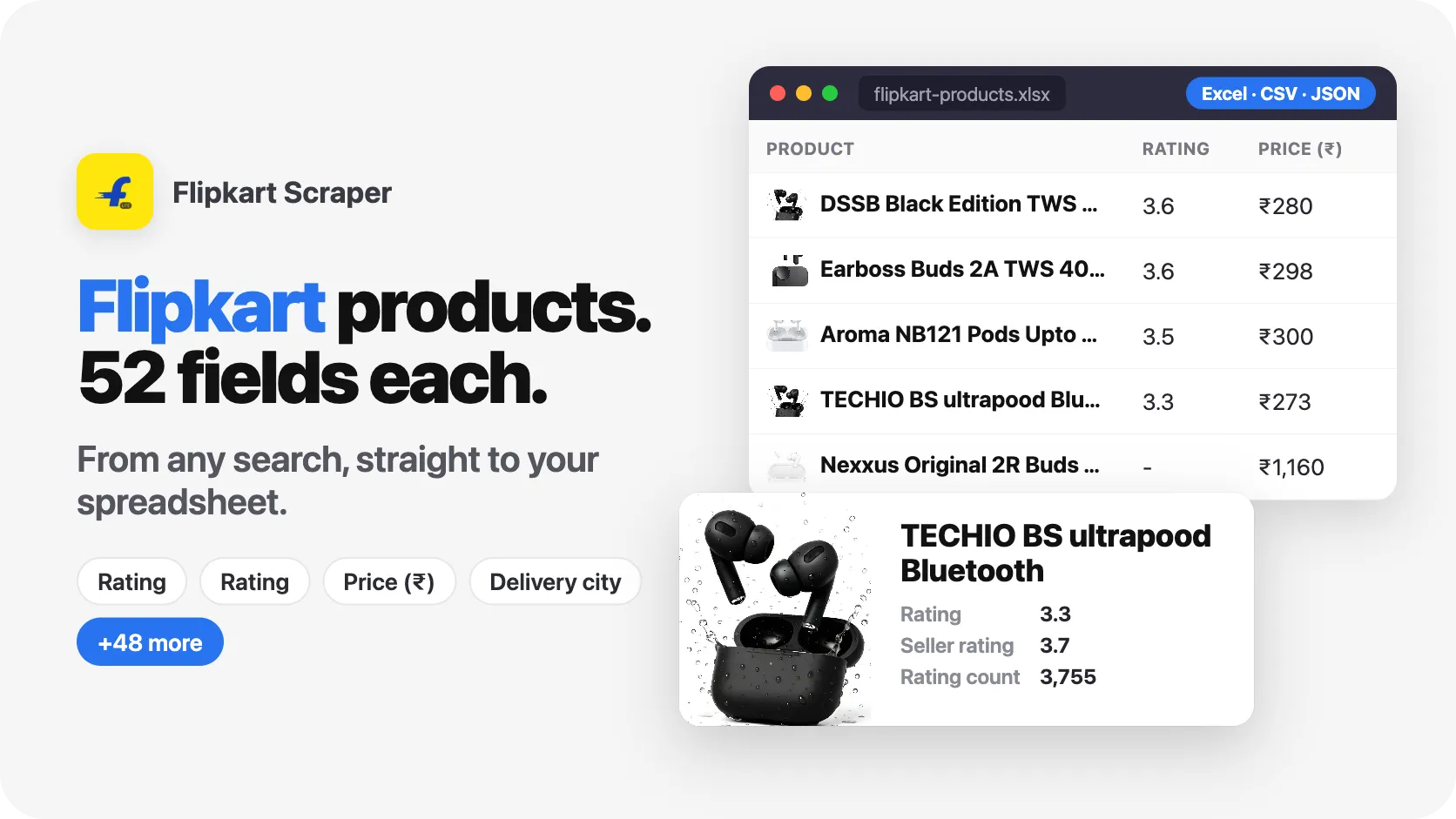
From SilentFlow. Creators of Facebook Search Scraper and JD Products Scraper (#1 for “jd” in Apify Store search), with 1,000,000+ combined lifetime runs.
See Flipkart the way a shopper in your city sees it: every product of a search, a category or your own list of product ids, with the price, MRP and discount at your PIN code, the seller holding the buy box, every other seller and their price, the delivery date, the specifications, what buyers rate each feature and the newest reviews. 20 products with all their sellers and reviews in 26 seconds, without a Flipkart account.
Why choose this actor?
Opening "See other sellers" product after product to find who undercuts your MRP? Checking prices from a Delhi address while your buyers live in Bengaluru and Mumbai? Reading 300 reviews to learn whether the battery or the sound is the weak point?
- Every seller of a product, with their price, not only the one in the buy box. Each row carries
sellers: every seller Flipkart lists for the product, with their price, MRP, discount, seller rating, delivery date, Flipkart Assured, cash on delivery and whether they hold the buy box, plussellerCountandlowestSellerPrice. In our test run of the default input, 20 products came back with 33 seller offers; one pair of GWALBROS earbuds had 12 sellers priced from ₹358 to ₹499 while the buy box sold at ₹466. - Prices, stock and delivery for the PIN code you choose. Set
pincodeand the buy-box seller, price, stock and delivery date are the ones a shopper at that address gets. In our runs the same earbuds were sold by V2ENTERPRISES2026 at ₹466 for New Delhi (110001) and by GDFTRADE at ₹361 for Mumbai (400001); 18 of the 20 default rows carried a delivery date for New Delhi, and the 2 others came back as not deliverable there, marked out of stock. - Only the brands and discounts you follow, with buyer scores per feature. Name
brandsand aminDiscountand Flipkart filters the shelf before a single row is read: Samsung phones at 20% off or more in the Mobiles category came back as 935 matches, every row a Samsung. Each row also carriesaspectRatings, the scores buyers give each feature (Sound Quality, Bass, Battery Backup, Call Quality on earbuds; Camera, Battery, Display on phones), filled on 17 of the 20 default rows.

Try your first product
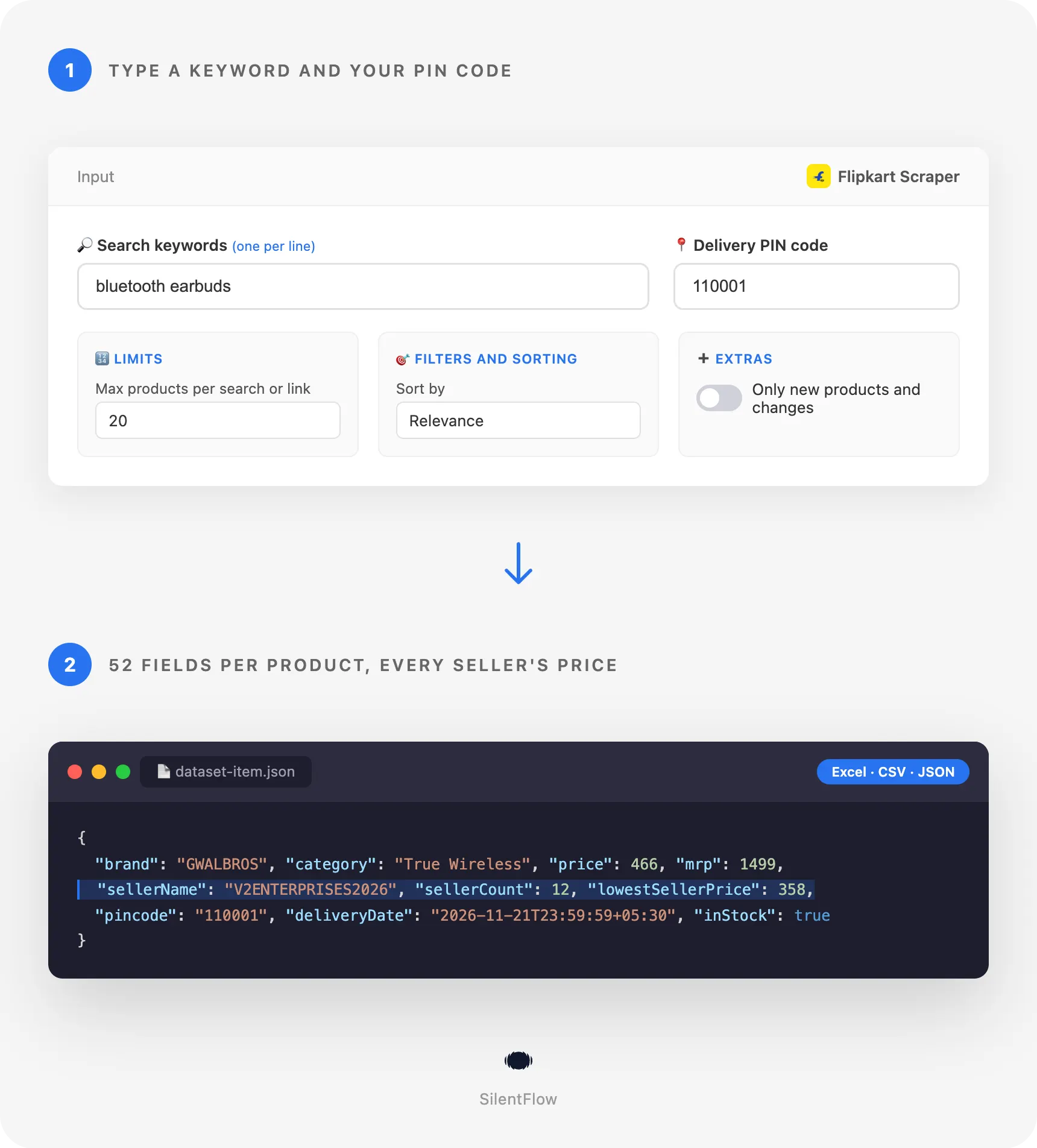
Paste this input in the JSON tab of the actor and press Start. It is the input the form opens with:
You get 20 rows, one per pair of earbuds, in Flipkart's search order, read for a shopper in New Delhi. In our run of 21 Nov 2026 the 20 rows took 26 seconds: every row had its price, MRP, discount, buy-box seller with their time on Flipkart, rating histogram, specifications (50.6 specification fields per product on average) and the best price with bank offers; 4 products had several sellers, two of them 12. 16 rows came with their newest reviews (up to 10 each), 146 reviews in all, each with its author, date and helpful votes (the 4 other products had no review yet). The Apify Free plan is enough to run it: no credit card, no Flipkart account, no API key.
Copy to your AI assistant
Paste this block into Claude, ChatGPT or Cursor to give it full context about this scraper:
How to scrape Flipkart products, prices and sellers
Check a list of products for your city
Paste product ids or product links. Each one comes back as its own row, whatever the result cap, with every seller and the delivery date for the PIN code.
In our run these 3 products (an iPhone 15, a pair of earbuds and a pair of running shoes) came back in 5 seconds for Mumbai, each with its 10 newest reviews.
Pull a filtered category the way Flipkart filters it
Start from a category page and add a brand, a minimum discount and a sort. Flipkart applies the filters itself, so every page you get is full of matches.
Our run of 21 Nov 2026 reported 948 matching Samsung phones and returned 15 for Bengaluru in 39 seconds, every one at 20% off or more at that PIN code and each with its newest reviews; a Samsung Galaxy A07 LTE had 12 sellers. 21 phones Flipkart lists at 20% off but sold with a smaller discount in Bengaluru were left out, and the log says how many.
Search a keyword in a price band, with reviews
With the ₹500 to ₹2,000 band and popularity order, our run returned 10 products in 14 seconds, all inside the band, and left out 3 that sold outside it. Without the band and the reviews, the same keyword returned 50 products in 54 seconds, over 2 result pages, 17 of them sold by more than one seller.
Get a quick price list of a whole shelf
Turn includeProductDetails off when you only need what the result pages show: title, brand, price, MRP, discount, images, key specs and badges, with rating and stock where Flipkart prints them. No product is opened, so hundreds of rows come back in seconds.
Our run of 21 Nov 2026 returned 200 laptops in 11 seconds over 12 result pages, every row with its brand (HP, Acer, ASUS, Lenovo, DELL...), price, MRP and discount. Run the same products by id with details on when you need their sellers, delivery and reviews.
Input parameters
| Parameter | Type | Default | What it does |
|---|---|---|---|
searchTerms | list of strings | bluetooth earbuds (prefill) | Keywords, one Flipkart search each, read in Flipkart's order. |
startUrls | list of links | none | Search pages, category pages or product pages from flipkart.com. The filters already in a link are kept. |
productIds | list of strings | none | Product ids or product links. Every id returns its own row, whatever maxItems is. |
maxItems | integer | 50 | Most products per keyword and per search or category link. No fixed upper limit. |
pincode | text | 110001 | The 6-digit Indian PIN code prices, buy box, stock and delivery dates are read for. |
sort | relevance, popularity, price low to high, price high to low, newest | relevance | The order Flipkart lists results in. |
minPrice | integer (₹) | none | Only products selling at this price or above. |
maxPrice | integer (₹) | none | Only products selling at this price or below. |
brands | list of strings | all brands | Flipkart's brand filter. Several brands are combined (any of them). |
minDiscount | any, 10, 20, 30, 40, 50 | any | Only products at least that percentage below their MRP. |
maxReviewsPerProduct | integer | 10 | Newest buyer reviews nested in each product row, with author, date and helpful votes. 0 skips them. |
includeProductDetails | true / false | true | Off: a fast price list straight from the result pages, without sellers, delivery, specifications or reviews. Product ids keep their price, sellers and delivery. |
monitorMode | true / false | false | Return only new products and products whose price or stock changed since the last run of the same input. |
Accepted formats
- Product ids: the 16-character
pidof a product link, such asMOBHQV9YZGYG64U7(upper or lower case). - Product links:
https://www.flipkart.com/apple-iphone-15-blue-128-gb/p/itm387c20f1f5347?pid=MOBHQV9YZGYG64U7, with or without the tracking parameters Flipkart adds. A reviews page link (/product-reviews/) is read as its product. - Search pages:
https://www.flipkart.com/search?q=iphone+15, including the filters you clicked on Flipkart. - Category pages:
https://www.flipkart.com/mobiles/pr?sid=tyy,4io,https://www.flipkart.com/mens-footwear/sports-shoes/pr?sid=osp,cil,1cu. - PIN codes: 6 digits, spaces allowed (
560 001). - Brands: as Flipkart writes them in its brand filter (
Samsung,boAt,Apple); our test withsamsungin lower case returned only Samsung phones. - Not read: account, cart and help pages, and links from other sites. They are named in the log and skipped.
A product id Flipkart does not know is counted at the end of the log as not found and never becomes an empty row.
What data can you extract from Flipkart?
Each row is one product, 59 fields grouped the way you read them:
- Identity (5 fields):
id(Flipkart's product id, stable for the life of the product),url(the product page),title,brand,listingId(the listing of the buy-box seller). - The product (12 fields):
description,category(as shoppers see it, likeTrue WirelessorMobiles),breadcrumb(the full category path),highlights(the key specs Flipkart shows first),specifications(every specification table, grouped: General, Display Features, Battery, Connectivity...),color,warranty,returnPolicy,countryOfOrigin,manufacturer,importer, andvariants(other colours, sizes or storage options, each with its own id and link). - The seller in the buy box (11 fields):
sellerName,sellerId,sellerRating,sellerProductQualityandsellerServiceQuality(the scores Flipkart publishes for the seller),sellerTenure(time on Flipkart),sellerDescription(the seller's own About text), andsellerAddress,sellerState,sellerPincode,sellerGstinwhen the seller published them in that text (the state also comes from the first two digits of a GSTIN, or from the city of an address written without it). - Every seller (2 fields):
sellerCountandsellers, one entry per seller with 13 fields: id, name, rating, price, MRP, discount, delivery date and text, Flipkart Assured, cash on delivery, free delivery, buy box, listing id. - Price and offers (7 fields):
price(what a shopper at the PIN code pays the buy-box seller),mrp,discountPercent,bestPrice(the price Flipkart shows with bank or coupon offers),lowestSellerPrice,currency,offers(bank, partner and special offers, each with its type and wording). - Stock and badges (5 fields):
inStock(deliverable and buyable at the PIN code),availability,isFlipkartAssured,isSponsored,badges(Bestseller, Hot Deal, Only few left, Lowest price since launch). - Ratings (5 fields):
rating,ratingCount,reviewCount,ratingHistogram(counts of 1 to 5 stars) andaspectRatings(buyers' scores per feature). - Delivery (6 fields):
pincode,deliveryCity,deliveryDate(RFC 3339, India time),deliveryText(Flipkart's own wording, like "Delivery by Tomorrow, Tuesday if ordered before 7:45 PM"),isDeliverable,cashOnDelivery. - Media and context (5 fields):
imageUrl,images,searchTerm,searchRank(the position in Flipkart's results) andscrapedAt. - Newest reviews (1 field):
reviews, the 10 newest buyer reviews by default, 15 fields each: rating, title, text, author, certified buyer, city, state, date, helpful votes, downvotes, the variant bought, photos, link. - In monitor mode:
changeTypeandpreviousPrice.
On the default input (run of 21 Nov 2026), 55 of the 59 fields were filled on at least half of the rows. The 4 others are the seller's address, state, PIN code and GSTIN, filled only when the seller writes them in their About text, which none of the 17 buy-box sellers of that run did. reviews was filled on the 16 products that had reviews (146 reviews, every one with its author and date), importer is only printed for imported goods (11 rows of 20) and warranty only where the seller gives one (10 rows of 20).
Output example
One full row from the default input (lists shortened to their first entries):
Advanced usage
Get only price drops and restocks on your products every morning
Schedule this input daily (Schedules in Apify Console, every day at 8:00). The first run returns every product; each run after that returns only new products and the ones whose price or stock changed, with changeType and previousPrice.
In our test the second run of a watch list of 6 earbuds returned 1 row and left out the 5 unchanged products. Each input (ids, keywords, PIN code and filters) keeps its own memory.
Compare the buy box city by city
Save one task per city with the same products and a different pincode, then join the datasets on id. The seller in the buy box, the price and the delivery date can all change.
The same earbuds were sold at ₹466 by one seller for New Delhi and at ₹361 by another for Mumbai in our runs.
Find every seller of your brand and who sells below your price
Read your brand's shelf, then filter the sellers lists for prices under your floor or for sellers you do not know.
lowestSellerPrice below price flags a cheaper seller than the one in the buy box straight away.
Hunt the deepest deals of a category
bestPrice adds what the bank and coupon offers take off on top, and badges shows "Lowest price since launch" where Flipkart prints it.
Read what buyers say before you stock a product
Each review keeps its author, date, helpful votes, the variant bought, the city and whether the buyer is certified. Every row already carries the 10 newest reviews without this setting; raise it to read further back. Pair reviews with aspectRatings to see which feature drags the rating down.
FAQ
What does this Flipkart scraper extract? One row per product: id, link, title, brand, category path, highlights, full specifications, variants, price, MRP, discount, best price with offers, the offers themselves, stock, Flipkart Assured, badges, rating with its 1 to 5 star counts, buyers' scores per feature, the seller in the buy box with their profile, every other seller with their price and delivery, the delivery date for your PIN code, and the 10 newest reviews with their author, date and helpful votes. 59 fields.
What is Flipkart? Flipkart is India's largest online marketplace, owned by Walmart, selling phones, electronics, fashion, home and appliances from thousands of sellers. Many products are sold by several sellers at once; Flipkart picks one for the buy box, and the choice depends on where the shopper lives.
Do I need a Flipkart account or an API key? No. The actor reads the public pages any visitor sees. No login, no API key, nothing to configure.
Why is the price different from the one in the search page?
price is what the seller in the buy box charges a shopper at your PIN code, the price you pay at checkout before offers. Flipkart's search page shows the default listing for its own default location, which can be another seller. Flipkart sorts and filters on that listed price; the actor then checks your price and discount filters again on the price at your PIN code and leaves out the rows that miss them, so every row you get is inside your filters. A sorted run can still show a few rows out of strict order: sort the dataset by price when you need it. All sellers are in sellers.
Which PIN code should I use?
Your buyers' city or your warehouse's. Without one, the run reads New Delhi (110001). A product no seller delivers to the PIN code comes back with isDeliverable false and inStock false, so you see where it is unavailable.
How many products can I get?
maxItems is the cap per keyword and per link, with no fixed upper limit; product ids are never cut. A broad keyword like "bluetooth earbuds" had 82,020 matches on Flipkart in our test. Product rows arrive at about one per second: 20 with their reviews in 26 seconds in our run. Set maxReviewsPerProduct to 0 to save a page per product, or turn includeProductDetails off for a price list straight from the result pages: 200 laptops in 11 seconds.
Can I combine filters?
Yes. brands, minDiscount, minPrice, maxPrice and sort work together, on keywords and on search or category links. Samsung + 20% off or more + price low to high in the Mobiles category gave 935 matches in our test. Price and discount are checked again on the price at your PIN code, so no row outside them is returned.
Does it return the seller's address and GSTIN? When the seller publishes them. Flipkart shows each seller's rating, scores, time on Flipkart and an About text written by the seller; the actor reads the address, state, PIN code and GSTIN from that text when they are there. A GSTIN alone also gives the state the seller is registered in (its first two digits), and an address written without PIN code gets its state from the city. Most sellers write a short pitch instead, and those fields stay null.
How fresh is the data? Live. Every run reads Flipkart at that moment: prices, stock and delivery dates are today's. Schedule the actor to build your own price history.
Are the links and images permanent?
url is the product page and stays valid as long as Flipkart sells the product. id never changes. Image links point to Flipkart's image server and keep working while the listing keeps its photos.
Are sponsored products included?
Yes, in the position Flipkart shows them, with isSponsored true so you can keep or drop them.
More SilentFlow scrapers
🛒 E-commerce
- JD - JD Products Scraper | JD.com Prices, Brands and Barcodes
- Pinterest - Pinterest Scraper | Pins, Boards and Profiles
- Udemy Course - Udemy Course Scraper
- TikTok Shop - TikTok Shop Scraper | Products, Sellers and Creator Videos
- Leboncoin - Leboncoin Scraper | Classified Ads, Prices and Sellers
- Back Market - Back Market Scraper | Refurbished Prices
- Leboncoin - Leboncoin Ad Details Scraper
- Allegro - Allegro Scraper | Products, Prices and Sellers
- Keepa - Keepa Scraper | Amazon Price History and Offers
- Naver - Naver Scraper | Shopping Products, Prices and Reviews
- Coupang - Coupang Scraper | Product Details, Prices and Options
- Naver - Naver Reviews Scraper | Shopping Product Reviews
- Taobao - Taobao Scraper | Products, Details, Prices and Sellers
- Amazon Seller - Amazon Seller Scraper | Emails, Phones and Ratings
- ImportYeti - ImportYeti Scraper | Suppliers, Importers and Bills of Lading
- Eventim - Eventim Scraper | Events, Ticket Prices and Venues
- Naver - Naver Products Scraper | Shopping Prices, Sellers and Ratings
- Wildberries - Wildberries Scraper | Product Details, Prices and Sellers
- 1688 - 1688 Scraper | Products, Reviews, Details, Wholesale Prices
- Avito - Avito Scraper | Listings, Prices and Sellers
- Leboncoin - Leboncoin Scraper
- Bring a Trailer - Bring a Trailer Scraper
- GasBuddy - GasBuddy Scraper | Gas Prices by Station
- Pinterest - Pinterest Scraper
- 1688 - 1688 Reviews Scraper | Product Reviews, Ratings, Buyer Photos
- Back Market - Back Market Scraper | Refurbished Electronics Prices
- Ctrip - Ctrip Scraper | Attractions, Tickets and Reviews
- Goofish - Goofish Detail Scraper | Xianyu Details, Prices and Sellers
- Store Leads Ecommerce - Store Leads Ecommerce Scraper
- Vinted Marketplace - Vinted Marketplace Scraper
- Alibaba - Alibaba Scraper | Products, Supplier Companies and Prices
- Avito - Avito Profiles Scraper | Sellers, Ratings and Reviews
- BAUHAUS - BAUHAUS Scraper | Product Prices, EAN and Specs
- CARFAX - CARFAX Scraper | Used Cars, Prices and History
- Che168 - Che168 Scraper | Used Car Listings and Prices
- Europages - Europages Scraper | Suppliers and B2B Companies
- Homedepot - Homedepot Reviews Scraper | Customer Reviews and Ratings
- Judge - Judge Scraper | Reviews, Ratings and Store Profiles
- Leboncoin - Leboncoin Details Scraper | Full Ad Data and Sellers
- Lowes - Lowes Products Scraper | Prices, Stock and Specs
- Sahibinden - Sahibinden Scraper | Real Estate and Car Listings
- VividSeats - VividSeats Scraper | Tickets, Prices and Events
- Acquire - Acquire Scraper | Startups for Sale & Prices
- Agoda - Agoda Scraper | Hotel Prices and Guest Ratings
- Barnes and Noble - Barnes and Noble Scraper | Book Prices and Availability
- Boohoo - Boohoo Scraper | Products, Prices and Stock
- BookMyShow - BookMyShow Scraper | Movies, Events and Showtimes
- Coles - Coles Products Scraper | Prices, Specials and Nutrition
- eBay Marketplace - eBay Marketplace Scraper
- Edmunds - Edmunds Scraper | Car Listings, Prices and Deal Ratings
- Encar - Encar Scraper | Used Car Listings and Accident History
- GetYourGuide - GetYourGuide Scraper | Tours, Activities, Prices & Reviews
- Goldin - Goldin Scraper | Auction Results, Sold Prices and Live Lots
- Google Hotels - Google Hotels Scraper | Prices, Offers and Ratings
- MakersRow - MakersRow Scraper | Manufacturers, Capabilities and Reviews
- Mobile.de - Mobile.de Scraper
- OfferUp - OfferUp Scraper | Listings, Prices and Sellers
- OLX - OLX Scraper | Brazil Listings, Prices and Sellers
- Poshmark - Poshmark Scraper | Sold Listings, Prices and Sellers
- Store Leads - Store Leads Scraper | Shopify Data
- Ticombo - Ticombo Scraper | Ticket Prices and Listings
- Tradeindia - Tradeindia Scraper | Suppliers, Products and Contacts
- Turo - Turo Scraper | Car Rentals, Prices and Reviews
- Udemy - Udemy Scraper
- Walmart - Walmart Scraper | Prices, Reviews, Sellers, Availability
- Webmotors - Webmotors Scraper | Car Listings, Prices and FIPE
- Woolworths - Woolworths Products Scraper | Prices, Specials and Nutrition
- YandexMarket - YandexMarket Scraper | Products, Prices and Sellers
- Zap - Zap Scraper | Prices and Store Offers
- Alibaba - Alibaba Products Scraper | Products, Suppliers, Prices and MOQ
- AliExpress - AliExpress Reviews Scraper | Product Reviews, Ratings, Feedback
- AliExpress - AliExpress Scraper | Products, Prices and Sales
- Amazon - Amazon Product Scraper
- Amazon Marketplace - Amazon Marketplace Scraper
- Apple - Apple Scraper | App Store Apps, Ratings and Charts
- AutoScout24 - AutoScout24 Scraper
- Carousell - Carousell Scraper | Listings, Prices and Sellers
- eBay Listings - eBay Listings Scraper
- Europages Deep Dive Extractor - Europages Deep Dive Extractor | VAT, Decision Makers, ISO Certs
- Fashionphile - Fashionphile Scraper | Listings, Prices and Sold Items
- Mercari - Mercari Scraper | Listings, Sold Prices and Sellers
- RA - RA Scraper | Events, Lineups and Tickets
- TickPick - TickPick Scraper | Ticket Prices and Events
- Trip - Trip Scraper | Hotels, Prices and Reviews
- Uniqlo - Uniqlo Scraper | Products, Prices and Stock
- Vinted - Vinted Scraper
- Walmart - Walmart Product Scraper
💼 Jobs
- ZipRecruiter - ZipRecruiter Jobs Scraper | Salary, Company & Location Filters
- Jobright - Jobright Scraper | Jobs, Salaries and H1B Sponsors
- Malt Freelancer - Malt Freelancer Scraper
- Glassdoor Job Listings - Glassdoor Job Listings Scraper
- Multi Board - Multi Board Job Scraper
- Indeed - Indeed Company Reviews Scraper
- Glassdoor - Glassdoor Jobs Scraper
- Jora - Jora Jobs Scraper
- Welcome to the Jungle - Welcome to the Jungle Scraper | Jobs and Company Data
- Francetravail - Francetravail Scraper | Job Offers and Salaries
- LinkedIn Job Search - LinkedIn Job Search Scraper | Salaries & Seniority
- Arbeitsagentur - Arbeitsagentur Jobs Scraper
- Cutshort - Cutshort Jobs Scraper | Salaries, Skills and Companies
- Dice - Dice Scraper | US Tech Jobs, Salaries and Skills
- Dice Tech - Dice Tech Jobs Scraper
- Freelancermap - Freelancermap Scraper | Projects, Skills and Companies
- 🔥 Glassdoor - 🔥 Glassdoor Scraper
- Gupy - Gupy Jobs Scraper | Brazil Jobs and Employers
- iimjobs - iimjobs Jobs Scraper | MBA, Finance and Hirist Tech Jobs
- Indeed - Indeed Companies Scraper | Reviews, Salaries, Interviews
- Instahyre - Instahyre Jobs Scraper | Companies, Recruiters and Ratings
- Jora - Jora Scraper | Jobs in Australia, New Zealand, Singapore
- Kununu - Kununu Scraper | Employee Reviews, Ratings and Interviews
- Malt - Malt Scraper | Freelance Profiles
- Naukri & NaukriGulf - Naukri & NaukriGulf Jobs Scraper
- Totaljobs - Totaljobs Jobs Scraper | UK Job Listings and Salaries
- Welcome to the Jungle - Welcome to the Jungle Job Scraper
- YCombinator - YCombinator Jobs Scraper | Startup Jobs, Salaries and Founders
- Zhaopin - Zhaopin Scraper | Jobs, Salaries and Companies
- All - All Jobs Scraper
- Arbeitsagentur - Arbeitsagentur Scraper | German and Austrian Job Board
- ATS - ATS Jobs Scraper | Greenhouse, Lever and Ashby
- iimjobs - iimjobs Scraper | Jobs, Companies and Recruiters
- Indeed - Indeed Jobs Scraper | NLP Skills
- Indeed - Indeed Jobs Scraper | Job Listings in 73 Countries
- LinkedIn - LinkedIn Jobs Scraper
- Seek - Seek Job Scraper
- StepStone - StepStone Scraper
- Ziprecruiter - Ziprecruiter Scraper
🏠 Real estate
- SeLoger - SeLoger Scraper | Real Estate Listings
- Airbnb Pro Host Contact & - Airbnb Pro Host Contact & Email Scraper
- Realtor Rental Listings - Realtor Rental Listings Scraper
- Bien'ici - Bien'ici Scraper | Property Listings
- Airbnb Professional Host - Airbnb Professional Host Scraper | Emails, Phones, SIRET
- Trulia Rental Listings - Trulia Rental Listings Scraper
- Realestate.com.au - Realestate.com.au Scraper
- Realtor - Realtor Detail Scraper | Property Details and Price History
- SeLoger - SeLoger Scraper | French Property Listings and Agencies
- Bienici - Bienici Scraper
- Idealista - Idealista Scraper
- Rightmove - Rightmove Scraper
- Airbnb - Airbnb Detail Scraper | Listings, Hosts and Availability
- Cian - Cian Scraper | Real Estate Listings and Phones
- Fincaraiz - Fincaraiz Scraper | Real Estate Listings and Prices
- Imovelweb - Imovelweb Scraper | Real Estate Listings
- Propiedades - Propiedades Scraper | Real Estate Listings and Agents
- Propwire - Propwire Scraper | Property Owner Leads
- Redfin - Redfin Detail Scraper | Property Data, Estimates and Flood Risk
- Redfin - Redfin Scraper | Listings, Sold Homes and Agents
- SeLoger - SeLoger Products Scraper | Property Listings and Agencies
- Zapimoveis - Zapimoveis Scraper | Real Estate Listings and Prices
- Zillow - Zillow Scraper
- Airbnb Search - Airbnb Search Scraper | Prices, Fees, Amenities, Hosts
- Airbnb Search - Airbnb Search Scraper
- Anjuke - Anjuke Scraper | Rental Listings, Prices and Agents
- Domclick - Domclick Scraper | Real Estate Listings
- Idealista - Idealista Scraper
- OpenRent - OpenRent Scraper | Rental Listings and Landlords
- Realtor Rental - Realtor Rental Scraper
- Trulia Rental - Trulia Rental Scraper | US Rentals, Prices, Pet Policy
📣 Social media
- Douyin - Douyin Transcript Scraper | Transcripts, Subtitles and SRT
- Facebook Search - Facebook Search Scraper
- LinkedIn Post Search - LinkedIn Post Search Scraper | Keywords, Hashtags & Profiles
- Instagram - Instagram Story Scraper | Stories & Highlights
- TikTok Creative - TikTok Creative Ads Scraper | Top Ads, Landing Pages & Metrics
- Facebook Search - Facebook Search Profiles Scraper | People by Name or Keyword
- LinkedIn Leads - LinkedIn Leads Scraper | Sales Navigator Export
- TwitchTracker - TwitchTracker Scraper | Twitch Streamer Stats and Rankings
- OnlyFans - OnlyFans Profile Scraper
- Reddit - Reddit Scraper | Posts, Comments and Subreddits
- TikTok Trend - TikTok Trend Scraper | Trending Hashtags and Videos
- LinkedIn Hashtag & - LinkedIn Hashtag & Post Scraper | No Cookies
- Snapchat - Snapchat Videos Scraper | Spotlight Videos, MP4 and Stats
- Discord - Discord Profiles Scraper | Users, Badges and Server Tags
- Discord - Discord Scraper | Servers, Member Counts and Invites
- Likee - Likee Scraper | Videos, Hashtags and Creators
- LinkedIn People Search - LinkedIn People Search Scraper | Profiles & Companies
- LinkedIn Sales Navigator - LinkedIn Sales Navigator Scraper
- Pinterest - Pinterest Ads Scraper | Ad Library, Reach & Targeting
- Reddit - Reddit Comments Scraper | Search, Threads and Replies
- Snapchat - Snapchat Contacts Scraper | Phones, Emails and Websites
- Bilibili - Bilibili Scraper | Videos, Comments, Profiles, Danmaku
- Facebook Business Page - Facebook Business Page Scraper
- Kwai - Kwai Scraper | Videos, Creators and Hashtags
- LinkedIn Ads Library - No Cookies - LinkedIn Ads Library Scraper - No Cookies
- LinkedIn Event - LinkedIn Event Scraper
- Pornhub - Pornhub Videos Scraper | Search, Tags and Stream Links
- Reddit - Reddit Profiles Scraper | User Karma, Activity and Communities
- Skool Community - Skool Community Scraper
- Telegram - Telegram Comments Scraper | Replies, Authors and Reactions
- TikTok Lookalike - TikTok Lookalike Scraper | Influencers, Emails and Engagement
- Twitch - Twitch Contacts Scraper | Emails and Social Links
- X Timeline - X Timeline Scraper | Tweets and Engagement Stats
- Bandsintown - Bandsintown Scraper | Concerts and Tour Dates
- Bluesky - Bluesky Scraper | Posts, Profiles and Followers
- Douyin - Douyin Comments Scraper | Comments, Likes and IP Regions
- Douyin - Douyin Hashtags Scraper | Views, Creators and Topics
- Facebook Thread - Facebook Thread Profiles Scraper | Followers, Bios & Engagement
- Kuaishou - Kuaishou Scraper | Videos, Comments and Creator Stats
- Meta Ad Library - Meta Ad Library Scraper
- Pikabu - Pikabu Scraper | Posts, Comments and Views
- Pinterest Trends - Pinterest Trends Scraper | Trending Keywords and Forecasts
- Pinterest - Pinterest Videos Scraper | Video Downloader, MP4 Links, Stats
- RedNote - RedNote Videos Scraper | Xiaohongshu Videos, Transcripts, Stats
- Snapchat - Snapchat Enricher Scraper | Account Age, Activity and Contacts
- Telegram - Telegram Scraper | Channel Posts, Views and Reactions
- TikTok - TikTok Scraper
- Twitch - Twitch Scraper | Streamers, Emails and Clips
- Xigua - Xigua Scraper | Videos, Creators and Downloads
- YouTube Autocomplete - YouTube Autocomplete Scraper | Keyword Suggestions
- YouTube - YouTube Channel Scraper | Videos, Shorts and Views
- YouTube - YouTube Transcript Scraper
- Facebook - Facebook Company Scraper | Emails, Phones, Ratings
- Instagram Engagement - Instagram Engagement Scraper
- LoyalFans - LoyalFans Scraper | Creator Profiles and Prices
- OnlyFans - OnlyFans Profiles Scraper | Creator Prices, Stats & Links
- OnlyFans - OnlyFans Creator Scraper
- Pinterest - Pinterest Profiles Scraper | Followers, Emails and Bios
- Reddit - Reddit Scraper | Comments, Posts and Users
- RedNote - RedNote Detail Scraper | Xiaohongshu Details, Images, Videos
- Skool Group - Skool Group Scraper
- Snapchat - Snapchat Ads Scraper | Ad Library, Impressions & Targeting
- Telegram - Telegram Posts Scraper | Views, Reactions and Comments
- Weibo - Weibo Scraper | Posts, Profiles, Followers and Engagement
🏢 Business data
- LinkedIn Company Search - LinkedIn Company Search Scraper | Profiles & Firmographics
- Teachable Course - Teachable Course Scraper
- Website Tech Stack - Website Tech Stack Scraper
- Teachable - Courses, Prices & Instructors - Teachable Scraper - Courses, Prices & Instructors
- Trustpilot - Trustpilot Scraper | Reviews, Ratings and Company Contacts
✈️ Travel
- Tencent - Tencent Scraper | Maps Places, Phones and Ratings
- Viator - Viator Reviews Scraper | Tour Reviews and Ratings
- Booking.com Hotel - Booking.com Hotel Scraper
- Despegar - Despegar Reviews Scraper | Hotel Reviews and Ratings
- 2GIS - 2GIS Reviews Scraper | Ratings, Photos and Owner Replies
- Apple Maps - Apple Maps Scraper | Places, Phones and Emails
- Flightpoints - Flightpoints Scraper | Award Flights, Miles and Seats
- Google Maps - Google Maps Scraper
- Kakao - Kakao Scraper | Map Places, Reviews and Phones
- Mafengwo - Mafengwo Scraper | Attractions, Ratings and Tickets
- OpenTable - OpenTable Reviews Scraper | Restaurant Reviews and Ratings
- Resy - Resy Scraper | Restaurants and Open Tables
- TheFork - TheFork Scraper | Restaurants, Menus and Ratings
- Trip - Trip Reviews Scraper | Hotel Reviews and Ratings
- Zomato - Zomato Reviews Scraper | Restaurant Ratings and Replies
- Booking - Booking Scraper | Hotel Prices, Photos, Availability
- Flight Price - Flight Price Scraper
🎯 Lead generation
- Northdata - Northdata Company Scraper
- Dealroom - Dealroom Scraper | Companies and Investors
- ZocDoc - ZocDoc Scraper | Doctors, Reviews and Availability
- KVK - KVK Scraper | Dutch Companies and SBI Codes
- UK Companies House - UK Companies House Enricher
- SIRET - SIRET Company Enricher
- PagesJaunes - PagesJaunes Scraper | French Business Emails and SIRET
- Dealroom Startup Data - Dealroom Startup Data Scraper
- Similarweb - Similarweb Scraper | Website Traffic, Rankings and Competitors
- BuiltWith - BuiltWith Scraper | Tech Stacks and Top Sites
- Clutch - Clutch Scraper | Agencies, Reviews, Ratings, Services
- CSLB - CSLB Scraper | Contractor Licenses, Bonds and Leads
- Justdial - Justdial Companies Scraper | Business Leads, Phones and Emails
- PagesJaunes - PagesJaunes Business Scraper
- ThomasNet Suppliers - ThomasNet Suppliers Scraper
- ZocDoc - ZocDoc Scraper
- ALEO - ALEO Scraper | Polish Companies and Financials
- Allabolag - Allabolag Detail Scraper | Company Data, Financials and Board
- BBB - BBB Scraper | Ratings, Reviews and Complaints
- BetaList - BetaList Scraper | Startups, Websites and Contacts
- Company Data - Company Data Scraper | Emails, Phones and Tech Stack
- Delaware - Delaware Scraper | Corporations, LLCs and Registered Agents
- Etimad - Etimad Scraper | Tenders, Awards and Deadlines
- French Company Prospector - French Company Prospector
- G2 - G2 Reviews Scraper
- Oregon - Oregon Scraper | Contractor Licenses and Complaints
- Paginasamarillas - Paginasamarillas Scraper | Business Leads, Emails and Phones
- Pappers - Pappers Scraper | French Companies, Directors & Financials
- SEC - SEC Scraper | EDGAR Filings and Company Data
- SIRET French - SIRET French Company Enricher
- SoftwareAdvice - SoftwareAdvice Scraper | Reviews, Ratings and Pros & Cons
- Sunbiz - Sunbiz Scraper | Florida Companies and Officers
- TrustRadius - TrustRadius Scraper | Software Reviews, Ratings, Pros and Cons
- USPTO - USPTO Scraper | Trademark Search and Status
- Clutch Agency - Clutch Agency Scraper
- CNPJ Brazilian - CNPJ Brazilian Company Enricher
- Domain - Domain Enricher
- Sunbiz - Sunbiz Companies Scraper | New Florida Business Leads
🔎 SEO
- SpyFu - SpyFu Scraper | SEO, PPC and Competitor Data
- Scribd - Scribd Scraper | Documents, Authors and Views
- Bing - Bing Enricher Scraper | Mobile Friendly Test and Indexing
- Google Ads Transparency - Google Ads Transparency Scraper
- Google News - Google News Scraper
- IPinfo - IPinfo Scraper | IP Geolocation and Abuse Contacts
- Urlscan - Urlscan Scraper | Scan Reports, Verdicts and IPs
- Yandexsearch - Yandexsearch Scraper | Search Results and Rankings
- Apple - Apple Reviews Scraper | App Store Reviews and Ratings
🎬 Video
📰 News
- ForexFactory - ForexFactory Scraper | Economic Calendar and Forecasts
- FT - FT Scraper | Financial Times Articles, Authors and Topics
- OpenAI - OpenAI Scraper | News, Blog Posts and Research
- DEV - DEV Scraper | Articles, Full Text and Authors
- HKEX - HKEX Scraper | Announcements and Filings
- Reuters - Reuters Scraper | News Articles, Tickers and Journalists
- TipRanks - TipRanks Scraper | Analyst Ratings and Price Targets
- Bloomberg - Bloomberg Scraper | News Articles and Full Text
🧰 More tools
- PrizePicks - PrizePicks Scraper | Player Props, Lines and Projections
- FanDuel - FanDuel Scraper | Odds, Spreads and Player Props
- Equibase - Equibase Scraper | Horse Racing Entries and Results
- Screener - Screener Scraper | Stock Fundamentals, NSE & BSE
- Maersk - Maersk Scraper | Vessel Schedules and Port Calls
- MarineTraffic - MarineTraffic Scraper | Vessel Positions and ETA
- Twelvedata - Twelvedata Scraper | Stock Data and Analyst Estimates
- Wunderground - Wunderground Scraper | Weather History and Stations
Support
Need something this scraper doesn't do yet? We ship features fast.
- Feature requests go straight to our backlog
- Enterprise needs? We do custom integrations and high-volume plans
- Pricing questions? Check the Monetization tab on the actor page
Response time: usually under 24 hours.
Legal compliance
This Actor extracts publicly available data from flipkart.com: product pages, prices, seller listings and reviews that any visitor can see. It does not bypass any login, paywall or CAPTCHA. Seller names and profiles are business information published by Flipkart; reviews carry the reviewer's display name and city as Flipkart shows them, so handle them as personal data where the law requires. Users are responsible for complying with Flipkart's terms of service and with applicable laws, including data protection rules such as GDPR, CCPA and PIPL where relevant. The data is informational: prices, stock and delivery dates are those published by Flipkart at run time, verify them before any contractual use.
Flipkart Scraper by SilentFlow: every product, every seller's price and the delivery date for your PIN code, one clean row per product.


