

Sainsburys Scraper | Grocery Prices, Nectar Offers, Nutrition
Pricing
from $2.51 / 1,000 products
Sainsburys Scraper | Grocery Prices, Nectar Offers, Nutrition
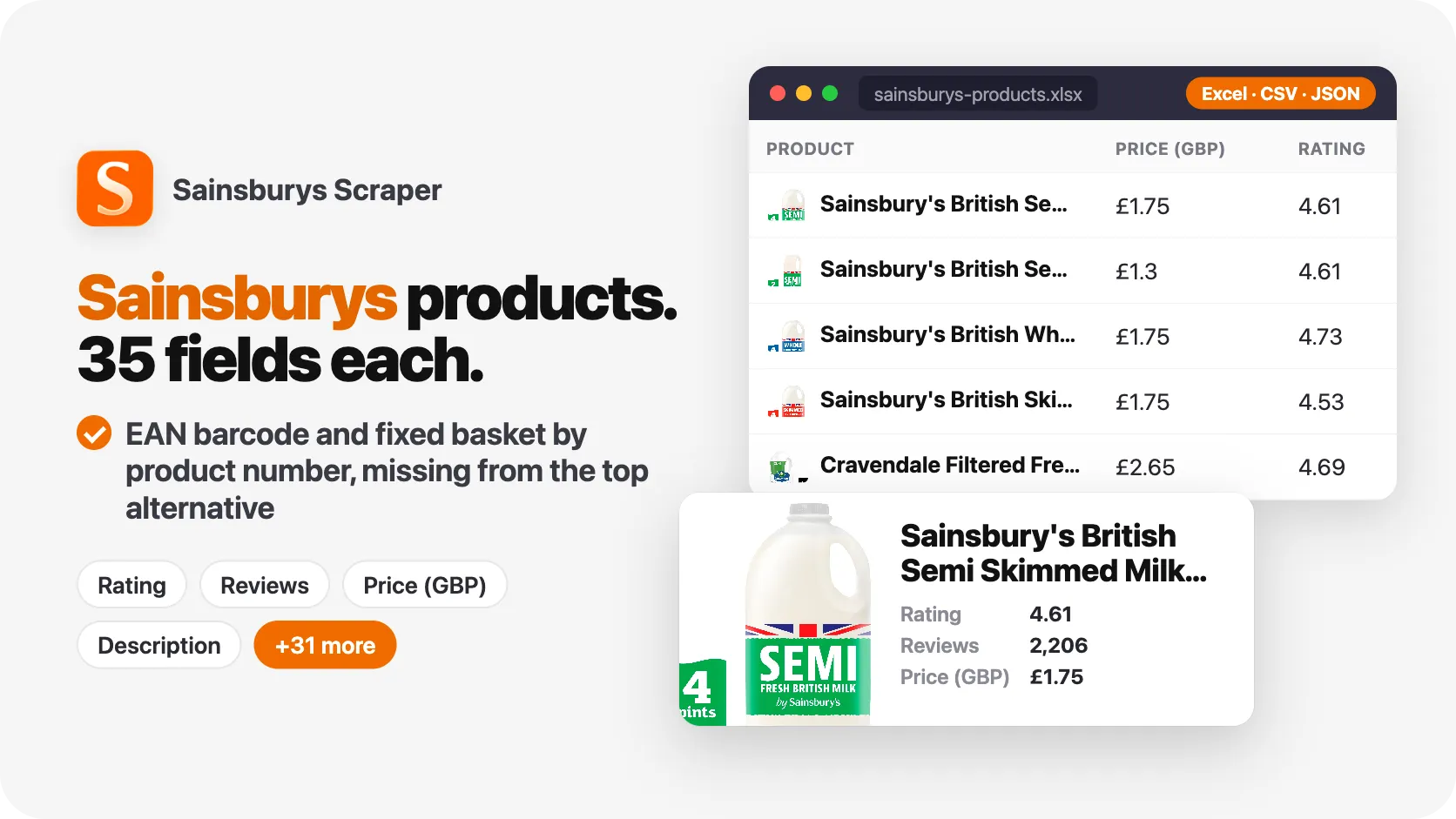
Sainsbury's scraper for UK grocery prices: search a term, an aisle link or product numbers and get price, unit price, Nectar Price and offer end date, barcode, rating, ingredients, allergens, nutrition and country of origin. 100 products in 23 seconds, 35 fields each. No login or account needed.
Pricing
from $2.51 / 1,000 products
Rating
0.0
(0)
Developer

SilentFlow
Maintained by CommunityActor stats
0
Bookmarked
1
Total users
0
Monthly active users
17 hours ago
Last modified
Categories
Features
Share
Sainsburys Scraper | Grocery Prices, Nectar Offers, Barcodes and Nutrition (2026)
From SilentFlow. Creators of Facebook Search Scraper and JD Products Scraper (#1 for “jd” in Apify Store search), with 1,100,000+ combined lifetime runs.
Turn Sainsbury's groceries into a clean price and product file: today's price, unit price, Nectar Price with the date the offer ends, the product's barcode, its customer rating, and the full label (ingredients, allergens, nutrition table, country of origin). Search by keyword, read a whole aisle from its link, or track a fixed basket by product number. The prefilled search for milk returned 100 complete products in under 30 seconds in our test.
Why choose this actor?
Copying Sainsbury's prices into a spreadsheet one product at a time? Getting a price but no barcode, so you cannot match the same product at Tesco, Asda or Morrisons? Needing the ingredients and nutrition panel too, and opening every product page by hand to read them?
- A barcode on every branded product, to match it across UK supermarkets. In our test search for milk, 80 of the 100 products came back with their EAN barcode, ready to join your Sainsbury's prices with another retailer's file on the same product. The 20 without one were Sainsbury's own-label lines with no shared barcode listed: the field stays empty rather than holding an in-store code no other shop scans.
- The full label on every row: ingredients, allergens and the nutrition table. 98 of the 100 milk products came with their nutrition table (1,008 nutrient lines in total, per 100 ml and per serving), 68 with their allergens, 48 with their ingredient list and 66 with their country of origin, plus storage, packaging and the manufacturer's address. No product page to open by hand.
- Customer ratings, a fixed basket by product number, or a whole aisle by link. All 100 milk products came with their average rating and review count (26,443 reviews in total). Paste 30 product numbers and you get 30 complete rows in one run; paste an aisle link such as the hot drinks, soft drinks and water aisle and you get its products, 60 of its offers sorted by price in our test.

Try your first product search
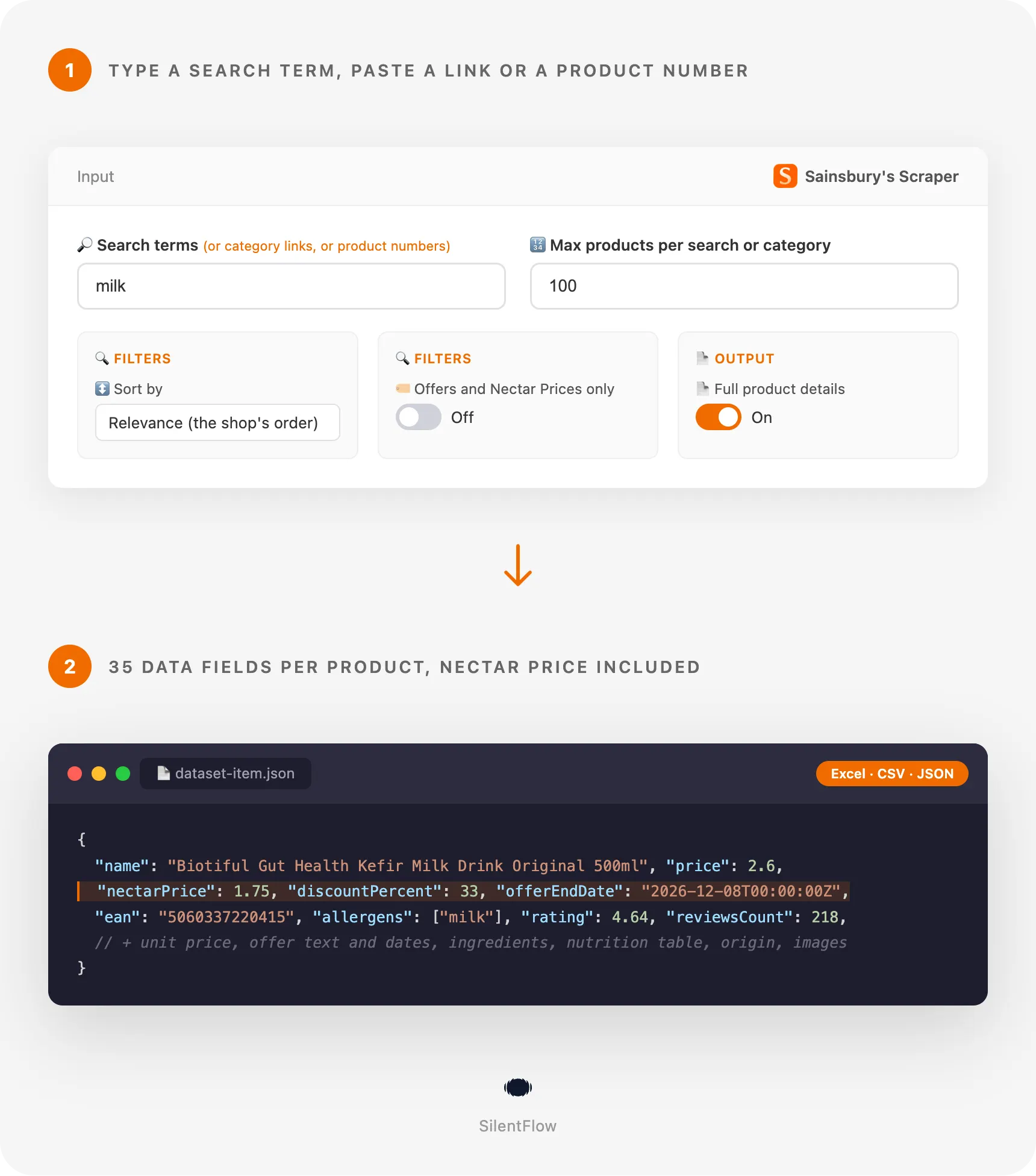
Paste this input in the JSON tab of the actor and press Start. It is the input the form opens with:
You get 100 rows, one per product of Sainsbury's search for milk, in the shop's own order: fresh milk, plant drinks, milk chocolate, condensed milk, each with its price, unit price, offer, barcode, rating, ingredients, allergens and nutrition table. The Apify Free plan is enough to run it: no credit card, no Sainsbury's account, no Nectar card, no API key.
Copy to your AI assistant
Paste this block into Claude, ChatGPT, or Cursor to give it full context about this scraper:
How to scrape Sainsbury's prices and product data
Get the products of a search, in the shop's order
Every row carries position, its rank in Sainsbury's own search, so you also see which brands the shop shows first.
Find the cheapest products of several searches
Each term is read on its own: you get the 20 cheapest products of each, 60 rows in one run. Sort on unitPrice afterwards to compare per kilo.
Pull this week's chocolate offers from two brands
Only products on offer today, with the offer text, the Nectar Price, the price everyone else pays and the date the offer ends. Turning details off returns the rows faster when prices are all you need.
Input parameters
| Parameter | Type | Default | What it does |
|---|---|---|---|
searchTerms | array of strings | ["milk"] (prefill) | Words to search, one per line, as typed in the shop's search box. |
startUrls | array of links | empty | sainsburys.co.uk links: a category or aisle, a search page or a product page. |
productIds | array of strings | empty | Product numbers or product page links. One row each, whatever the cap. |
maxItems | integer | 100 | Products read per search term and per category link, 1 to 10,000. |
sortBy | select | relevance | relevance, price_asc, price_desc or rating, as on the site. |
offersOnly | boolean | false | Keep only products with an offer or a Nectar Price today. |
dietary | multi-select | empty | Dietary and allergy filters of the shop. Every choice must match. |
brands | array of strings | empty | Keep these brands. Several brands give the products of any of them. |
includeDetails | boolean | true | Open each product page to add the brand, ingredients, allergens, nutrition, origin and every image. |
debugMode | boolean | false | Detailed log for support. |
Accepted formats
- Search terms: any words, such as
milk,oat drink,gluten free bread. A sainsburys.co.uk link pasted here is read as a link. - Category links: any Sainsbury's aisle, shelf or category page, from the menu or from a product's breadcrumb, such as
https://www.sainsburys.co.uk/gol-ui/groceries/dairy-eggs-and-chilled/milk/c:1019342orhttps://www.sainsburys.co.uk/groceries/browse/baby-and-toddler/teethers-and-soothers/c:1018680. The number afterc:is what counts. - Search page links:
https://www.sainsburys.co.uk/gol-ui/SearchResults/oat%20milk. - Product links:
https://www.sainsburys.co.uk/gol-ui/product/sainsburys-bananas-loose, or the older/shop/gb/groceries/product/details/...form. - Product numbers: the
idcolumn of any run, such as357937. Numbers can be sent as text or as numbers.
The sort, the offers filter, the dietary filters and the brands apply to every search term and every category link of the run. Product numbers and product links are always read as they are.
What data can you extract from Sainsbury's?
Each row is one product, with 45 fields grouped the same way in every run:
- Identity (6):
id, the Sainsbury's product number, stable over time;url, the permanent product page;name;brand;ean, the first barcode;eans, every barcode the shop lists. - Label and content (17):
description,category,categoryPath(the aisle path, such as Hot drinks, soft drinks & water > Milk & milk drinks > Fresh milk),size,labels(shop badges such as BRITISH or ALDI PRICE MATCH),ingredients,allergens,dietaryInformation,nutrition,nutritionBasis,servingSize,countryOfOrigin,storage,packaging,manufacturer,alcoholByVolumefor wines, beers and spirits, andisHfssRestricted, whether the product falls under England's rules on less healthy food promotions. - Prices and offers (17):
price,currency,unitPrice,unitPriceMeasure,isOnOffer,isNectarOffer,offerType,offerDescription,nectarPrice,nectarUnitPrice,wasPrice,discountPercent,offerStartDate,offerEndDate,isAvailable,rating,reviewsCount. - Images (2):
imageUrl, the main image at full size, andimages, every product image. - Meta (3):
searchTerm,position(the rank in the search or category),scrapedAt.
Each nutrition entry has 3 fields: nutrient as printed on the pack, per100 (per 100 g or 100 ml, see nutritionBasis) and perServing (see servingSize).
How the prices read: price is what every shopper pays today. When a Nectar Price is on, nectarPrice is what Nectar members pay, and price stays the regular price. When the shop cuts the price for everyone, price is the new price and wasPrice the old one. Multi buys and meal deals do not change the price of one item: they are in offerDescription, such as "Buy any 2 for £4.00 with Nectar".
Fields the shop does not show for a product are null, never an empty text. Dates are RFC 3339 in UTC. Product links and image links are permanent.
Output example
One row of the prefilled milk search, with full details on:
Advanced usage
Track a fixed basket every morning
Schedule this run daily in the Apify Console: each product number returns one row, every day, with its price, unit price, Nectar Price and offer end date. Append the datasets to follow a basket over weeks. A product the shop no longer sells is named in the log instead of failing the run.
List every Nectar Price of an aisle, cheapest first
Use the Offers and Nectar Prices view of the dataset: name, price, Nectar Price, was price, saving, offer and end date side by side. Our test of this aisle returned 60 offers in about a second with a cap of 60, out of 921 the aisle had on offer that day.
Build a free-from product list with full labels
Products the shop lists as both gluten free and dairy free, each with its ingredients, allergens, nutrition table and country of origin. Useful for allergy apps, dietitians and free-from category reviews.
Compare own label with the brands on one shelf
Every loaf of the bread shelf (145 products listed the day we tested it) with brand, size, price per kilo, rating, review count and its rank on the shelf. Group by brand to see how Sainsbury's own label prices and rates against Warburtons, Hovis or Kingsmill.
Send a daily price file to a spreadsheet with Python
The ean column lets you join this file with another supermarket's prices on the same barcode. Every dataset can also be downloaded as CSV, Excel or JSON from the run's Storage tab, or read from https://api.apify.com/v2/datasets/{DATASET_ID}/items?format=csv&token=YOUR_TOKEN.
FAQ
What is Sainsbury's? Sainsbury's is one of the four largest supermarket chains in the United Kingdom, with an online grocery shop at sainsburys.co.uk and the Nectar loyalty scheme. Its online prices are the prices of its delivery and click and collect service.
What does a row contain exactly? One product: its name, brand, barcode, size, price, unit price, offers, Nectar Price, rating and review count, aisle path and images. With full details on (the default), each row also has the ingredients, allergens, dietary information, nutrition table, country of origin, storage, packaging and manufacturer, as printed on the product page.
Do I need a Sainsbury's account or a Nectar card? No. The actor reads the prices and offers any visitor sees, without an account, a Nectar card or an API key. Nectar Prices are shown on the site to everyone and returned in their own field.
What is the difference between price and nectarPrice?
price is what every shopper pays today. nectarPrice is what Nectar members pay when a Nectar Price is on, and it is null otherwise. wasPrice is filled when the shop cuts the price for everyone. The offer text, its type and its start and end dates are on the same row.
Can I search several terms, aisles and products in one run?
Yes. Put as many search terms, links and product numbers as you need. Each search term and each category gives up to maxItems products, and each product number always gives its row. A product found twice in the same run is returned once.
How many products can I get? As many as the shop lists, up to 10,000 per search term or category. A popular term such as milk lists about 950 products, a whole aisle can list several thousand. Product numbers are not capped.
How fresh is the data? Live. Every run reads the shop at the moment it runs, nothing is cached. Prices and offers change during the week, so schedule the run at the frequency you need.
Why do some products have no barcode?
Some Sainsbury's own-label lines list no shared barcode, and loose fruit, vegetables or counter products only carry an in-store weighed code, which cannot be matched at another retailer. ean is then left empty rather than filled with a code that means nothing elsewhere. Branded products carry their real barcode: 80 of the 100 products of our milk test had one, and the 20 without were all own label.
Why are some label fields empty?
They follow the product page. Fresh fruit has no ingredient list, plain milk has no ingredients either, and some products have no country of origin printed. The field is then null. If a product page cannot be read during a run, the row still comes with its price, offer, barcode and rating, and the log says how many rows have the listing data only.
Do the filters combine?
Yes. sortBy, offersOnly, dietary and brands apply together to every search and category. For example "searchTerms": ["chocolate"], "offersOnly": true, "brands": ["Cadbury"] and "sortBy": "price_asc" give the Cadbury chocolates on offer today, cheapest first. Dietary choices must all match; brands match any of them.
Are the links permanent?
Yes. url is the product's permanent page and id its permanent product number, so you can use either as a key across runs. Image links point to the shop's image server and stay valid while the product is sold.
Can I use it from Make, Zapier, n8n or my own code? Yes. Run it through the Apify API, the Python or JavaScript client, or the Apify integrations, and get the dataset as JSON, CSV or Excel.
More SilentFlow scrapers
🛒 E-commerce
- Pinterest - Pinterest Scraper | Pins, Boards and Profiles
- JD - JD Products Scraper | JD.com Prices, Brands and Barcodes
- Udemy Course - Udemy Course Scraper
- TikTok Shop - TikTok Shop Scraper | Products, Sellers and Creator Videos
- Leboncoin - Leboncoin Scraper | Classified Ads, Prices and Sellers
- Back Market - Back Market Scraper | Refurbished Prices
- Allegro - Allegro Scraper | Products, Prices and Sellers
- Keepa - Keepa Scraper | Amazon Price History and Offers
- Leboncoin - Leboncoin Ad Details Scraper
- ImportYeti - ImportYeti Scraper | Suppliers, Importers and Bills of Lading
- Naver - Naver Scraper | Shopping Products, Prices and Reviews
- Coupang - Coupang Scraper | Product Details, Prices and Options
- Naver - Naver Reviews Scraper | Shopping Product Reviews
- Taobao - Taobao Scraper | Products, Details, Prices and Sellers
- Amazon Seller - Amazon Seller Scraper | Emails, Phones and Ratings
- Eventim - Eventim Scraper | Events, Ticket Prices and Venues
- Leboncoin - Leboncoin Scraper
- Wildberries - Wildberries Scraper | Product Details, Prices and Sellers
- GasBuddy - GasBuddy Scraper | Gas Prices by Station
- Avito - Avito Scraper | Listings, Prices and Sellers
- Goofish - Goofish Detail Scraper | Xianyu Details, Prices and Sellers
- Naver - Naver Products Scraper | Shopping Prices, Sellers and Ratings
- 1688 - 1688 Scraper | Products, Reviews, Details, Wholesale Prices
- Bring a Trailer - Bring a Trailer Scraper
- Ctrip - Ctrip Scraper | Attractions, Tickets and Reviews
- 1688 - 1688 Reviews Scraper | Product Reviews, Ratings, Buyer Photos
- Back Market - Back Market Scraper | Refurbished Electronics Prices
- BAUHAUS - BAUHAUS Scraper | Product Prices, EAN and Specs
- CARFAX - CARFAX Scraper | Used Cars, Prices and History
- Lowes - Lowes Products Scraper | Prices, Stock and Specs
- Pinterest - Pinterest Scraper
- Sahibinden - Sahibinden Scraper | Real Estate and Car Listings
- Store Leads - Store Leads Scraper | Shopify Data
- Vinted Marketplace - Vinted Marketplace Scraper
- Acquire - Acquire Scraper | Startups for Sale & Prices
- Alibaba - Alibaba Scraper | Products, Supplier Companies and Prices
- Che168 - Che168 Scraper | Used Car Listings and Prices
- Europages - Europages Scraper | Suppliers and B2B Companies
- Judge - Judge Scraper | Reviews, Ratings and Store Profiles
- Leboncoin - Leboncoin Details Scraper | Full Ad Data and Sellers
- VividSeats - VividSeats Scraper | Tickets, Prices and Events
- YandexMarket - YandexMarket Scraper | Products, Prices and Sellers
- AbeBooks - AbeBooks Scraper | Book Listings and Prices
- Agoda - Agoda Scraper | Hotel Prices and Guest Ratings
- Avito - Avito Profiles Scraper | Sellers, Ratings and Reviews
- Barnes and Noble - Barnes and Noble Scraper | Book Prices and Availability
- Boohoo - Boohoo Scraper | Products, Prices and Stock
- Booking.com Hotel - Booking.com Hotel Scraper
- BookMyShow - BookMyShow Scraper | Movies, Events and Showtimes
- Coles - Coles Products Scraper | Prices, Specials and Nutrition
- eBay Marketplace - eBay Marketplace Scraper
- Edmunds - Edmunds Scraper | Car Listings, Prices and Deal Ratings
- Encar - Encar Scraper | Used Car Listings and Accident History
- Ferguson - Ferguson Scraper | Products, Prices and Specs
- Flipkart - Flipkart Scraper | Products, Prices and Sellers
- GetYourGuide - GetYourGuide Scraper | Tours, Activities, Prices & Reviews
- Goldin - Goldin Scraper | Auction Results, Sold Prices and Live Lots
- Google Hotels - Google Hotels Scraper | Prices, Offers and Ratings
- Homedepot - Homedepot Reviews Scraper | Customer Reviews and Ratings
- MakersRow - MakersRow Scraper | Manufacturers, Capabilities and Reviews
- Mobile.de - Mobile.de Scraper
- Nykaa - Nykaa Scraper | Products, Prices and Reviews
- OfferUp - OfferUp Scraper | Listings, Prices and Sellers
- OLX - OLX Scraper | Brazil Listings, Prices and Sellers
- Poshmark - Poshmark Scraper | Sold Listings, Prices and Sellers
- Sweetwater - Sweetwater Scraper | Product Prices and Stock
- Target - Target Reviews Scraper | Product Ratings and Review Summaries
- TickPick - TickPick Scraper | Ticket Prices and Events
- Ticombo - Ticombo Scraper | Ticket Prices and Listings
- Tradeindia - Tradeindia Scraper | Suppliers, Products and Contacts
- Tradeinn - Tradeinn Scraper | Product Prices by Country and Stock
- Turo - Turo Scraper | Car Rentals, Prices and Reviews
- Udemy - Udemy Scraper
- Walmart - Walmart Scraper | Prices, Reviews, Sellers, Availability
- Webmotors - Webmotors Scraper | Car Listings, Prices and FIPE
- Woolworths - Woolworths Products Scraper | Prices, Specials and Nutrition
- Zap - Zap Scraper | Prices and Store Offers
- Alibaba - Alibaba Products Scraper | Products, Suppliers, Prices and MOQ
- AliExpress - AliExpress Reviews Scraper | Product Reviews, Ratings, Feedback
- AliExpress - AliExpress Scraper | Products, Prices and Sales
- Amazon - Amazon Product Scraper
- Amazon Marketplace - Amazon Marketplace Scraper
- Apple - Apple Scraper | App Store Apps, Ratings and Charts
- AutoScout24 - AutoScout24 Scraper
- Carousell - Carousell Scraper | Listings, Prices and Sellers
- eBay Listings - eBay Listings Scraper
- Europages Deep Dive Extractor - Europages Deep Dive Extractor | VAT, Decision Makers, ISO Certs
- Fashionphile - Fashionphile Scraper | Listings, Prices and Sold Items
- Mercari - Mercari Scraper | Listings, Sold Prices and Sellers
- RA - RA Scraper | Events, Lineups and Tickets
- Store Leads Ecommerce - Store Leads Ecommerce Scraper
- Trip - Trip Scraper | Hotels, Prices and Reviews
- Uniqlo - Uniqlo Scraper | Products, Prices and Stock
- Vinted - Vinted Scraper
- Walmart - Walmart Product Scraper
💼 Jobs
- ZipRecruiter - ZipRecruiter Jobs Scraper | Salary, Company & Location Filters
- Jobright - Jobright Scraper | Jobs, Salaries and H1B Sponsors
- Malt Freelancer - Malt Freelancer Scraper
- Glassdoor Job Listings - Glassdoor Job Listings Scraper
- Indeed - Indeed Company Reviews Scraper
- Multi Board - Multi Board Job Scraper
- Glassdoor - Glassdoor Jobs Scraper
- Jora - Jora Jobs Scraper
- Welcome to the Jungle - Welcome to the Jungle Scraper | Jobs and Company Data
- Cutshort - Cutshort Jobs Scraper | Salaries, Skills and Companies
- LinkedIn Job Search - LinkedIn Job Search Scraper | Salaries & Seniority
- Arbeitsagentur - Arbeitsagentur Jobs Scraper
- Dice - Dice Scraper | US Tech Jobs, Salaries and Skills
- Dice Tech - Dice Tech Jobs Scraper
- Francetravail - Francetravail Scraper | Job Offers and Salaries
- Freelancermap - Freelancermap Scraper | Projects, Skills and Companies
- Gupy - Gupy Jobs Scraper | Brazil Jobs and Employers
- iimjobs - iimjobs Jobs Scraper | MBA, Finance and Hirist Tech Jobs
- Indeed - Indeed Companies Scraper | Reviews, Salaries, Interviews
- Instahyre - Instahyre Jobs Scraper | Companies, Recruiters and Ratings
- Jora - Jora Scraper | Jobs in Australia, New Zealand, Singapore
- Kununu - Kununu Scraper | Employee Reviews, Ratings and Interviews
- Naukri & NaukriGulf - Naukri & NaukriGulf Jobs Scraper
- Totaljobs - Totaljobs Jobs Scraper | UK Job Listings and Salaries
- Welcome to the Jungle - Welcome to the Jungle Job Scraper
- YCombinator - YCombinator Jobs Scraper | Startup Jobs, Salaries and Founders
- Zhaopin - Zhaopin Scraper | Jobs, Salaries and Companies
- All - All Jobs Scraper
- Arbeitsagentur - Arbeitsagentur Scraper | German and Austrian Job Board
- ATS - ATS Jobs Scraper | Greenhouse, Lever and Ashby
- 🔥 Glassdoor - 🔥 Glassdoor Scraper
- iimjobs - iimjobs Scraper | Jobs, Companies and Recruiters
- Indeed - Indeed Jobs Scraper | NLP Skills
- Indeed - Indeed Jobs Scraper | Job Listings in 73 Countries
- LinkedIn - LinkedIn Jobs Scraper
- Malt - Malt Scraper | Freelance Profiles
- Seek - Seek Job Scraper
- StepStone - StepStone Scraper
- Ziprecruiter - Ziprecruiter Scraper
🏠 Real estate
- SeLoger - SeLoger Scraper | Real Estate Listings
- Airbnb Pro Host Contact & - Airbnb Pro Host Contact & Email Scraper
- Realtor Rental Listings - Realtor Rental Listings Scraper
- Bien'ici - Bien'ici Scraper | Property Listings
- Airbnb Professional Host - Airbnb Professional Host Scraper | Emails, Phones, SIRET
- Realestate.com.au - Realestate.com.au Scraper
- Trulia Rental Listings - Trulia Rental Listings Scraper
- Realtor - Realtor Detail Scraper | Property Details and Price History
- Airbnb - Airbnb Detail Scraper | Listings, Hosts and Availability
- Bienici - Bienici Scraper
- Cian - Cian Scraper | Real Estate Listings and Phones
- Idealista - Idealista Scraper
- Redfin - Redfin Scraper | Listings, Sold Homes and Agents
- Rightmove - Rightmove Scraper
- SeLoger - SeLoger Scraper | French Property Listings and Agencies
- Fincaraiz - Fincaraiz Scraper | Real Estate Listings and Prices
- Imovelweb - Imovelweb Scraper | Real Estate Listings
- Propiedades - Propiedades Scraper | Real Estate Listings and Agents
- Propwire - Propwire Scraper | Property Owner Leads
- Redfin - Redfin Detail Scraper | Property Data, Estimates and Flood Risk
- SeLoger - SeLoger Products Scraper | Property Listings and Agencies
- TOCTOC - TOCTOC Scraper | Property Listings and UF Prices
- Zapimoveis - Zapimoveis Scraper | Real Estate Listings and Prices
- Airbnb Search - Airbnb Search Scraper | Prices, Fees, Amenities, Hosts
- Airbnb Search - Airbnb Search Scraper
- Anjuke - Anjuke Scraper | Rental Listings, Prices and Agents
- Domclick - Domclick Scraper | Real Estate Listings
- Idealista - Idealista Scraper
- OpenRent - OpenRent Scraper | Rental Listings and Landlords
- Realtor Rental - Realtor Rental Scraper
- Trulia Rental - Trulia Rental Scraper | US Rentals, Prices, Pet Policy
- Zillow - Zillow Scraper
📣 Social media
- Douyin - Douyin Transcript Scraper | Transcripts, Subtitles and SRT
- Facebook Search - Facebook Search Scraper
- LinkedIn Post Search - LinkedIn Post Search Scraper | Keywords, Hashtags & Profiles
- Instagram - Instagram Story Scraper | Stories & Highlights
- TikTok Creative - TikTok Creative Ads Scraper | Top Ads, Landing Pages & Metrics
- Facebook Search - Facebook Search Profiles Scraper | People by Name or Keyword
- LinkedIn Leads - LinkedIn Leads Scraper | Sales Navigator Export
- TwitchTracker - TwitchTracker Scraper | Twitch Streamer Stats and Rankings
- OnlyFans - OnlyFans Profile Scraper
- TikTok Trend - TikTok Trend Scraper | Trending Hashtags and Videos
- LinkedIn Hashtag & - LinkedIn Hashtag & Post Scraper | No Cookies
- Discord - Discord Profiles Scraper | Users, Badges and Server Tags
- Discord - Discord Scraper | Servers, Member Counts and Invites
- Likee - Likee Scraper | Videos, Hashtags and Creators
- LinkedIn People Search - LinkedIn People Search Scraper | Profiles & Companies
- Pinterest - Pinterest Ads Scraper | Ad Library, Reach & Targeting
- Pornhub - Pornhub Videos Scraper | Search, Tags and Stream Links
- Reddit - Reddit Comments Scraper | Search, Threads and Replies
- Reddit - Reddit Scraper | Posts, Comments and Subreddits
- Snapchat - Snapchat Contacts Scraper | Phones, Emails and Websites
- Bilibili - Bilibili Scraper | Videos, Comments, Profiles, Danmaku
- Facebook Business Page - Facebook Business Page Scraper
- Kwai - Kwai Scraper | Videos, Creators and Hashtags
- LinkedIn Ads Library - No Cookies - LinkedIn Ads Library Scraper - No Cookies
- LinkedIn Event - LinkedIn Event Scraper
- Meta Ad Library - Meta Ad Library Scraper
- Pinterest - Pinterest Videos Scraper | Video Downloader, MP4 Links, Stats
- Reddit - Reddit Profiles Scraper | User Karma, Activity and Communities
- Skool Community - Skool Community Scraper
- Snapchat - Snapchat Enricher Scraper | Account Age, Activity and Contacts
- Snapchat - Snapchat Videos Scraper | Spotlight Videos, MP4 and Stats
- Telegram - Telegram Comments Scraper | Replies, Authors and Reactions
- TikTok Lookalike - TikTok Lookalike Scraper | Influencers, Emails and Engagement
- TikTok - TikTok Scraper
- Twitch - Twitch Contacts Scraper | Emails and Social Links
- X Timeline - X Timeline Scraper | Tweets and Engagement Stats
- Xigua - Xigua Scraper | Videos, Creators and Downloads
- YouTube - YouTube Transcript Scraper
- Bandsintown - Bandsintown Scraper | Concerts and Tour Dates
- Behance - Behance Scraper | Projects, Creators and Contacts
- Bluesky - Bluesky Scraper | Posts, Profiles and Followers
- Douyin - Douyin Comments Scraper | Comments, Likes and IP Regions
- Douyin - Douyin Hashtags Scraper | Views, Creators and Topics
- Facebook Thread - Facebook Thread Profiles Scraper | Followers, Bios & Engagement
- Kuaishou - Kuaishou Scraper | Videos, Comments and Creator Stats
- LinkedIn Sales Navigator - LinkedIn Sales Navigator Scraper
- Listennotes - Listennotes Scraper | Podcasts, Listen Scores and Audience
- Pikabu - Pikabu Scraper | Posts, Comments and Views
- Pinterest Trends - Pinterest Trends Scraper | Trending Keywords and Forecasts
- RedNote - RedNote Videos Scraper | Xiaohongshu Videos, Transcripts, Stats
- Skool Group - Skool Group Scraper
- Telegram - Telegram Scraper | Channel Posts, Views and Reactions
- Twitch - Twitch Scraper | Streamers, Emails and Clips
- YouTube Autocomplete - YouTube Autocomplete Scraper | Keyword Suggestions
- YouTube - YouTube Channel Scraper | Videos, Shorts and Views
- Facebook - Facebook Company Scraper | Emails, Phones, Ratings
- Instagram Engagement - Instagram Engagement Scraper
- LoyalFans - LoyalFans Scraper | Creator Profiles and Prices
- OnlyFans - OnlyFans Profiles Scraper | Creator Prices, Stats & Links
- OnlyFans - OnlyFans Creator Scraper
- Pinterest - Pinterest Profiles Scraper | Followers, Emails and Bios
- Reddit - Reddit Scraper | Comments, Posts and Users
- RedNote - RedNote Detail Scraper | Xiaohongshu Details, Images, Videos
- Snapchat - Snapchat Ads Scraper | Ad Library, Impressions & Targeting
- Telegram - Telegram Posts Scraper | Views, Reactions and Comments
- Weibo - Weibo Scraper | Posts, Profiles, Followers and Engagement
🏢 Business data
- LinkedIn Company Search - LinkedIn Company Search Scraper | Profiles & Firmographics
- Teachable Course - Teachable Course Scraper
- Teachable - Courses, Prices & Instructors - Teachable Scraper - Courses, Prices & Instructors
- Trustpilot - Trustpilot Scraper | Reviews, Ratings and Company Contacts
- Website Tech Stack - Website Tech Stack Scraper
✈️ Travel
- Tencent - Tencent Scraper | Maps Places, Phones and Ratings
- Viator - Viator Reviews Scraper | Tour Reviews and Ratings
- 2GIS - 2GIS Reviews Scraper | Ratings, Photos and Owner Replies
- Despegar - Despegar Reviews Scraper | Hotel Reviews and Ratings
- Apple Maps - Apple Maps Scraper | Places, Phones and Emails
- Flightpoints - Flightpoints Scraper | Award Flights, Miles and Seats
- Google Maps - Google Maps Scraper
- Mafengwo - Mafengwo Scraper | Attractions, Ratings and Tickets
- OpenTable - OpenTable Reviews Scraper | Restaurant Reviews and Ratings
- Resy - Resy Scraper | Restaurants and Open Tables
- TheFork - TheFork Scraper | Restaurants, Menus and Ratings
- Trip - Trip Reviews Scraper | Hotel Reviews and Ratings
- Zomato - Zomato Reviews Scraper | Restaurant Ratings and Replies
- Booking - Booking Scraper | Hotel Prices, Photos, Availability
- Flight Price - Flight Price Scraper
- Kakao - Kakao Scraper | Map Places, Reviews and Phones
🎯 Lead generation
- Northdata - Northdata Company Scraper
- Dealroom - Dealroom Scraper | Companies and Investors
- ZocDoc - ZocDoc Scraper | Doctors, Reviews and Availability
- KVK - KVK Scraper | Dutch Companies and SBI Codes
- UK Companies House - UK Companies House Enricher
- PagesJaunes - PagesJaunes Scraper | French Business Emails and SIRET
- SIRET - SIRET Company Enricher
- ZocDoc - ZocDoc Scraper
- BuiltWith - BuiltWith Scraper | Tech Stacks and Top Sites
- Clutch - Clutch Scraper | Agencies, Reviews, Ratings, Services
- CSLB - CSLB Scraper | Contractor Licenses, Bonds and Leads
- Dealroom Startup Data - Dealroom Startup Data Scraper
- Justdial - Justdial Companies Scraper | Business Leads, Phones and Emails
- Similarweb - Similarweb Scraper | Website Traffic, Rankings and Competitors
- ThomasNet Suppliers - ThomasNet Suppliers Scraper
- ALEO - ALEO Scraper | Polish Companies and Financials
- Allabolag - Allabolag Detail Scraper | Company Data, Financials and Board
- BBB - BBB Scraper | Ratings, Reviews and Complaints
- BetaList - BetaList Scraper | Startups, Websites and Contacts
- Company Data - Company Data Scraper | Emails, Phones and Tech Stack
- Delaware - Delaware Scraper | Corporations, LLCs and Registered Agents
- French Company Prospector - French Company Prospector
- G2 - G2 Reviews Scraper
- Oregon - Oregon Scraper | Contractor Licenses and Complaints
- PagesJaunes - PagesJaunes Business Scraper
- Paginasamarillas - Paginasamarillas Scraper | Business Leads, Emails and Phones
- Pappers - Pappers Scraper | French Companies, Directors & Financials
- SEC - SEC Scraper | EDGAR Filings and Company Data
- SIRET French - SIRET French Company Enricher
- SoftwareAdvice - SoftwareAdvice Scraper | Reviews, Ratings and Pros & Cons
- Sunbiz - Sunbiz Scraper | Florida Companies and Officers
- TrustRadius - TrustRadius Scraper | Software Reviews, Ratings, Pros and Cons
- USPTO - USPTO Scraper | Trademark Search and Status
- Clutch Agency - Clutch Agency Scraper
- CNPJ Brazilian - CNPJ Brazilian Company Enricher
- Domain - Domain Enricher
- Etimad - Etimad Scraper | Tenders, Awards and Deadlines
- Sunbiz - Sunbiz Companies Scraper | New Florida Business Leads
🔎 SEO
- SpyFu - SpyFu Scraper | SEO, PPC and Competitor Data
- Scribd - Scribd Scraper | Documents, Authors and Views
- Google Ads Transparency - Google Ads Transparency Scraper
- Yandexsearch - Yandexsearch Scraper | Search Results and Rankings
- Bing - Bing Enricher Scraper | Mobile Friendly Test and Indexing
- Google News - Google News Scraper
- IPinfo - IPinfo Scraper | IP Geolocation and Abuse Contacts
- Urlscan - Urlscan Scraper | Scan Reports, Verdicts and IPs
- Apple - Apple Reviews Scraper | App Store Reviews and Ratings
🎬 Video
- Pexels - Pexels Scraper | Photos, Videos and Download Stats
- TheTVDB - TheTVDB Scraper | Series, Episodes and Cast
📰 News
- ForexFactory - ForexFactory Scraper | Economic Calendar and Forecasts
- FT - FT Scraper | Financial Times Articles, Authors and Topics
- OpenAI - OpenAI Scraper | News, Blog Posts and Research
- Benzinga - Benzinga Scraper | Analyst Ratings & Price Targets
- DEV - DEV Scraper | Articles, Full Text and Authors
- HKEX - HKEX Scraper | Announcements and Filings
- Reuters - Reuters Scraper | News Articles, Tickers and Journalists
- TipRanks - TipRanks Scraper | Analyst Ratings and Price Targets
- Bloomberg - Bloomberg Scraper | News Articles and Full Text
🧰 More tools
- PrizePicks - PrizePicks Scraper | Player Props, Lines and Projections
- FanDuel - FanDuel Scraper | Odds, Spreads and Player Props
- Screener - Screener Scraper | Stock Fundamentals, NSE & BSE
- Barchart - Barchart Scraper | Stock Quotes, Options and Futures
- Equibase - Equibase Scraper | Horse Racing Entries and Results
- Maersk - Maersk Scraper | Vessel Schedules and Port Calls
- MarineTraffic - MarineTraffic Scraper | Vessel Positions and ETA
- OddsPortal - OddsPortal Scraper | Odds History, Results and Bookmakers
- Twelvedata - Twelvedata Scraper | Stock Data and Analyst Estimates
- Wunderground - Wunderground Scraper | Weather History and Stations
- Zacks - Zacks Scraper | Zacks Rank, Style Scores and Estimates
Support
Need something this scraper doesn't do yet? We ship features fast.
- Feature requests go straight to our backlog
- Enterprise needs? We do custom integrations and high-volume plans
- Pricing questions? Check the Monetization tab on the actor page
Response time: usually under 24 hours.
Legal compliance
This Actor extracts publicly available data from sainsburys.co.uk: the product, price, offer and label information Sainsbury's displays to any visitor of its online shop. It does not bypass any login, paywall, or CAPTCHA, and it does not access any customer account or basket. Users are responsible for complying with Sainsbury's terms of use and applicable laws, including data protection rules (GDPR, CCPA, and PIPL where relevant). The output contains product data only, no personal data. Label data is informational: always read the product's own label before relying on allergen or nutrition information.
Built by SilentFlow for pricing analysts, grocery brands and food apps who follow Sainsbury's every day.


